
ແນະນຳ
The Raycon Open Headphones are engineered to provide an immersive audio experience while maintaining real-time awareness of your surroundings. Their lightweight, over-ear design ensures comfort for extended wear, making them suitable for various activities from work to exercise. This manual will guide you through the essential steps to set up, operate, and maintain your headphones.
ຄຸນນະສົມບັດທີ່ສໍາຄັນ:
- Real-Time Awareness: Non-intrusive design keeps ear canals free, allowing environmental sounds to be heard.
- Surround Sound Quality: Delivers rich, detailed audio with advanced surround sound technology.
- ອາຍຸການໃຊ້ງານແບັດເຕີຣີ 12 ຊົ່ວໂມງ: Provides extended listening time on a single charge.
- ໄມໂຄຣໂຟນຄູ່: Ensures clear call quality with maximum audio pickup.
- 5.3 Bluetooth Technology: Offers a strong and stable wireless connection to your devices.
ແມ່ນຫຍັງຢູ່ໃນກ່ອງ
Upon opening your Raycon Open Headphones package, please ensure all the following components are present:
- Raycon Open Headphones (Black)
- ຄູ່ມືຜູ້ໃຊ້ (ເອກະສານນີ້)
- Charging Cable (Proprietary)
ຕັ້ງຄ່າ
1. ການສາກຫູຟັງ
Before initial use, fully charge your Raycon Open Headphones. Connect the provided charging cable to the charging port on the headphones and plug the other end into a compatible USB power source. The LED indicator will show charging status and turn off when fully charged.
2. ເປີດ / ປິດພະລັງງານ
- ເປີດ: Press and hold the Power button until the LED indicator lights up and you hear an audible prompt.
- ປິດພະລັງງານ: Press and hold the Power button until the LED indicator turns off and you hear an audible prompt.
3. ການຈັບຄູ່ Bluetooth
- ກວດໃຫ້ແນ່ໃຈວ່າປິດຫູຟັງແລ້ວ.
- Press and hold the Power button for approximately 5-7 seconds until the LED indicator flashes rapidly, indicating pairing mode.
- ໃນອຸປະກອນຂອງທ່ານ (ໂທລະສັບສະຫຼາດ, ແທັບເລັດ, ຄອມພິວເຕີ), ເປີດ Bluetooth ແລະຊອກຫາອຸປະກອນທີ່ມີຢູ່.
- Select "Raycon Open Headphones" from the list of found devices.
- ເມື່ອເຊື່ອມຕໍ່ແລ້ວ, ຕົວຊີ້ວັດ LED ຈະຢຸດກະພິບແລະຍັງຄົງແຂງ, ແລະທ່ານຈະໄດ້ຍິນສຽງຢືນຢັນ.
4. ໃສ່ຫູຟັງ
The Raycon Open Headphones are designed for a comfortable and secure fit. Place the ear hooks over your ears, ensuring the speakers are positioned just outside your ear canals. Adjust the band around the back of your neck for optimal comfort and stability.
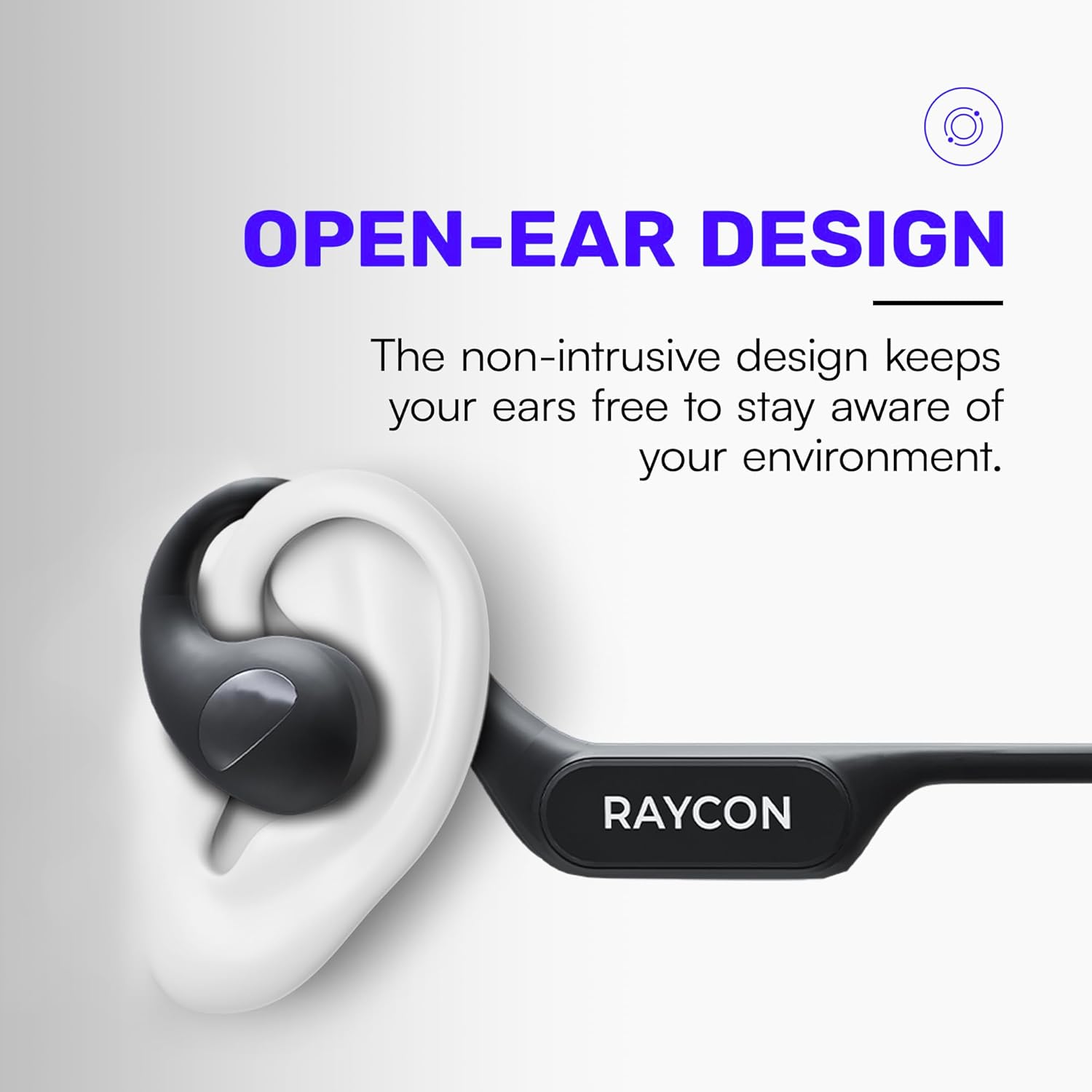
Image: Proper placement of the Raycon Open Headphones, highlighting the open-ear design for comfort and awareness.
ຄໍາແນະນໍາການດໍາເນີນງານ
ການຄວບຄຸມview

Image: The control buttons are located on the left side of the headphone band.
- ປຸ່ມເປີດປິດ: ກົດຄ້າງໄວ້ເພື່ອເປີດ/ປິດ.
- ປະລິມານຂຶ້ນ (+): ກົດສັ້ນເພື່ອເພີ່ມລະດັບສຽງ.
- ປະລິມານລົງ (-): ກົດສັ້ນ Short ເພື່ອຫຼຸດລະດັບສຽງລົງ.
- ຫຼິ້ນ/ຢຸດ: Double-tap the main control button to play or pause audio.
- ເພງຕໍ່ໄປ: Triple-tap the main control button to skip to the next track.
- ຕິດຕາມກ່ອນ ໜ້າ ນີ້: (Functionality may vary, refer to device settings or specific app controls).
- ຮັບ/ສາຍໂທ: Double-tap the main control button during an incoming call.
- ປະຕິເສດການໂທ: Press and hold the main control button during an incoming call.
- ກະຕຸ້ນຜູ້ຊ່ວຍສຽງ: Quadruple-tap the main control button to activate your device's voice assistant (e.g., Siri, Google Assistant).
ການເຊື່ອມຕໍ່ຫລາຍຈຸດ
The Raycon Open Headphones support multi-point connection, allowing you to connect to two devices simultaneously. This feature enables seamless switching between audio sources without re-pairing.

Image: The headphones can connect to multiple devices simultaneously for versatile use.
To use multi-point connection:
- Pair the headphones with your first device as described in the "Bluetooth Pairing" section.
- ປິດໃຊ້ງານ Bluetooth ໃນອຸປະກອນທໍາອິດ. ຫູຟັງຈະເຂົ້າສູ່ໂໝດຈັບຄູ່ຄືນໃໝ່.
- ຈັບຄູ່ຫູຟັງກັບອຸປະກອນທີສອງຂອງທ່ານ.
- ເປີດໃຊ້ Bluetooth ຄືນໃໝ່ໃນອຸປະກອນທຳອິດ. ຫູຟັງຄວນເຊື່ອມຕໍ່ກັບອຸປະກອນທັງສອງໂດຍອັດຕະໂນມັດ.
- ສຽງຈະຫຼິ້ນຈາກອຸປະກອນທີ່ກຳລັງສົ່ງສຽງຢ່າງຫ້າວຫັນ.
ບໍາລຸງຮັກສາ
ທໍາຄວາມສະອາດ
Regularly clean your headphones to ensure optimal performance and hygiene. Use a soft, dry, lint-free cloth to wipe down the surfaces. For stubborn dirt, slightly dampen the cloth with water. Avoid using harsh chemicals, cleaning solvents, or strong detergents.
ການເກັບຮັກສາ
When not in use, store your headphones in a cool, dry place away from direct sunlight and extreme temperatures. Avoid placing heavy objects on top of the headphones to prevent damage.
ການດູແລຫມໍ້ໄຟ
To prolong battery life, avoid fully discharging the headphones frequently. Charge them regularly, even if not in constant use. If storing for an extended period, charge the battery to approximately 50% before storage.

Image: The headphones offer up to 12 hours of battery life for extended use.
ການແກ້ໄຂບັນຫາ
If you encounter any issues with your Raycon Open Headphones, please refer to the following common solutions:
- ບໍ່ມີສຽງ: Ensure the headphones are powered on, paired correctly, and the volume is turned up on both the headphones and the connected device. Check if the audio source is playing.
- ບັນຫາການຈັບຄູ່: Turn off Bluetooth on all previously paired devices. Power off the headphones, then re-enter pairing mode and try connecting again. Ensure the headphones are within the Bluetooth range of your device.
- ບັນຫາການສາກໄຟ: Verify that the charging cable is securely connected to both the headphones and the power source. Try a different USB port or power adapter. Ensure the charging cable is not damaged.
- ຄຸນະພາບສຽງບໍ່ດີ: Ensure the headphones are fully charged. Check for any obstructions between the headphones and your device. Move closer to your device to reduce interference.
- ໄມໂຄຣໂຟນບໍ່ເຮັດວຽກ: Ensure the headphones are properly connected. Check the microphone settings on your connected device to ensure the Raycon headphones are selected as the input device.
If the issue persists after trying these steps, please contact Raycon customer support for further assistance.
ຂໍ້ມູນຈໍາເພາະ
| ຄຸນສົມບັດ | ລາຍລະອຽດ |
|---|---|
| ຊື່ຕົວແບບ | RBO841-24E-BLA |
| ເຕັກໂນໂລຊີການເຊື່ອມຕໍ່ | ໄຮ້ສາຍ |
| ເຕັກໂນໂລຊີການສື່ສານໄຮ້ສາຍ | Bluetooth 5.3 |
| ຊີວິດຫມໍ້ໄຟ | 12 ຊົ່ວໂມງ |
| ຮູບຮ່າງຫູຫູ | ເກີນຫູ |
| ການຈັດວາງຫູ | ເປີດຫູ |
| ປັດໄຈແບບຟອມ | ເກີນຫູ |
| ການຄວບຄຸມສິ່ງລົບກວນ | ການແຍກສຽງ |
| ນ້ໍາຫນັກລາຍການ | 5.6 ອອນ |
| ຜູ້ຜະລິດ | ເຣຄອນ |
| UPC | 811162032347 |
ການຮັບປະກັນແລະການສະຫນັບສະຫນູນ
Your Raycon Open Headphones are covered by a return policy allowing for a refund or replacement within 30 days of purchase. For detailed warranty information or technical support, please contact Raycon customer service directly.