
ແນະນຳ
Thank you for choosing the Doubc Q13 Wireless Bluetooth 5.3 Earbuds. These earbuds are designed to provide a high-quality audio experience with advanced features such as HiFi stereo sound, ENC noise-cancelling microphones, and IPX7 waterproofing. This manual will guide you through the setup, operation, and maintenance of your new earbuds.

Image: The Doubc Q13 Wireless Bluetooth 5.3 Earbuds in their open charging case, displaying the digital battery indicator.
ເນື້ອໃນຊຸດ
ກະລຸນາກວດເບິ່ງຊຸດສຳລັບລາຍການຕໍ່ໄປນີ້:
- Doubc Q13 Wireless Earbuds (Left and Right)
- ກ່ອງສາກ
- ສາຍສາກໄຟ USB Type-C
- ຄູ່ມືຜູ້ໃຊ້
- ຈຸກຫູຟັງ (ຂະໜາດຕ່າງໆ, ໂດຍປົກກະຕິແມ່ນ S/M/L)
ຕັ້ງຄ່າ
1. ການສາກໄຟເບື້ອງຕົ້ນ
ກ່ອນການນຳໃຊ້ຄັ້ງທຳອິດ, ໃຫ້ສາກຫູຟັງ ແລະ ກ່ອງສາກໄຟໃຫ້ເຕັມ. ເຊື່ອມຕໍ່ສາຍ USB Type-C ທີ່ໃຫ້ມາເຂົ້າກັບພອດສາກໄຟໃນກ່ອງ ແລະ ແຫຼ່ງພະລັງງານ. ຈໍສະແດງຜົນ LED ໃນກ່ອງສາກໄຟຈະສະແດງເປີເຊັນແບັດເຕີຣີ.tage. A full charge takes approximately 1.5 hours.
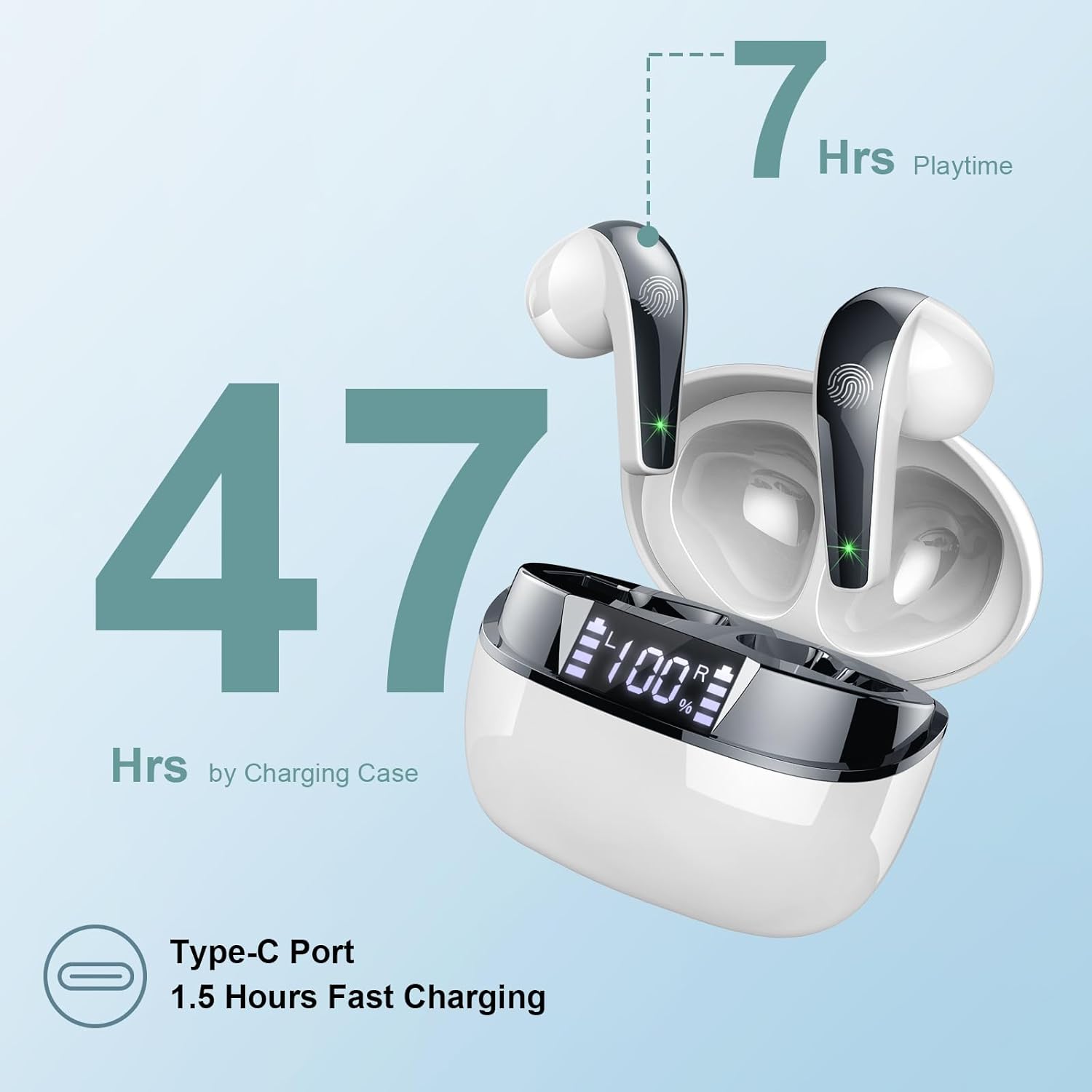
Image: The charging case highlighting 47 hours of total playtime and the Type-C charging port.

Image: A visual representation of the earbuds and charging case, emphasizing 7 hours of music time per charge and 47 hours total with the charging case, along with the dual LED digital display.
2. ການຈັບຄູ່ກັບອຸປະກອນ
- ກວດໃຫ້ແນ່ໃຈວ່າໄດ້ສາກຫູຟັງແລ້ວ.
- ເປີດກ່ອງສາກໄຟ. ຫູຟັງເອຍບັດຈະເຂົ້າສູ່ໂໝດຈັບຄູ່ໂດຍອັດຕະໂນມັດ.
- ໃນອຸປະກອນຂອງທ່ານ (ໂທລະສັບສະຫຼາດ, ແທັບເລັດ, ຄອມພິວເຕີ), ໄປທີ່ການຕັ້ງຄ່າ Bluetooth.
- ຊອກຫາ ອຸປະກອນທີ່ມີຢູ່ ແລະ ເລືອກ "Q13" ຈາກລາຍການ.
- ເມື່ອເຊື່ອມຕໍ່ແລ້ວ, ທ່ານຈະໄດ້ຍິນສຽງຢືນຢັນ, ແລະຫູຟັງເອຍບັດຈະພ້ອມໃຫ້ໃຊ້.
The Doubc Q13 earbuds feature one-step pairing and wide compatibility with iOS, Android, and Windows devices.

Image: The earbuds in their charging case next to a smartphone displaying Bluetooth settings, showing "Q13" as a discoverable device, illustrating the one-step pairing process.
ຄໍາແນະນໍາການດໍາເນີນງານ
ແຕະການຄວບຄຸມ
The Doubc Q13 earbuds feature smart touch controls for easy management of music and calls. The touch sensitive area is located on the outer surface of each earbud.

Image: A user wearing an earbud, with icons indicating various touch control functions such as volume adjustment, call management, music playback, and voice assistant activation.
| ການປະຕິບັດ | ຟັງຊັນ |
|---|---|
| ແຕະຄັ້ງດຽວ (L/R) | ຫຼິ້ນ/ຢຸດເພງ, ຮັບສາຍ/ວາງສາຍ |
| ແຕະສອງເທື່ອ (ຂວາ) | ຕິດຕາມຕໍ່ໄປ |
| ແຕະສອງເທື່ອ (ຊ້າຍ) | ເພງກ່ອນໜ້າ |
| ແຕະສາມເທື່ອ (ຂວາ) | ປະລິມານຂຶ້ນ |
| ແຕະສາມເທື່ອ (ຊ້າຍ) | ປະລິມານລົງ |
| ກົດຄ້າງໄວ້ (2ວິ) (L/R) | ປະຕິເສດການໂທ, ເປີດໃຊ້ຜູ້ຊ່ວຍສຽງ |
ເປີດ/ປິດ
- ເປີດ: ເປີດກ່ອງສາກໄຟ, ແລະຫູຟັງຈະເປີດໂດຍອັດຕະໂນມັດ. ອີກທາງເລືອກໜຶ່ງ, ກົດຄ້າງໄວ້ທີ່ພື້ນທີ່ສຳຜັດໃນຫູຟັງທັງສອງຂ້າງເປັນເວລາ 3 ວິນາທີ.
- ປິດພະລັງງານ: ໃສ່ຫູຟັງຄືນໃນກ່ອງສາກໄຟ ແລະ ປິດຝາປິດ. ພວກມັນຈະປິດໂດຍອັດຕະໂນມັດ ແລະ ເລີ່ມສາກໄຟ. ຫຼື, ກົດຄ້າງໄວ້ທີ່ພື້ນທີ່ສຳຜັດໃນຫູຟັງທັງສອງຂ້າງເປັນເວລາ 5 ວິນາທີ.
ບໍາລຸງຮັກສາ
ທໍາຄວາມສະອາດ
To ensure optimal performance and charging, regularly clean the charging contacts on both the earbuds and the charging case. Use a cotton swab lightly dampened with alcohol to gently wipe the contacts.

Image: A diagram illustrating the location of charging contacts on the earbuds and inside the charging case, with instructions to clean them if charging issues occur.
ການຕໍ່ຕ້ານນ້ໍາ
The earbuds are IPX7 waterproof, meaning they can withstand immersion in water up to 1 meter for 30 minutes. This makes them suitable for workouts and light rain. However, the charging case is not waterproof. Do not expose the charging case to water.

Image: Two earbuds covered in water droplets, visually representing their IPX7 waterproof capability.
ການເກັບຮັກສາ
Store the earbuds in their charging case when not in use to protect them and keep them charged. Avoid extreme temperatures and direct sunlight.
ການແກ້ໄຂບັນຫາ
ຫູຟັງບໍ່ສາກ
- ໃຫ້ແນ່ໃຈວ່າສາຍສາກໄດ້ເຊື່ອມຕໍ່ຢ່າງປອດໄພກັບທັງກໍລະນີ ແລະແຫຼ່ງພະລັງງານ.
- Verify that the charging contacts on both the earbuds and the case are clean and free of debris. Use alcohol to clean them if necessary.
- ກວດສອບວ່າກ່ອງສາກໄຟມີປະຈຸແບັດເຕີຣີພຽງພໍຫຼືບໍ່.
Only One Earbud Has Sound
- ວາງຫູຟັງຫູຟັງທັງສອງໃສ່ໃນກ່ອງສາກ ແລະປິດຝາປິດ.
- On your phone's Bluetooth settings, manually "forget" or "unpair" the "Q13" device.
- After approximately 10 seconds, open the charging case. The earbuds should automatically re-enter pairing mode.
- Reconnect the earbuds with your phone via Bluetooth.
Image: A diagram illustrating solutions for common issues: cleaning charging contacts for charging problems and re-pairing steps for when only one earbud produces sound.
ຫູຟັງບໍ່ເຊື່ອມຕໍ່
- ໃຫ້ແນ່ໃຈວ່າ Bluetooth ຖືກເປີດໃຊ້ຢູ່ໃນອຸປະກອນຂອງທ່ານ.
- Make sure the earbuds are within the effective range (typically 10 meters) of your device.
- Turn off and then turn on your device's Bluetooth.
- ເຮັດຊ້ໍາຂັ້ນຕອນການຈັບຄູ່ຕາມທີ່ອະທິບາຍໄວ້ໃນສ່ວນ "ຕັ້ງຄ່າ".
ຂໍ້ມູນຈໍາເພາະ
| ຄຸນສົມບັດ | ລາຍລະອຽດ |
|---|---|
| ໝາຍເລກຕົວແບບ | ຄໍາຖາມທີ 13 |
| ລຸ້ນ Bluetooth | 5.3 |
| ໄດເວີສຽງ | 13mm Graphene Audio Driver |
| ຊ່ວງຄວາມຖີ່ | 20Hz - 20,000Hz |
| ເວລາຫຼິ້ນ (ຫູຟັງ) | ສູງສຸດ 7 ຊົ່ວໂມງ (ສາກດຽວ) |
| ເວລາຫຼິ້ນທັງໝົດ (ພ້ອມກໍລະນີ) | ສູງສຸດ 47 ຊົ່ວໂມງ |
| ພອດສາກໄຟ | USB Type-C |
| ເວລາສາກໄຟ | ປະມານ 1.5 ຊົ່ວໂມງ (ກ່ອງ) |
| ການປະເມີນກັນນ້ໍາ | IPX7 (ຫູຟັງຫູຟັງເທົ່ານັ້ນ) |
| ໄມໂຄຣໂຟນ | 4 ENC Noise Cancelling Microphones |
| ນ້ ຳ ໜັກ ຕຸ້ມຫູ | ປະມານ 3 ກຣາມ (ແຕ່ລະອັນ) |
| ນ້ຳໜັກກ່ອງສາກ | ປະມານ. 29g |
| ຂະໜາດສິນຄ້າ | 2.13 x 1.81 x 1.34 ນິ້ວ (ກ່ອງສາກ) |

ຮູບພາບ: A ລາຍລະອຽດ view of the 13mm Graphene Audio Driver, emphasizing HiFi Stereo Sound and built-in microphones with noise reduction for HD calling.

Image: A diagram illustrating the benefits of Advanced Bluetooth 5.3 technology, including faster transfer, lower power consumption, more stable connection, and lower latency.

Image: A visual showing the comfortable and lightweight design of the earbuds and charging case, including their dimensions and individual weights (3g per earbud, 29g for the case).
ການຮັບປະກັນແລະການສະຫນັບສະຫນູນ
The Doubc Q13 Wireless Bluetooth 5.3 Earbuds come with a ຮັບປະກັນ 3 ປີ, ຮັບປະກັນຄວາມສະຫງົບຂອງຈິດໃຈກ່ຽວກັບຄຸນນະພາບຜະລິດຕະພັນແລະການປະຕິບັດ.
For technical support, warranty claims, or any inquiries, please refer to the contact information provided on the product packaging or the official Doubc website. Specific support contact details are not available in this manual.
ຂໍ້ມູນຄວາມປອດໄພທີ່ສໍາຄັນ
- ຢ່າຖອດຫຼືດັດແປງຜະລິດຕະພັນ.
- ຮັກສາໃຫ້ຫ່າງຈາກອຸນຫະພູມສູງສຸດແລະແສງແດດໂດຍກົງ.
- ຫຼີກລ່ຽງການເອົາກ່ອງສາກໄຟໃຫ້ຖືກນໍ້າ.
- ໃຊ້ພຽງແຕ່ສາຍສາກທີ່ສະໜອງໃຫ້ ຫຼືສາຍທຽບເທົ່າທີ່ໄດ້ຮັບການຮັບຮອງ.
- ກໍາຈັດຜະລິດຕະພັນຢ່າງມີຄວາມຮັບຜິດຊອບຕາມລະບຽບການທ້ອງຖິ່ນ.