
1. ບົດແນະນຳ
This document provides operational guidelines and important information for your Generic Replacement Remote Control. This remote is designed to function as a replacement for specific Honeywell Portable Air Conditioner models. Please verify compatibility by comparing your original remote with the images provided in this manual.
This remote control utilizes infrared (IR) technology and requires a clear line of sight to the air conditioner's IR receiver for proper operation.
2. ຕັ້ງຄ່າ
2.1 ການຕິດຕັ້ງຫມໍ້ໄຟ
ການຄວບຄຸມໄລຍະໄກຕ້ອງການສອງ (2) ຫມໍ້ໄຟ AAA (ບໍ່ລວມ) ສໍາລັບການດໍາເນີນງານ. ປະຕິບັດຕາມຂັ້ນຕອນເຫຼົ່ານີ້ເພື່ອຕິດຕັ້ງຫມໍ້ໄຟ:
- ຊອກຫາຝາປິດຊ່ອງໃສ່ຫມໍ້ໄຟຢູ່ດ້ານຫຼັງຂອງຣີໂໝດຄວບຄຸມ.
- ເລື່ອນຝາປິດລົງລຸ່ມ ຫຼືກົດປຸ່ມ ແລະຍົກເພື່ອເປີດຊ່ອງໃສ່.
- ໃສ່ໝໍ້ໄຟ AAA ສອງໜ່ວຍ, ຮັບປະກັນຈຸດບວກ (+) ແລະ ລົບ (-) ສອດຄ່ອງຖືກຕ້ອງກັບເຄື່ອງໝາຍພາຍໃນຊ່ອງ.
- ປ່ຽນຝາປິດຊ່ອງໃສ່ແບັດເຕີລີໂດຍການເລື່ອນມັນກັບຄືນໃສ່ບ່ອນເກົ່າຈົນກວ່າມັນຈະກົດຢ່າງປອດໄພ.

Figure 1: Battery compartment with cover removed, showing battery slots.
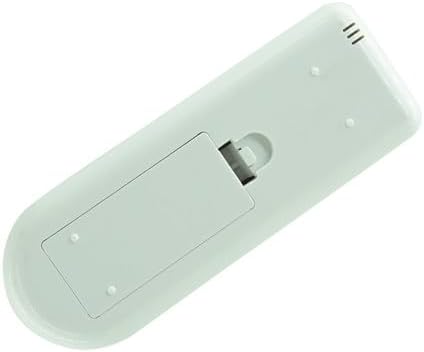
Figure 2: Remote control with battery cover installed.
2.2 ໝາຍເຫດຄວາມເຂົ້າກັນໄດ້
This remote is a replacement unit. For optimal functionality, ensure your original remote control matches the appearance of this replacement. Some advanced or specific functions of your original air conditioner might not be fully supported by this generic replacement.
3. ຄໍາແນະນໍາການດໍາເນີນງານ
Point the remote control directly at the infrared receiver on your Honeywell Portable Air Conditioner. Ensure there are no obstructions between the remote and the air conditioner.

ຮູບ 3: ດ້ານຫນ້າ view ຂອງການຄວບຄຸມໄລຍະໄກ.
3.1 ການທໍາງານຂອງປຸ່ມ
| ປຸ່ມ | ຟັງຊັນ |
|---|---|
| ເປີດ/ປິດ (ປຸ່ມສີແດງ) | ເປີດ ຫຼື ປິດເຄື່ອງປັບອາກາດ. |
| ໂໝດ | Cycles through operating modes (e.g., Cool, Fan, Dry, Heat - if applicable). |
| ຄວາມໄວພັດລົມ | ປັບຄວາມໄວພັດລົມ (ເຊັ່ນ: ຕ່ຳ, ປານກາງ, ສູງ, ອັດຕະໂນມັດ). |
| ອຸນຫະພູມເພີ່ມຂຶ້ນ (+) | ເພີ່ມອຸນຫະພູມທີ່ກໍານົດໄວ້. |
| ອຸນຫະພູມຫຼຸດລົງ (-) | ຫຼຸດອຸນຫະພູມທີ່ຕັ້ງໄວ້. |
| ໂມງຈັບເວລາ | ຕັ້ງຄ່າໂມງຈັບເວລາສຳລັບການເປີດ/ປິດອັດຕະໂນມັດ. |
| ນອນ | Activates or deactivates sleep mode for quieter operation and energy saving. |
| LED | ຄວບຄຸມແສງຈໍສະແດງຜົນຢູ່ໃນໜ່ວຍເຄື່ອງປັບອາກາດ. |
| ແກວ່ງ | Controls the louver swing function (if available on your unit). |
| ° C / ° F | ສະຫຼັບການສະແດງອຸນຫະພູມລະຫວ່າງເຊວຊີ ແລະຟາເຣນຮາຍ. |
4. ບໍາລຸງຮັກສາ
4.1 ການທົດແທນຫມໍ້ໄຟ
When the remote control's range decreases or it becomes unresponsive, it is time to replace the batteries. Refer to Section 2.1 for battery installation instructions.
4.2 ການທໍາຄວາມສະອາດ
To clean the remote control, wipe it gently with a soft, dry cloth. Do not use liquid cleaners, abrasive materials, or chemical solvents, as these may damage the remote's surface or internal components.
5. ການແກ້ໄຂບັນຫາ
- ໄລຍະໄກບໍ່ຕອບສະໜອງ:
- ໃຫ້ແນ່ໃຈວ່າໄດ້ຕິດຕັ້ງແບັດເຕີຣີ AAA ໃໝ່ຢ່າງຖືກຕ້ອງ.
- Check for a clear line of sight between the remote and the air conditioner's IR receiver.
- Verify that the remote is within the maximum operating range (approximately 8 meters).
- ໜ້າທີ່ຈຳກັດ:
- As a generic replacement, this remote may not offer all the exact functions or advanced features of your original air conditioner's remote. Refer to your air conditioner's original manual for specific functions.
- Ensure your air conditioner model is listed as compatible.
6. ຂໍ້ມູນຈໍາເພາະ
| ຄຸນສົມບັດ | ລາຍລະອຽດ |
|---|---|
| ຍີ່ຫໍ້ | ທົ່ວໄປ |
| ໝາຍເລກຕົວແບບ | Easytry11456 |
| ສີ | ດຳ |
| ເຕັກໂນໂລຊີການເຊື່ອມຕໍ່ | ອິນຟາເລດ (IR) |
| ຂອບເຂດສູງສຸດ | 8 ແມັດ |
| ຈຳນວນອຸປະກອນທີ່ຮອງຮັບ | 1 |
| ອຸປະກອນທີ່ເຂົ້າກັນໄດ້ | Honeywell Portable Air Conditioners (various models including HM0CESAWK6, HM2CESAWK8, HT12CESAWK, HT12CESVWK, HT09CESVWK, HM2CESSWK8, HM4CESAWK0, HT09CESAWK, HT13CESAWK, HT13CESVWK) |
| ຕ້ອງໃຊ້ແບັດເຕີຣີ | 2 x AAA (ບໍ່ລວມ) |
| ຄຸນນະສົມບັດພິເສດ | Ergonomic design, Direct replacement functionality |
7. ການຮັບປະກັນແລະການສະຫນັບສະຫນູນ
7.1 ຂໍ້ມູນການຮັບປະກັນ
This product comes with a 90-day warranty, offering hassle-free returns for manufacturing defects or malfunctions under normal use. Please retain your proof of purchase for warranty claims.
7.2 ສະຫນັບສະຫນູນລູກຄ້າ
For any questions regarding compatibility, specific functions not covered in this manual, or troubleshooting assistance, please contact the seller or refer to the original user manual of your Honeywell Portable Air Conditioner.


