
1. ບົດແນະນຳ
This manual provides detailed instructions for the operation and maintenance of your LIJIANI RD239 Multi-Band Shortwave Radio. The RD239 is a compact, versatile radio designed for receiving various frequency bands, including AM, FM, Shortwave (SW), Aviation (AIR), Very High Frequency (VHF), and Weather Band (WB). It also features Bluetooth connectivity, TF card playback, digital recording, an integrated flashlight, alarm clock, and sleep timer functions.
2. ຜະລິດຕະພັນເກີນview
2.1 ລັກສະນະທີ່ສໍາຄັນ
- ການຮັບສັນຍານຫຼາຍແຖບຄວາມຖີ່: Supports AIR/VHF/AM/FM/Shortwave/Weather bands for comprehensive listening.
- ການບັນທຶກດິຈິຕອລ: Record radio broadcasts or external audio directly to a TF card.
- Bluetooth & TF Card Playback: Stream audio wirelessly via Bluetooth or play MP3/WAV/WMA files from a TF card. Includes 6 EQ modes.
- ແສງປະສົມປະສານ: Features a high-power flashlight and a reading lamp ສໍາລັບສະຖານະການຕ່າງໆ.
- ການຈັດການເວລາ: Includes an alarm clock and a programmable sleep timer.
- ຕົວເລືອກພະລັງງານ: Operates on 3 AA batteries or a BL-5C rechargeable battery, with Type-C input for charging and external power.
- ການໂຕ້ຕອບຜູ້ໃຊ້: Backlit display and keys for visibility in low-light conditions.
2.2 ເນື້ອໃນຊຸດ
- LIJIANI RD239 Shortwave Radio
- ຄູ່ມືເຈົ້າຂອງ
2.3 ການກໍານົດອົງປະກອບ

ຮູບ 1: ດ້ານຫນ້າ view of the LIJIANI RD239 Shortwave Radio, showing the display, keypad, speaker, and extended antenna.

ຮູບ 2: ຂ້າງ view illustrating the radio's dimensions (3"L x 5.3"W x 1"H) and port locations including the 3.5mm audio input (AUX IN), Type-C charging port, and headphone jack.
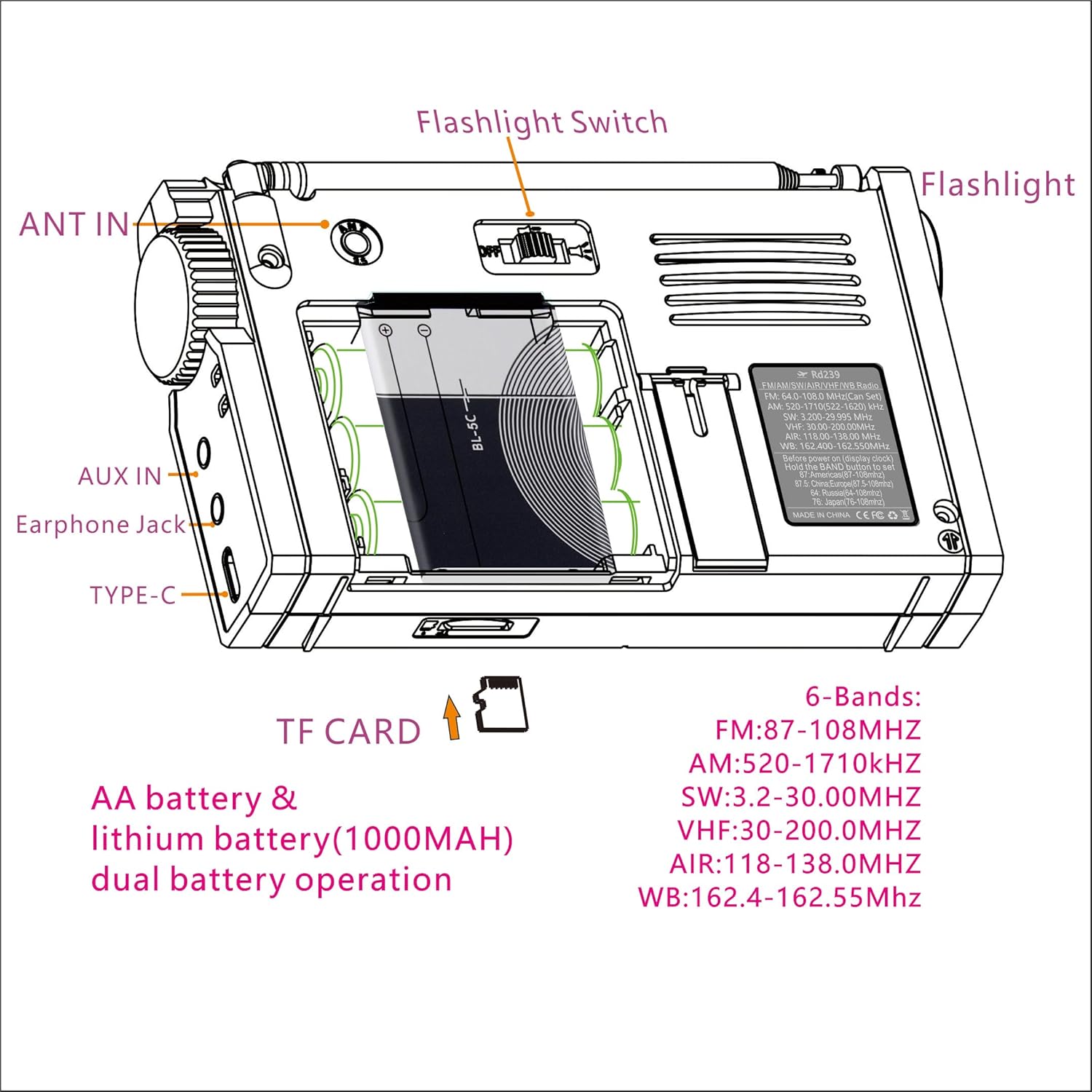
ຮູບ 3: ດ້ານຫລັງ view of the radio, highlighting the battery compartment, ANT IN jack, AUX IN jack, Earphone Jack, Type-C port, Flashlight Switch, and TF Card slot.
3. ຕັ້ງຄ່າ
3.1 ການຕິດຕັ້ງຫມໍ້ໄຟ

Figure 4: Schematic for installing BL-5C lithium-ion battery and AA batteries.
- ເປີດຝາປິດຊ່ອງໃສ່ຫມໍ້ໄຟຢູ່ດ້ານຫຼັງຂອງວິທະຍຸ.
- For BL-5C Lithium-Ion Battery: Insert the BL-5C battery (1000mAh) into the compartment, ensuring the correct polarity (+/-) as indicated. Insert the electrode end first.
- ສໍາລັບຫມໍ້ໄຟ AA: Insert three (3) 1.5V AA batteries, observing the correct polarity.
- ປິດຝາປິດຊ່ອງໃສ່ຫມໍ້ໄຟຢ່າງປອດໄພ.
Important Note on AA Batteries: When using AA batteries, especially with high volume, the radio may experience early shutdown, screen flickering, or sound lag due to insufficient current supply. To mitigate this, reduce the volume or use headphones. It is recommended to use the BL-5C lithium-ion battery for optimal performance, reserving AA batteries for emergency backup.
3.2 ການເປີດເຄື່ອງເບື້ອງຕົ້ນ
Press the power button once to activate the display, then press it a second time to turn on the radio. This two-step process helps prevent accidental power-on.
4. ຄໍາແນະນໍາການດໍາເນີນງານ
4.1 ເປີດ/ປິດ
- ເພື່ອເປີດ: ກົດປຸ່ມ ພະລັງງານ button once to wake the display, then press it again to power on the radio.
- ເພື່ອປິດ: ກົດຄ້າງໄວ້ ພະລັງງານ ປຸ່ມ.
4.2 Band Selection and Tuning

Figure 5: Radio displaying various frequency bands and their ranges.
- ກົດ ແຖບ button to cycle through available frequency bands: FM, AM, SW, AIR, VHF, WB.
- Use the tuning knob on the side of the radio for manual frequency adjustment.
- For direct frequency input, use the numeric keypad and press ປ້ອນ.
- To save a station, tune to the desired frequency, then press ຄວາມຈຳ followed by a numeric key to assign a preset.
- To recall a saved station, press the corresponding numeric key.
4.3 ແບບບູທູດ
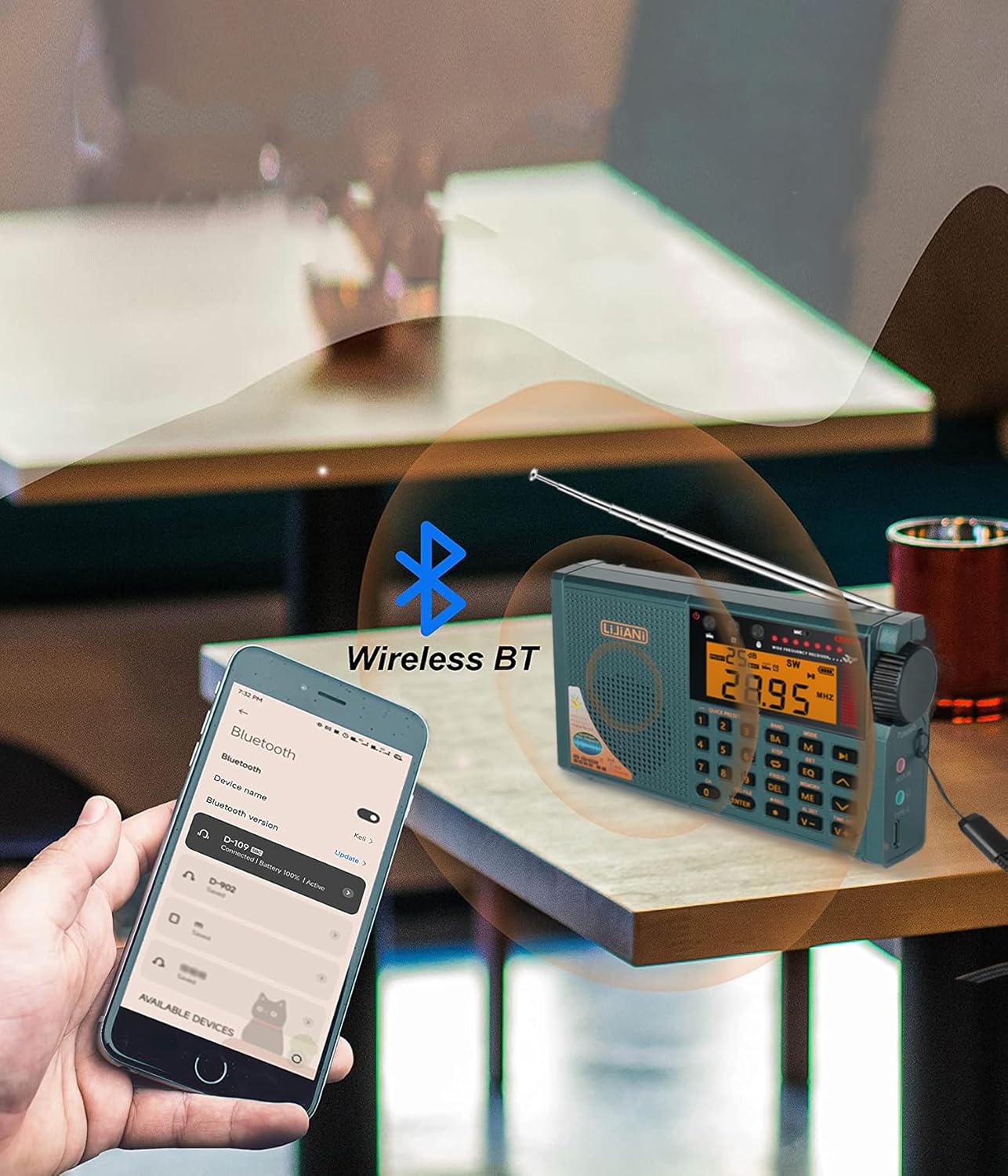
Figure 6: The radio wirelessly connected to a smartphone via Bluetooth.
- ກົດ ໂໝດ button until "BT" or the Bluetooth icon appears on the display.
- On your smartphone or other Bluetooth device, search for available devices and select "RD239" to pair.
- ເມື່ອຈັບຄູ່ແລ້ວ, ທ່ານສາມາດຖ່າຍທອດສຽງຈາກອຸປະກອນຂອງທ່ານໄປຫາວິທະຍຸໄດ້.
4.4 ການຫຼິ້ນບັດ TF
- Insert a TF (Micro SD) card into the designated slot on the side of the radio.
- ກົດ ໂໝດ button until "TF" or the TF card icon appears.
- ໃຊ້ປຸ່ມນຳທາງ (ກ່ອນ/ຕໍ່ໄປ) to select tracks and ຫຼິ້ນ/ຢຸດຊົ່ວຄາວ ເພື່ອຄວບຄຸມການຫຼິ້ນຄືນ.
- ກົດ EQ button to cycle through 6 available equalizer modes.
4.5 ການບັນທຶກດິຈິຕອນ
- ກວດໃຫ້ແນ່ໃຈວ່າໄດ້ໃສ່ບັດ TF ແລ້ວ.
- To record radio broadcasts: Tune to the desired station, then press the REC ປຸ່ມເພື່ອເລີ່ມຕົ້ນການບັນທຶກ. ກົດ REC ອີກເທື່ອຫນຶ່ງເພື່ອຢຸດເຊົາການ.
- To record external audio: Connect an external audio source to the AUX IN jack (if applicable for external recording, otherwise use built-in microphone). Press REC to start and stop.
- To play recordings: Press REC FILE to access recorded files on the TF card. Use navigation buttons to select and play.
- To delete recordings: While playing a recording, press the DEL ປຸ່ມ.
4.6 Flashlight and Reading Lamp

Figure 7: The radio's integrated flashlight providing illumination.
- The radio features a high-power flashlight on one end and a reading lamp ຂ້າງ.
- ຄົ້ນຫາສະຖານທີ່ ໄຟສາຍປ່ຽນ on the top/back of the radio (refer to Figure 3).
- Slide the switch to activate the flashlight or reading lamp.
4.7 ໂມງປຸກ ແລະໂມງຈັບເວລານອນ
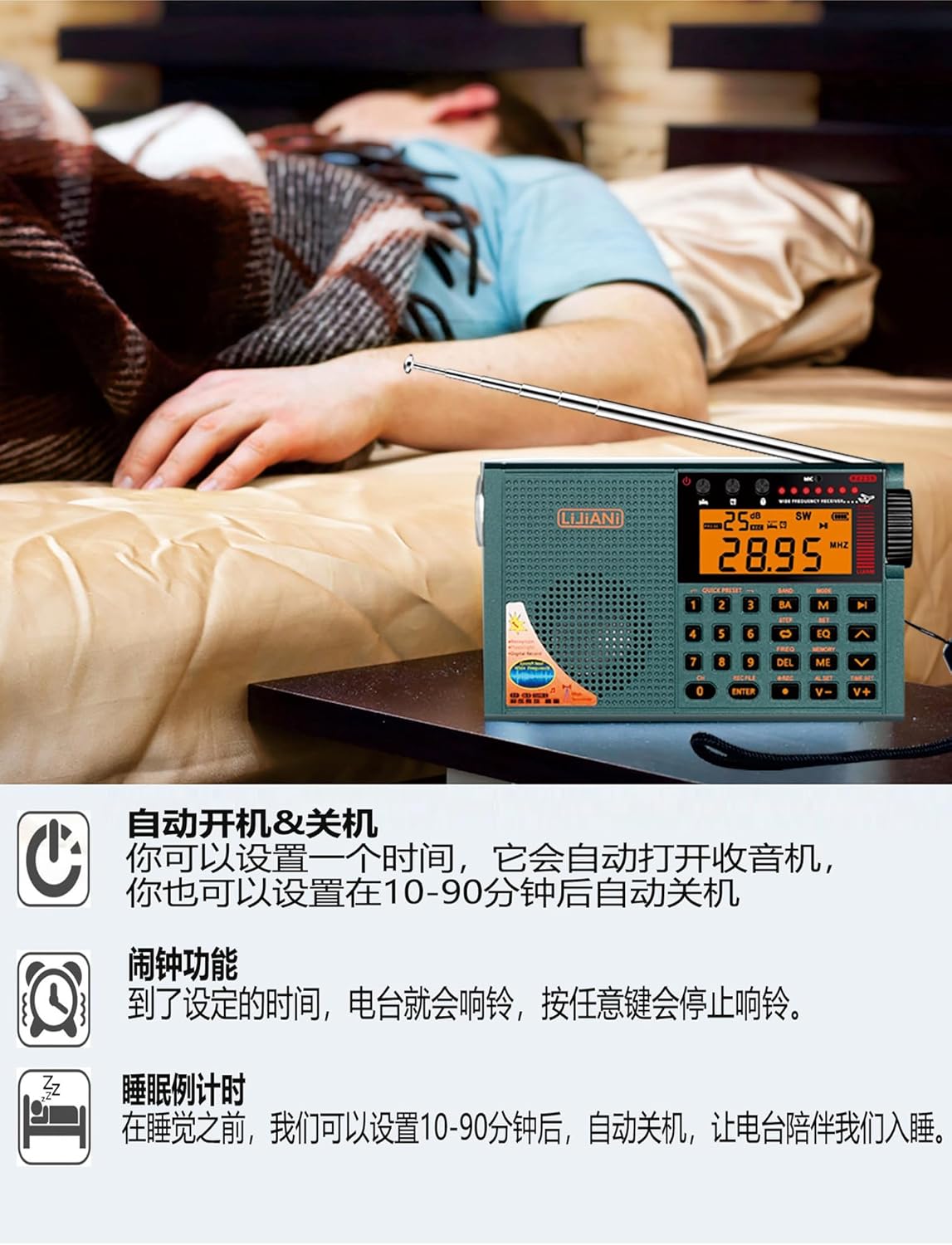
Figure 8: The radio functioning as an alarm clock and sleep timer.
- ການຕັ້ງຄ່າໂມງ: While the radio is off and displaying the clock, press and hold the ເວລາ ກຳ ນົດ button. Use the numeric keys or tuning knob to adjust the time, then press ເວລາ ກຳ ນົດ ອີກເທື່ອຫນຶ່ງເພື່ອຢືນຢັນ.
- ການຕັ້ງຄ່າປຸກ: ກົດ AL SET button. Use the numeric keys or tuning knob to set the alarm time. Press AL SET again to confirm. When the alarm sounds, press any button to stop it.
- ການຕັ້ງເວລານອນ: ກົດ ນອນ button repeatedly to cycle through sleep timer durations (e.g., 10-90 minutes). The radio will automatically turn off after the selected time.
4.8 Backlit Keys and Display
- The keypad and display feature backlighting for improved visibility.
- To adjust the backlight duration: Before turning on the radio (when the clock is displayed), press and hold the SET button until the duration options appear (e.g., 5, 10, 15, 20 seconds). Press SET again to select the desired duration. The setting will automatically apply after 3 seconds.
5. ຄຸນສົມບັດຂັ້ນສູງ
5.1 Squelch (SQ) Function (AIR Band)
- The SQ function is effective only for the AIR band.
- When listening to an AIR band station, press and hold the SET button for 2 seconds. "ON" or "OFF" will appear.
- ກົດ SET button to select "ON" to enable squelch. The setting will automatically exit and take effect after 3 seconds.
- Squelch automatically mutes the output signal when the radio does not receive a signal or the signal is weak, preventing noise.
5.2 FM/VHF Bandwidth Setting
- When listening to FM, long press the SET button for 2 seconds. Characters like "50K-100K-150K-200K" will appear.
- ກົດ SET button again to select the desired bandwidth (e.g., 100K).
- The setting will automatically exit after 3 seconds and the FM frequency bandwidth will operate at the selected value.
6. ການຄຸ້ມຄອງພະລັງງານ
6.1 Battery Usage Guidelines
- The radio is designed to use either a BL-5C lithium-ion battery or 3 AA batteries.
- For optimal performance and to avoid issues like early shutdown or sound distortion at high volumes, prioritize using the BL-5C lithium-ion battery.
- If using AA batteries, especially with high volume, it is recommended to reduce the volume or use headphones to prevent power-related issues. Avoid using inferior quality AA batteries.
6.2 ການສາກໄຟ
- Connect the radio to a power source using a standard Type-C cable.
- Charging is only effective for the BL-5C lithium-ion battery. The Type-C input does not charge AA batteries.
- The Type-C port can also function as an external computer speaker connector or allow the device to act as a card reader when a TF card is inserted and connected to a computer.
7. ການແກ້ໄຂບັນຫາ
- No Power/Early Shutdown: Ensure batteries are correctly installed and charged. If using AA batteries, consider replacing them with fresh, high-quality ones or switching to the BL-5C battery. High volume with AA batteries can cause premature shutdown.
- ການຕ້ອນຮັບທີ່ບໍ່ດີ: Extend the telescopic antenna fully. Try repositioning the radio to a location with better signal. For AM, rotate the radio for optimal reception.
- Screen Flickering/Sound Lag: This can occur with low battery power, especially when using AA batteries at high volume. Reduce volume or replace/recharge batteries.
- No Sound from TF Card/Bluetooth: Ensure the correct mode is selected. Check if the TF card is properly inserted and contains compatible audio files. For Bluetooth, ensure the radio is paired correctly with your device.
- ບັນຫາການບັນທຶກ: ກວດສອບວ່າບັດ TF ຖືກໃສ່ແລ້ວ ແລະ ມີພື້ນທີ່ຫວ່າງພຽງພໍ.
8. ຂໍ້ມູນຈໍາເພາະ
| ຄຸນສົມບັດ | ຂໍ້ມູນຈໍາເພາະ |
|---|---|
| ໝາຍເລກຕົວແບບ | RD239 |
| ຂະໜາດສິນຄ້າ | 3 x 5.3 x 1 ນິ້ວ (7.62 x 13.46 x 2.54 cm) |
| ນ້ໍາຫນັກລາຍການ | 8.8 ອອນສ໌ (249.5 ກຣາມ) |
| ແຖບວິທະຍຸສະຫນັບສະຫນູນ | FM, AM, SW, AIR, VHF, WB |
| ເຕັກໂນໂລຊີການເຊື່ອມຕໍ່ | Bluetooth |
| ແຫຼ່ງພະລັງງານ | 3 AA batteries or BL-5C LI-ION battery |
| ຄຸນນະສົມບັດພິເສດ | Built-In AM Antenna, Built-In Clock, Built-In Flashlight, Digital Recording, TF Card Playback |
| ຜູ້ຜະລິດ | LIJIANI |
9. ການຮັບປະກັນແລະການສະຫນັບສະຫນູນ
9.1 ຂໍ້ມູນການຮັບປະກັນ
Specific warranty details for the LIJIANI RD239 radio are typically provided at the point of purchase or within separate warranty documentation. Please refer to your purchase receipt or contact the retailer for information regarding warranty coverage and terms.
9.2 ສະຫນັບສະຫນູນລູກຄ້າ
For technical assistance, troubleshooting, or further inquiries regarding your LIJIANI RD239 Shortwave Radio, please contact the manufacturer or your authorized dealer. Contact information can usually be found on the product packaging or the seller's webເວັບໄຊ.