
ແນະນຳ
Thank you for choosing the Midland GXT3000 GMRS Two-Way Radio. This manual provides essential information for the safe and efficient operation of your new radio. Please read it thoroughly before use and keep it for future reference. The GXT3000 is designed for robust, long-range communication, ideal for outdoor enthusiasts, farmers, and professionals.
ສິນຄ້າເກີນview
The Midland GXT3000 GMRS Two-Way Radio offers advanced features for clear and dependable communication:
- 50 GMRS Channels: ສະໜອງທາງເລືອກໃນການສື່ສານທີ່ຫຼາກຫຼາຍ.
- ລະຫັດຄວາມເປັນສ່ວນຕົວ 142 ຂໍ້: Enhances communication privacy and reduces interference.
- ຄວາມສາມາດໃນໄລຍະຍາວ: Designed for extended communication distances, up to 50 miles in optimal conditions.
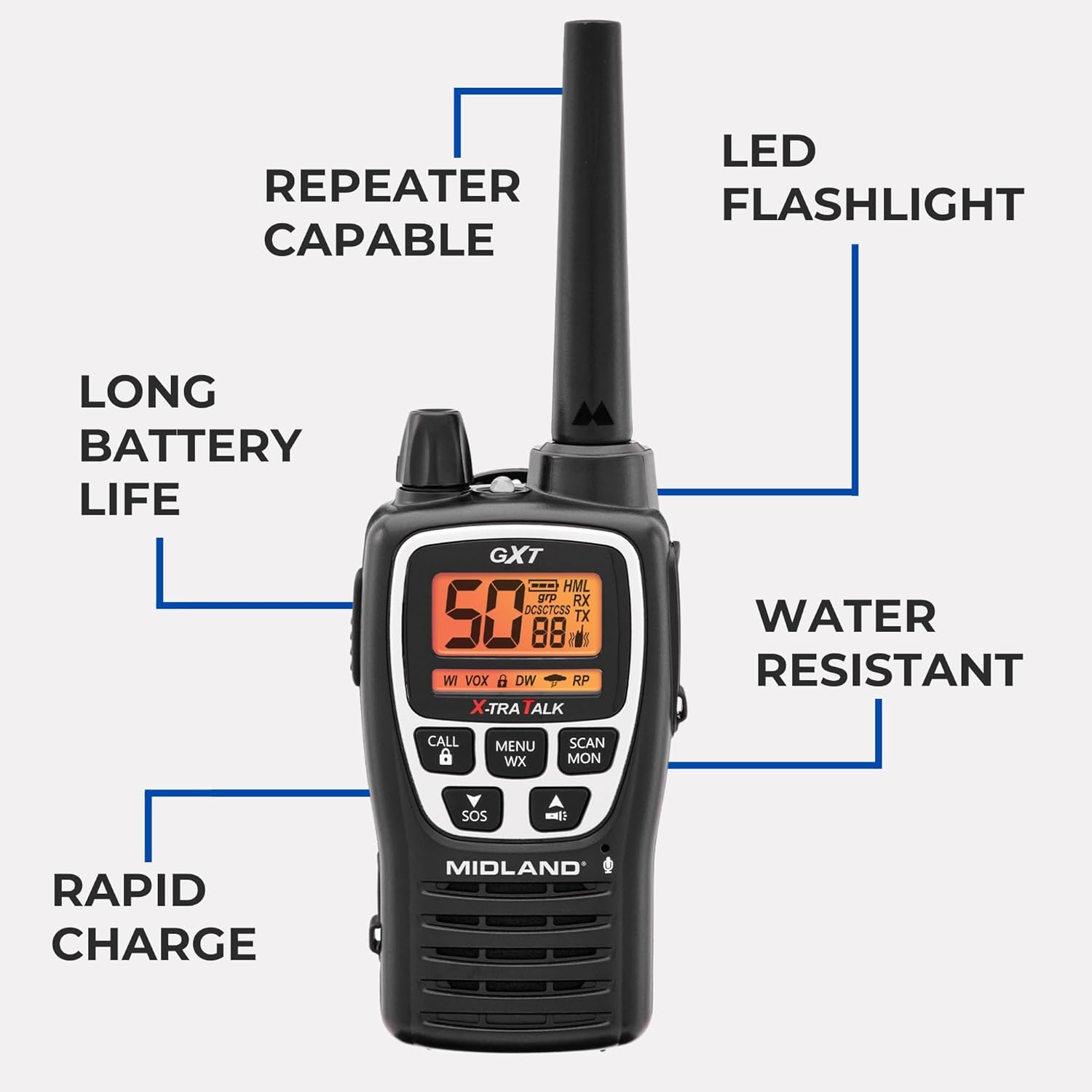
- Repeater Capable: Extends signal range for even greater coverage.
- NOAA ແຈ້ງເຕືອນສະພາບອາກາດ: Keeps you informed of severe weather conditions.
- SOS Siren: ສໍາລັບສັນຍານສຸກເສີນ.
- ແບັດເຕີຣີ Lithium-Ion ສາມາດສາກໄດ້: Offers long-lasting power (up to 18 hours) and rapid charging (4 hours).
- Water Resistant (JIS4 Rating): Protects against splashing water from any direction.
- VOX (ການແລກປ່ຽນສຽງ): ການດໍາເນີນງານແບບແຮນຟຣີ.
- ໄຟສາຍ LED ປະສົມປະສານ: For convenience in low-light conditions.
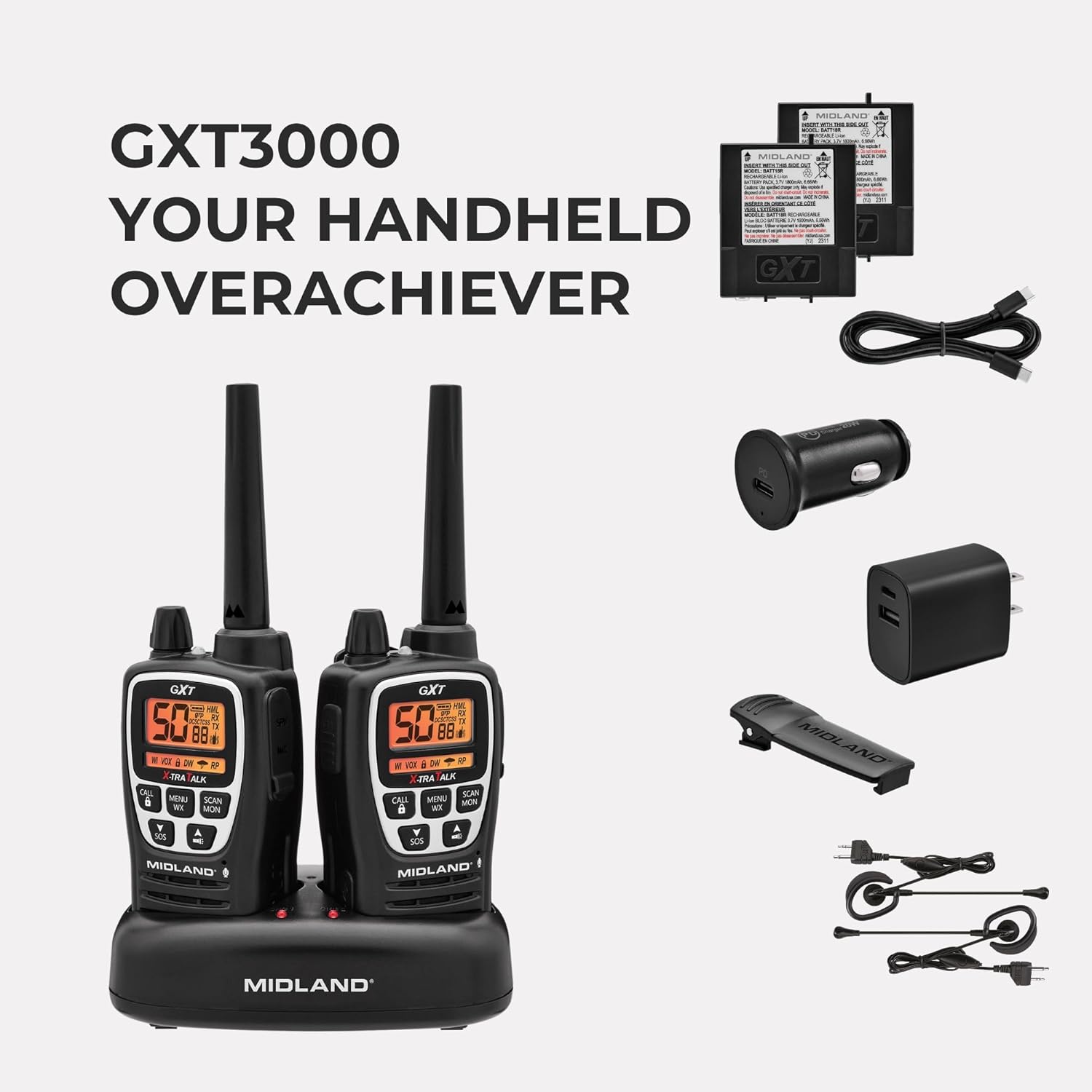
ມີຫຍັງຢູ່ໃນກ່ອງ:
- Midland GXT3000 GMRS Two-Way Radios (2 units)
- Rechargeable Lithium-Ion Battery Packs (2 units)
- Desktop Charger with AC Wall Adapter
- ເຂັມຂັດສາຍແອວ (2 ໜ່ວຍ)
- ຄູ່ມືເຈົ້າຂອງ
ຕັ້ງຄ່າ
1. ການຕິດຕັ້ງຫມໍ້ໄຟ
- ໃຫ້ແນ່ໃຈວ່າວິທະຍຸຖືກປິດ.
- Remove the belt clip by sliding it up on the radio and pushing up the BELT CLIP LOCK TAB.
- Lift the BATTERY COVER LATCH and remove the battery cover.
- Insert the rechargeable Lithium-Ion battery pack, observing the polarity as shown in the battery compartment. Alternatively, you can use 4 AA alkaline batteries (not included).
- Replace the battery cover and secure the belt clip until it locks into place.
2. ການສາກແບັດເຕີຣີ
Your radio is equipped with a rechargeable Lithium-Ion battery pack. For optimal performance, charge the battery for 4 hours before initial use. Subsequent charges typically take 4 hours.
- Place the rechargeable battery packs into the desktop charger.
- Connect the AC adapter plug into an AC wall outlet.
- The charging indicator light on the desktop charger will turn red while charging and green when fully charged.
ໝາຍເຫດ: Only use the Midland Lithium-Ion battery pack or optional AA alkaline batteries. Do not attempt to charge alkaline batteries in the desktop charger. For long-term storage, remove batteries from the radio.

ຄໍາແນະນໍາການດໍາເນີນງານ
1. ເປີດ/ປິດ ແລະຄວບຄຸມລະດັບສຽງ
- Turn the POWER/VOLUME knob clockwise to turn the radio ON and increase the volume.
- Turn the POWER/VOLUME knob counter-clockwise to decrease the volume and turn the radio OFF.
2. ການເລືອກຊ່ອງ
- ກົດປຸ່ມ MENU ເພື່ອເຂົ້າໄປໃນເມນູ.
- ໃຊ້ປຸ່ມລູກສອນຂຶ້ນ/ລົງເພື່ອເລືອກຊ່ອງ (1-50).
- Press the PTT button to confirm your selection and exit the menu.
3. ລະຫັດຄວາມເປັນສ່ວນຕົວ (CTCSS/DCS)
- To use privacy codes, both radios must be set to the same channel and privacy code.
- Press the MENU button twice to access the privacy code setting.
- Use the UP/DOWN arrow buttons to select a privacy code (1-142).
- Press the PTT button to confirm and exit.
4. ການສົ່ງແລະການຮັບ
- To transmit, press and hold the PTT button and speak into the microphone.
- ປ່ອຍປຸ່ມ PTT ເພື່ອຮັບ.
5. ການສະແກນສະພາບອາກາດຂອງ NOAA
- Press the MENU WX button to activate the NOAA Weather Scan feature.
- The radio will scan for active weather channels and alert you to severe weather.
6. SOS Siren
- Press and hold the SOS button for 5 seconds to activate the SOS siren function.
- This sends out an audible distress signal to other radios within range.
7. ປຸ່ມລັອກ
- Press and hold the LOCK button to lock or unlock the keypad, preventing accidental changes to settings.
8. Repeater Capability
- The GXT3000 is repeater capable, allowing you to extend your communication range significantly. Refer to the detailed manual for specific repeater setup instructions.
9. VOX (ການແລກປ່ຽນສຽງ)
- Activates transmission by voice, allowing for hands-free operation. Adjust VOX sensitivity in the menu.
ບໍາລຸງຮັກສາ
1. ການດູແລທົ່ວໄປ
- ເຮັດຄວາມສະອາດວິທະຍຸດ້ວຍສຽງອ່ອນ, ງamp ຜ້າ. ຢ່າໃຊ້ສານເຄມີທີ່ຮຸນແຮງຫຼືເຄື່ອງເຮັດຄວາມສະອາດຂັດ.
- ຮັກສາວິທະຍຸໃຫ້ແຫ້ງ. ຖ້າມັນປຽກ, ໃຫ້ເຊັດໃຫ້ແຫ້ງທັນທີ.
- ຫຼີກລ່ຽງການໃຫ້ວິທະຍຸສຳຜັດກັບອຸນຫະພູມທີ່ສູງ ຫຼື ແສງແດດໂດຍກົງເປັນເວລາດົນ.
2. ການດູແລຫມໍ້ໄຟ
- To maximize battery life, avoid overcharging. Once fully charged, remove the radio from the charger.
- If storing the radio for an extended period, remove the batteries.
3. Water Resistance
The GXT3000 is rated JIS4 water resistant, meaning it is protected against splashing water from any direction. It is ບໍ່ submersible. Do not immerse the radio in water.

ການແກ້ໄຂບັນຫາ
| ບັນຫາ | ສາເຫດທີ່ເປັນໄປໄດ້ | ການແກ້ໄຂ |
|---|---|---|
| ບໍ່ມີພະລັງງານ | Batteries low or incorrectly installed. | ຕື່ມ ຫຼືປ່ຽນແບັດ. ກວດເບິ່ງທິດທາງຫມໍ້ໄຟ. |
| ຊ່ວງທີ່ບໍ່ດີ | Obstructions (buildings, terrain), low battery, or low power setting. | Move to an open area. Recharge batteries. Set transmit power to High (H). Consider using repeater channels. |
| ລົບກວນ/ສິ່ງລົບກວນ | Other users on the same channel/privacy code, electrical interference. | Change channel and/or privacy code. Move away from electrical devices. |
| ບໍ່ສາມາດສົ່ງ/ຮັບໄດ້ | Keypad locked, incorrect channel/privacy code, out of range. | Unlock keypad. Verify channel and privacy code match. Move closer to other radio. |
For more detailed troubleshooting, please refer to the comprehensive manual or visit the Midland support webເວັບໄຊ.
ຂໍ້ມູນຈໍາເພາະ
- ຍີ່ຫໍ້: ກາງ
- ໝາຍເລກຕົວແບບ: GXT3000VP4
- ຈຳນວນຊ່ອງ: 50
- ຊ່ວງຄວາມຖີ່: 462-467 MHz (GMRS)
- ໄລຍະການເວົ້າສູງສຸດ: ສູງສຸດ 50 ໄມລ໌ (ເງື່ອນໄຂທີ່ດີທີ່ສຸດ)
- ລະຫັດຄວາມເປັນສ່ວນຕົວ: 142 (CTCSS/DCS)
- ປະເພດຫມໍ້ໄຟ: Rechargeable Lithium-Ion (included), also accepts 2 Lithium Ion batteries required.
- ອາຍຸສະເລ່ຍຂອງຫມໍ້ໄຟ: 18 ຊົ່ວໂມງ
- Rapid Charge Time: 4 ຊົ່ວໂມງ
- ລະດັບຄວາມຕ້ານທານນ້ໍາ: JIS4 (Splash Resistant)
- ນ້ໍາຫນັກລາຍການ: 1.93 ປອນ
- ຄຸນນະສົມບັດພິເສດ: Long Range, Repeater Capable, SOS Siren, NOAA Weather Alert, VOX, LED Flashlight
ການຮັບປະກັນແລະການສະຫນັບສະຫນູນ
The Midland GXT3000 GMRS Two-Way Radio comes with a ຮັບປະກັນ 3 ປີ. For warranty claims, technical support, or additional product information, please visit the official Midland Radio webເວັບໄຊ ຫຼືຕິດຕໍ່ບໍລິການລູກຄ້າຂອງເຂົາເຈົ້າ.