
1. ບົດແນະນຳ
The Parsonver Smartwatch Z139 is designed to enhance your daily life with a variety of intelligent functions. This manual provides detailed instructions for setting up, operating, and maintaining your smartwatch to ensure optimal performance and user experience.
Key features include Bluetooth calling, comprehensive health monitoring (heart rate, blood oxygen, sleep), over 100 sports modes, and smart notifications.
2. ການເລີ່ມຕົ້ນ: ການຕິດຕັ້ງ
2.1 ເນື້ອໃນຊຸດ
- Parsonver Smartwatch Z139
- ສາຍສາກ
- ຄູ່ມືຜູ້ໃຊ້
2.2 ການສາກ Smartwatch
ກ່ອນທີ່ຈະໃຊ້ຄັ້ງທໍາອິດ, ໃຫ້ສາກ smartwatch ຂອງທ່ານໃຫ້ເຕັມ. ເຊື່ອມຕໍ່ສາຍສາກແບບສະນະແມ່ເຫຼັກກັບຕົວຕິດຕໍ່ສາກໄຟຢູ່ດ້ານຫຼັງຂອງໂມງ ແລະສຽບປາຍ USB ໃສ່ກັບອະແດັບເຕີໄຟ (ບໍ່ລວມ) ຫຼືພອດ USB ຂອງຄອມພິວເຕີ.
2.3 ການຕິດຕັ້ງແອັບ ແລະ ການຈັບຄູ່
To unlock the full potential of your Parsonver Smartwatch, download the companion app on your smartphone. The app is compatible with iOS 9.0/Android 6.0 or above.
- Scan the QR code in the manual or search for "Parsonver" in your phone's app store (Google Play Store for Android, Apple App Store for iOS).
- ຕິດຕັ້ງແລະເປີດ app ໄດ້.
- Follow the on-screen instructions in the app to create an account and pair your smartwatch via Bluetooth. Ensure Bluetooth is enabled on your smartphone.
- During pairing, grant necessary permissions for notifications, location, and health data synchronization.

Image: The Parsonver Smartwatch Z139, showcasing its main display with time, date, and step count.
3. ຄໍາແນະນໍາການດໍາເນີນງານ
3.1 Bluetooth Calls and Smart Notifications
Once connected via Bluetooth, you can manage calls directly from your smartwatch.
- ຮັບສາຍ/ໂທອອກ: Use the watch's interface to answer incoming calls or dial numbers. The watch features high-quality speakers and a high-definition microphone for clear communication.
- ການແຈ້ງເຕືອນ: Receive alerts for SMS, WhatsApp, Facebook, emails, and other app notifications directly on your watch. The watch will vibrate to inform you of new messages.
- ຜູ້ຊ່ວຍສຽງ: Utilize the integrated voice assistant for hands-free control and information access.
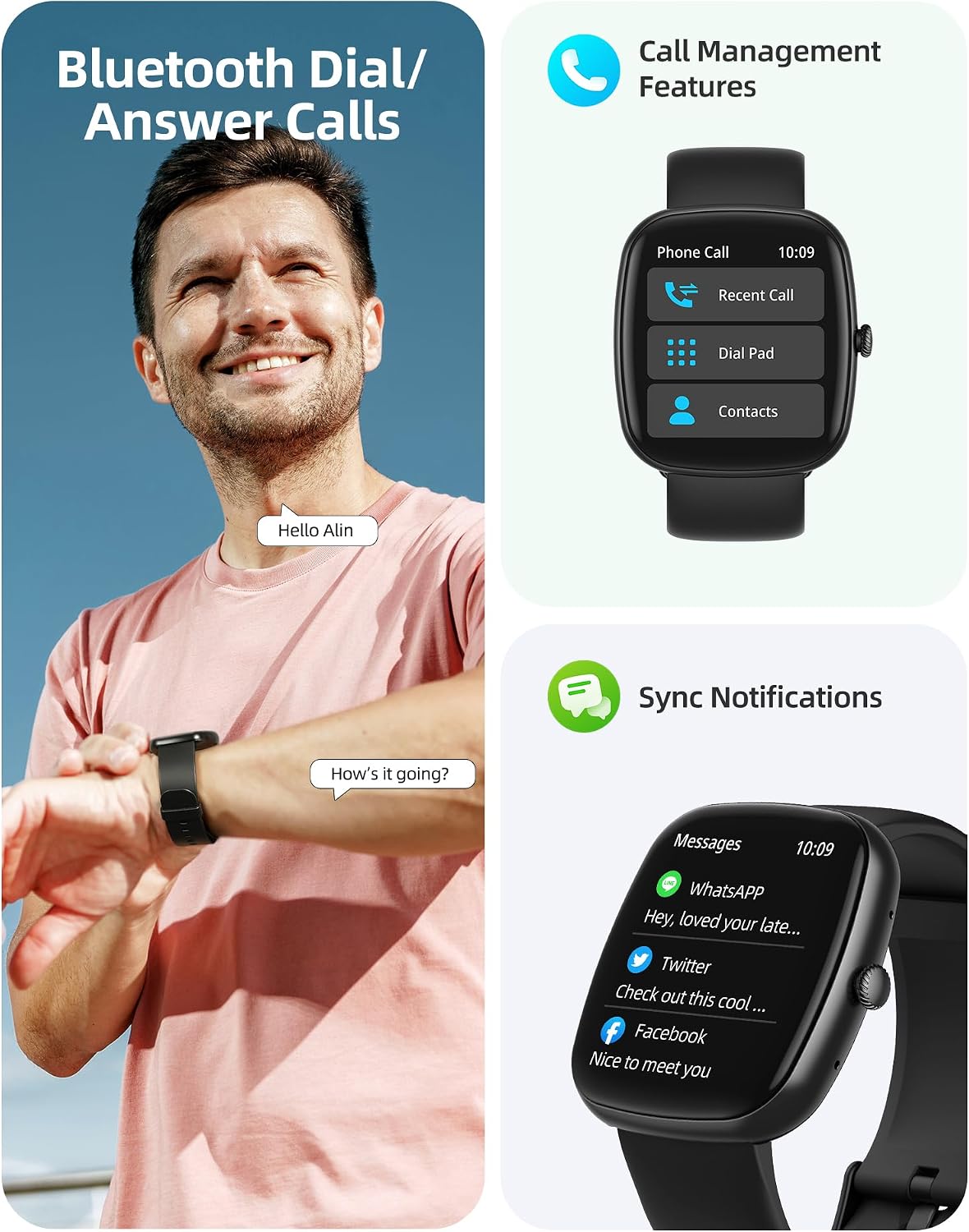
Image: A user interacting with the smartwatch for Bluetooth calls, demonstrating the call management interface.
3.2 ການຕິດຕາມສຸຂະພາບ
The smartwatch features advanced sensors for continuous health tracking.
- ການກວດສອບອັດຕາການເຕັ້ນຫົວໃຈ: Measures and records your heart rate throughout the day. The app displays trends and alerts for abnormal readings.
- ການຕິດຕາມອົກຊີເຈນໃນເລືອດ (SpO2): ຕິດຕາມລະດັບຄວາມອີ່ມຕົວຂອງອົກຊີເຈນໃນເລືອດຂອງທ່ານ.
- ການຕິດຕາມການນອນ: Analyzes your sleep patterns, including deep sleep, light sleep, and awake times, to help optimize your sleep habits.
- ການຕິດຕາມຄວາມຄຽດ: ໃຫ້ຄວາມເຂົ້າໃຈກ່ຽວກັບລະດັບຄວາມກົດດັນຂອງທ່ານ.
- ການຕິດຕາມສຸຂະພາບຂອງແມ່ຍິງ: Records menstrual cycles and ovulation periods.

Image: Visual representation of the smartwatch's health monitoring capabilities, including heart rate, blood oxygen, and pressure readings.
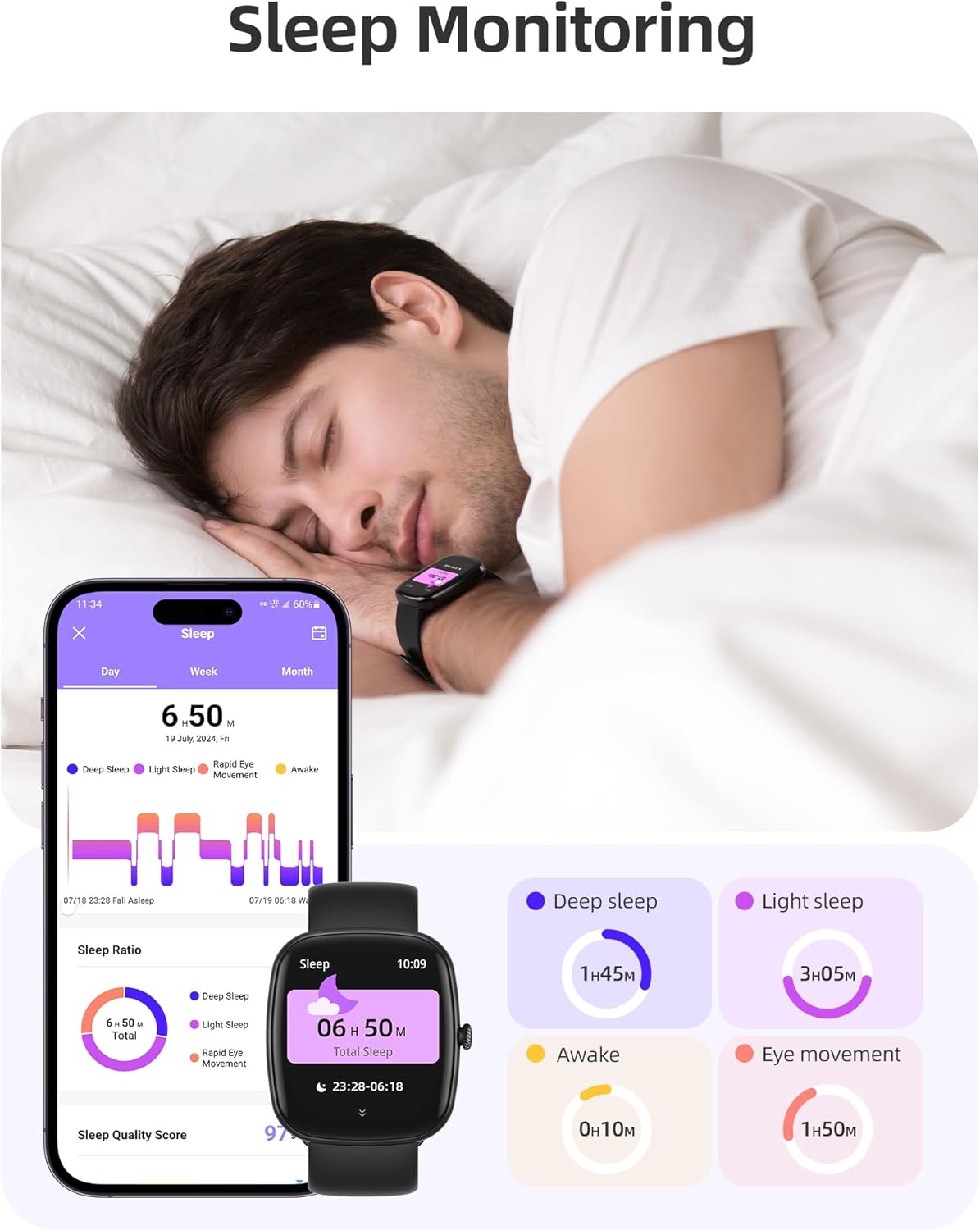
Image: The smartwatch monitoring sleep, with a detailed breakdown of sleep stages displayed on the companion app.
3.3 ຮູບແບບກິລາ ແລະ ການຕິດຕາມກິດຈະກຳ
The activity tracker supports over 100 sports modes to monitor your workouts effectively.
- ໂໝດທີ່ສາມາດໃຊ້ໄດ້: Includes yoga, running, jumping, cycling, badminton, football, rowing, and many more.
- ການຕິດຕາມຂໍ້ມູນ: Records steps, distance, calories burned, and real-time heart rate during exercise.
- ຄະແນນຄວາມພ້ອມປະຈຳວັນ: Provides a summary of your daily activity and recovery.

Image: The smartwatch tracking a user's activity during a run, displaying key metrics like calories, steps, heart rate, and distance.
3.4 App Experience and BMI Tracking
The companion app offers additional features for health management.
- Weight and BMI Tracking: Manually input your weight in the app to track changes and automatically calculate your Body Mass Index (BMI). View daily, weekly, monthly, and yearly weight trends.
- Training Courses: Access integrated training courses from beginner to advanced levels.
- Relaxation Features: Includes white noise, meditation exercises, and relaxation training.

Image: The companion app displaying weight and BMI tracking features, helping users monitor their body composition.
3.5 ໜ້າໂມງທີ່ສາມາດປັບແຕ່ງໄດ້
Personalize your smartwatch with over 200 different watch face designs available through the app.

Image: A selection of customizable watch faces, demonstrating the variety of styles and information layouts available.
3.6 ຫນ້າທີ່ປະຕິບັດອື່ນໆ
The smartwatch includes several other useful features:
- ພະຍາກອນອາກາດ: View 7-day weather forecasts.
- ການຄວບຄຸມດົນຕີ: ຄວບຄຸມການຫຼິ້ນເພງໂດຍກົງຈາກຂໍ້ມືຂອງທ່ານ.
- ການຄວບຄຸມກ້ອງຖ່າຍຮູບ: ຄວບຄຸມກ້ອງສະມາດໂຟນຂອງທ່ານຈາກໄລຍະໄກ.
- ໂມງປຸກ: ຕັ້ງໂມງປຸກຫຼາຍອັນ.
- ໂມງຈັບເວລາ ແລະໂມງຈັບເວລາ: ເວລາທີ່ແນ່ນອນສຳລັບກິດຈະກຳຕ່າງໆ.
- ເຕືອນປະຈຳຕົວ: ກະຕຸ້ນໃຫ້ທ່ານຍ້າຍຫຼັງຈາກໄລຍະເວລາທີ່ບໍ່ມີການເຄື່ອນໄຫວ.
- ອອກກໍາລັງກາຍຫາຍໃຈ: Guided exercises to reduce stress.
- ຊອກຫາໂທລະສັບ: Locate your paired smartphone with a tap on your watch.
- ການປັບຄວາມສະຫວ່າງ: Continuously adjustable screen brightness for optimal visibility in any lighting condition.

ຮູບພາບ: ຫຼາຍກວ່າview of the various practical functions available on the Parsonver Smartwatch Z139.
4. ບໍາລຸງຮັກສາ
Proper care ensures the longevity and performance of your smartwatch.
- ທໍາຄວາມສະອາດ: Regularly clean the watch and strap with a soft, dry cloth. Avoid harsh chemicals.
- ຄວາມຕ້ານທານນ້ໍາ: The smartwatch has an IP68 water resistance rating, meaning it can withstand hand washing, rain, and splashes. Do not use it for swimming, diving, or in saunas.
- ການສາກໄຟ: Use only the provided charging cable. Avoid exposing charging contacts to moisture.
- ການເກັບຮັກສາ: ເກັບຮັກສາໂມງໄວ້ໃນບ່ອນທີ່ເຢັນ, ແຫ້ງເມື່ອບໍ່ໄດ້ໃຊ້.
5. ການແກ້ໄຂບັນຫາ
If you encounter issues with your smartwatch, try the following steps:
- ໂມງບໍ່ເປີດ: ກວດໃຫ້ແນ່ໃຈວ່າໂມງຖືກສາກເຕັມແລ້ວ.
- ບໍ່ສາມາດຈັບຄູ່ກັບໂທລະສັບໄດ້:
- ກວດໃຫ້ແນ່ໃຈວ່າ Bluetooth ເປີດຢູ່ໃນໂທລະສັບ ແລະໂມງຂອງທ່ານ.
- ໃຫ້ແນ່ໃຈວ່າໂມງຢູ່ໃນຂອບເຂດຂອງໂທລະສັບຂອງທ່ານ.
- ຣີສະຕາດທັງໂມງ ແລະໂທລະສັບຂອງທ່ານ.
- Try unpairing and re-pairing through the app.
- ບໍ່ໄດ້ຮັບການແຈ້ງເຕືອນ:
- Check app permissions on your phone to ensure notifications are allowed for the Parsonver app.
- Verify that notifications are enabled within the Parsonver app settings.
- ກວດໃຫ້ແນ່ໃຈວ່າໂມງເຊື່ອມຕໍ່ຢ່າງຖືກຕ້ອງຜ່ານ Bluetooth.
- ຂໍ້ມູນສຸຂະພາບບໍ່ຖືກຕ້ອງ:
- ໃຫ້ແນ່ໃຈວ່າໂມງຖືກໃສ່ຢູ່ໃນຂໍ້ມືຂອງເຈົ້າຢ່າງສະບາຍ, ບໍ່ແຫນ້ນເກີນໄປຫຼືວ່າງເກີນໄປ.
- ເຮັດຄວາມສະອາດເຊັນເຊີຢູ່ດ້ານຫຼັງຂອງໂມງ.
- ຫຼີກເວັ້ນການເຄື່ອນໄຫວຫຼາຍເກີນໄປໃນລະຫວ່າງການວັດແທກ.
- ໜ້າຈໍບໍ່ຕອບສະໜອງ: Try restarting the watch. If the issue persists, contact customer support.
6. ຂໍ້ມູນຈໍາເພາະ
| ຄຸນສົມບັດ | ຂໍ້ມູນຈໍາເພາະ |
|---|---|
| ຍີ່ຫໍ້ | Parsonver |
| ໝາຍເລກຕົວແບບ | Z139 |
| ຂະໜາດໜ້າຈໍ | 1.83 ນິ້ວ |
| ຄວາມເຂົ້າກັນໄດ້ຂອງລະບົບປະຕິບັດການ | iOS 9.0/Android 6.0 or above Smartphones |
| ເຕັກໂນໂລຊີການເຊື່ອມຕໍ່ | Bluetooth |
| ຄຸນນະສົມບັດພິເສດ | Bluetooth Calls, 100+ Sports Modes, Heart Rate Monitoring, SpO2 Monitoring, Sleep Monitoring, IP68 Water Resistance, Music Control, Camera Control, Weather, Alarm, Timer, Stopwatch, Sedentary Reminder, Breathing Exercises, Find Phone, Brightness Adjustment, Women's Health Tracking |
| ອົງປະກອບຫມໍ້ໄຟ | lithium-polymer |
| ຄວາມອາດສາມາດຫມໍ້ໄຟ | 230 mAh |
| ການຈັດອັນດັບຄວາມຕ້ານທານນ້ໍາ | IP68 (Not for swimming/diving/sauna) |
| ຄວາມອາດສາມາດເກັບຮັກສາຫນ່ວຍຄວາມຈໍາ | 512 MB |
| GPS | ຜ່ານໂທລະສັບສະຫຼາດ |
7. ການຮັບປະກັນແລະການສະຫນັບສະຫນູນ
For warranty information and customer support, please refer to the documentation included with your purchase or visit the official Parsonver website. Typically, products are covered by a manufacturer's warranty against defects in materials and workmanship for a specified period from the date of purchase. Please retain your proof of purchase.
If you experience any issues not covered in this manual, or require further assistance, please contact Parsonver customer service.