
1. ບົດແນະນຳ
Thank you for choosing the Hama DR2002BT Digital Radio. This device offers a comprehensive audio experience with FM, DAB/DAB+ digital radio reception, and Bluetooth connectivity. Its user-friendly design, featuring large buttons and a clear 4.3-inch TFT color display, makes it suitable for all users. This manual will guide you through the setup, operation, and maintenance of your new digital radio.
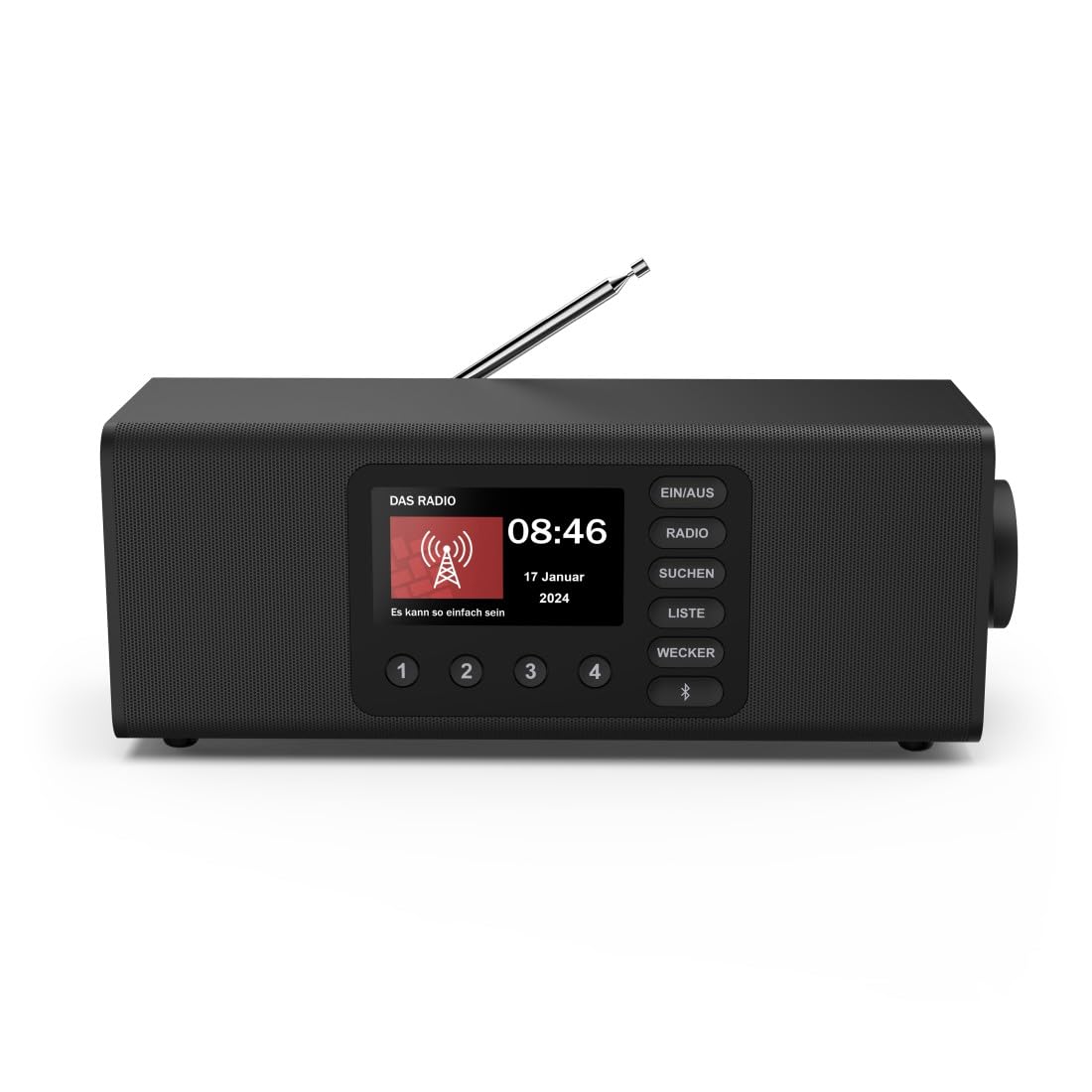
ຮູບພາບ: ທາງຫນ້າ view of the Hama DR2002BT Digital Radio, showcasing ຈໍສະແດງຜົນແລະປຸ່ມຄວບຄຸມຂອງມັນ.
2. ຂໍ້ມູນຄວາມປອດໄພ
ກະລຸນາອ່ານຄໍາແນະນໍາດ້ານຄວາມປອດໄພເຫຼົ່ານີ້ຢ່າງລະອຽດກ່ອນທີ່ຈະນໍາໃຊ້ອຸປະກອນ. ເກັບຮັກສາຄູ່ມືນີ້ໄວ້ເພື່ອອ້າງອີງໃນອະນາຄົດ.
- ຢ່າໃຫ້ອຸປະກອນຖືກຄວາມຊຸ່ມຊື່ນ, ຝົນ ຫຼື ອຸນຫະພູມສູງເກີນໄປ.
- ຫຼີກເວັ້ນການວາງອຸປະກອນຢູ່ໃກ້ກັບແຫຼ່ງຄວາມຮ້ອນ ຫຼືຢູ່ໃນແສງແດດໂດຍກົງ.
- ຢ່າເປີດອຸປະກອນ casinຊ. ການສ້ອມແປງຄວນປະຕິບັດໂດຍພະນັກງານທີ່ມີຄຸນວຸດທິເທົ່ານັ້ນ.
- ໃຊ້ພຽງແຕ່ອະແດັບເຕີໄຟທີ່ໃຫ້ມາ.
- ຮັບປະກັນການລະບາຍອາກາດທີ່ເຫມາະສົມຮອບອຸປະກອນ.
3. ເນື້ອໃນຊຸດ
ກວດສອບວ່າລາຍການທັງຫມົດແມ່ນມີຢູ່ໃນການຍົກເລີກການຫຸ້ມຫໍ່:
- Hama DR2002BT Digital Radio
- Power Adapter
- ຄູ່ມືຜູ້ໃຊ້
4. ຜະລິດຕະພັນເກີນview
4.1 ການຄວບຄຸມແຜງໜ້າປັດ ແລະ ຈໍສະແດງຜົນ

Image: Front panel of the radio highlighting the display and control buttons, with icons for Bluetooth, DAB+, and Alarm functions.
The front panel features a 4.3-inch TFT color display, large control buttons, and a rotary knob for easy navigation and selection. Key buttons include:
- EIN/AUS (ON/OFF): ເປີດ ຫຼື ປິດອຸປະກອນ.
- ວິທະຍຸ: Switches between FM and DAB/DAB+ modes.
- SUCHEN (SEARCH): Initiates station scanning.
- LISTE (LIST): Accesses the list of available stations.
- WECKER (ALARM): Configures alarm settings.
- ປຸ່ມ Bluetooth: ເປີດໃຊ້ໂໝດການຈັບຄູ່ Bluetooth.
- ປຸ່ມທີ່ຕັ້ງໄວ້ລ່ວງໜ້າ (1-4): Quick access to stored favorite stations.
- Rotary Knob (LAUTSTÄRKE/NAVIGIEREN): Controls volume and navigates menus.
4.2 ການເຊື່ອມຕໍ່ແຜງດ້ານຫລັງ
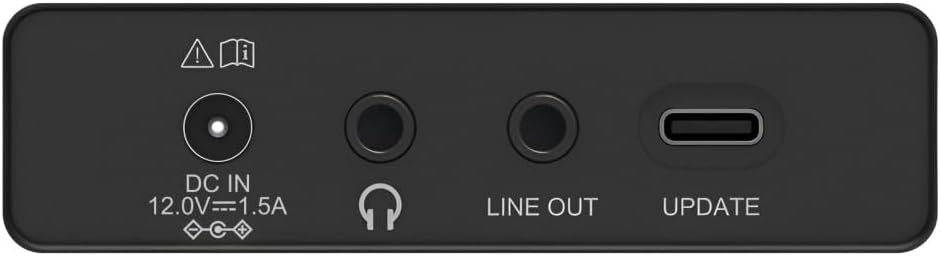
Image: Close-up of the rear panel showing the DC IN, Headphone, Line Out, and UPDATE (USB-C) ports.
The rear panel provides essential connectivity options:
- DC IN 12.0V --- 1.5A: Power input for the external adapter.
- Jack ຫູຟັງ (3.5mm): ສໍາລັບການຟັງສ່ວນຕົວ.
- ສາຍອອກ: Audio output for connecting to external amplifiers ຫຼືລໍາໂພງ.
- UPDATE (USB-C): ສໍາລັບການອັບເດດເຟີມແວ.
- ເສົາອາກາດ Telescopic: For FM and DAB/DAB+ reception.

ຮູບພາບ: ດ້ານຫລັງ view of the Hama DR2002BT Digital Radio with its telescopic antenna extended for optimal signal reception.
5. ຕັ້ງຄ່າ
5.1 ການເຊື່ອມຕໍ່ພະລັງງານ
- ເຊື່ອມຕໍ່ອະແດບເຕີໄຟທີ່ໃຫ້ມາກັບ DC IN port on the rear of the radio.
- ສຽບອະແດບເຕີໄຟເຂົ້າໄປໃນບ່ອນສຽບໄຟທີ່ເຫມາະສົມ.
- The radio will power on automatically or enter standby mode.
5.2 ການວາງຕຳແໜ່ງຂອງເສົາອາກາດ
For optimal FM and DAB/DAB+ reception, fully extend the telescopic antenna. Position the radio near a window if reception is poor.
5.3 ການຕັ້ງຄ່າເບື້ອງຕົ້ນ (ການໃຊ້ຄັ້ງທຳອິດ)
Upon first power-on, the radio may guide you through an initial setup process, including language selection and an automatic DAB station scan. Follow the on-screen prompts.
6. ຄໍາແນະນໍາການດໍາເນີນງານ
6.1 ເປີດ/ປິດ
ກົດ EIN/AUS ປຸ່ມເພື່ອເປີດຫຼືປິດວິທະຍຸ.
6.2 DAB/DAB+ Radio Mode
- ກົດ ວິທະຍຸ ປຸ່ມເພື່ອເລືອກໂຫມດ DAB.
- If this is the first time in DAB mode or if you want to rescan, press SUCHEN ເພື່ອດໍາເນີນການສະແກນຢ່າງເຕັມທີ່ສໍາລັບສະຖານີທີ່ມີຢູ່.
- Use the rotary knob to navigate through the station list. Press the knob to select a station.
- ເຖິງ view the station list, press the ລາຍຊື່ ປຸ່ມ.
ໂໝດວິທະຍຸ 6.3 FM
- ກົດ ວິທະຍຸ ປຸ່ມເພື່ອເລືອກໂໝດ FM.
- ກົດ SUCHEN ເພື່ອສະແກນຫາສະຖານີ FM ຕໍ່ໄປໂດຍອັດຕະໂນມັດ.
- Alternatively, use the rotary knob to manually tune to a frequency.
6.4 ການເກັບຮັກສາແລະເອີ້ນຄືນ presets
The radio allows you to store up to 4 favorite stations using the dedicated preset buttons (1-4).
- Tune to the desired station (DAB or FM).
- Press and hold one of the preset buttons (1-4) until the display confirms the station has been saved.
- To recall a preset station, simply press the corresponding preset button (1-4).
6.5 ການດໍາເນີນງານ Bluetooth

ຮູບພາບ: ທາງຫນ້າ view of the radio with Bluetooth and stereo speaker icons, indicating its wireless audio streaming capability.
The Hama DR2002BT can stream audio from your smartphone, tablet, or laptop via Bluetooth 5.0.
- Press the Bluetooth button on the front panel to enter Bluetooth pairing mode. The display will show a pairing indicator.
- On your external device (smartphone, tablet), enable Bluetooth and search for available devices.
- Select "Hama DR2002BT" from the list of devices to pair.
- Once paired, you can play audio from your device, and it will be output through the radio's speakers.
6.6 ຟັງຊັນໂມງປຸກ

Image: A person waking up with the Hama DR2002BT Digital Radio placed on a bedside table, illustrating its alarm clock functionality.
The radio features two independent alarm settings.
- ກົດ WECKER ປຸ່ມເພື່ອເຂົ້າເຖິງການຕັ້ງຄ່າປຸກ.
- Use the rotary knob to select Alarm 1 or Alarm 2.
- Configure the alarm time, source (buzzer or radio station), and repetition (once, daily, weekdays, weekends, or specific days).
- Press the rotary knob to confirm each setting.
- To quickly activate/deactivate an alarm, press the WECKER button and use the rotary knob to toggle the alarm status.

Image: A person interacting with the Hama DR2002BT Digital Radio, demonstrating its ease of use for setting functions like alarms or tuning stations.
7. ບໍາລຸງຮັກສາ
To ensure the longevity and optimal performance of your Hama DR2002BT Digital Radio, follow these maintenance guidelines:
- ທໍາຄວາມສະອາດ: Use a soft, dry, lint-free cloth to clean the exterior of the radio. Do not use abrasive cleaners, waxes, or solvents.
- ຂີ້ຝຸ່ນ: Regularly dust the device to prevent accumulation in vents and ports.
- ການເກັບຮັກສາ: If storing the radio for an extended period, disconnect it from the power supply and store it in a cool, dry place.
- ເສົາອາກາດ: ຈັບເສົາອາກາດ telescopic ຢ່າງລະມັດລະວັງເພື່ອຫຼີກເວັ້ນການບິດຫຼືແຕກ.
8. ການແກ້ໄຂບັນຫາ
ຖ້າທ່ານພົບບັນຫາກັບວິທະຍຸຂອງທ່ານ, ໃຫ້ອ້າງອີງເຖິງບັນຫາ ແລະ ວິທີແກ້ໄຂທົ່ວໄປຕໍ່ໄປນີ້:
| ບັນຫາ | ສາເຫດທີ່ເປັນໄປໄດ້ | ການແກ້ໄຂ |
|---|---|---|
| ບໍ່ມີພະລັງງານ | Power adapter not connected; Power outlet faulty | Check power adapter connection; Try a different power outlet. |
| ການຮັບສັນຍານວິທະຍຸບໍ່ດີ (DAB/FM) | Antenna not extended; Weak signal area; Interference | Fully extend the telescopic antenna; Reposition the radio (e.g., near a window); Perform a new station scan. |
| ການຈັບຄູ່ Bluetooth ລົ້ມເຫລວ | Bluetooth not enabled on external device; Radio not in pairing mode; Device too far | Ensure Bluetooth is on and visible on your device; Press the Bluetooth button on the radio; Move devices closer (within 10m). |
| ບໍ່ມີສຽງ | Volume too low; Mute activated; Incorrect source selected | Increase volume using the rotary knob; Check if mute is active; Ensure the correct mode (DAB, FM, Bluetooth) is selected. |
| ໂມງປຸກບໍ່ມີສຽງ | Alarm not activated; Incorrect alarm time/day set | Verify alarm is enabled in settings; Check alarm time and repetition settings. |
9. ຂໍ້ມູນຈໍາເພາະ

Image: Diagram showing the dimensions of the Hama DR2002BT Digital Radio: 35 cm (width), 12.5 cm (depth), and 13 cm (height).
| ຄຸນສົມບັດ | ລາຍລະອຽດ |
|---|---|
| ໝາຍເລກຕົວແບບ | DR2002BT (00054298) |
| ການຕ້ອນຮັບ | DAB, DAB+, FM |
| ລຸ້ນ Bluetooth | 5.0 |
| ພະລັງງານອອກ (RMS) | 10 ວັດ (ສະເຕີຣີໂອ) |
| ຈໍສະແດງຜົນ | ຈໍສະແດງຜົນສີ TFT 4.3 ນິ້ວ |
| ການເຊື່ອມຕໍ່ | 3.5mm Jack (Headphone), USB-C (Update), Line Out, DC IN |
| ການສະຫນອງພະລັງງານ | ຜູ້ດັດແປງພະລັງງານພາຍນອກ |
| ຂະໜາດ (ກວ້າງ x ສູງ) | 35 x 12.5 x 13 cm |
| ນ້ຳໜັກ | 1788 ກຣາມ |
| ວັດສະດຸ | ພາດສະຕິກ |
| ສີ | ດຳ |
| ຄຸນສົມບັດເພີ່ມເຕີມ | Alarm Function (2 alarms), Direct Selection Keys |
10. ການຮັບປະກັນແລະການສະຫນັບສະຫນູນ
Hama GmbH & Co KG provides a warranty for this product. Please refer to the warranty card included in your package or visit the official Hama webເວັບໄຊສໍາລັບເງື່ອນໄຂການຮັບປະກັນລາຍລະອຽດ.
For technical support, troubleshooting assistance, or spare parts, please contact Hama customer service or visit their website. The availability of spare parts in the EU is guaranteed for 7 years.
- ຜູ້ຜະລິດ: Hama GmbH & Co KG
- ປະເທດຕົ້ນກໍາເນີດ: ເຢຍລະມັນ
- ການມີອາໄຫຼ່ຂອງສະຫະພາບເອີຣົບ: 7 ປີ