
1. ບົດແນະນຳ
This manual provides detailed instructions for the installation, operation, and maintenance of the Yitouniu EWeLink 2-Channel Smart WiFi Switch Relay. This device enables remote control of household appliances and electronic devices via a mobile application, RF remote control, and voice commands through smart assistants like Alexa and Google Home. It supports various operating modes and timing functions to enhance smart home automation.
2. ຂໍ້ມູນຄວາມປອດໄພ
- ໃຫ້ແນ່ໃຈວ່າໄຟຟ້າໄດ້ຖືກຕັດກ່ອນການຕິດຕັ້ງ ຫຼື ການບຳລຸງຮັກສາເພື່ອປ້ອງກັນໄຟຟ້າຊັອດ.
- Installation should be performed by qualified personnel or under strict adherence to electrical safety guidelines.
- ບໍ່ເກີນກະແສໄຟຟ້າສູງສຸດແລະ voltagການໃຫ້ຄະແນນ e ທີ່ລະບຸໄວ້ສຳລັບອຸປະກອນ.
- ຮັກສາອຸປະກອນໃຫ້ຫ່າງຈາກນ້ໍາ, ຄວາມຊຸ່ມຊື່ນ, ແລະອຸນຫະພູມທີ່ສຸດ.
- Verify all wiring connections are secure and correct before restoring power.
3. ຜະລິດຕະພັນເກີນview
The Yitouniu EWeLink Smart WiFi Switch Relay is a compact, 2-channel device designed for integrating traditional appliances into a smart home system. It features WiFi and Bluetooth connectivity for app control and supports RF 433MHz for remote control.

ຮູບພາບ 3.1: ດ້ານຫນ້າ view of the Yitouniu EWeLink Smart WiFi Switch Relay. The device is white with branding and connection labels visible.

ຮູບພາບທີ 3.2: ໄລຍະໃກ້ view of the Yitouniu EWeLink Smart WiFi Switch Relay, showing input terminals (N, L), output terminals (NO, COM, NC), and model information.

Image 3.3: The compact size of the Yitouniu EWeLink Smart WiFi Switch Relay, held in a hand for scale.
4. ຂໍ້ມູນຈໍາເພາະ
| ພາລາມິເຕີ | ມູນຄ່າ |
|---|---|
| ການປ້ອນຂໍ້ມູນ Voltage | AC/DC 85-250V, Micro USB 5V input |
| ປະຈຸບັນສູງສຸດທີ່ເຄຍ | 10A |
| ພະລັງງານສູງສຸດ | 2200W |
| ມາດຕະຖານ WiFi | WiFi 2.4GHz b/n/g + Bluetooth (IEEE 802.11b/g/n) |
| ອຸນຫະພູມປະຕິບັດການ | -20°C ເຖິງ 70°C |
| ວັດສະດຸ | ແປວໄຟ ABS |
| ຂະໜາດສິນຄ້າ | 2.76 x 1.77 x 1.1 ນິ້ວ |
| ນ້ໍາຫນັກລາຍການ | 1.76 ອອນ |
| ປະເພດການຕິດຕໍ່ | ເປີດປົກກະຕິ |
| ການຈັດອັນດັບການປົກປ້ອງສາກົນ | IP65 |
| ການຢັ້ງຢືນ | FCC |
5. ການຕິດຕັ້ງແລະການຕິດຕັ້ງ
5.1 ຄໍາແນະນໍາການສາຍ
The device supports both AC/DC 85-250V input and Micro USB 5V input. Ensure correct wiring based on your application. The relay has Normally Open (NO), Common (COM), and Normally Closed (NC) contacts for controlling external devices.
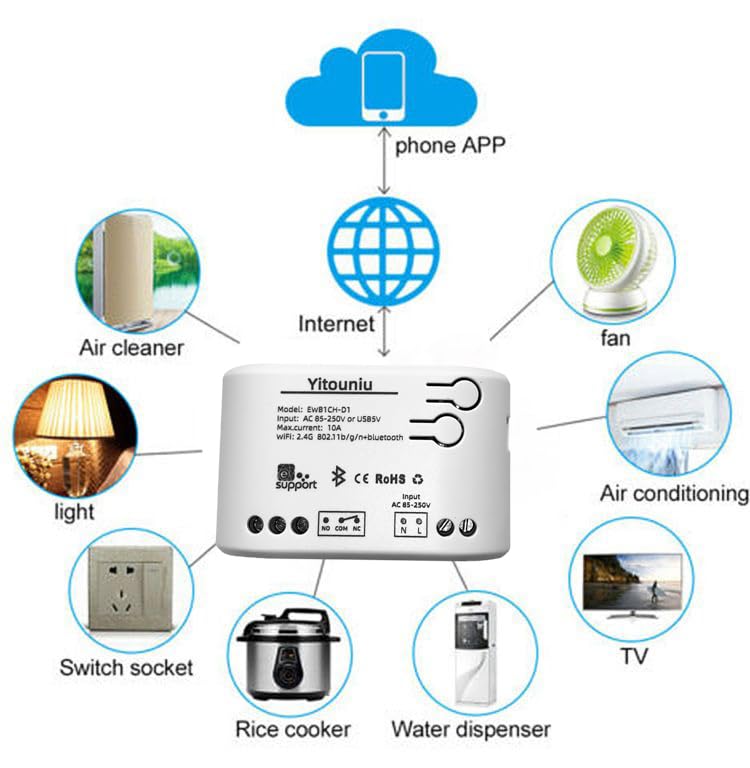
Image 5.1: Diagram illustrating the connectivity of the Yitouniu EWeLink Smart WiFi Switch Relay to various household appliances like lights, fans, and air conditioners, all controlled via a phone app and the internet.
5.2 ການດາວໂຫຼດແອັບ ແລະ ການຈັບຄູ່
- ດາວນ໌ໂຫລດ eWeLink app ຈາກ Apple App Store ຫຼື Google Play Store.
- ລົງທະບຽນບັນຊີແລະເຂົ້າສູ່ລະບົບ.
- Power on the Smart WiFi Switch Relay.
- Open the eWeLink app, tap the '+' icon to add a device.
- Follow the on-screen instructions to connect the device to your 2.4GHz WiFi network.

Image 5.2: Screenshots of the eWeLink app interface, showing controls for a garage door (ON/OFF) and a scheduling function for setting specific times.
6. ຮູບແບບການເຮັດວຽກ
The device supports three operating modes: self-locking, interlocking, and inching (micromotion). These modes can typically be configured within the eWeLink app or via physical buttons on the device, depending on the specific model variant.
- ຮູບແບບລັອກຕົນເອງ: Each channel operates independently. Pressing the button (or app control) turns the relay ON, pressing it again turns it OFF.
- Interlocking Mode: When one channel is turned ON, all other channels are automatically turned OFF. This is useful for applications where only one device should be active at a time.
- Inching (Micromotion) Mode: The relay turns ON for a set duration (e.g., 0.5 seconds to 1 hour) and then automatically turns OFF. This is suitable for momentary actions like garage door openers or pulse controls.
7. App Control and Voice Control
7.1 eWeLink App Features
The eWeLink app provides comprehensive control over your Smart WiFi Switch Relay:
- ເປີດ/ປິດໄລຍະໄກ: Control connected devices from anywhere with an internet connection.
- ຟັງຊັນເວລາ: Set schedules, countdowns, or recurring timers for automatic on/off operations.
- ການຄວບຄຸມເອກະລາດ: Each of the two channels can be controlled independently.
- ການແບ່ງປັນອຸປະກອນ: Share control of your devices with family members.
- ການຄວບຄຸມກຸ່ມ: Organize multiple smart devices into groups for simultaneous control.

Image 7.1: A user remotely controlling home lighting via the eWeLink mobile application, demonstrating the convenience of app-based control.

Image 7.2: Illustration of the eWeLink app's group control and sharing functions, allowing multiple users to manage devices across different rooms.

Image 7.3: The timing function interface within the eWeLink app, enabling users to set specific on/off times for connected appliances.
7.2 ການປະສົມປະສານການຄວບຄຸມດ້ວຍສຽງ
The Yitouniu Smart WiFi Switch Relay is compatible with popular voice assistants, including Amazon Alexa and Google Home/Nest. To enable voice control:
- Ensure your Smart WiFi Switch Relay is successfully paired with the eWeLink app.
- ເປີດແອັບ Alexa ຫຼື Google Home.
- ໄປທີ່ພາກສ່ວນ 'ທັກສະ' ຫຼື 'ເຮັດວຽກກັບ Google'.
- ຊອກຫາ and enable the 'eWeLink Smart Home' skill/service.
- Link your eWeLink account when prompted.
- Discover devices. Your Smart WiFi Switch Relay should now be controllable via voice commands.
Exampຄໍາສັ່ງ le:
- "Alexa, ເປີດໄຟຫ້ອງຮັບແຂກ."
- "Hey Google, ປິດພັດລົມ."

Image 7.4: A user interacting with voice assistants like Amazon Alexa and Google Home to control smart devices, highlighting the voice control capability of the relay.
8. ບໍາລຸງຮັກສາ
The Yitouniu Smart WiFi Switch Relay requires minimal maintenance. Follow these guidelines:
- ທໍາຄວາມສະອາດ: Wipe the device with a dry, soft cloth. Do not use liquid cleaners or solvents.
- ກວດສອບການເຊື່ອມຕໍ່: ກວດກາສາຍໄຟເປັນໄລຍະເພື່ອຮັບປະກັນວ່າພວກມັນຍັງຄົງປອດໄພ.
- ການອັບເດດເຟີມແວ: Keep the eWeLink app updated to receive the latest firmware for the device, which may include performance improvements and new features.
9. ການແກ້ໄຂບັນຫາ
- ອຸປະກອນບໍ່ໄດ້ເຊື່ອມຕໍ່ກັບ WiFi:
- Ensure your WiFi network is 2.4GHz. The device does not support 5GHz networks.
- ກວດສອບວ່າລະຫັດຜ່ານ WiFi ທີ່ໃສ່ໃນແອັບນັ້ນຖືກຕ້ອງຫຼືບໍ່.
- ຍ້າຍອຸປະກອນໃຫ້ໃກ້ກັບເຣົາເຕີ WiFi ຂອງທ່ານຫຼາຍຂຶ້ນ.
- Restart the device and your router.
- ອຸປະກອນອອບລາຍຢູ່ໃນແອັບ:
- ກວດສອບວ່າການເຊື່ອມຕໍ່ອິນເຕີເນັດຢູ່ເຮືອນຂອງທ່ານເປີດໃຊ້ງານຢູ່.
- Check if the device has power.
- ປິດເປີດອຸປະກອນຄືນໃໝ່.
- ການຄວບຄຸມດ້ວຍສຽງບໍ່ເຮັດວຽກ:
- Confirm the eWeLink skill/service is enabled and linked in your Alexa or Google Home app.
- Ensure the device is named clearly in the eWeLink app and discovered by your voice assistant.
- ກວດເບິ່ງການເຊື່ອມຕໍ່ອິນເຕີເນັດຂອງທ່ານ.
- Device not responding to RF remote:
- Ensure the RF remote is paired with the switch. Refer to the RF pairing instructions (if applicable to your specific remote).
- Check the battery in the RF remote.
10. ສິ່ງທີ່ຢູ່ໃນກ່ອງ
ເມື່ອເປີດການຫຸ້ມຫໍ່ຜະລິດຕະພັນ, ທ່ານຄວນຊອກຫາລາຍການຕໍ່ໄປນີ້:
- 1 x Yitouniu Wifi 2-Channel Relay Switch
- 1 x ຄູ່ມືແນະນຳ (ເອກະສານນີ້)
11. ການຮັບປະກັນແລະການສະຫນັບສະຫນູນ
This product comes with a standard manufacturer's warranty. For specific warranty terms, conditions, and duration, please refer to the documentation included with your purchase or contact Yitouniu customer support. For technical assistance or further inquiries, please visit the official Yitouniu website ຫຼືຕິດຕໍ່ຊ່ອງທາງການບໍລິການລູກຄ້າຂອງພວກເຂົາ.