
Active Pixel AP-4G-SY4.0MP-DUAL CAM-V-4MM-BW1
Active Pixel 4G SIM PTZ Security Camera User Manual
Model: AP-4G-SY4.0MP-DUAL CAM-V-4MM-BW1
1. ຜະລິດຕະພັນເກີນview
The Active Pixel 4G SIM PTZ Security Camera is an outdoor surveillance device designed for locations without traditional Wi-Fi or wired internet access. It operates using a 4G SIM card, providing remote monitoring capabilities. The camera features a dual-lens system for comprehensive coverage and detailed imaging, pan-tilt-zoom functionality, motion tracking, color night vision, and two-way audio communication.
1.1 ລັກສະນະທີ່ສໍາຄັນ
- 4G SIM Connectivity: Operates independently using a 4G SIM card (Vi & Airtel Sim Supported), suitable for remote areas without Wi-Fi.
- Dual Lens (4MP + 4MP = 8MP Total): Provides both a wide-angle view and a detailed close-up view simultaneously for enhanced monitoring.
- 360° Pan-Tilt-Zoom (PTZ): Allows remote control of camera direction and zoom, with automatic human motion tracking.
- ວິໄສທັດກາງຄືນສີ: Equipped with bright spotlight LEDs and IR lights for clear, full-color footage ໃນສະພາບແສງສະຫວ່າງຕ່ໍາ.
- ສຽງສອງທາງ: Enables real-time communication through the camera via a mobile application.
- Outdoor Ready (IP65): Weatherproof design ensures durability against rain and dust for outdoor installation.
- Smart Motion Tracking: ຕິດຕາມການເຄື່ອນໄຫວຂອງມະນຸດໂດຍອັດຕະໂນມັດ.
1.2 ເນື້ອໃນຊຸດ
ກວດສອບວ່າລາຍການທັງຫມົດແມ່ນມີຢູ່ໃນຊຸດ:
- 1x Active Pixel 4G SIM PTZ Security Camera
- 1x ຂາຕັ້ງ
- 1x ຕົວແປງໄຟ
- 1x ຄູ່ມືຜູ້ໃຊ້ (ເອກະສານນີ້)
- 1x Screw Kit for installation
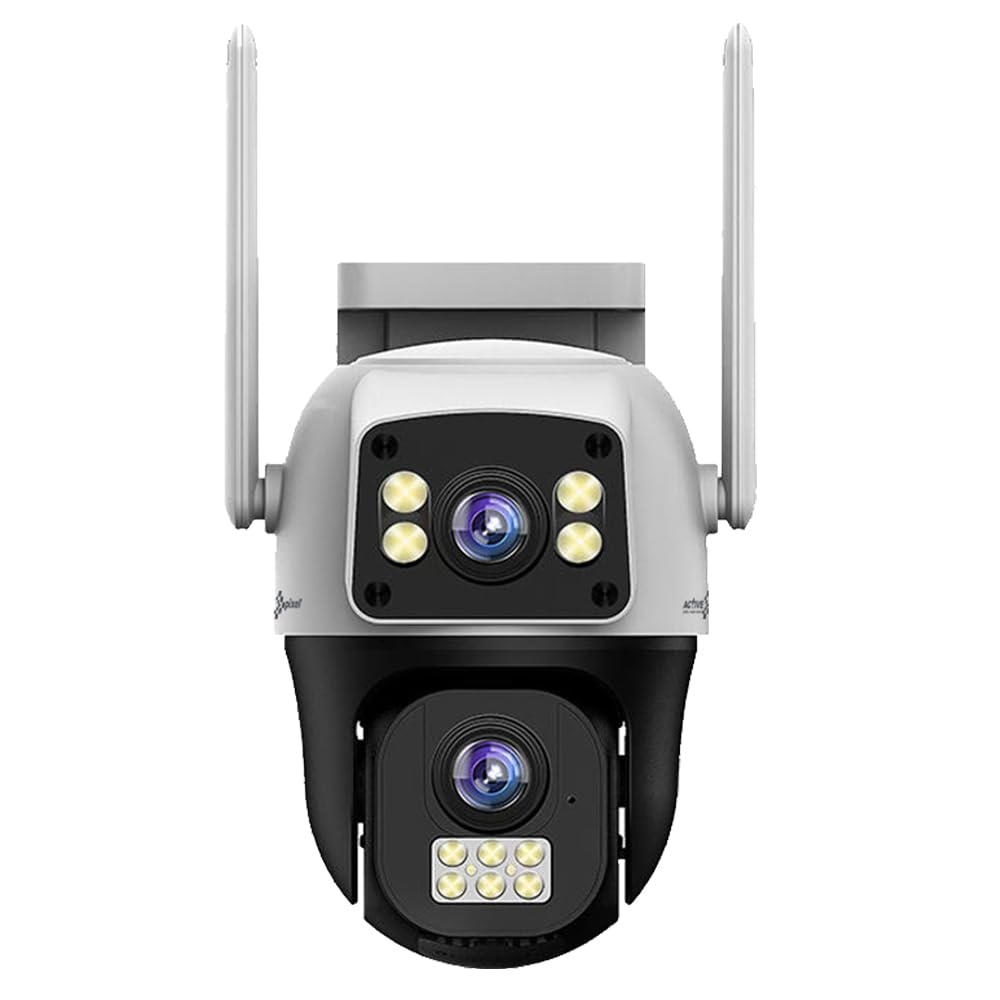
Figure 1: Active Pixel 4G SIM PTZ Security Camera (Front View)
2. ຂໍ້ມູນຄວາມປອດໄພ
- ໃຫ້ແນ່ໃຈວ່າກ້ອງຖ່າຍຮູບຖືກຕິດຕັ້ງຢູ່ໃນສະຖານທີ່ທີ່ໝັ້ນຄົງເພື່ອປ້ອງກັນການຕົກ.
- Use only the provided power adapter to avoid damage or fire hazards.
- ຢ່າໃຫ້ກ້ອງຖ່າຍຮູບຖືກອຸນຫະພູມສູງເກີນໄປນອກເໜືອຈາກຂອບເຂດການເຮັດວຽກຂອງມັນ.
- ຮັກສາກ້ອງຖ່າຍຮູບຢູ່ຫ່າງຈາກສະຫນາມແມ່ເຫຼັກທີ່ເຂັ້ມແຂງ.
- ຫຼີກລ່ຽງການສຳຜັດກັບແຫຼ່ງແສງສະຫວ່າງທີ່ແຮງໂດຍກົງຂອງເລນເປັນເວລາດົນ.
- Do not attempt to disassemble or repair the camera yourself. Contact support for assistance.
- Ensure proper sealing of all connections to maintain the IP65 water resistance rating.
3. ຕັ້ງຄ່າ
3.1 ການໃສ່ຊິມກາດ
- Locate the SIM card slot on the camera. This is typically protected by a waterproof cover.
- Carefully open the cover using a small screwdriver if necessary.
- Insert a activated 4G SIM card (Vi or Airtel recommended) into the slot with the metal contacts facing down and the notched corner aligned correctly.
- Ensure the SIM card clicks into place.
- Securely close the waterproof cover to prevent water ingress.
Note: The camera does not require Wi-Fi. Ensure the 4G SIM card has an active data plan.
3.2 ການເຊື່ອມຕໍ່ພະລັງງານ
- ເຊື່ອມຕໍ່ອະແດບເຕີໄຟຟ້າທີ່ໃຫ້ມາເຂົ້າກັບພອດສຽບໄຟເຂົ້າຂອງກ້ອງຖ່າຍຮູບ.
- ສຽບອະແດບເຕີໄຟເຂົ້າໄປໃນບ່ອນສຽບໄຟຟ້າທີ່ເຫມາະສົມ.
- The camera will power on and initiate its self-test sequence.
3.3 ການຕິດຕັ້ງແອັບ ແລະ ການຈັບຄູ່
- Download the official Active Pixel security camera application from your mobile device's app store (e.g., Google Play Store for Android).
- ລົງທະບຽນສຳລັບບັນຊີໃໝ່ ຫຼື ເຂົ້າສູ່ລະບົບຖ້າທ່ານມີບັນຊີແລ້ວ.
- Follow the in-app instructions to add a new device. This typically involves scanning a QR code on the camera or manually entering its device ID.
- Once paired, you will be able to view ອາຫານສົດແລະຄວບຄຸມກ້ອງຖ່າຍຮູບ.
3.4 ຕິດຕັ້ງກ້ອງ
The camera is designed for wall-mounted installation.
- ເລືອກສະຖານທີ່ກາງແຈ້ງທີ່ເໝາະສົມ ເຊິ່ງສະໜອງແສງທີ່ຕ້ອງການ viewing angle and is within reach of a power source.
- Use the included mounting stand as a template to mark drilling points on the wall.
- ເຈາະຮູນັກບິນ ແລະ ໃສ່ບ່ອນຍຶດຕິດຝາ ຖ້າຈຳເປັນ.
- ຍຶດບ່ອນຍຶດຕິດໃສ່ຝາດ້ວຍສະກູທີ່ໃຫ້ໄວ້.
- Attach the camera to the mounting stand, ensuring it is firmly secured.
- Adjust the camera's initial angle as needed before final tightening.
ຮູບທີ 2: ຕົວຢ່າງample of camera mounting (Image not available, refer to physical manual for illustration).
4. ຄໍາແນະນໍາການດໍາເນີນງານ
4.1 ດໍາລົງຊີວິດ View ແລະການຄວບຄຸມ PTZ
- Open the Active Pixel app on your smartphone.
- Select your camera from the device list to access the live video feed.
- Use the on-screen controls to pan (move horizontally), tilt (move vertically), and zoom the camera.
4.2 ການກວດຈັບ ແລະ ຕິດຕາມການເຄື່ອນໄຫວ
- ໄປທີ່ການຕັ້ງຄ່າກ້ອງຖ່າຍຮູບພາຍໃນແອັບ.
- Enable "Motion Detection" and configure sensitivity levels as desired.
- Activate "Smart Motion Tracking" to allow the camera to automatically follow detected human movement.
- You will receive instant alerts on your mobile device when motion is detected.
4.3 ສຽງສອງທາງ
- ໃນຂະນະທີ່ຢູ່ໃນຊີວິດ view, tap the microphone icon in the app to speak through the camera's speaker.
- ແຕະໄອຄອນລຳໂພງເພື່ອຟັງສຽງຈາກໄມໂຄຣໂຟນຂອງກ້ອງຖ່າຍຮູບ.
4.4 ວິໄສທັດກາງຄືນ
The camera automatically switches to night vision mode in low-light conditions. The powerful LEDs provide full-color night vision, while IR lights assist in darker environments.
4.5 ການບັນທຶກແລະການເກັບຮັກສາ
The camera supports local storage via a MicroSD card (not included) and may offer cloud storage options (check app for details). Recordings are triggered by motion detection or can be initiated manually.
- Insert a MicroSD card (up to 128GB, Class 10 recommended) into the designated slot (usually near the SIM card slot).
- Format the MicroSD card via the app settings before first use.
- ການເຂົ້າເຖິງບັນທຶກ footage through the playback feature in the app.
5. ບໍາລຸງຮັກສາ
- ທໍາຄວາມສະອາດ: ເຊັດເລນກ້ອງຖ່າຍຮູບ ແລະ ຮ່າງກາຍໃຫ້ອ່ອນໆ, ງamp ຜ້າ. ຢ່າໃຊ້ສານເຄມີທີ່ຮຸນແຮງຫຼືເຄື່ອງເຮັດຄວາມສະອາດຂັດ.
- ການອັບເດດເຟີມແວ: Regularly check the app for available firmware updates to ensure optimal performance and security. Follow in-app instructions for updating.
- ການກັນອາກາດ: Periodically inspect the waterproof covers and seals for any signs of wear or damage, especially after extreme weather conditions. Ensure they are securely closed.
- ການສະຫນອງພະລັງງານ: ໃຫ້ແນ່ໃຈວ່າອະແດບເຕີໄຟຟ້າ ແລະ ສາຍໄຟບໍ່ເສຍຫາຍ.
6. ການແກ້ໄຂບັນຫາ
| ບັນຫາ | ສາເຫດທີ່ເປັນໄປໄດ້ | ການແກ້ໄຂ |
|---|---|---|
| ກ້ອງຖ່າຍຮູບບໍ່ເປີດ | ບໍ່ມີໄຟ, ອະແດບເຕີມີບັນຫາ, ການເຊື່ອມຕໍ່ວ່າງ. | ກວດສອບປລັກສຽບໄຟຟ້າ, ໃຫ້ແນ່ໃຈວ່າອະແດບເຕີໄດ້ເຊື່ອມຕໍ່ແໜ້ນດີແລ້ວ, ລອງໃຊ້ປລັກສຽບອື່ນ. |
| ບໍ່ມີວິດີໂອສົດ | No 4G signal, inactive SIM card, incorrect app pairing. | Check 4G signal strength, ensure SIM card is active and has data, re-pair camera with app. |
| ການກວດຈັບການເຄື່ອນໄຫວບໍ່ເຮັດວຽກ | Motion detection disabled, sensitivity too low, incorrect detection zone. | Enable motion detection in app, increase sensitivity, adjust detection zones. |
| ບັນຫາສຽງສອງທາງ | Microphone/speaker disabled in app, poor network connection. | Ensure audio features are enabled in app, check 4G signal strength. |
| Poor video quality at night | Obstruction of IR/spotlight LEDs, dirty lens. | Clear any obstructions, clean the camera lens. |
7. ຂໍ້ມູນຈໍາເພາະ
| ຄຸນສົມບັດ | ລາຍລະອຽດ |
|---|---|
| ໝາຍເລກຕົວແບບ | AP-4G-SY4.0MP-DUAL CAM-V-4MM-BW1 |
| ຍີ່ຫໍ້ | Active Pixel |
| ເຕັກໂນໂລຊີການເຊື່ອມຕໍ່ | ໄຮ້ສາຍ (4G ເຊວລູລາ) |
| ຄວາມລະອຽດການຖ່າຍວິດີໂອ | 1536P (Dual 4MP lenses for 8MP total clarity) |
| ຄຸນນະສົມບັດພິເສດ | Dual Lens, 360° PTZ, Smart Motion Tracking, Color Night Vision, Two-Way Audio |
| ການນຳໃຊ້ພາຍໃນ/ນອກ | ກາງແຈ້ງ |
| ແຫຼ່ງພະລັງງານ | DC |
| ວິທີການຄວບຄຸມ | App (Android compatible) |
| ວັດສະດຸ | Acrylonitrile Butadiene Styrene (ABS) |
| ຂະໜາດລາຍການ (LxWxH) | 15 x 10 x 8 ຊັງຕີແມັດ |
| ລະດັບຄວາມຕ້ານທານນ້ໍາ | IP65 (ກັນນໍ້າ) |
| ເຕັກໂນໂລຊີແສງສະຫວ່າງຕ່ໍາ | ສີກາງຄືນ |
| ປະເພດ Alert | ການເຄື່ອນໄຫວເທົ່ານັ້ນ |
| ເທັກໂນໂລຍີເຊັນເຊີຮູບພາບ | CMOS |
| ປະເພດການຕິດຕັ້ງ | ຕິດຝາ |
| ອົງປະກອບລວມ | Camera, Stand, Adapter, Manual, Screw Kit |
8. ການຮັບປະກັນແລະການສະຫນັບສະຫນູນ
8.1 ຂໍ້ມູນການຮັບປະກັນ
This Active Pixel product comes with a ຮັບປະກັນ 1 ປີ ຈາກວັນທີ່ຊື້. ກະລຸນາຮັກສາໃບຮັບເງິນການຊື້ຂອງທ່ານໄວ້ເປັນຫຼັກຖານຂອງການຮັບປະກັນ.
The warranty covers manufacturing defects. It does not cover damage caused by misuse, accidents, unauthorized modifications, or improper installation.
8.2 ສະຫນັບສະຫນູນລູກຄ້າ
For technical assistance, troubleshooting, or warranty claims, please contact Active Pixel customer care:
- ໝາຍເລກການດູແລລູກຄ້າ: 9321367328
- ຜູ້ຜະລິດ: Glorious Digital Solution Pvt Ltd, Mumbai, India.
Please have your product model number (AP-4G-SY4.0MP-DUAL CAM-V-4MM-BW1) and purchase details ready when contacting support.
Ask a question about this manual
Ask about setup, troubleshooting, compatibility, parts, safety, or missing instructions. Manuals+ will review the question and use this page’s manual context to help answer it.