
1. ບົດແນະນຳ
Thank you for choosing the MECHEN H1-Pro Bluetooth MP3 Player with WiFi. This device is designed to provide a versatile and enjoyable audio and video experience. Featuring a 4-inch touchscreen and running on Android 9.0, it supports various applications and connectivity options. This manual provides essential information for setting up, operating, and maintaining your device.
2. ເນື້ອໃນຊຸດ
ກວດສອບວ່າລາຍການທັງຫມົດທີ່ລະບຸໄວ້ຂ້າງລຸ່ມນີ້ແມ່ນລວມຢູ່ໃນຊຸດຂອງທ່ານ. ຖ້າລາຍການໃດຂາດຫາຍໄປຫຼືເສຍຫາຍ, ກະລຸນາຕິດຕໍ່ຝ່າຍຊ່ວຍເຫຼືອລູກຄ້າ.
- MECHEN H1-Pro MP3 Player
- ສາຍ USB
- ຫູຟັງ
- ຮູບເງົາປ້ອງກັນ
- ກໍລະນີປ້ອງກັນ
- ຄູ່ມືຜູ້ໃຊ້

Image: The MECHEN H1-Pro MP3 Player displayed with its accessories, including a USB cable, headphones, protective film, and a clear protective case.
3. ອຸປະກອນເກີນview
Familiarize yourself with the physical components and controls of your MECHEN H1-Pro MP3 Player.
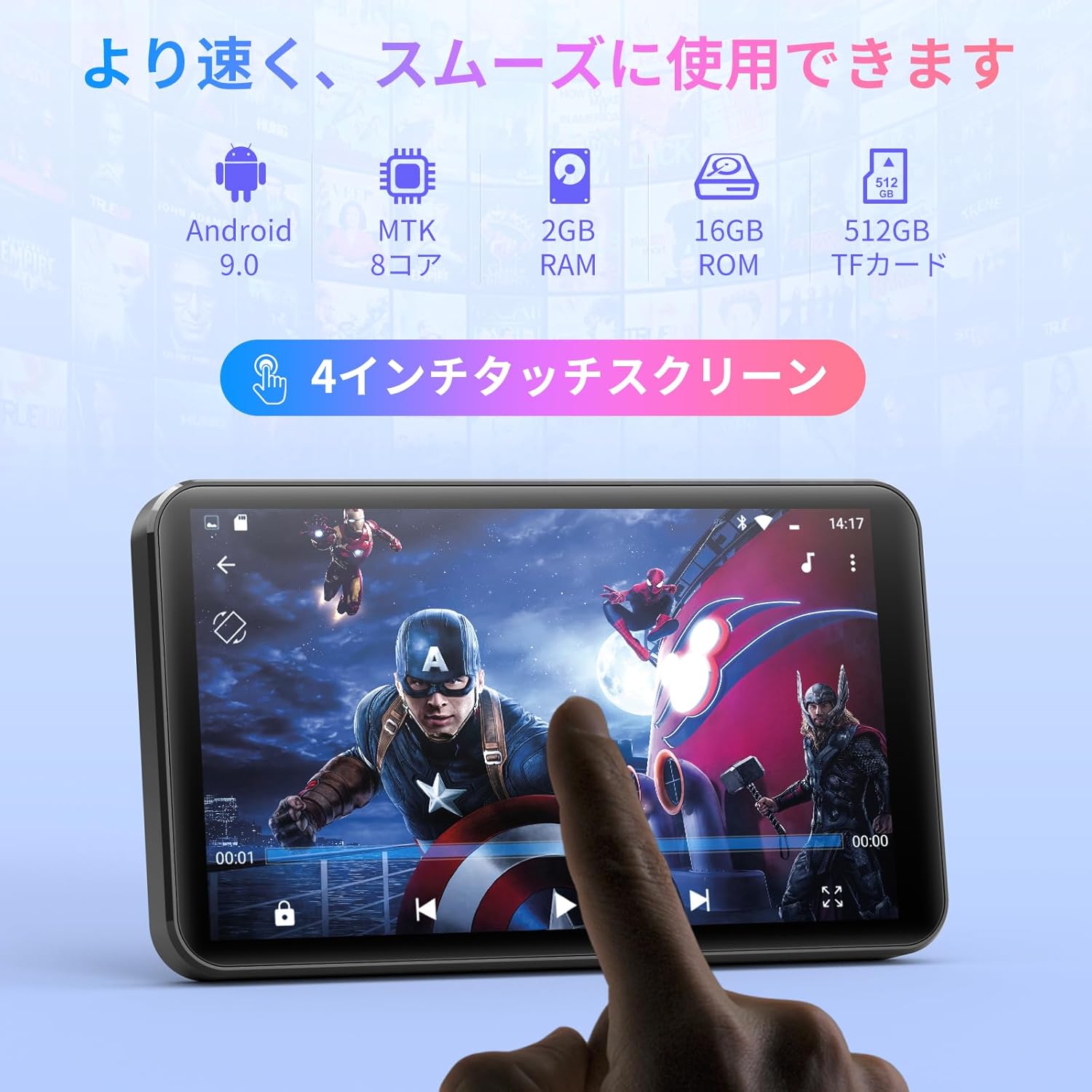
ຮູບພາບ: ທາງຫນ້າ view of the MECHEN H1-Pro MP3 Player, showcasing ຈໍສະແດງຜົນ touchscreen 4 ນິ້ວຂອງມັນ.

ຮູບພາບ: ຂ້າງ view of the MECHEN H1-Pro MP3 Player, highlighting the power button and volume controls.

ຮູບພາບ: ເທິງແລະລຸ່ມ views of the MECHEN H1-Pro MP3 Player, illustrating the USB-C charging port, headphone jack, and Micro SD card slot.
4. ຕັ້ງຄ່າ
4.1 ການສາກໄຟເບື້ອງຕົ້ນ
Before first use, fully charge the device. Connect the provided USB cable to the player's USB-C port and the other end to a USB power adapter (not included) or a computer's USB port. The charging indicator will show the charging status.
4.2 ເປີດ/ປິດ
- ເພື່ອເປີດເຄື່ອງ: Press and hold the Power button on the side of the device until the screen lights up.
- ປິດເຄື່ອງ: Press and hold the Power button until a power-off menu appears on the screen. Select 'Power Off' to shut down the device.
4.3 ການເຊື່ອມຕໍ່ Wi-Fi
ເພື່ອເຂົ້າເຖິງຄຸນສົມບັດອອນໄລນ໌ ແລະ ດາວໂຫຼດແອັບ, ໃຫ້ເຊື່ອມຕໍ່ອຸປະກອນຂອງທ່ານກັບເຄືອຂ່າຍ Wi-Fi.
- ໄປທີ່ ການຕັ້ງຄ່າ > ເຄືອຂ່າຍ ແລະອິນເຕີເນັດ > Wi-Fi.
- ສະຫຼັບ Wi-Fi On.
- ເລືອກເຄືອຂ່າຍ Wi-Fi ທີ່ທ່ານຕ້ອງການຈາກບັນຊີລາຍຊື່.
- ໃສ່ລະຫັດຜ່ານຖ້າຖືກເຕືອນແລະແຕະ ເຊື່ອມຕໍ່.

Image: The MECHEN H1-Pro MP3 Player screen showing Wi-Fi settings and available networks.
4.4 ການໃສ່ Micro SD Card
The device supports Micro SD cards for expanded storage. Locate the Micro SD card slot on the side of the device. Gently insert the card with the gold contacts facing down until it clicks into place.
5. ຄໍາແນະນໍາການດໍາເນີນງານ
5.1 Basic Navigation (Touchscreen)
The MECHEN H1-Pro features a responsive 4-inch touchscreen. Use standard touch gestures:
- ແຕະ: ເພື່ອເລືອກລາຍການ ຫຼືເປີດແອັບໃດໜຶ່ງ.
- ປັດ: ເພື່ອເລື່ອນຜ່ານລາຍການ ຫຼືປ່ຽນລະຫວ່າງໜ້າຈໍ.
- ເມື່ອເຂົ້າຕາຈົນ: To zoom in or out (in supported applications).
5.2 ການຫລີ້ນດົນຕີ
The device supports various audio formats including MP3, WAV, WMA, APE, OGG, and FLAC for high-fidelity music playback.
- ເປີດ ດົນຕີ ຄໍາຮ້ອງສະຫມັກ.
- ຊອກຫາຫ້ອງສະໝຸດເພງຂອງທ່ານຕາມສິນລະປິນ, ອາລະບໍາ, ເພງ, ຫຼືລາຍການຫຼິ້ນ.
- ແຕະທີ່ເພງເພື່ອເລີ່ມຫຼິ້ນຄືນ.
- ໃຊ້ການຄວບຄຸມເທິງໜ້າຈໍສຳລັບການຫຼິ້ນ/ຢຸດຊົ່ວຄາວ, ຂ້າມເພງ ແລະ ການປັບລະດັບສຽງ.

Image: The MECHEN H1-Pro MP3 Player screen showing a music playback interface with album art and controls.
5.3 ການຫຼີ້ນວີດີໂອຄືນ
Enjoy 720P/1080P full-format HD video playback without conversion. Supported formats include RM, RMVB, FLV, MP4, DAT, MKV, MPG, MOV, TS, etc.
- ເປີດ ເຄື່ອງຫຼິ້ນວີດີໂອ ຄໍາຮ້ອງສະຫມັກ.
- ເລືອກວິດີໂອ file from your storage.
- Tap to play. Use on-screen controls for playback options.

Image: The MECHEN H1-Pro MP3 Player screen showing a video playing in full-screen mode.
5.4 ການເຊື່ອມຕໍ່ Bluetooth
Connect to Bluetooth headphones, speakers, or other compatible devices.
- ໄປທີ່ ການຕັ້ງຄ່າ > ອຸປະກອນທີ່ເຊື່ອມຕໍ່ > Bluetooth.
- ສະຫຼັບ Bluetooth On.
- ກວດໃຫ້ແນ່ໃຈວ່າອຸປະກອນເສີມ Bluetooth ຂອງທ່ານຢູ່ໃນໂໝດຈັບຄູ່.
- Select the accessory from the list of available devices to pair.

Image: The MECHEN H1-Pro MP3 Player shown alongside a pair of wireless headphones, indicating Bluetooth connectivity.
5.5 Wi-Fi Connectivity & App Downloads
With Android 9.0 and Wi-Fi, you can download and install various applications from the Google Play Store.
- Ensure the device is connected to Wi-Fi (see Section 4.3).
- ເປີດ Play Store ຄໍາຮ້ອງສະຫມັກ.
- ເຂົ້າສູ່ລະບົບດ້ວຍບັນຊີ Google ຂອງທ່ານ.
- ຊອກຫາ and download desired applications (e.g., Spotify, Amazon Music, Audible).

Image: The MECHEN H1-Pro MP3 Player screen showing a variety of installed applications, including music streaming services and web ຕົວທ່ອງເວັບ.
ວິທະຍຸ 5.6 FM
ຟັງສະຖານີວິທະຍຸ FM ທີ່ທ່ານມັກ.
- Connect wired headphones to the 3.5mm audio jack; they act as the antenna.
- ເປີດ ວິທະຍຸ FM ຄໍາຮ້ອງສະຫມັກ.
- Use the on-screen controls to scan for stations or tune manually.
5.7 File ການຄຸ້ມຄອງ
ໃຊ້ໃນຕົວ file ຜູ້ຈັດການໃນການຈັດຕັ້ງຂອງທ່ານ files on internal storage and the Micro SD card.
- ເປີດ File ຜູ້ຈັດການ ຄໍາຮ້ອງສະຫມັກ.
- Navigate through folders to view, copy, move, or delete files.
6. ບໍາລຸງຮັກສາ
6.1 ການທໍາຄວາມສະອາດ
Wipe the device with a soft, dry, lint-free cloth. Do not use liquid cleaners or abrasive materials.
6.2 ການເກັບຮັກສາ
Store the device in a cool, dry place away from direct sunlight and extreme temperatures. If storing for an extended period, ensure the battery is partially charged (around 50%) to prolong its lifespan.
6.3 ການດູແລຫມໍ້ໄຟ
To maximize battery life, avoid fully discharging the battery frequently. Use the original charging cable for optimal performance.
7. ການແກ້ໄຂບັນຫາ
| ບັນຫາ | ການແກ້ໄຂທີ່ເປັນໄປໄດ້ |
|---|---|
| ອຸປະກອນບໍ່ເປີດ. | Ensure the battery is charged. Connect to a charger for at least 30 minutes. If unresponsive, perform a hard reset by holding the power button for 10-15 seconds. |
| ບໍ່ສາມາດເຊື່ອມຕໍ່ກັບ Wi-Fi ໄດ້. | Check if Wi-Fi is enabled. Verify the Wi-Fi password. Restart your router and the MP3 player. |
| ອຸປະກອນ Bluetooth ບໍ່ໄດ້ຈັບຄູ່. | Ensure Bluetooth is enabled on both devices and the accessory is in pairing mode. Move devices closer together. |
| ແອັບຯຊ້າ ຫຼືຂັດຂ້ອງ. | Close unnecessary background apps. Clear app cache (Settings > Apps > [App Name] > Storage > Clear Cache). Restart the device. Too many apps can lead to slowdowns. |
| ບໍ່ມີສຽງຈາກຫູຟັງ. | ກວດເບິ່ງການເຊື່ອມຕໍ່ຫູຟັງ. ໃຫ້ແນ່ໃຈວ່າລະດັບສຽງບໍ່ໄດ້ຖືກປິດສຽງຫຼືຕ່ໍາເກີນໄປ. ທົດສອບກັບຫູຟັງທີ່ແຕກຕ່າງກັນ. |
8. ຂໍ້ມູນຈໍາເພາະ
| ຄຸນສົມບັດ | ລາຍລະອຽດ |
|---|---|
| ຍີ່ຫໍ້ | MECHEN |
| ຊື່ຕົວແບບ | H1-Pro (EU-H11) |
| ລະບົບປະຕິບັດການ | Android 9.0 |
| ໂຮງງານຜະລິດ | MTK 8-core |
| RAM | 2 GB |
| ການເກັບຮັກສາພາຍໃນ | 16 GB |
| ການເກັບຮັກສາທີ່ຂະຫຍາຍໄດ້ | Micro SD (ສູງສຸດ 512GB) |
| ຂະໜາດໜ້າຈໍ | 4 ນິ້ວ |
| ເຕັກໂນໂລຊີຫນ້າຈໍ | ຈໍ LCD |
| ການເຊື່ອມຕໍ່ | Bluetooth, USB, Wi-Fi |
| ຄຸນນະສົມບັດພິເສດ | FM Radio, Equalizer, Video Playback |
| ຮູບແບບສຽງທີ່ຮອງຮັບ | MP3, WAV, WMA, APE, OGG, FLAC |
| ຮູບແບບວິດີໂອສະຫນັບສະຫນູນ | RM, RMVB, FLV, MP4, DAT, MKV, MPG, MOV, TS, etc. |
| ຄວາມອາດສາມາດຫມໍ້ໄຟ | 2000 mAh |
| ອາຍຸແບັດເຕີຣີ (ດົນຕີ) | ສູງສຸດ 50 ຊົ່ວໂມງ |
| ອາຍຸການໃຊ້ງານຂອງແບັດເຕີຣີ (ວິດີໂອ) | ສູງສຸດ 8 ຊົ່ວໂມງ |
| ຂະ ໜາດ (D x W x H) | 10.5 x 6.2 x 1.2 ຊມ (4.14 x 2.44 x 0.46 ນິ້ວ) |
| ນ້ໍາຫນັກລາຍການ | 97.5 ກຣາມ (3.45 oz) |

Image: The MECHEN H1-Pro MP3 Player shown with its physical dimensions and weight specifications.
9. ການຮັບປະກັນແລະການສະຫນັບສະຫນູນ
For warranty information and technical support, please refer to the warranty card included in your package or visit the official MECHEN webເວັບໄຊ. ຮັກສາໃບຮັບເງິນການຊື້ຂອງທ່ານໄວ້ເປັນຫຼັກຖານການຊື້ສໍາລັບການຮ້ອງຂໍການຮັບປະກັນ.