
ຂໍ້ມູນຄວາມປອດໄພທີ່ສໍາຄັນ
Please read all instructions carefully before operating your Acekool Portable Air Conditioner. Keep this manual for future reference. Failure to follow these instructions may result in electric shock, fire, or personal injury.
- Always connect the unit to a grounded power outlet with the correct voltage.
- ຫ້າມໃຊ້ອຸປະກອນທີ່ມີສາຍໄຟ ຫຼືປລັກສຽບເສຍຫາຍ.
- Do not block the air inlets or outlets. Ensure proper ventilation.
- ຢ່າເອົາສິ່ງຂອງເຂົ້າໄປໃນຊ່ອງລະບາຍອາກາດ.
- ເກັບຮັກສາເຄື່ອງໃຫ້ຫ່າງຈາກວັດສະດຸໄວໄຟ ແລະ ແຫຼ່ງຄວາມຮ້ອນ.
- ຖອດປລັກໜ່ວຍອອກກ່ອນທຳຄວາມສະອາດ ຫຼືເຮັດການບຳລຸງຮັກສາ.
- ເຄື່ອງໃຊ້ນີ້ບໍ່ໄດ້ມີຈຸດປະສົງເພື່ອໃຊ້ໂດຍບຸກຄົນ (ລວມທັງເດັກນ້ອຍ) ທີ່ມີຄວາມສາມາດທາງຮ່າງກາຍ, ຄວາມຮູ້ສຶກ ຫຼືຈິດໃຈທີ່ຫຼຸດລົງ, ຫຼືຂາດປະສົບການ ແລະຄວາມຮູ້, ເວັ້ນເສຍແຕ່ວ່າພວກເຂົາໄດ້ຮັບການຊີ້ນໍາ ຫຼືຄໍາແນະນໍາກ່ຽວກັບການນໍາໃຊ້ເຄື່ອງໃຊ້ໂດຍບຸກຄົນທີ່ຮັບຜິດຊອບຄວາມປອດໄພຂອງເຂົາເຈົ້າ.
ສິນຄ້າເກີນview
The Acekool 8000 BTU Portable Air Conditioner is a versatile 3-in-1 unit designed to provide cooling, dehumidification, and fan functions for rooms up to 350 sq. ft.
ຄຸນນະສົມບັດທີ່ສໍາຄັນ:
- Fast Cooling Efficiency: ຄວາມອາດສາມາດເຮັດຄວາມເຢັນ 8,000 BTU ສໍາລັບຫ້ອງສູງເຖິງ 350 sq. ft.
- 3-in-1 Multi-function Mode: Offers Cooling, Dehumidifier (45 pints/day), and Fan (300m³/h airflow, 2 speeds) modes.
- ການອອກແບບທີ່ເປັນມິດກັບຜູ້ໃຊ້: Includes a remote control, LED display, 24-hour timer, and sleep mode.
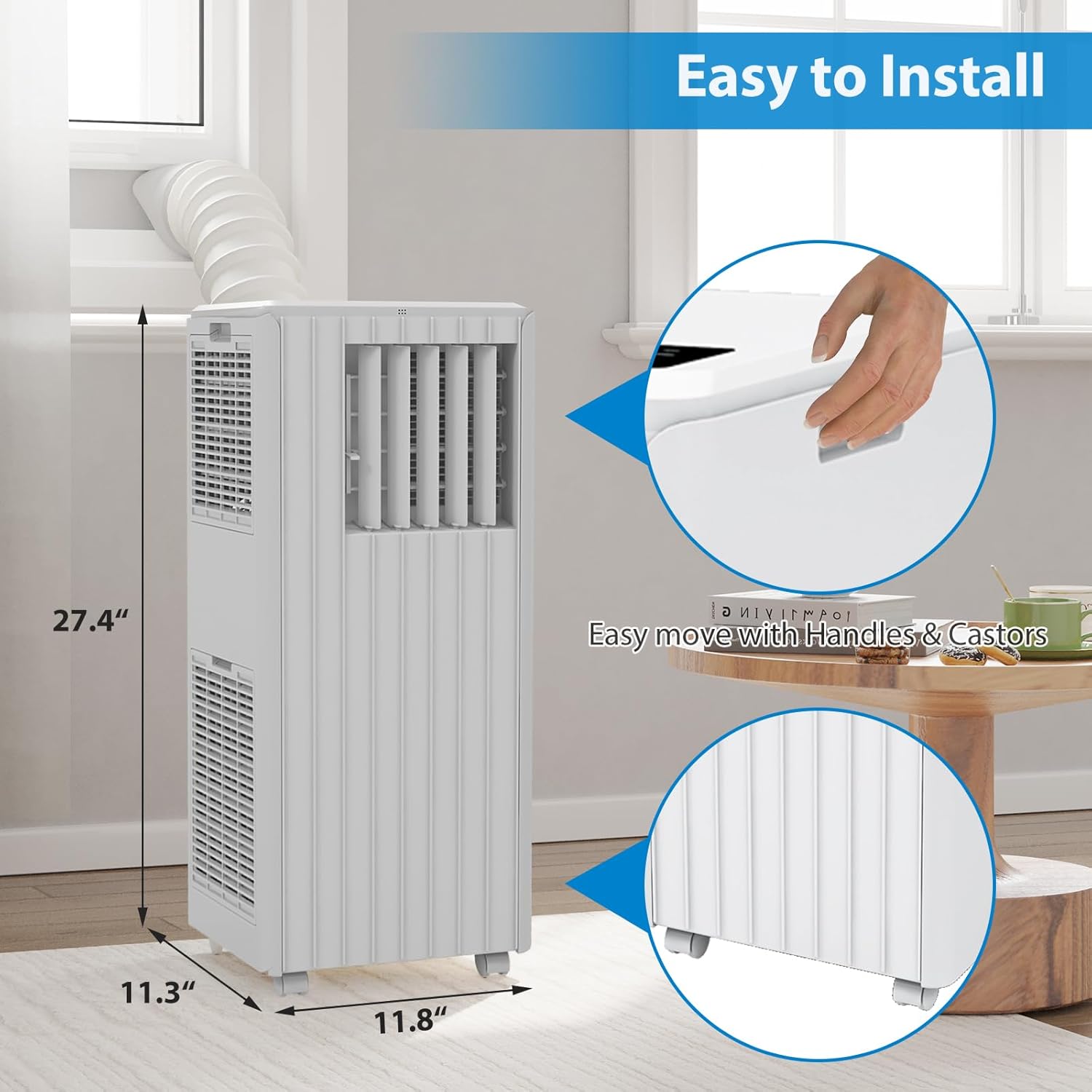
- Portable ແລະສະດວກ: Lightweight, freestanding design with roll caster wheels and a built-in carrying handle for easy movement.
- ການດໍາເນີນງານງຽບ: Operates at approximately 51dB, suitable for quiet environments.
ອົງປະກອບຂອງໜ່ວຍ:
ຄຸ້ນເຄີຍກັບສ່ວນປະກອບຫຼັກຂອງເຄື່ອງປັບອາກາດແບບພົກພາຂອງທ່ານ.


ການຕິດຕັ້ງແລະການຕິດຕັ້ງ
ການຕິດຕັ້ງທີ່ເຫມາະສົມແມ່ນສໍາຄັນສໍາລັບການປະຕິບັດງານທີ່ມີປະສິດທິພາບຂອງເຄື່ອງປັບອາກາດແບບພົກພາຂອງເຈົ້າ.
ການຫຸ້ມຫໍ່:
- ເອົາຫົວຫນ່ວຍແລະອຸປະກອນເສີມທັງຫມົດອອກຈາກການຫຸ້ມຫໍ່ຢ່າງລະມັດລະວັງ.
- ກວດສອບຄວາມເສຍຫາຍຈາກການຂົນສົ່ງ. ຕິດຕໍ່ຝ່າຍສະໜັບສະໜູນລູກຄ້າຖ້າພົບຄວາມເສຍຫາຍ.
- ຮັກສາການຫຸ້ມຫໍ່ສໍາລັບການເກັບຮັກສາຫຼືການຂົນສົ່ງໃນອະນາຄົດ.
ການຈັດວາງ:
- ວາງ ໜ່ວຍ ບໍລິເວນພື້ນທີ່ຮາບພຽງແລະ ໝັ້ນ ຄົງ.
- ໃຫ້ແນ່ໃຈວ່າມີຊ່ອງຫວ່າງຢ່າງໜ້ອຍ 20 ນິ້ວ (50 ຊຕມ) ອ້ອມຕົວເຄື່ອງສໍາລັບການໄຫຼວຽນຂອງອາກາດທີ່ເຫມາະສົມ.
- ວາງຕົວເຄື່ອງໄວ້ໃກ້ປ່ອງຢ້ຽມເພື່ອຕິດຕັ້ງທໍ່ລະບາຍອາກາດ.
ການຕິດຕັ້ງຊຸດປ່ອງຢ້ຽມ:
- ປະກອບຊຸດແຜ່ນປະທັບຕາປ່ອງຢ້ຽມຕາມປະເພດປ່ອງຢ້ຽມຂອງທ່ານ (sliding ຫຼື casement).
- Extend the exhaust hose and attach one end to the exhaust outlet on the back of the AC unit.
- ແນບສົ້ນອື່ນໆຂອງທໍ່ລະບາຍອາກາດໃສ່ກັບອະແດັບເຕີຢູ່ເທິງແຜ່ນປະທັບຕາຂອງປ່ອງຢ້ຽມ.
- Securely fit the window sealing plate into the window opening, ensuring a tight seal to prevent hot air from entering the room.
ຄໍາແນະນໍາການດໍາເນີນງານ
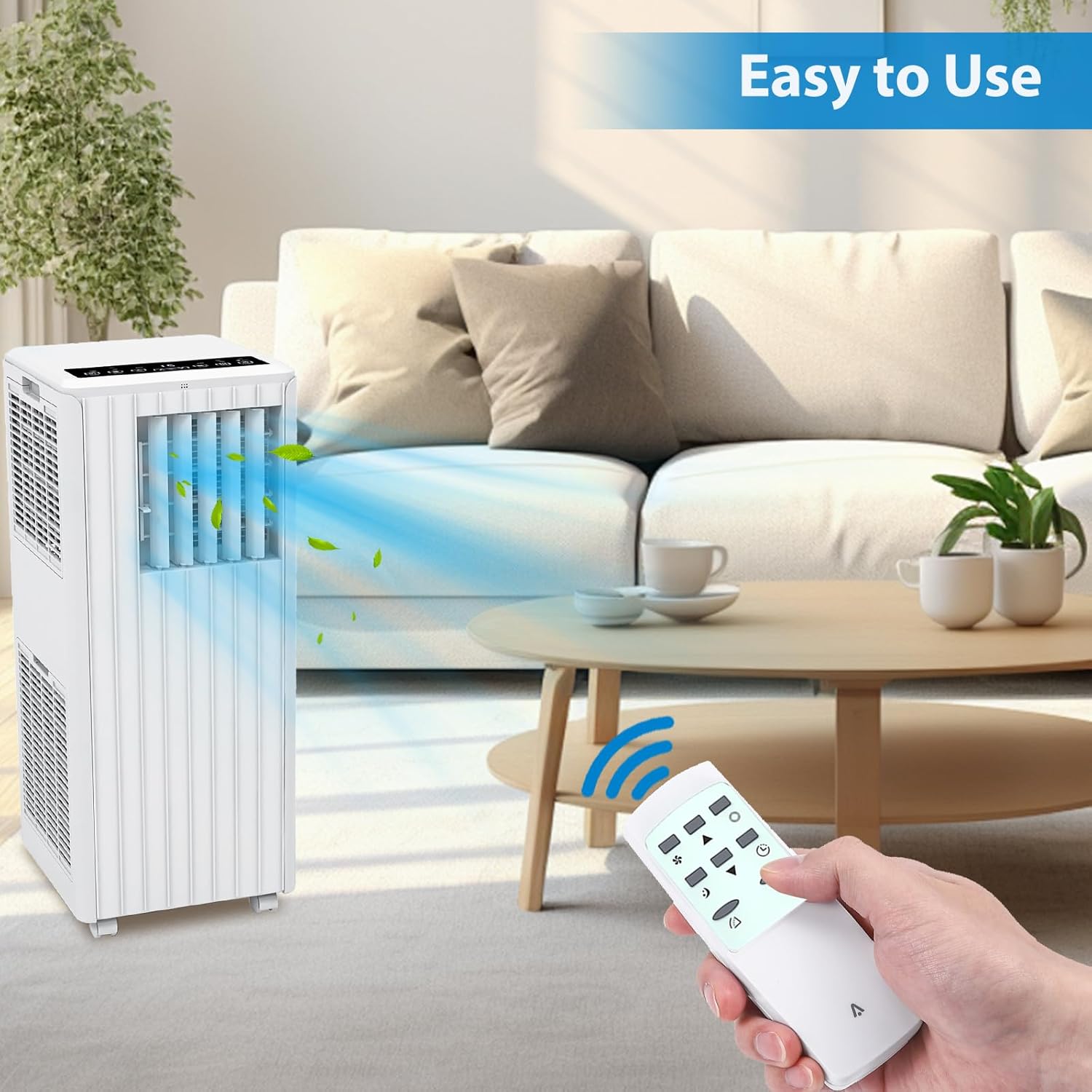
Your Acekool Portable Air Conditioner can be operated using the control panel on the unit or the included remote control.
ກະດານຄວບຄຸມ:

ການຄວບຄຸມໄລຍະໄກ:
ການດໍາເນີນງານພື້ນຖານ:
- ເປີດ/ປິດ: ກົດ ພະລັງງານ ປຸ່ມເພື່ອເປີດຫຼືປິດເຄື່ອງ.
- ການເລືອກໂໝດ: ກົດ ໂໝດ button to cycle through Cool, Dry (Dehumidify), and Fan modes.
- Temperature Adjustment (Cool Mode): ໃຊ້ ຂຶ້ນ/ລົງ ລູກສອນເພື່ອຕັ້ງອຸນຫະພູມທີ່ທ່ານຕ້ອງການ.
- ຄວາມໄວພັດລົມ: ກົດ ຄວາມໄວ button to select High or Low fan speed.
- ຟັງຊັນຈັບເວລາ: ກົດ ເວລາ button to set an auto-on or auto-off time (1-24 hours).
- ຮູບແບບການນອນ: ກົດ ນອນ button for quieter operation and gradual temperature adjustment during sleep.
- ຟັງຊັນ Swing: ກົດ ແກວ່ງ button to activate or deactivate the automatic louver swing for wider air distribution.

ບໍາລຸງຮັກສາ
ການບໍາລຸງຮັກສາເປັນປົກກະຕິຮັບປະກັນປະສິດທິພາບທີ່ດີທີ່ສຸດແລະຍືດອາຍຸຂອງເຄື່ອງປັບອາກາດຂອງທ່ານ.
ທໍາຄວາມສະອາດການກັ່ນຕອງ:
- ການກັ່ນຕອງອາກາດຄວນເຮັດຄວາມສະອາດທຸກໆສອງອາທິດຫຼືເລື້ອຍໆຂື້ນກັບການນໍາໃຊ້ແລະຄຸນນະພາບຂອງອາກາດ.
- ຖອດປລັກໜ່ວຍອອກກ່ອນທຳຄວາມສະອາດ.
- Remove the filter from the back or side of the unit.
- ລ້າງການກັ່ນຕອງດ້ວຍນ້ໍາສະບູທີ່ອົບອຸ່ນ. ລ້າງໃຫ້ສະອາດແລະປ່ອຍໃຫ້ມັນແຫ້ງຫມົດກ່ອນທີ່ຈະໃສ່ໃຫມ່.
ການລະບາຍນ້ໍາ:
- In Dehumidifier mode, water will collect in the internal reservoir. The unit will stop operating when the reservoir is full.
- To drain, place a shallow pan or bucket under the drain port at the bottom rear of the unit.
- Remove the drain plug to allow water to flow out. Replace the plug securely once drained.
- For continuous drainage, connect a drain hose (not included) to the drain port and direct it to a floor drain.
ການເກັບຮັກສາ:
- Before storing, drain all accumulated water from the unit.
- ເຮັດຄວາມສະອາດເຄື່ອງກອງອາກາດ.
- ຖອດສາຍໄຟອອກ ແລະ ພັນມັນໃຫ້ສະອາດ.
- ເກັບຮັກສາເຄື່ອງໄວ້ໃນບ່ອນເຢັນ, ແຫ້ງ, ດີກວ່າຢູ່ໃນບັນຈຸພັນຕົ້ນສະບັບຂອງມັນ.
ການແກ້ໄຂບັນຫາ
ອ້າງອີງໃສ່ພາກນີ້ສໍາລັບບັນຫາທົ່ວໄປແລະວິທີແກ້ໄຂຂອງພວກເຂົາ. ຖ້າບັນຫາຍັງຄົງຢູ່, ໃຫ້ຕິດຕໍ່ຝ່າຍຊ່ວຍເຫຼືອລູກຄ້າ.
| ບັນຫາ | ສາເຫດທີ່ເປັນໄປໄດ້ | ການແກ້ໄຂ |
|---|---|---|
| ຫນ່ວຍບໍລິການບໍ່ເປີດ | ບໍ່ມີພະລັງງານ; ສາຍໄຟບໍ່ໄດ້ສຽບ; ເຄື່ອງຕັດວົງຈອນປິດ | ກວດສອບຊ່ອງສຽບໄຟຟ້າ; ຮັບປະກັນວ່າປລັກສຽບຖືກສຽບແໜ້ນແລ້ວ; ຕັ້ງຄ່າເບຣກເກີຄືນໃໝ່ |
| ຫນ່ວຍບໍລິການບໍ່ເຢັນປະສິດທິຜົນ | ການກັ່ນຕອງອາກາດເປື້ອນ; ທໍ່ລະບາຍອາກາດບໍ່ໄດ້ຕິດຕັ້ງຢ່າງຖືກຕ້ອງ; ຫ້ອງໃຫຍ່ເກີນໄປ; ປະຕູ/ປ່ອງຢ້ຽມເປີດ | Clean air filter; Ensure exhaust hose is sealed; Close doors/windows; Check room size suitability |
| ນ້ໍາຮົ່ວ | Drain plug loose; Unit not level; Internal reservoir full (Dehumidifier mode) | Tighten drain plug; Place unit on a level surface; Drain water from reservoir |
| ການດໍາເນີນງານທີ່ບໍ່ມີສຽງ | Unit not level; Obstruction in fan; Filter dirty | ໃຫ້ແນ່ໃຈວ່າຫນ່ວຍງານແມ່ນລະດັບ; ກວດເບິ່ງສິ່ງກີດຂວາງ; ເຮັດຄວາມສະອາດການກັ່ນຕອງອາກາດ |
ຂໍ້ມູນຈໍາເພາະ
Detailed technical specifications for the Acekool Portable Air Conditioner.
- ຍີ່ຫໍ້: Acekool
- ໝາຍເລກຕົວແບບ: BM73qZAAwo7WKtl-Lz1IbwZ3X
- UPC: 198723112558
- ພະລັງງານເຮັດຄວາມເຢັນ: 8000 ໜ່ວຍຄວາມຮ້ອນຂອງອັງກິດ (BTU)
- ພື້ນທີ່ຄອບຄຸມ: ເຖິງ 350 ຕາແມັດ
- Dehumidifier Capacity: 45 ໃບຕໍ່ມື້
- ກະແສລົມ: 300m³/ຊມ
- ລະດັບສຽງລົບກວນ: 51 Decibels
- ຂະໜາດສິນຄ້າ (D x W x H): 12.99" x 12.91" x 34.45"
- ນ້ໍາຫນັກລາຍການ: 49.6 ປອນ
- ສະບັບtage: 115V
- ຕູ້ເຢັນ: R 410A
- ປະເພດການກັ່ນຕອງ: Pre-Filter or Activated Carbon Filter
- ວິທີການຄວບຄຸມ: Remote Control, On-unit Panel
- ຄຸນນະສົມບັດພິເສດ: 4 ທາງ swing
ການຮັບປະກັນແລະການສະຫນັບສະຫນູນ
ການຮັບປະກັນຈໍາກັດ:
This Acekool Portable Air Conditioner comes with a limited warranty. Please refer to the warranty card included in your product packaging for specific terms and conditions, including coverage duration and limitations. Keep your purchase receipt as proof of purchase.
ການຊ່ວຍເຫຼືອລູກຄ້າ:
For technical assistance, troubleshooting beyond this manual, or warranty claims, please contact Acekool customer support. Contact information can typically be found on the product packaging, the official Acekool webເວັບໄຊ, ຫຼືເອກະສານການຊື້ຂອງທ່ານ.