
1. ບົດແນະນຳ
ຂອບໃຈສໍາລັບການຊື້asing the Minetom BL-HW02 Outdoor RGB Christmas Laser Light Projector. This device is designed to create dynamic and decorative light displays for various occasions, both indoors and outdoors. Featuring multiple color combinations, motion effects, and remote control operation, it offers a versatile lighting solution. Please read this manual thoroughly before use to ensure proper operation and safety.
2. ຂໍ້ມູນຄວາມປອດໄພ
- ຄວາມປອດໄພຕາ: Do not look directly into the laser light beam. Direct exposure to laser light can cause eye damage.
- ແຫຼ່ງພະລັງງານ: ໃຫ້ແນ່ໃຈວ່າແຫຼ່ງພະລັງງານກົງກັບ voltage requirements specified on the product label. Use only the provided power adapter.
- ການນໍາໃຊ້ກາງແຈ້ງ: While the projector is IP65 waterproof, ensure the power adapter and connections are protected from water exposure.
- ການຕິດຕັ້ງ: Install the projector securely to prevent it from falling or being dislodged by wind or other environmental factors.
- ເດັກນ້ອຍແລະສັດລ້ຽງ: Keep the device out of reach of children and pets to prevent accidental damage or injury.
- ອຸນຫະພູມ: Do not operate the device outside its specified temperature range (-30°F to 104°F).
- ບໍາລຸງຮັກສາ: ຢ່າພະຍາຍາມເປີດຫຼືສ້ອມແປງອຸປະກອນດ້ວຍຕົນເອງ. ອ້າງອີງການບໍລິການທັງໝົດໃຫ້ກັບບຸກຄະລາກອນທີ່ມີຄຸນວຸດທິ.
3. ເນື້ອໃນຊຸດ
ກວດສອບວ່າລາຍການທັງຫມົດແມ່ນມີຢູ່ໃນຊຸດ:
- Minetom RGB Christmas Laser Light Projector
- RF ຄວບຄຸມໄລຍະໄກ
- ສະເຕກພື້ນດິນ
- ພື້ນຖານຮອບ
- Power Adapter (with 16.4ft extension cord)
- ຄູ່ມືຜູ້ໃຊ້ (ເອກະສານນີ້)
4. ຕັ້ງຄ່າ
4.1 Choosing an Installation Method
The projector offers three installation options: ground-mounted, wall-mounted, or placed on a flat surface.
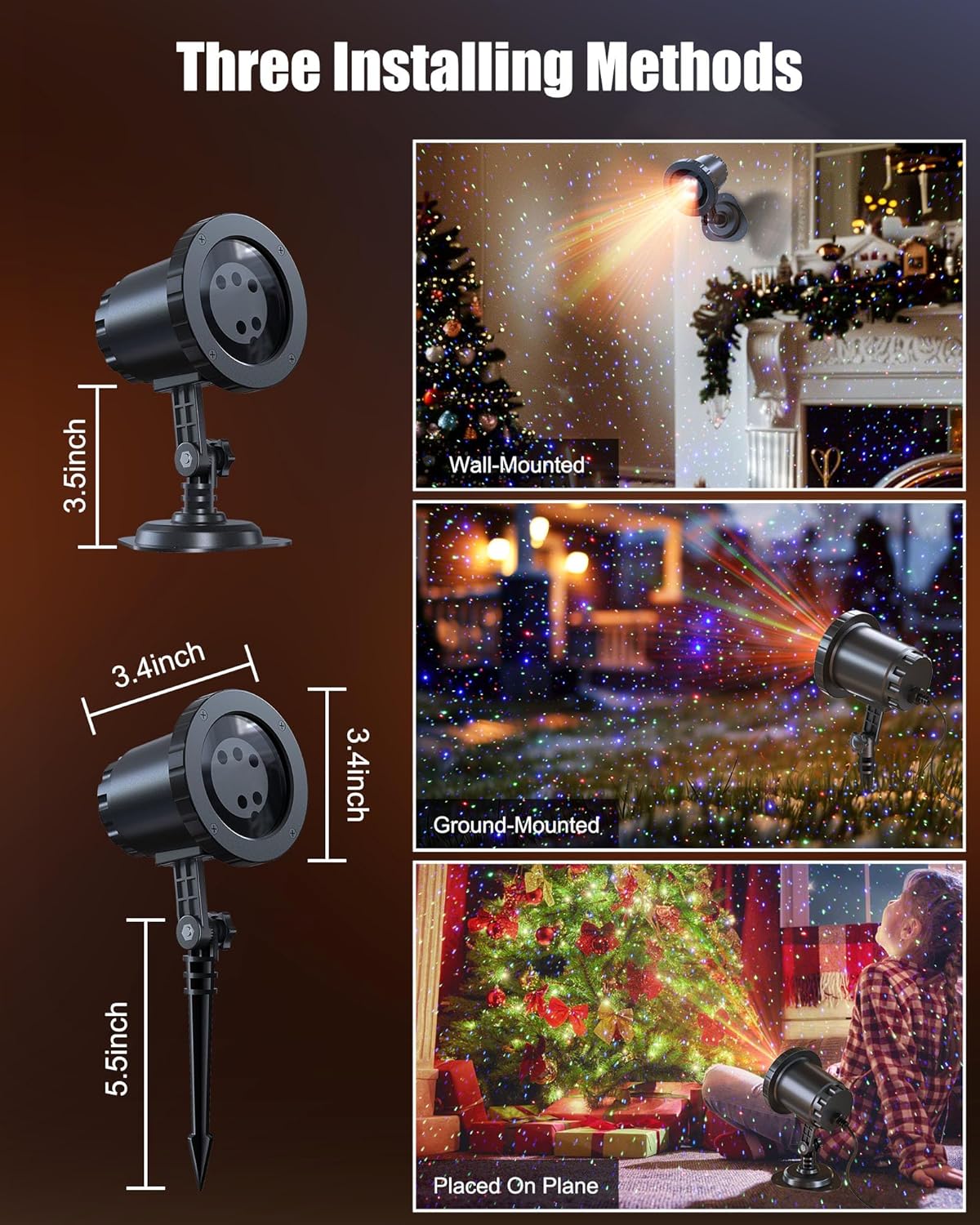
Image: The Minetom laser light projector can be installed in three ways: wall-mounted, ground-mounted, or placed on a flat surface using the included accessories.
- Ground-Mounted: Attach the ground stake to the projector. Insert the stake firmly into soft ground in your desired outdoor location.
- ຕິດຝາ: Attach the round base to the projector. Secure the base to a wall using appropriate screws (not included) for a stable installation.
- Placed on Plane: Attach the round base to the projector. Place the projector on any stable, flat surface indoors or outdoors.
4.2 ການເຊື່ອມຕໍ່ພະລັງງານ
- Connect the projector to the provided power adapter.
- Use the 16.4ft extension cord to reach a suitable outdoor power outlet.
- ຮັບປະກັນວ່າການເຊື່ອມຕໍ່ທັງໝົດແມ່ນປອດໄພ ແລະ ປ້ອງກັນຈາກຄວາມຊຸ່ມ.
- ສຽບອະແດບເຕີໄຟເຂົ້າໄປໃນປລັກສຽບໄຟຟ້າທີ່ມີສາຍດິນ.
5. ຄໍາແນະນໍາການດໍາເນີນງານ
Once powered on, the projector will begin its default light show. Use the RF remote control to customize the display.
5.1 ຫນ້າທີ່ຄວບຄຸມໄລຍະໄກ
The RF remote control allows you to manage various settings from a distance. Ensure 2*AAA batteries (not included) are installed in the remote.

Image: RF Remote Control layout with functions for each button.
| ປຸ່ມ | ຟັງຊັນ |
|---|---|
| ເປີດ/ປິດ | ເປີດ ຫຼືປິດໂປຣເຈັກເຕີ. |
| 2H / 4H / 6H | Sets the timer for 2, 4, or 6 hours. |
| (H) Restore | Restores to default timing (6 hours on, 18 hours off). |
| ວົງຈອນສີ | Cycles through Green, Blue, Red-Green, Blue-Green, Red-Blue, Red-Green-Blue, and Red-Green-Blue cycle. |
| ຮູບແບບການຫາຍໃຈ | Activates a slow fade-in/fade-out effect. |
| Jumping Mode | Activates a rapid color change effect. |
| S0 (Static) | Sets the light display to static (no motion). |
| S- / S+ | Adjusts rotation speed (S- for slow, S+ for fast). |
| R / G / B | Selects Red, Green, or Blue light individually. |
| R/G/B Breathing | Activates breathing mode for individual Red, Green, or Blue colors. |
| R/G/B Strobe | Activates strobe mode for individual Red, Green, or Blue colors. Press sequentially to adjust speed (Slow, Medium, Fast, Stop). |
| R/G/B Steady | Sets individual Red, Green, or Blue colors to steady (non-flashing). |
5.2 ສີພາຍ
The projector supports various color combinations to create diverse effects.

ຮູບພາບ: Examples of the 7 available color combinations.
- ສີແດງ
- ສີຂຽວ
- ສີຟ້າ
- ສີຂຽວສີແດງ
- ສີແດງສີຟ້າ
- ສີຂຽວສີຟ້າ
- ສີແດງສີຂຽວສີຟ້າ
6. ລະດັບກັນນ້ຳ IP65
The projector body is designed with an IP65 waterproof rating, ensuring reliable performance in various weather conditions such as snow, rain, dust, and intense sunlight. It is cold-proof, operating effectively from -30°F to 104°F.

Image: The projector operating in rainy and snowy conditions, highlighting its IP65 waterproof and cold-proof features.
7. Coverage Area
The projector can cover a significant area, illuminating indoor ceilings, walls, or outdoor walls, gardens, lawns, trees, and rooftops. From a distance of 32.8 feet, it can cover approximately 3229.17 square feet.

Image: Coverage area chart illustrating how the projected area expands with increased distance from the surface.
8. ບໍາລຸງຮັກສາ
- ທໍາຄວາມສະອາດ: Gently wipe the projector lens and body with a soft, dry cloth. Do not use abrasive cleaners or solvents.
- ການເກັບຮັກສາ: ເມື່ອບໍ່ໄດ້ໃຊ້ງານ, ໃຫ້ເກັບຮັກສາໂປເຈັກເຕີໄວ້ໃນບ່ອນທີ່ເຢັນ, ແຫ້ງ, ຫ່າງຈາກແສງແດດໂດຍກົງ ແລະ ອຸນຫະພູມທີ່ຮຸນແຮງ.
- ການກວດສອບສາຍ: Periodically check the power cord and adapter for any signs of damage. Discontinue use if damage is found.
9. ການແກ້ໄຂບັນຫາ
| ບັນຫາ | ການແກ້ໄຂ |
|---|---|
| ໂປເຈັກເຕີບໍ່ເປີດ. |
|
| ການຄວບຄຸມໄລຍະໄກບໍ່ຕອບສະຫນອງ. |
|
| ຜົນອອກມາຂອງແສງມີໜ້ອຍ ຫຼື ບໍ່ສອດຄ່ອງ. |
|
| Multiple projectors interfere with each other. |
|
10. ຂໍ້ມູນຈໍາເພາະ
| ຄຸນສົມບັດ | ລາຍລະອຽດ |
|---|---|
| ໝາຍເລກຕົວແບບ | BL-HW02 |
| ຍີ່ຫໍ້ | ມິນທອມ |
| ສີ | ສີແດງສີຂຽວສີຟ້າ |
| ວັດສະດຸ | ພາດສະຕິກ |
| ປະເພດສໍາເລັດຮູບ | ໂປເຈັກເຕີ |
| ປະເພດແຫຼ່ງແສງ | ໄດໂອດປ່ອຍແສງ |
| ແຫຼ່ງພະລັງງານ | ໄຟຟ້າສາຍ |
| ປະເພດການຕິດຕັ້ງ | Floor Mount, Wall Mount |
| ຂະໜາດສິນຄ້າ | 2.75"L x 2.75"W x 11.02"H |
| ນ້ໍາຫນັກລາຍການ | 14 ອອນ |
| Beam Angle | 120 ອົງສາ |
| ການປະເມີນກັນນ້ໍາ | IP65 |
| ອຸນຫະພູມປະຕິບັດການ | -30°F ຫາ 104°F |
| Coverage Area (approx.) | 3229.17 sq ft at 32.8 ft distance |
11. ການຮັບປະກັນແລະການສະຫນັບສະຫນູນ
For warranty information or technical support, please refer to the contact details provided at the point of purchase or visit the official Minetom webເວັບໄຊ. ຮັກສາໃບຮັບເງິນການຊື້ຂອງທ່ານໄວ້ເປັນຫຼັກຖານການຊື້.