
ແນະນຳ
Welcome to the KIDYWOLF Kidyprint Instant Print Camera user manual. This guide provides essential information for the safe and effective use of your new instant camera. The Kidyprint is designed to allow children to capture and instantly print their memories, fostering creativity and exploration.
ສິນຄ້າເກີນview
The KIDYWOLF Kidyprint is an instant print camera for children, featuring thermal printing technology that produces black and white images without the need for ink cartridges. It includes a range of creative tools to enhance the photography experience.
- Thermal Printing System: Prints black and white images instantly without ink or cartridges.
- ຄຸນສົມບັດສ້າງສັນ: Equipped with 21 filters, an 8Mpx selfie camera, and a 2.4-inch LCD screen for viewing ແລະນໍາທາງ.
- ການອອກແບບທົນທານແລະ Portable: Lightweight, robust, and rechargeable via USB-C. Includes a safety neck strap for secure carrying.
- ອຸປະກອນເສີມລວມ: Comes with thermal paper rolls (including sticker and colored options), magnetic frames, and stickers for photo customization.

The camera's intuitive interface allows for easy navigation and photo capture, making it suitable for young users.
ຕັ້ງຄ່າ
1. Unboxing ແລະການກວດກາເບື້ອງຕົ້ນ
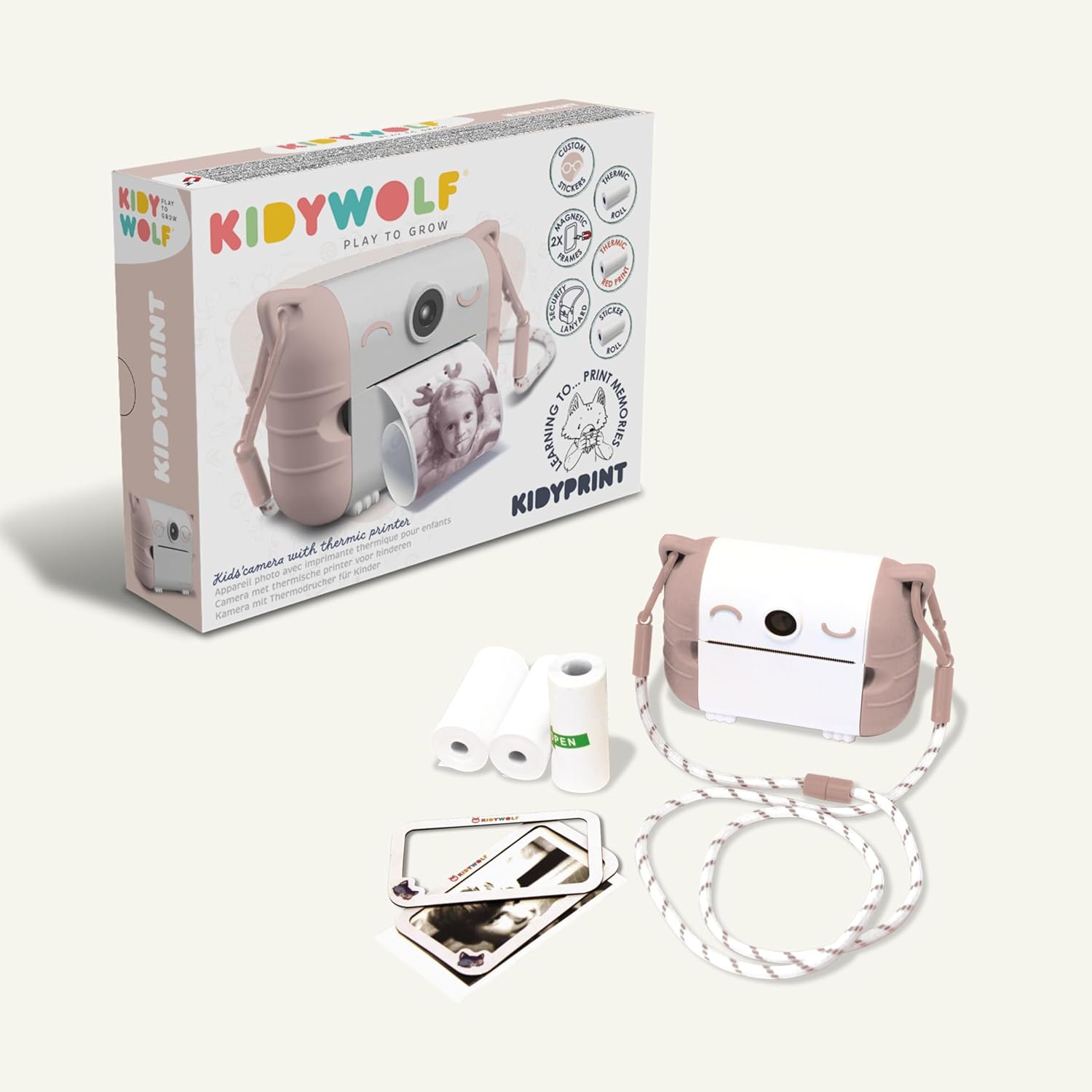
ເອົາສ່ວນປະກອບທັງຫມົດອອກຈາກການຫຸ້ມຫໍ່ຢ່າງລະມັດລະວັງ. ກວດສອບວ່າລາຍການທັງຫມົດທີ່ລະບຸໄວ້ຂ້າງລຸ່ມນີ້ແມ່ນມີແລະບໍ່ເສຍຫາຍ:
- KIDYWOLF Kidyprint Camera
- ສາຍສາກ USB-C
- Thermal Paper Rolls (standard, sticker, colored)
- Magnetic Photo Frames
- ສາຍຄໍ
2. ກຳລັງສາກກ້ອງ
Before first use, fully charge the camera. Connect the provided USB-C cable to the camera's charging port and plug the other end into a compatible USB power adapter (not included) or computer. The charging indicator light will show the charging status.
3. Inserting Thermal Paper
- Locate the paper compartment on the camera.
- ເປີດຝາປິດ.
- Insert a roll of thermal paper, ensuring the paper feeds correctly.
- Close the compartment cover, leaving a small portion of paper extended.
4. ການຕິດສາຍຄໍ
Attach the safety neck strap to the designated attachment points on the camera. Ensure it is securely fastened to prevent accidental drops.
ຄໍາແນະນໍາການດໍາເນີນງານ
1. ເປີດ / ປິດພະລັງງານ
Press and hold the power button (usually marked with a power symbol) to turn the camera on or off. The 2.4-inch LCD screen will illuminate upon startup.
2. ຖ່າຍຮູບ
Point the camera at your subject. Use the 8Mpx selfie camera for self-portraits. Press the shutter button to capture an image. The camera will display a preview ໃນຫນ້າຈໍ.

3. Navigating Menus and Applying Filters
Use the navigation buttons (up, down, left, right, OK) to browse through the camera's menu options. Select from 21 available filters to add creative effects to your photos before printing.
4. ການພິມຮູບພາບ
After capturing or selecting an image, press the print button. The camera will instantly print the image in black and white using its thermal printing system. Allow the print to fully emerge before tearing it off.

5. Viewing Photos and Connectivity
Access the gallery mode to view previously captured images. The camera supports HDMI and USB connectivity for transferring photos to compatible devices like TVs, computers, smartphones, or tablets.

ບໍາລຸງຮັກສາ
1. ການເຮັດຄວາມສະອາດກ້ອງຖ່າຍຮູບ
Use a soft, dry cloth to clean the exterior of the camera. Do not use liquid cleaners or solvents. For the lens and screen, use a specialized lens cleaning cloth.
2. ປ່ຽນເຈ້ຍຄວາມຮ້ອນ
When the paper roll is depleted, replace it with a new KIDYWOLF thermal paper roll. Follow the instructions in the 'Inserting Thermal Paper' section.

3. ການດູແລຫມໍ້ໄຟ
The camera uses an Alkaline battery. To prolong battery life, avoid fully discharging the camera frequently. Recharge the camera using the USB-C cable when the battery level is low. Store the camera in a cool, dry place when not in use for extended periods.
4. Water Resistance
The KIDYWOLF Kidyprint camera is ບໍ່ກັນນ້ໍາ. ຫຼີກເວັ້ນການສໍາຜັດກັບນ້ໍາຫຼືຄວາມຊຸ່ມຊື່ນຫຼາຍເກີນໄປເພື່ອປ້ອງກັນຄວາມເສຍຫາຍ.
ການແກ້ໄຂບັນຫາ
- ກ້ອງຖ່າຍຮູບບໍ່ເປີດ: Ensure the battery is charged. Connect the camera to a power source using the USB-C cable and try again.
- ຄຸນນະພາບການພິມບໍ່ດີ: Check if the thermal paper is correctly inserted and not damaged. Ensure the camera lens is clean.
- ເຈ້ຍຕິດ: Open the paper compartment and carefully remove any jammed paper. Reinsert a new roll if necessary.
- ໜ້າຈໍບໍ່ຕອບສະໜອງ: Try restarting the camera by holding the power button. If the issue persists, contact customer support.
ຂໍ້ມູນຈໍາເພາະ
| ຍີ່ຫໍ້ | KIDYWOLF |
| ຕົວແບບ | KIDYPRINTPAR |
| ສີ | ດອກກຸຫຼາບ |
| ໜ້າຈໍ | ຈໍ LCD 2.4 ນິ້ວ |
| ເຕັກໂນໂລຊີການເຊື່ອມຕໍ່ | HDMI, USB |
| ຄວາມລະອຽດວິດີໂອ | 720p |
| ອົງປະກອບຫມໍ້ໄຟ | ດ່າງ |
| ຂະໜາດສິນຄ້າ (L x W x H) | 23.8 x 5.5 x 17.5 cm |
| ນ້ຳໜັກສິນຄ້າ | 610 ກຣາມ |
| ສະຖຽນລະພາບຮູບພາບ | ບໍ່ມີ |
| Burst Mode Speed | 30 FPS |
| ຊ່ວງ ISO | 100-3200 |
| ສະຫນັບສະຫນູນ File ຮູບແບບ | JPEG |
| ລະດັບຄວາມຕ້ານທານນ້ໍາ | ບໍ່ກັນນ້ຳ |
| ອຸປະກອນທີ່ເຂົ້າກັນໄດ້ | TV, computer, smartphone, tablet |
ການຮັບປະກັນແລະການສະຫນັບສະຫນູນ
ຂໍ້ມູນການຮັບປະກັນ
The KIDYWOLF Kidyprint camera comes with a ການຮັບປະກັນຂອງຜູ້ຜະລິດ 2 ປີ. ການຮັບປະກັນນີ້ກວມເອົາຂໍ້ບົກພ່ອງຂອງວັດສະດຸແລະການເຮັດວຽກພາຍໃຕ້ການນໍາໃຊ້ປົກກະຕິ. ກະລຸນາຮັກສາຫຼັກຖານການຊື້ຂອງທ່ານສໍາລັບການຮຽກຮ້ອງການຮັບປະກັນ.
ການຊ່ວຍເຫຼືອລູກຄ້າ
For any questions, technical assistance, or warranty claims, please contact KIDYWOLF customer service. Our team is available to provide reactive support and ensure your satisfaction.