
ແນະນຳ
Welcome to the user manual for your new Redmi Xiaomi 13 4G LTE smartphone. This guide provides essential information on setting up, operating, maintaining, and troubleshooting your device to ensure optimal performance and user experience. Please read this manual thoroughly before using your phone.
ແມ່ນຫຍັງຢູ່ໃນກ່ອງ
Upon unboxing your Redmi Xiaomi 13, verify that all the following items are included:
- Redmi Xiaomi 13 Smartphone
- ເຄື່ອງສາກໄຟ 33W
- ອະແດັບເຕີ
- ເຄື່ອງສາກໄຟລົດໄວ
- ຕົວຖອດຖາດຊິມ
ຕັ້ງຄ່າ
1. ການຕິດຕັ້ງແຜ່ນ SIM ແລະບັດ MicroSD
Your Redmi 13 supports Dual Nano SIM cards or one Nano SIM and one MicroSD card in a hybrid slot. Ensure your SIM card is activated by your carrier before installation.
- ຊອກຫາຖາດຊິມຢູ່ດ້ານຂ້າງຂອງໂທລະສັບຂອງທ່ານ.
- ສຽບເຄື່ອງມືຖອດຖາດ SIM ເຂົ້າໄປໃນຮູນ້ອຍໆທີ່ຢູ່ຂ້າງຖາດ ແລະກົດໃຫ້ແໜ້ນຈົນກວ່າຖາດຈະອອກມາ.
- Carefully place your Nano SIM card(s) and/or MicroSD card into the designated slots on the tray. Ensure the gold contacts face downwards.
- Gently push the tray back into the phone until it is flush with the device.
ຮູບພາບ: ຂ້າງ view of the Redmi Xiaomi 13, illustrating the location of the SIM tray and camera module.
2. ເປີດ ແລະ ຕັ້ງຄ່າເບື້ອງຕົ້ນ
ເພື່ອເປີດອຸປະກອນຂອງທ່ານເປັນຄັ້ງທຳອິດ:
- Press and hold the Power button (located on the right side of the phone) until the Redmi logo appears on the screen.
- ປະຕິບັດຕາມຄໍາແນະນໍາໃນໜ້າຈໍເພື່ອເລືອກພາສາ, ພາກພື້ນ, ເຊື່ອມຕໍ່ກັບເຄືອຂ່າຍ Wi-Fi ແລະຕັ້ງຄ່າບັນຊີ Google ຂອງທ່ານ.
- You will be prompted to set up security features such as a PIN, pattern, password, fingerprint, or face unlock.

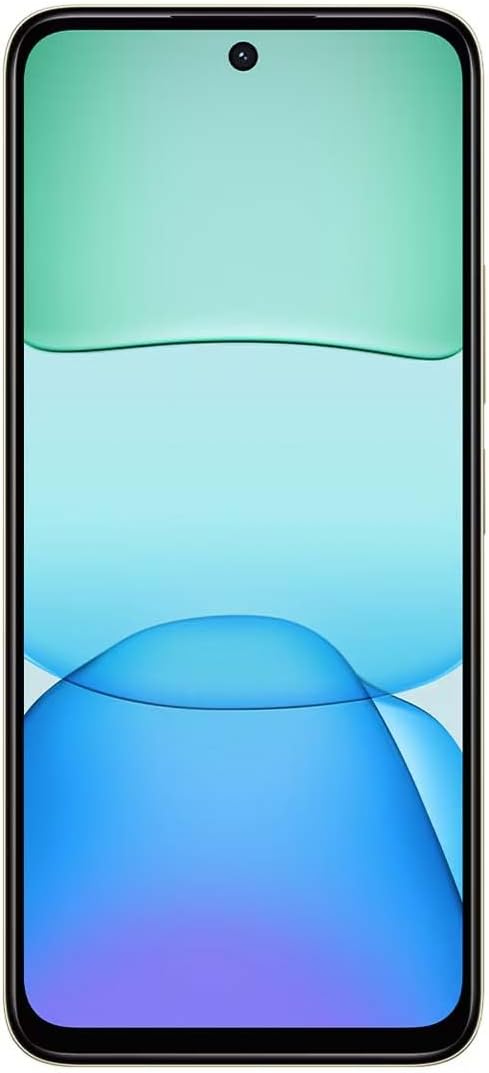
ຮູບພາບ: ທາງຫນ້າ view of the Redmi Xiaomi 13, showing the display and front camera.
3. ການຕັ້ງຄ່າເຄືອຂ່າຍ
Your device is designed for 4G LTE connectivity. For USA users, it is compatible with Tello and Mint Mobile. For global users, it supports various GSM carriers. Ensure your APN settings are correctly configured if you experience network issues. These settings are usually automatically detected upon SIM insertion.
ການປະຕິບັດອຸປະກອນຂອງທ່ານ
1. ຄຸນສົມບັດການສະແດງ
The Redmi 13 features a 6.79-inch Dot Drop HD+ display with a resolution of 1650 x 720. It supports Sunlight display for better visibility in bright conditions and Reading mode to reduce eye strain. You can adjust color temperature in the display settings.
2. ການນໍາໃຊ້ກ້ອງຖ່າຍຮູບ
Your phone is equipped with a powerful camera system:
- ກ້ອງຫຼັງ: 108MP main camera (f/1.8 with 4-in-1 pixel binning) and a 2MP depth camera (f/2.4).
- ກ້ອງໜ້າ: 13MP ສໍາລັບ selfies ແລະການໂທວິດີໂອ.
ເພື່ອຖ່າຍຮູບ:
- ເປີດແອັບພລິເຄຊັນກ້ອງຖ່າຍຮູບ.
- ເລືອກຮູບແບບທີ່ທ່ານຕ້ອງການ (ຮູບພາບ, ຮູບຄົນ, ວິດີໂອ, ແລະອື່ນໆ).
- ແຕະປຸ່ມຊັດເຕີເພື່ອຖ່າຍຮູບ.
The camera features HDR mode for improved dynamic range and quick snap functionality for capturing moving moments efficiently.

ຮູບພາບ: ກັບຄືນໄປບ່ອນ view of the Redmi Xiaomi 13, highlighting the 108MP dual camera system.
3. ການເຊື່ອມຕໍ່
The device supports Wi-Fi for internet access, GPS for navigation (including AGPS, GLONASS, Beidou, Galileo), and Bluetooth for connecting wireless accessories. It also includes a 3.5mm headphone jack for wired audio.
4. ຄຸນນະສົມບັດຄວາມປອດໄພ
ປົກປ້ອງອຸປະກອນ ແລະ ຂໍ້ມູນຂອງທ່ານໂດຍໃຊ້ຕົວເລືອກຄວາມປອດໄພຕໍ່ໄປນີ້:
- ເຊັນເຊີລາຍນິ້ວມືດ້ານຫຼັງ: ລົງທະບຽນລາຍນິ້ວມືຂອງທ່ານເພື່ອປົດລັອກໄວ ແລະປອດໄພ.
- AI Face Unlock: ໃຊ້ໃບໜ້າຂອງທ່ານເພື່ອປົດລັອກອຸປະກອນ.
- PIN/Pattern/Password: Standard lock screen security methods.
ບໍາລຸງຮັກສາ
1. ການດູແລຫມໍ້ໄຟ
The Redmi 13 is equipped with a 5030mAh (typ) battery. To prolong battery life:
- ຫຼີກເວັ້ນອຸນຫະພູມທີ່ຮຸນແຮງ.
- Use the provided 33W charger for optimal charging speed and safety.
- ຢ່າປ່ອຍໃຫ້ແບັດເຕີຣີໝົດເລື້ອຍໆ.
2. ການປັບປຸງຊອບແວ
ກວດສອບ ແລະຕິດຕັ້ງການອັບເດດຊອບແວເປັນປະຈຳເພື່ອຮັບປະກັນວ່າອຸປະກອນຂອງທ່ານມີຄຸນສົມບັດຫຼ້າສຸດ, ແຜ່ນປ້ອງກັນຄວາມປອດໄພ ແລະການປັບປຸງປະສິດທິພາບ. ທ່ອງໄປຫາ ການຕັ້ງຄ່າ > ກ່ຽວກັບໂທລະສັບ > ການອັບເດດລະບົບ ເພື່ອກວດສອບການອັບເດດ.
3. ການເຮັດຄວາມສະອາດອຸປະກອນຂອງທ່ານ
Use a soft, lint-free cloth to clean your phone. Avoid using harsh chemicals or abrasive materials that could damage the screen or finish.
ການແກ້ໄຂບັນຫາ
If you encounter issues with your Redmi 13, try the following common troubleshooting steps:
- ອຸປະກອນບໍ່ຕອບສະໜອງ: ກົດປຸ່ມເປີດປິດຄ້າງໄວ້ປະມານ 10-15 ວິນາທີເພື່ອບັງຄັບໃຫ້ຣີສະຕາດ.
- ບັນຫາເຄືອຂ່າຍ: Check if your SIM card is properly inserted. Toggle Airplane Mode on and off. Reset network settings via ການຕັ້ງຄ່າ > ການເຊື່ອມຕໍ່ ແລະການແບ່ງປັນ > ຣີເຊັດ Wi-Fi, ເຄືອຂ່າຍມືຖື ແລະ Bluetooth.
- ແອັບຂັດຂ້ອງ: ລຶບລ້າງແຄດ ແລະ ຂໍ້ມູນຂອງແອັບຜ່ານ ການຕັ້ງຄ່າ > ແອັບ > ຈັດການແອັບ > [ຊື່ແອັບ] > ລຶບຂໍ້ມູນຖ້າບັນຫາຍັງຄົງຢູ່, ໃຫ້ຖອນການຕິດຕັ້ງ ແລະ ຕິດຕັ້ງແອັບຄືນໃໝ່.
- ແບັດເຕີຣີໝົດໄວ: Review ການນໍາໃຊ້ຫມໍ້ໄຟໃນ ການຕັ້ງຄ່າ > ແບັດເຕີຣີ ເພື່ອລະບຸແອັບທີ່ໃຊ້ພະລັງງານຫຼາຍ. ຫຼຸດຄວາມສະຫວ່າງຂອງໜ້າຈໍ ແລະ ປິດໃຊ້ງານຄຸນສົມບັດທີ່ບໍ່ຈຳເປັນເຊັ່ນ GPS ຫຼື Bluetooth ເມື່ອບໍ່ໄດ້ໃຊ້ງານ.
- ບ່ອນຈັດເກັບຂໍ້ມູນເຕັມ: ລຶບທີ່ບໍ່ຈໍາເປັນ files, photos, and videos. Uninstall unused apps. Consider moving media to a MicroSD card if installed.
- ປັບຄ່າໂຮງງານ: ສຳລັບບັນຫາຊອບແວທີ່ຍັງຄົງຄ້າງຢູ່, ທ່ານສາມາດຕັ້ງຄ່າໂຮງງານຄືນໃໝ່ໄດ້. ຄຳເຕືອນ: ນີ້ຈະລຶບຂໍ້ມູນທັງໝົດໃນໂທລະສັບຂອງທ່ານ. ສໍາຮອງຂໍ້ມູນທີ່ສໍາຄັນກ່ອນທີ່ຈະດໍາເນີນການ. ໄປທີ່ ການຕັ້ງຄ່າ > ກ່ຽວກັບໂທລະສັບ > ຣີເຊັດເປັນຄ່າໂຮງງານ.
ຂໍ້ມູນຈໍາເພາະ
Below are the key technical specifications for the Redmi Xiaomi 13 4G LTE:
| ຊື່ຕົວແບບ | Redmi 13 |
| ລະບົບປະຕິບັດການ | Android 14 HyperOS |
| ໂຮງງານຜະລິດ | MediaTek Helio G91 Ultra Octa-core (2x2.0 GHz Cortex-A75 & 6x1.8 GHz Cortex-A55) |
| GPU | Mali-G52 MC2 |
| ຈໍສະແດງຜົນ | 6.79 Inches Dot Drop HD+ (1650 x 720) |
| RAM | 6 GB |
| ການເກັບຮັກສາພາຍໃນ | 128 GB |
| ກ້ອງຫຼັງ | 108MP (ຫຼັກ) + 2MP (ຄວາມເລິກ) |
| ກ້ອງໜ້າ | 13MP |
| ຄວາມອາດສາມາດຫມໍ້ໄຟ | 5030 mAh (ປົກກະຕິ) |
| ກຳລັງສາກໄຟ | ສາກໄວ 33W (USB Type-C) |
| ການເຊື່ອມຕໍ່ | 4G LTE, Wi-Fi, Bluetooth, GPS (AGPS, GLONASS, Beidou, Galileo) |
| ສຽງ Jack | 3.5 ມມ |
| ຄວາມປອດໄພ | ເຊັນເຊີລາຍນິ້ວມືດ້ານຫຼັງ, AI Face Unlock |
| ຂະໜາດແພັກເກັດ | 7 x 4 x 2 ນິ້ວ |
| ນ້ຳໜັກ | 6 ອອນ |
Note: Specifications are subject to change without prior notice. Please refer to the official Redmi webເວັບໄຊທ໌ສໍາລັບຂໍ້ມູນຂ່າວສານທີ່ທັນສະໄຫມທີ່ສຸດ.
ການຮັບປະກັນແລະການສະຫນັບສະຫນູນ
For warranty information, please refer to the warranty card included with your product or visit the official Redmi/Xiaomi website. For technical support, software updates, or service inquiries, please contact Xiaomi customer service or visit their official support channels. Keep your proof of purchase for warranty claims.
Official Redmi/Xiaomi Support: https://www.mi.com/global/support


