
1. ຜະລິດຕະພັນເກີນview
The VIVOTEK FD9383-HTV is a high-performance 5-megapixel outdoor network dome camera designed for robust surveillance applications. It features a 2.8-12mm motorized varifocal lens, providing flexibility in field of view, and integrated IR LEDs for clear night vision up to 98 feet. This camera is built to withstand harsh outdoor conditions with IP66 and IK10 ratings, ensuring protection against dust, water, and vandalism. It also includes a built-in microphone for audio monitoring.
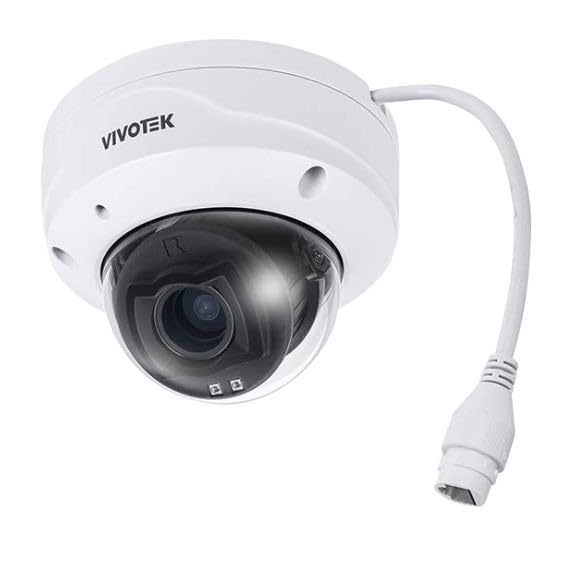
ຮູບພາບ 1.1: ດ້ານຫນ້າ view of the VIVOTEK FD9383-HTV 5MP Outdoor Network Dome Camera.
ຄຸນນະສົມບັດທີ່ສໍາຄັນ:
- 2560 x 1920 Resolution at 30 fps for high-quality video.
- IR LEDs for Night Vision up to 98 feet (30 meters).
- 2.8-12mm Motorized Varifocal Lens for flexible viewມຸມ.
- 95.4 to 28.7° Horizontal Angle of View.
- Built-In Microphone for audio capture.
- IP66-Rated for outdoor use, protecting against dust and water.
- IK10-Rated for vandal resistance.
- Supports microSD Cards up to 1TB for local storage.
- RJ45 Ethernet with Power over Ethernet (PoE) Technology.
- Complies with ONVIF Profiles G, S, T for broad compatibility.
2. ເນື້ອໃນຊຸດ
ກວດສອບໃຫ້ແນ່ໃຈວ່າລາຍການທັງໝົດມີຢູ່ ແລະ ຢູ່ໃນສະພາບດີ. ຖ້າມີລາຍການໃດຂາດຫາຍໄປ ຫຼື ເສຍຫາຍ, ໃຫ້ຕິດຕໍ່ຜູ້ຂາຍຂອງທ່ານທັນທີ.
- VIVOTEK FD9383-HTV Network Dome Camera
- ຊຸດສະກູຕິດຕັ້ງ (ສະກູ, ຕົວຍຶດຝາ)
- ຊຸດຕົວເຊື່ອມຕໍ່ກັນນໍ້າ
- Alignment Sticker/Drill Template
- ຄູ່ມືການຕິດຕັ້ງດ່ວນ
- ຊີດີຊອບແວ (ຫຼື ຂໍ້ມູນລິ້ງດາວໂຫຼດ)
3. ຂໍ້ມູນຄວາມປອດໄພ
Please read these safety instructions carefully before operating the device to prevent injury to yourself or others and to avoid damage to the device. Keep this manual for future reference.
- ການຕິດຕັ້ງ: Installation should be performed by qualified personnel only and must comply with all local codes.
- ແຫຼ່ງພະລັງງານ: Use only the specified power source (PoE or 12V DC adapter, if applicable) to avoid fire or electric shock.
- ສະພາບແວດລ້ອມ: ຢ່າໃຫ້ກ້ອງຖ່າຍຮູບຖືກອຸນຫະພູມສູງ, ຄວາມຊຸ່ມຊື່ນ ຫຼື ສະພາບແວດລ້ອມທີ່ມີການກັດກ່ອນນອກເໜືອຈາກເງື່ອນໄຂການເຮັດວຽກທີ່ລະບຸໄວ້.
- ທໍາຄວາມສະອາດ: ຕັດການເຊື່ອມຕໍ່ໄຟຟ້າກ່ອນທີ່ຈະທໍາຄວາມສະອາດ. ໃຊ້ຜ້າອ່ອນ, ແຫ້ງ. ຫ້າມໃຊ້ນໍ້າສະອາດ ຫຼື ແອໂຣໂຊລ.
- ການບໍລິການ: ຢ່າພະຍາຍາມບໍລິການຜະລິດຕະພັນນີ້ດ້ວຍຕົນເອງ. ອ້າງເຖິງການບໍລິການທັງtoົດໃຫ້ກັບພະນັກງານບໍລິການທີ່ມີຄຸນວຸດທິ.
4. ຕັ້ງຄ່າ
4.1 ການຕິດຕັ້ງທາງດ້ານຮ່າງກາຍ
The FD9383-HTV camera is designed for wall or ceiling mounting. Ensure the mounting surface is strong enough to support the camera's weight.
- ການກະກຽມດ້ານການຕິດຕັ້ງ: Use the provided drill template to mark the screw holes on the desired mounting location.
- ຮູເຈາະ: Drill pilot holes for the mounting screws and, if necessary, for the network cable. Insert wall anchors if mounting on drywall or masonry.
- ຕິດຕົວຍຶດຕິດ: Secure the camera's mounting bracket to the surface using the provided screws.
- ເຊື່ອມຕໍ່ສາຍ: Route the Ethernet cable through the mounting surface or cable entry point. Connect the RJ45 connector to the camera's network port. If not using PoE, connect a 12V DC power adapter (sold separately) to the power input. Ensure waterproof connections for outdoor installations.
- Secure Camera Body: Attach the camera body to the mounting bracket. Adjust the camera's orientation and angle as needed.
- ສຳເລັດການຕິດຕັ້ງ: Secure all covers and ensure the camera is firmly mounted and protected from the elements.

Image 4.1: Illustrative diagram of camera mounting and cable connection.
4.2 ການເຊື່ອມຕໍ່ເຄືອຂ່າຍ
ກ້ອງຖ່າຍຮູບຮອງຮັບ Power over Ethernet (PoE) ສໍາລັບການຕິດຕັ້ງທີ່ງ່າຍດາຍ, ໃຫ້ທັງພະລັງງານແລະຂໍ້ມູນຖືກສົ່ງຜ່ານສາຍ Ethernet ດຽວ.
- Connect the camera to a PoE-enabled switch or a PoE injector using a standard Ethernet cable.
- Alternatively, connect to a standard network switch and use a separate 12V DC power adapter.
- Ensure your network is configured to assign an IP address to the camera (DHCP recommended for initial setup).
4.3 ການຕັ້ງຄ່າເບື້ອງຕົ້ນ
After physical installation and network connection, you need to access the camera's web ອິນເຕີເຟດສຳລັບການຕັ້ງຄ່າເບື້ອງຕົ້ນ.
- ຄົ້ນພົບກ້ອງຖ່າຍຮູບ: Use VIVOTEK's IP Search utility (available on their website) or a network scanner to find the camera's IP address on your network.
- ການເຂົ້າເຖິງ Web ການໂຕ້ຕອບ: ເປີດ ກ web ໂປຣແກຣມທ່ອງເວັບ (ຕົວຢ່າງ, Chrome, Firefox) ແລະ ໃສ່ທີ່ຢູ່ IP ຂອງກ້ອງຖ່າຍຮູບໃນແຖບທີ່ຢູ່.
- ເຂົ້າສູ່ລະບົບ: The default username is typically 'root' and the password is 'pass'. You will be prompted to change the password upon first login for security reasons.
- ການຕັ້ງຄ່າພື້ນຖານ: Configure essential settings such as date/time, network settings (if not using DHCP), and user accounts.
5. ການເຮັດວຽກ
5.1 ການເຂົ້າເຖິງການໂຕ້ຕອບຂອງກ້ອງຖ່າຍຮູບ
ເມື່ອຕັ້ງຄ່າແລ້ວ, ທ່ານສາມາດເຂົ້າເຖິງການຖ່າຍທອດສົດຂອງກ້ອງຖ່າຍຮູບໄດ້ view and settings through its web interface or compatible VIVOTEK software/NVR systems.
- Enter the camera's IP address in your web ຕົວທ່ອງເວັບ.
- Log in with your configured username and password.
- The interface provides access to live video, recording settings, motion detection, and other advanced features.
5.2 Adjusting Lens and Focus
The FD9383-HTV features a motorized varifocal lens, allowing remote adjustment of zoom and focus.
- Navigate to the 'Video' or 'Lens' settings section in the web ການໂຕ້ຕອບ.
- Use the zoom controls to adjust the focal length (2.8mm to 12mm) to achieve the desired field of view.
- Utilize the focus controls to sharpen the image. Many VIVOTEK cameras offer a one-touch focus feature for automatic adjustment.
5.3 Night Vision Settings
The camera automatically switches to night vision mode in low-light conditions using its IR LEDs.
- In the 'Image' or 'IR' settings, you can configure the IR illuminator's behavior (e.g., auto, manual on/off).
- Adjust IR intensity if available, to prevent overexposure or underexposure in specific scenarios.
5.4 ການບັນທຶກແລະການເກັບຮັກສາ
The camera supports various recording methods, including local storage on a microSD card and network video recording (NVR).
- ກາດ MicroSD: Insert a compatible microSD card (up to 1TB) into the camera's slot. Format the card via the web interface. Configure recording schedules and triggers (e.g., continuous, motion-triggered).
- NVR/NAS: Connect the camera to a VIVOTEK NVR or a compatible Network Attached Storage (NAS) device. Configure recording settings on the NVR/NAS.
5.5 ການກວດຈັບການເຄື່ອນໄຫວ
Configure motion detection to trigger recordings, send alerts, or activate other actions.
- Access the 'Event' or 'Motion Detection' settings in the web ການໂຕ້ຕອບ.
- Define detection zones within the camera's field of view.
- ປັບລະດັບຄວາມອ່ອນໄຫວເພື່ອຫຼຸດຜ່ອນສັນຍານເຕືອນທີ່ບໍ່ຖືກຕ້ອງ.
- Set up actions to be taken when motion is detected (e.g., record video, send email notification).
6. ບໍາລຸງຮັກສາ
6.1 ການທໍາຄວາມສະອາດ
ການທໍາຄວາມສະອາດເປັນປົກກະຕິຊ່ວຍຮັກສາຄຸນນະພາບຮູບພາບທີ່ດີທີ່ສຸດແລະຍືດອາຍຸຂອງກ້ອງຖ່າຍຮູບ.
- ເລນ: Gently wipe the lens with a soft, lint-free cloth. For stubborn dirt, use a lens cleaning solution specifically designed for optical surfaces. Avoid abrasive materials.
- ທີ່ຢູ່ອາໄສ: ເຊັດເຮືອນກ້ອງຖ່າຍຮູບດ້ວຍການໂຄສະນາamp ຜ້າ. ຢ່າໃຊ້ຢາຊັກຟອກຫຼືສານລະລາຍທີ່ເຂັ້ມແຂງ.
- Dome Cover: If applicable, carefully clean the dome cover to ensure clear visibility.
6.2 ການອັບເດດເຟີມແວ
Periodically check the VIVOTEK website for firmware updates. Firmware updates often include bug fixes, performance improvements, and new features.
- Download the latest firmware for your FD9383-HTV model from the official VIVOTEK support page.
- ເຂົ້າເຖິງກ້ອງຖ່າຍຮູບ web interface and navigate to the 'System' or 'Maintenance' section.
- ປະຕິບັດຕາມຄໍາແນະນໍາໃນຫນ້າຈໍເພື່ອອັບໂຫລດແລະຕິດຕັ້ງເຟີມແວ. ຢ່າປິດກ້ອງໃນລະຫວ່າງການອັບເດດ.
7. ການແກ້ໄຂບັນຫາ
This section provides solutions to common issues you might encounter with your VIVOTEK FD9383-HTV camera.
| ບັນຫາ | ສາເຫດທີ່ເປັນໄປໄດ້ | ການແກ້ໄຂ |
|---|---|---|
| ກ້ອງຖ່າຍຮູບບໍ່ເປີດ | No power from PoE switch/injector; faulty power adapter; loose cable connection. | Check PoE status on switch; verify power adapter functionality; ensure all cables are securely connected. |
| ບໍ່ສາມາດເຂົ້າເຖິງກ້ອງຖ່າຍຮູບຜ່ານເຄືອຂ່າຍ | Incorrect IP address; network cable issue; firewall blocking access; camera not receiving an IP address. | Verify IP address; check network cable integrity; temporarily disable firewall; use IP Search utility to find camera. |
| ຄຸນນະພາບຮູບພາບບໍ່ດີ (ມົວ, ມືດ) | Lens out of focus; dirty lens/dome; insufficient lighting; incorrect image settings. | ປັບໂຟກັສຜ່ານ web interface; clean lens/dome; check IR settings; reset image settings to default. |
| ການກວດຈັບການເຄື່ອນໄຫວບໍ່ເຮັດວຽກ | Detection zones not configured; sensitivity too low; event actions not set up. | Configure detection zones; increase sensitivity; ensure event actions (e.g., record, notify) are enabled. |
| ບໍ່ໄດ້ບັນທຶກບັດ MicroSD | Card not formatted; card full; recording schedule not active; faulty card. | Format microSD card in camera settings; check recording schedule; replace card if faulty. |
8. ຂໍ້ມູນຈໍາເພາະ
Detailed technical specifications for the VIVOTEK FD9383-HTV camera.
| ຄຸນສົມບັດ | ຂໍ້ມູນຈໍາເພາະ |
|---|---|
| ເຊັນເຊີຮູບພາບ | 1/2.8" Type CMOS |
| ຄວາມລະອຽດ | 2560 x 1920 ທີ່ 30 fps |
| ຄວາມຍາວໂຟກັສ | 2.8 to 12mm Motorized Varifocal Lens |
| ມຸມນອນຂອງ View | 95.4 ຫາ 28.7° |
| ວິໄສທັດກາງຄືນ | IR LEDs up to 98 feet (30 meters) |
| ສຽງ | ໄມໂຄຣໂຟນໃນຕົວ |
| ການເກັບຮັກສາ | Supports microSD Cards up to 1TB |
| ການເຊື່ອມໂຍງເຄືອຂ່າຍ | 1x RJ45 Input (PoE) |
| ການຈັດອັນດັບສິ່ງແວດລ້ອມ | IP66 (ກັນຝຸ່ນ ແລະ ກັນນໍ້າ) |
| ການຕໍ່ຕ້ານ Vandal | IK10-Rated |
| ONVIF Compliance | ໂປຣfiles G, S, T |
| ຂະໜາດສິນຄ້າ | 5.3 x 4.1 x 4.1 ນິ້ວ (13.5 x 10.4 x 10.4 cm) |
| ນ້ໍາຫນັກລາຍການ | 1.9 ປອນ (0.86 ກິໂລ) |
9. ການຮັບປະກັນແລະການສະຫນັບສະຫນູນ
VIVOTEK products are covered by a limited warranty. For specific warranty terms and conditions, please refer to the warranty card included with your product or visit the official VIVOTEK webເວັບໄຊ.
For technical support, product documentation, and software downloads, please visit the VIVOTEK official support portal:
https://www.vivotek.com/support
When contacting support, please have your camera's model number (FD9383-HTV) and serial number ready.