
1. ບົດແນະນຳ
Thank you for choosing the ALONEFIRE X66 LED Mini Flashlight. This compact and powerful flashlight is designed for everyday carry (EDC) and various utility purposes, featuring multiple light modes, USB-C recharging, and a magnetic base. Please read this manual carefully to ensure proper use and maintenance of your device.
2. ຂໍ້ມູນຄວາມປອດໄພ
- ຄວາມປອດໄພຫມໍ້ໄຟ: Use only the specified rechargeable battery. Do not attempt to disassemble, puncture, or expose the battery to extreme temperatures or fire.
- ການປົກປ້ອງຕາ: Do not shine the flashlight directly into eyes, as the high lumen output can cause temporary vision impairment.
- ຄວາມຕ້ານທານນ້ໍາ: The flashlight is water-resistant, not waterproof. Avoid submerging it in water. Ensure the USB-C port cover is securely closed to prevent water ingress.
- ຄວາມຮ້ອນ: The flashlight may become warm during prolonged use, especially on higher brightness settings. This is normal.
- ເດັກນ້ອຍ: ຮັກສາໃຫ້ໄກຈາກເດັກນ້ອຍ.
3. ເນື້ອໃນຊຸດ
ກວດສອບວ່າລາຍການທັງຫມົດແມ່ນມີຢູ່ໃນຊຸດຂອງທ່ານ:
- ALONEFIRE X66 LED Mini Flashlight
- ແບັດເຕີຣີທີ່ສາມາດສາກໄດ້ (ຕິດຕັ້ງໄວ້ລ່ວງໜ້າ ຫຼືແຍກກັນ)
- ສາຍສາກ USB-A ຫາ USB-C
4. ຜະລິດຕະພັນເກີນview
The ALONEFIRE X66 is a compact and versatile flashlight designed for portability and functionality.
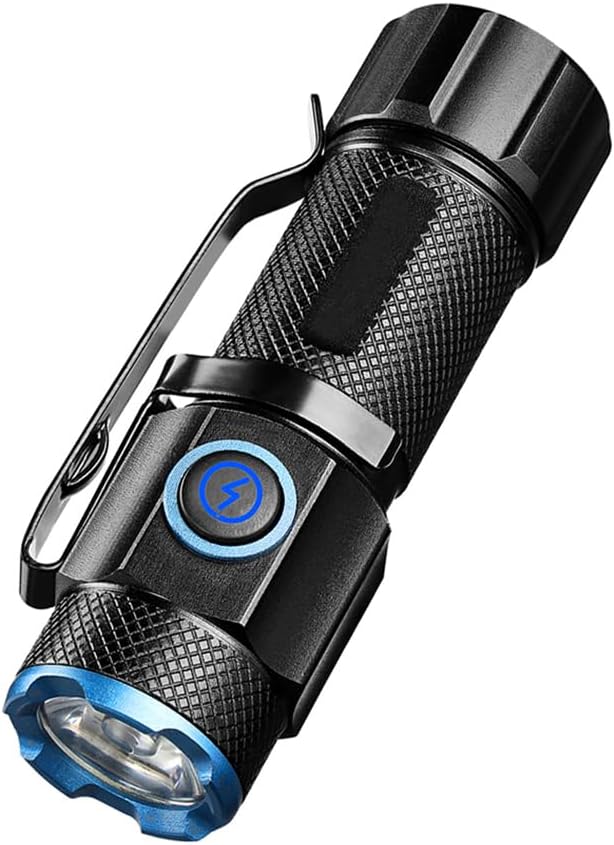
ຮູບທີ 4.1: The ALONEFIRE X66 LED Mini Flashlight, showcasing its compact design, textured body for grip, integrated pocket clip, and blue accent ring around the lens and power button.

ຮູບທີ 4.2: ລາຍລະອຽດ view of the P50 LED emitter, highlighting the powerful light source responsible for the flashlight's bright output.

ຮູບທີ 4.3: The flashlight emitting a bright beam, demonstrating its capability to cycle through 5 distinct light modes: High, Medium, Low, Strobe, and Super Bright.

ຮູບທີ 4.4: The flashlight connected to a laptop via its USB-C charging port, illustrating convenient and fast recharging from various power sources.

ຮູບທີ 4.5: The flashlight securely attached to a metallic surface by its strong magnetic tail cap, demonstrating its hands-free utility.
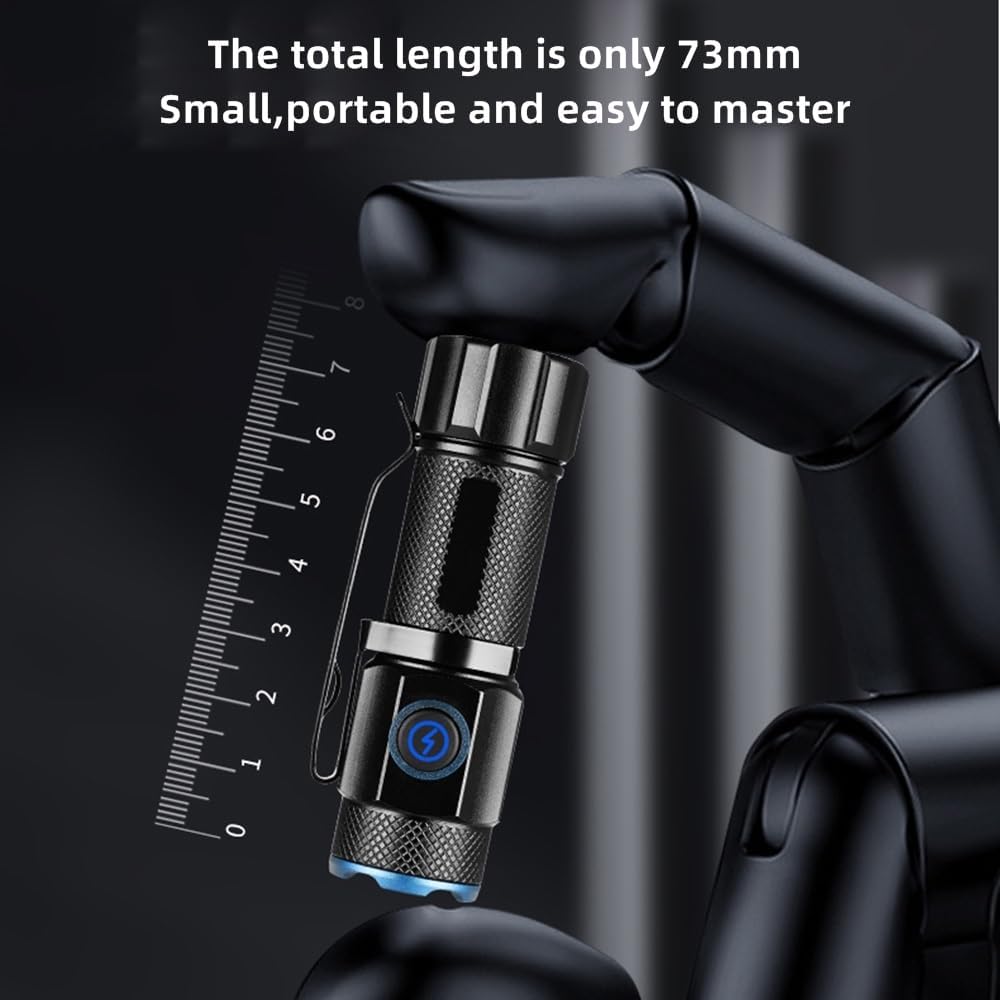
ຮູບທີ 4.6: The compact size of the flashlight, measuring only 73mm in length, making it highly portable and easy to carry.

ຮູບທີ 4.7: The flashlight resting on a wet, rocky surface, illustrating its water-resistant design suitable for various outdoor conditions.

ຮູບທີ 4.8: The ALONEFIRE X66 Flashlight displayed alongside its included USB-A to USB-C charging cable.
5. Setup (Charging)
Before first use, or when the battery is low, charge the flashlight using the provided USB-C cable.
- Locate the USB-C charging port on the flashlight body. It is typically covered by a rubber flap.
- Gently open the rubber flap to expose the USB-C port.
- Connect the small end of the USB-C cable to the flashlight's port.
- Connect the larger USB-A end of the cable to a compatible USB power source (e.g., computer, wall adapter, power bank).
- The charging indicator light around the power button will illuminate ສີແດງ ໃນຂະນະທີ່ກຳລັງສາກໄຟ ແລະ ໝຸນ ສີຂຽວ ເມື່ອສາກເຕັມແລ້ວ.
- Once charging is complete, disconnect the cable and securely close the rubber flap to maintain water resistance.
6. ຄໍາແນະນໍາການດໍາເນີນງານ
6.1 ເປີດ/ປິດ
- ເພື່ອເປີດ: Press the power button once. The flashlight will turn on in the last used mode (excluding Strobe and Super Bright).
- ປິດ: Press the power button once while the flashlight is on.
6.2 ການປ່ຽນຮູບແບບແສງ
The ALONEFIRE X66 features 5 distinct lighting modes:
- High-Medium-Low: With the flashlight on, single-press the power button repeatedly to cycle through High, Medium, and Low brightness modes.
- ໂໝດ Strobe: Press and hold the power button for approximately 2-3 seconds from any mode (on or off) to activate Strobe mode. Release the button to return to the previous mode or turn off.
- Super Bright Mode: Double-click the power button quickly from any mode (on or off) to activate Super Bright mode. Double-click again to return to the previous mode or turn off.
6.3 Magnetic Base Function
The flashlight is equipped with a strong magnet in its tail cap. This allows it to be securely attached to any ferrous metal surface, providing hands-free illumination for tasks such as vehicle maintenance, working in workshops, or during power outages.
6.4 Pocket Clip Usage
The integrated pocket clip allows for convenient carrying and versatile attachment. You can clip it to your pocket, belt, backpack strap, or even the brim of a hat for use as a makeshift headlamp.
7. ບໍາລຸງຮັກສາ
- ທໍາຄວາມສະອາດ: ເຊັດຮ່າງກາຍໄຟສາຍດ້ວຍຄວາມອ່ອນ, ງamp ຜ້າ. ຢ່າໃຊ້ເຄື່ອງເຮັດຄວາມສະອາດຂັດຫຼືສານລະລາຍ.
- ການເກັບຮັກສາ: Store the flashlight in a cool, dry place away from direct sunlight and extreme temperatures. If storing for extended periods, charge the battery every 3-6 months to prolong its lifespan.
- ການປ່ຽນແບັດເຕີຣີ: If the rechargeable battery needs replacement, ensure you use a compatible battery type. Refer to the specifications section for details.
- O-rings: Periodically inspect the O-rings for wear and tear. Lubricate them with silicone grease if necessary to maintain water resistance.
8. ການແກ້ໄຂບັນຫາ
If you encounter issues with your ALONEFIRE X66 flashlight, refer to the table below:
| ບັນຫາ | ສາເຫດທີ່ເປັນໄປໄດ້ | ການແກ້ໄຂ |
|---|---|---|
| ໄຟສາຍບໍ່ເປີດ. | ແບັດເຕີຣີຕໍ່າ. ບໍ່ໄດ້ໃສ່ແບັດເຕີຣີຢ່າງຖືກຕ້ອງ. ສາຍເຊື່ອມຕໍ່ວ່າງ. | ສາກແບັດເຕີຣີ. ໃຫ້ແນ່ໃຈວ່າແບັດເຕີຣີຖືກໃສ່ດ້ວຍຂົ້ວທີ່ຖືກຕ້ອງ. Tighten all parts of the flashlight body. |
| ໄຟສາຍບໍ່ໄດ້ສາກໄຟ. | ສາຍສາກໄຟມີຂໍ້ບົກຜ່ອງ. Power source faulty. USB-C port obstructed. | ລອງໃຊ້ສາຍ USB-C ອື່ນ. ລອງໃຊ້ແຫຼ່ງພະລັງງານ USB ອື່ນ. Check USB-C port for debris. |
| ແສງອອກໜ້ອຍລົງ. | ແບັດເຕີຣີຕໍ່າ. ເລນແມ່ນເປື້ອນ. | ສາກແບັດເຕີຣີ. ເຮັດຄວາມສະອາດເລນດ້ວຍຜ້າອ່ອນໆ. |
| Magnetic base is weak. | Surface is not ferrous metal. Magnet is dirty. | Ensure attachment to a suitable metal surface. Clean the magnet surface. |
9. ຂໍ້ມູນຈໍາເພາະ
| ຄຸນສົມບັດ | ລາຍລະອຽດ |
|---|---|
| ຍີ່ຫໍ້ | ALONEFIRE |
| ໝາຍເລກຕົວແບບ | X66 |
| ປະເພດແຫຼ່ງແສງ | LED |
| ແຫຼ່ງພະລັງງານ | ພະລັງງານຫມໍ້ໄຟ |
| ປະເພດຫມໍ້ໄຟ | Lithium Ion |
| ພອດສາກໄຟ | USB-C |
| ວັດສະດຸ | ອາລູມີນຽມ |
| ນ້ໍາຫນັກລາຍການ | 35 ກຣາມ |
| ລະດັບຄວາມຕ້ານທານນ້ໍາ | ກັນນ້ຳ |
| ຄຸນນະສົມບັດພິເສດ | Rechargeable, Magnetic Base, Pocket Clip, 5 Light Modes |
10. ການຮັບປະກັນແລະການສະຫນັບສະຫນູນ
For warranty information or technical support, please refer to the product packaging or contact the ALONEFIRE customer service directly through the retailer's platform where the product was purchased. Keep your purchase receipt as proof of purchase.