
Ebitcam 8311
ຄູ່ມືການໃຊ້ກ້ອງຖ່າຍຮູບຄວາມປອດໄພ Ebitcam
Model: 8311 | Brand: Ebitcam
1. ບົດແນະນຳ
Thank you for choosing the Ebitcam Security Camera. This manual provides detailed instructions on how to set up, operate, and maintain your camera. This 3-megapixel camera offers robust security features, including IP66 weather resistance for both indoor and outdoor environments, two-way audio, and advanced AI-powered detection capabilities. Enjoy peace of mind with 24-hour monitoring and remote access from your smartphone.

The Ebitcam security camera provides high-resolution monitoring for various environments.
2. ເນື້ອໃນຊຸດ
ກະລຸນາກວດເບິ່ງຊຸດສຳລັບລາຍການຕໍ່ໄປນີ້:
- Ebitcam Security Camera (Model 8311)
- Power Adapter
- screws mounting ແລະ plugs ຝາ
- ຄູ່ມືຜູ້ໃຊ້
3. ຜະລິດຕະພັນເກີນview
Familiarize yourself with the components of your Ebitcam security camera:

The camera features a lens, status LED, microphone, and a durable IP66-rated casing.
- ເລນ: ບັນທຶກວິດີໂອ footage.
- ສະຖານະພາບ LED: Indicates camera status (e.g., power, connection).
- ໄມໂຄຣໂຟນ: ສໍາລັບການປ້ອນຂໍ້ມູນສຽງແລະການສື່ສານສອງທາງ.
- ລໍາໂພງ: ສໍາລັບຜົນຜະລິດສຽງແລະການສື່ສານສອງທາງ.
- ຊ່ອງໃສ່ບັດ SD: Supports up to 512GB microSD card for local storage. Located under the lens.
- ປຸ່ມຣີເຊັດ: Used to reset the camera to factory settings. Located under the lens.
- ພອດພະລັງງານ: ເຊື່ອມຕໍ່ກັບອະແດບເຕີພະລັງງານ.
- ຖານຕິດຕັ້ງ: Integrated base for various installation options.
4. ຕັ້ງຄ່າ
4.1 ການເປີດພະລັງງານເບື້ອງຕົ້ນ
- Connect the power adapter to the camera's power port and plug it into a power outlet.
- Wait for the camera's status LED to indicate it is ready for setup (refer to app instructions for specific LED behavior).
4.2 ການດາວໂຫຼດແອັບ ແລະ ການລົງທະບຽນບັນຊີ
- Download the "Ebitcam" app from your smartphone's app store (available for iPhone and Android).
- ເປີດແອັບ ແລະ ປະຕິບັດຕາມຄຳແນະນຳໃນໜ້າຈໍເພື່ອລົງທະບຽນບັນຊີໃໝ່ ຫຼື ເຂົ້າສູ່ລະບົບຖ້າທ່ານມີບັນຊີແລ້ວ.
- Add your camera by scanning the QR code located on the camera body using the app.
4.3 ການເຊື່ອມຕໍ່ Wi-Fi
- The camera supports 2.4GHz Wi-Fi networks only. Ensure your smartphone is connected to a 2.4GHz Wi-Fi network during setup.
- ປະຕິບັດຕາມການກະຕຸ້ນເຕືອນຂອງແອັບເພື່ອເຊື່ອມຕໍ່ກ້ອງຖ່າຍຮູບກັບເຄືອຂ່າຍ Wi-Fi ຂອງທ່ານ.
- For optimal performance, choose an installation location with a strong Wi-Fi signal.
4.4 ການຕິດຕັ້ງທາງດ້ານຮ່າງກາຍ
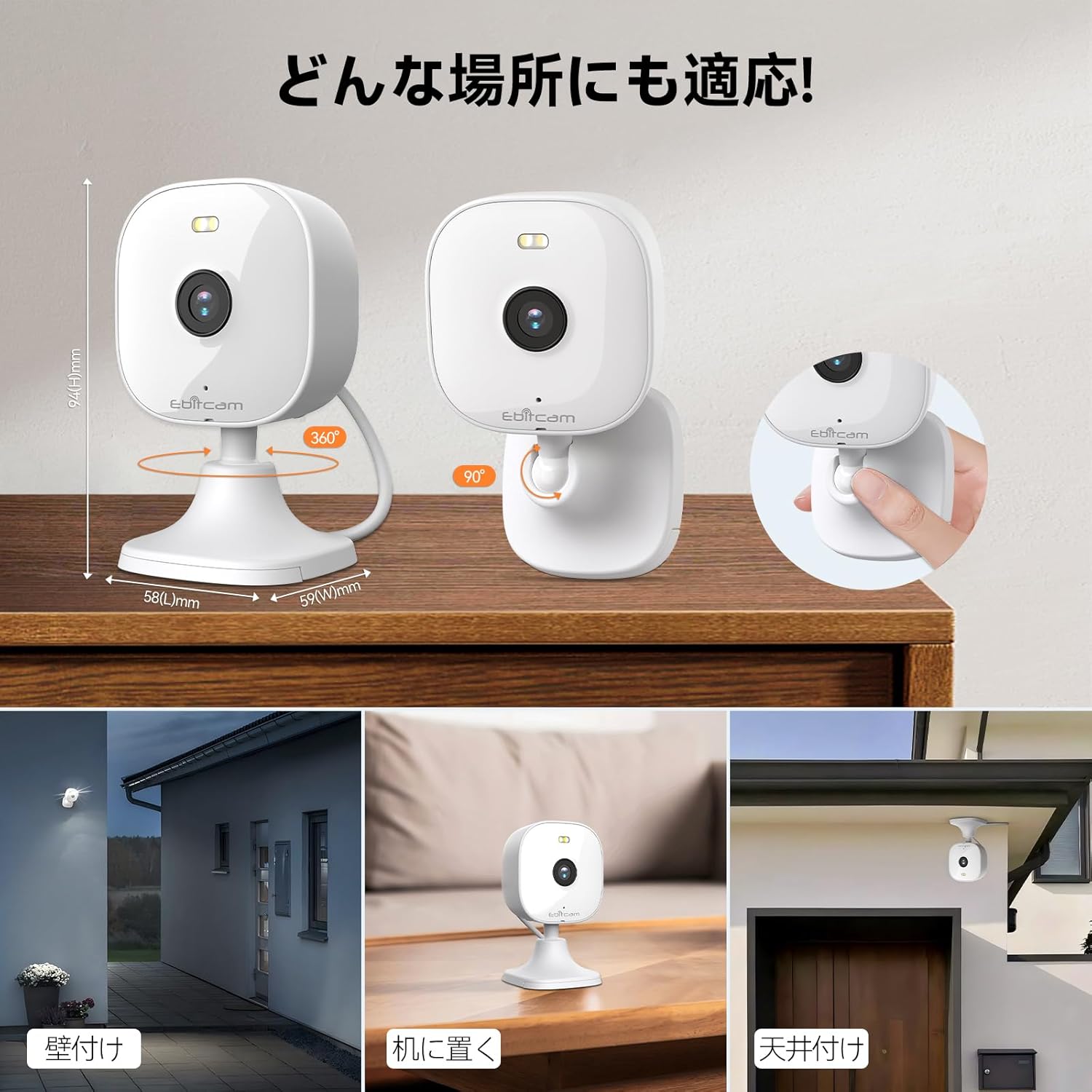
The camera offers versatile mounting options:

The camera can be mounted on walls, ceilings, or placed on a tabletop.
- ການຈັດວາງເທິງໂຕະ: Simply place the camera on a flat surface. The integrated base allows for stable positioning.
- ຕິດຝາ/ເພດານ: The camera's base can be detached by gently pulling the camera from its base. Use the included mounting screws and wall plugs to secure the base to your desired wall or ceiling location. Then, reattach the camera to the mounted base.
Note: The product package includes matching screw mounting tools for installation.
5. ຄໍາແນະນໍາການດໍາເນີນງານ
5.1 ດໍາລົງຊີວິດ View ແລະການບັນທຶກ
Access the live video feed and manage recordings through the Ebitcam app.

The camera supports 2K (1296p) resolution for clear video capture.
- ຟີດສົດ: ເປີດ app ແລະເລືອກກ້ອງຖ່າຍຮູບຂອງທ່ານທີ່ຈະ view the real-time video stream.
- ບັນທຶກຢ່າງຕໍ່ເນື່ອງ: If an SD card is inserted or cloud storage is active, the camera can record continuously 24/7.
- Event-Triggered Recording: Configure settings to automatically start recording when motion, sound, or human presence is detected.
5.2 ສຽງສອງທາງ
Communicate with people or pets on the camera's side using the built-in microphone and speaker.
Engage in real-time conversations through the camera's two-way audio feature.
- Tap the microphone icon in the app to speak. Your voice will be transmitted through the camera's speaker.
- The camera's high-sensitivity microphone captures audio from the environment.
5.3 Motion, Sound, and Human Detection & Alerts
The camera utilizes advanced AI to detect specific events and notify you.

AI detection accurately distinguishes between humans and other moving objects.
- ການກວດຫາ AI: The camera can differentiate between human movement, general motion, and sound events.
- Mobile Alerts: ຮັບການແຈ້ງເຕືອນທັນທີໃນໂທລະສັບສະຫຼາດຂອງທ່ານເມື່ອກວດພົບເຫດການ.
- Automatic Lighting/Alarm: Configure settings to trigger automatic white light illumination or an audible alarm to deter unwanted visitors upon detection.
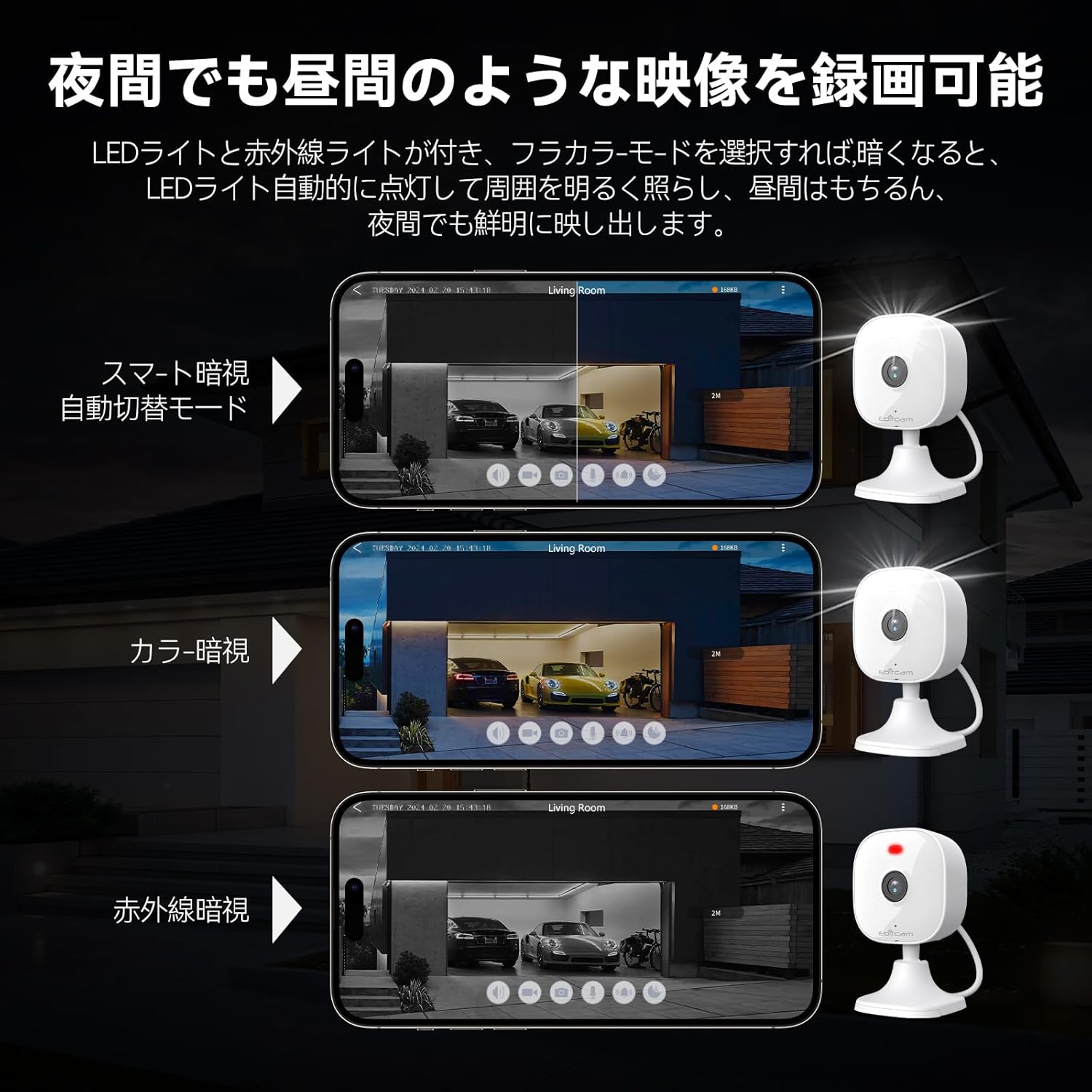
5.4 ໂໝດວິໄສທັດກາງຄືນ
The camera provides clear visibility even in low-light or dark conditions.

Choose from various night vision modes for optimal clarity.
- ວິໄສທັດກາງຄືນເຕັມສີ: Utilizes built-in white lights to provide color video footage in darkness (requires settings).
- ວິໄສທັດກາງຄືນອິນຟາເຣດ: ໃຫ້ວິດີໂອສີຂາວດຳທີ່ຊັດເຈນໃນຄວາມມືດສະນິດໂດຍໃຊ້ໄຟ LED ອິນຟາເຣດ.
- ສະຫຼັບອັດຕະໂນມັດ: The camera can automatically switch between day and night modes based on ambient light.
5.5 ຊູມດິຈິຕອນ
ຊູມເບິ່ງລາຍລະອຽດພາຍໃນສົດ view ຫຼື ອາຫານທີ່ບັນທຶກໄວ້tage.

The camera supports up to 8x digital zoom.
- Use the pinch-to-zoom gesture on your smartphone screen within the app to digitally zoom in or out.
5.6 ການເຊື່ອມໂຍງ Alexa
Control your Ebitcam camera using voice commands with Amazon Alexa.
Integrate your camera with Alexa for convenient voice control.
- Enable the Ebitcam skill in your Alexa app.
- Use commands like "Alexa, show me the [camera name]" to view the live feed on compatible Alexa devices.
5.7 ການແບ່ງປັນຄອບຄົວ
Share access to your camera with family members or trusted friends.
- Within the Ebitcam app, navigate to the sharing settings for your camera.
- You can share access by generating a QR code for others to scan, allowing them to view ອາ ຫານ ກ້ອງ ຖ່າຍ ຮູບ.
6. ບໍາລຸງຮັກສາ
6.1 ການຈັດການ SD Card
The camera supports up to a 512GB microSD card for local video storage.

Insert a microSD card for local video storage.
- ການແຊກ: Gently insert the microSD card into the slot located under the camera lens until it clicks into place.
- ການຈັດຮູບແບບ: It is recommended to format the SD card through the camera settings in the app before first use.
- ການໂຍກຍ້າຍ: Push the SD card gently to release it, then pull it out.
6.2 ການທໍາຄວາມສະອາດ
- Wipe the camera lens with a soft, clean cloth to ensure clear image quality.
- ເຮັດຄວາມສະອາດຮ່າງກາຍກ້ອງຖ່າຍຮູບດ້ວຍການໂຄສະນາamp ຜ້າ. ຢ່າໃຊ້ສານເຄມີທີ່ຮຸນແຮງຫຼືເຄື່ອງເຮັດຄວາມສະອາດຂັດ.
6.3 ການອັບເດດເຟີມແວ
- Periodically check for firmware updates through the Ebitcam app. Updates can improve performance, add new features, and enhance security.
- Follow the app's instructions carefully when performing a firmware update.
7. ການແກ້ໄຂບັນຫາ
ນີ້ແມ່ນວິທີແກ້ໄຂບັນຫາທົ່ວໄປທີ່ເຈົ້າອາດຈະພົບ:
- Unstable SD Card Performance: If you experience issues with recording or playback, an unstable SD card may be the cause. Please replace your SD card with a reliable, high-quality one and try again.
- App Not Functioning Correctly / Unstable Network: If the app does not function correctly, it might be due to an unstable network environment. Please ensure you have a stable 2.4GHz Wi-Fi connection.
- Camera Offline / Connection Issues: Ensure the camera is powered on and within range of your 2.4GHz Wi-Fi router. Check your Wi-Fi password in the app.
- Forgetting Login Password / Changing Network Environment: If you change your network environment or forget your login password, you can reset the camera. The camera's restart button is located under the lens. Press and hold it for a few seconds until the camera resets.
- False Alarms from Motion Detection: Adjust the motion detection sensitivity settings within the app. Consider setting specific detection zones to reduce unwanted alerts from areas like busy streets or swaying trees.
8. ຂໍ້ມູນຈໍາເພາະ
| ຄຸນສົມບັດ | ຂໍ້ມູນຈໍາເພາະ |
|---|---|
| ຈຳ ນວນຕົວແບບຜະລິດຕະພັນ | 8311 |
| ຈໍານວນລາຍການ | 1 |
| ເຕັກໂນໂລຊີການສື່ສານໄຮ້ສາຍ | Wi-Fi |
| ປະເພດການຕິດຕັ້ງ | Freestanding, Wall Mount, Ceiling Mount, Tabletop Mount, Door Mount |
| ຂອບເຂດວິໄສທັດກາງຄືນ | 10 ແມັດ |
| ອັດຕາເຟຣມ | 25 fps |
| ຂະໜາດສິນຄ້າ (LxWxH) | 10 x 5 x 5 cm |
| ລະດັບກັນນໍ້າ | ກັນນໍ້າ IP66 |
| ນ້ຳໜັກສິນຄ້າ | 190 g |
| ການນໍາໃຊ້ທີ່ແນະນໍາ | Interior, Home, Living Room, Bedroom, Pet, Shop |
| ເຕັກໂນໂລຊີການເຊື່ອມຕໍ່ | WiFi |
| ໃຊ້ພາຍໃນ/ນອກ | ພາຍໃນ, ກາງແຈ້ງ |
| ອຸປະກອນທີ່ເຂົ້າກັນໄດ້ | iPhone, TV, Tablet, Desktop, Smartphone |
| ແຫຼ່ງພະລັງງານ | ໄຟຟ້າສາຍ |
| ອະນຸສັນຍາການເຊື່ອມຕໍ່ | Wi-Fi |
| ຄວາມລະອຽດການຖ່າຍວິດີໂອ | 1296p (2K) |
9. ການຮັບປະກັນແລະການສະຫນັບສະຫນູນ
Ebitcam provides the following warranty and support for your product:
- ການຮັບປະກັນ: A 2-year warranty is provided from the original purchase date.
- ສະຫນັບສະຫນູນອອນໄລນ໌: Online support is available Monday to Friday, from 8 AM to 5 PM (local time). Please refer to the Ebitcam app or official webເວັບໄຊທ for ສໍາລັບລາຍລະອຽດການຕິດຕໍ່.
Ask a question about this manual
Ask about setup, troubleshooting, compatibility, parts, safety, or missing instructions. Manuals+ will review the question and use this page’s manual context to help answer it.