
ແນະນຳ
This manual provides detailed instructions for the installation, operation, and maintenance of your Inefala 2+64G Android 15 Car Stereo. This unit is designed for Toyota Hilux and Fortuner models manufactured between 2005 and 2014, supporting both manual and auto A/C systems. Please read this manual thoroughly before installation and use to ensure proper function and to maximize your experience.
ການຕິດຕັ້ງແລະການຕິດຕັ້ງ
1. ຄວາມເຂົ້າກັນໄດ້ຂອງຍານພາຫະນະ
This head unit is compatible with Toyota Fortuner and Hilux models from 2005 to 2014. It supports vehicles with both manual and automatic air conditioning controls. Ensure the power cable port on the stereo matches your original car's wiring before proceeding with installation.

ຮູບພາບ: Examples of compatible Toyota Hilux and Fortuner dashboards.
2. ກວດສອບການຕິດຕັ້ງກ່ອນ
Before full installation, perform a quick test:
- ລວມສາຍສີແດງ ແລະ ສີເຫຼືອງຂອງເຄື່ອງສຽງລົດເຂົ້າກັນ ແລະ ເຊື່ອມຕໍ່ພວກມັນເຂົ້າກັບຂົ້ວບວກຂອງແບັດເຕີຣີ 12V.
- ເຊື່ອມຕໍ່ສາຍສີດຳເຂົ້າກັບຂົ້ວລົບຂອງແບັດເຕີຣີ.
- If the stereo functions normally and the screen lights up, it indicates the unit is working. If not, recheck the wiring and connections.
3. ສາຍໄຟ ແລະການເຊື່ອມຕໍ່
The stereo comes with an in-dash head unit, wiring harness cables, and a frame panel. Ensure all connections are secure.
- ສາຍໄຟ: ເຊື່ອມຕໍ່ສາຍໄຟຫຼັກເຂົ້າກັບແຫຼ່ງຈ່າຍໄຟຂອງລົດ.
- ສາຍ RCA: For audio/video input and output connections.
- ເສົາອາກາດ GPS: ເຊື່ອມຕໍ່ເພື່ອຟັງຊັນການນຳທາງ. ວາງຕຳແໜ່ງຢູ່ໃນສະຖານທີ່ທີ່ມີທ້ອງຟ້າແຈ່ມໃສ view.
- ໄມໂຄຣໂຟນພາຍນອກ: Connect for hands-free calling and voice commands.
- ສາຍ USB: For connecting external devices or for wired CarPlay/Android Auto.
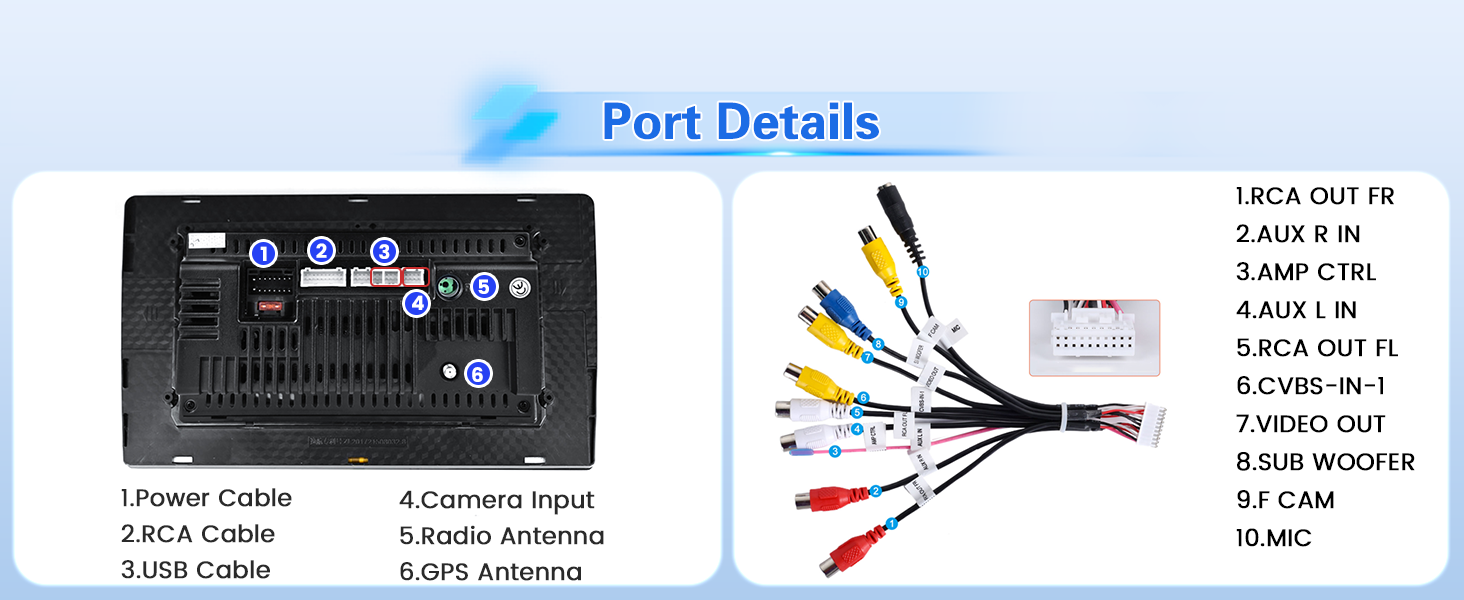
Image: Rear port details and wiring connections.
4. ການເຊື່ອມຕໍ່ກ້ອງຖ່າຍຮູບສຳຮອງ
The unit supports an AHD backup camera. Follow these steps for connection:
- Connect cable 1 and cable 5 to the positive pole of the car's reversing light cable.
- Connect cable 2 to the negative pole of the car's reversing light cable.
- Connect cable 3 and cable 4 to the reverse trigger wire of the power cable (labeled "Reverse/Back"). This connection is necessary even if a reversing camera is not used, as it affects WiFi and Bluetooth signals.

Image: Backup camera wiring diagram.
ຄໍາແນະນໍາການດໍາເນີນງານ
1. ການໂຕ້ຕອບຜູ້ໃຊ້ແລະຫົວຂໍ້
The Android 15 system features a 2.5D 1024x600 touchscreen display. You can switch between 28 different desktop themes and various backgrounds. To change themes, long-press on an empty space on the desktop.

Image: Multiple desktop themes and EQ settings.
2. CarPlay & Android Auto (Wireless/Wired)
Connect your smartphone for voice-assisted controls and access to navigation, music, calls, and messages.
- ການເຊື່ອມຕໍ່ໄຮ້ສາຍ:
- Turn on your phone's Bluetooth, search for the car stereo's Bluetooth, and pair it.
- Click the "CPLink" / "Android Auto" app on the car stereo. (If using Android, you may need to install the "Android Auto" app in advance).
- Wait a few seconds for the CarPlay/Android Auto wireless connection to establish.
- After the first successful connection, simply turn on Bluetooth, and it will start automatically.
- ການເຊື່ອມຕໍ່ສາຍ:
- Connect your iOS/Android cell phone via the original USB cable.
- Click the "CPLink" / "Android Auto" app on the car stereo. (If using Android, you may need to install the "Android Auto" app in advance).
- Wait a few seconds for the CarPlay/Android Auto wired connection to establish.
ໝາຍເຫດ: Some Samsung and Huawei phones may not support Android Auto and Mirror Link functionality. Ensure your phone supports Google Services and has the "Android Auto" app installed for Android Auto functionality.

Image: Apple CarPlay, Android Auto, and Mirror Link features.
3. Mirror Link (iOS/Android)
Mirror Link allows you to display your phone's screen on the car stereo. Connect via WiFi hotspot or your phone's original USB cable.
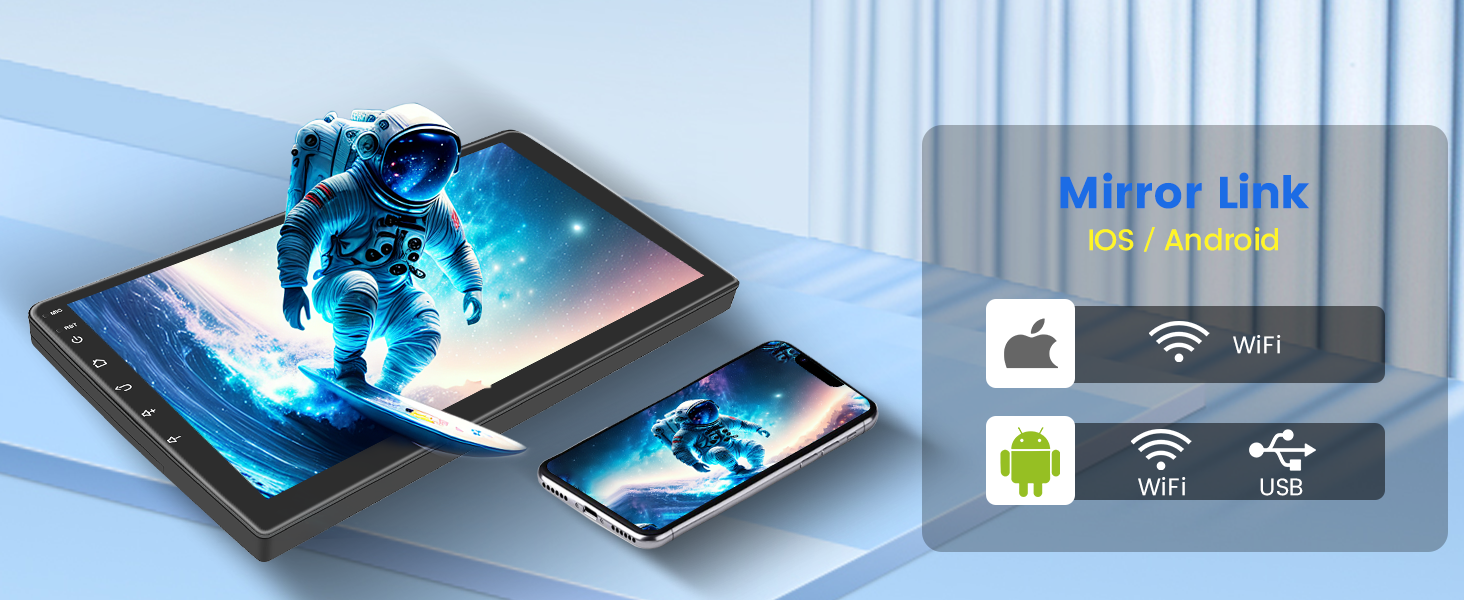
Image: Mirror Link functionality for iOS and Android devices.
4. GPS Navigation & WiFi Hotspot
The unit includes online and offline navigation capabilities. Connect to a WiFi hotspot to download additional apps like YouTube, TikTok, and more.

Image: GPS Navigation and WiFi connectivity for app downloads.
5. Bluetooth & FM/RDS Radio
- Bluetooth: Supports hands-free calling, phone book download, and music playback.
- ວິທະຍຸ FM/RDS: The stable FM/RDS radio allows you to preset up to 18 stations, providing channel broadcast information, weather forecasts, and real-time road conditions.

Image: Bluetooth hands-free calling and FM/RDS radio interface.
6. ການຕັ້ງຄ່າ EQ
Customize your audio experience with the 32-band EQ options. Adjust frequencies to match your preferences and vehicle acoustics.

Image: Detailed EQ settings interface.
7. ການທໍາງານຂອງ Split Screen
The unit supports split-screen mode, allowing you to run two applications simultaneously, such as navigation and music playback.
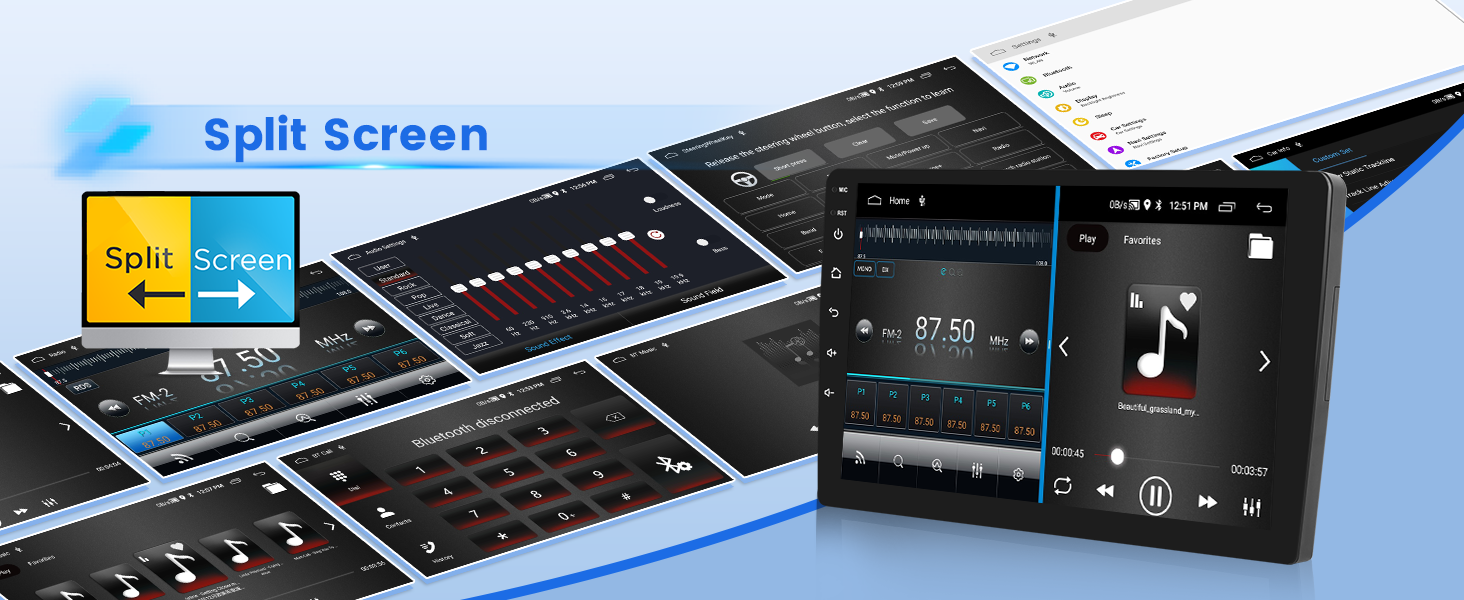
Image: Split screen mode in operation.
8. ການຄວບຄຸມພວງມາໄລ
The stereo supports steering wheel controls for convenience. The method of activation depends on whether your vehicle has a CANBUS box:
- Without CANBUS box: Activation of steering wheel controls requires key learning in the settings menu.
- With CANBUS box:
- Connect the 20-pin white port in the power cable to the CANBUS itself.
- Connect the remaining 8-pin white port to the corresponding port on the back of the radio.
- Match the car model in the CANBUS Matching Path: Settings > Factory Setup (Password 1234) > Can Settings.

Image: Steering wheel control interface for button mapping.
9. USB DVR Support
The unit supports USB DVR (Digital Video Recorder) functionality. An optional USB DVR can be connected to record driving footage.
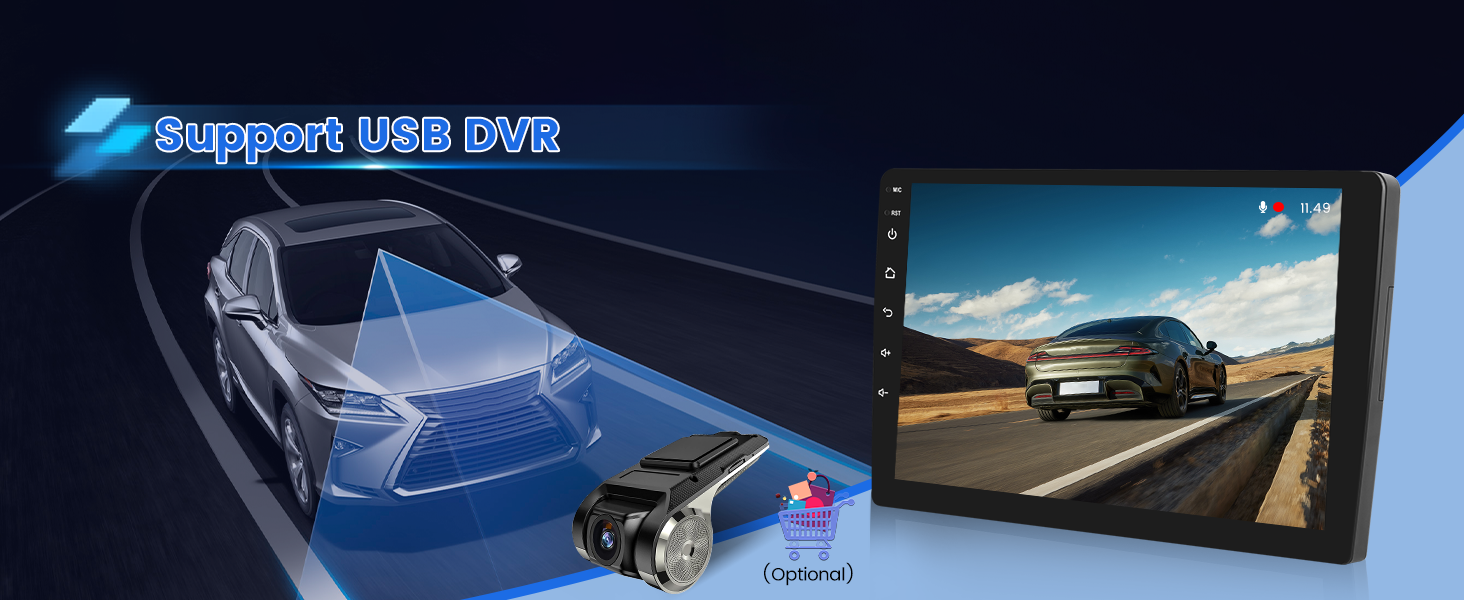
Image: USB DVR support and display.
10. ວິດີໂອສາທິດ
Video: A demonstration of the Android car radio's upgrade function interface, showcasing various features and user interactions.
ບໍາລຸງຮັກສາ
To ensure the longevity and optimal performance of your Inefala car stereo, follow these general maintenance guidelines:
- ທໍາຄວາມສະອາດ: ໃຊ້ຜ້າອ່ອນ, ແຫ້ງເພື່ອເຮັດຄວາມສະອາດຫນ້າຈໍແລະດ້ານນອກ. ຫຼີກລ້ຽງການເຮັດຄວາມສະອາດຂັດຫຼືສານລະລາຍທີ່ອາດເຮັດໃຫ້ຈໍສະແດງຜົນເສຍຫາຍຫຼືສໍາເລັດຮູບ.
- ອັບເດດຊອບແວ: Periodically check for available software updates to ensure you have the latest features and performance improvements.
- ເງື່ອນໄຂສິ່ງແວດລ້ອມ: ຫຼີກລ້ຽງການເປີດເຄື່ອງໃຫ້ຢູ່ໃນອຸນຫະພູມທີ່ຮ້າຍແຮງ, ແສງແດດໂດຍກົງເປັນເວລາດົນນານ, ຫຼືຄວາມຊຸ່ມເກີນໄປ.
ການແກ້ໄຂບັນຫາ
If you encounter issues with your car stereo, refer to the following tips:
- ບໍ່ມີພະລັງງານ / ຫນ່ວຍງານບໍ່ເປີດ:
- Double-check the power cable connections. Ensure the red and yellow wires are correctly connected to a 12V power source and the black wire to ground.
- ກວດສອບວ່າຟິວຂອງລົດສຳລັບສະເຕີລິໂອຍັງຄົງຢູ່.
- ບໍ່ມີສຽງ:
- ກວດເບິ່ງການເຊື່ອມຕໍ່ສາຍຂອງລໍາໂພງ.
- ໃຫ້ແນ່ໃຈວ່າລະດັບສຽງບໍ່ໄດ້ຖືກປິດສຽງ ຫຼື ຕັ້ງເປັນລະດັບສຽງຕໍ່າສຸດ.
- Verify audio output settings in the stereo menu.
- ການຮັບວິທະຍຸທີ່ບໍ່ດີ:
- ກວດສອບການເຊື່ອມຕໍ່ເສົາອາກາດ.
- Ensure the antenna is properly installed and not obstructed.
- Bluetooth/WiFi Issues:
- Ensure the reverse trigger wire is connected, even if no backup camera is used, as it affects wireless signals.
- Restart the stereo and your mobile device.
- Clear Bluetooth/WiFi settings on both devices and attempt to re-pair/reconnect.
- CarPlay/Android Auto ບໍ່ເຮັດວຽກ:
- For wired connections, use the original USB cable.
- Ensure the "CPLink" or "Android Auto" app is selected on the stereo.
- Verify your phone's compatibility and that necessary apps (e.g., Android Auto) are installed.
- Some Samsung and Huawei phones may have limited compatibility.
- ການຄວບຄຸມພວງມາໄລບໍ່ຕອບສະໜອງ:
- Perform key learning in the settings if your vehicle does not have a CANBUS box.
- If equipped with CANBUS, ensure correct wiring and car model matching in Settings > Factory Setup (Password 1234) > Can Settings.
ຂໍ້ມູນຈໍາເພາະ
| ຍີ່ຫໍ້ | Inefala |
| ໝາຍເລກຕົວແບບ | 2+64G |
| ລະບົບປະຕິບັດການ | Android 15 |
| ຄວາມອາດສາມາດເກັບຮັກສາຫນ່ວຍຄວາມຈໍາ | 64 GB |
| RAM | 2 GB |
| ຂະໜາດໜ້າຈໍ | 9 ນິ້ວ |
| ປະເພດການສະແດງ | LCD, Capacitive Touchscreen |
| ຄວາມລະອຽດ | 1024 x 600 |
| ເຕັກໂນໂລຊີການເຊື່ອມຕໍ່ | Bluetooth, USB, Wi-Fi, Wireless |
| Supported Navigation System | GPS (North America, Worldwide maps) |
| ຮູບແບບການອອກສຽງ | ສະເຕຣິໂອ |
| ຄຸນນະສົມບັດພິເສດ | 1080P Video Playback, 32-band EQ Setting, 28 Desktop Themes, Hands-free Bluetooth, FM/RDS Radio, Reverse Input Support, Steering Wheel Learning, Wireless/Wired CarPlay & Android Auto & Mirror Link, Siri/Voice Assistant, WiFi/Hotspot Connection |
| ອຸປະກອນທີ່ເຂົ້າກັນໄດ້ | ໂທລະສັບສະຫຼາດ |
| ວິທີການຄວບຄຸມ | ແຕະ, ສຽງ |
| ປະເພດການຕິດຕັ້ງ | Dashboard Mount |
ແມ່ນຫຍັງຢູ່ໃນກ່ອງ
ຊຸດປະກອບມີອົງປະກອບດັ່ງຕໍ່ໄປນີ້:
- Inefala Android Radio for Toyota Fortuner Hilux
- 1 x ສາຍໄຟ
- 1 x RCA Harness
- 1 x ເສົາອາກາດ GPS
- 1 x AHD Backup Camera
- 1 x ສາຍປ້ອນກ້ອງຫຼັງ
- 1 x ໄມໂຄຣໂຟນພາຍນອກ
- 2 x ສາຍ USB
- 1 x Installation Tool & Accessories

Image: Package contents list.
ຂໍ້ມູນການຮັບປະກັນ
Your Inefala car stereo comes with a ຮັບປະກັນ 1 ປີ from the date of purchase. This warranty covers manufacturing defects and ensures product quality. For any warranty claims or issues, please contact customer support.
ການຊ່ວຍເຫຼືອລູກຄ້າ
For technical assistance, troubleshooting, or any questions regarding your Inefala car stereo, please reach out to our customer support team.
ທ່ານສາມາດຕິດຕໍ່ພວກເຮົາໂດຍ:
- ອີເມວ: inefalaservices@163.com
- Amazon: Visit the product page, click on 'Inefala Direct' (the seller name), and then click 'Ask a question'.
Please provide relevant pictures or videos when contacting support to help us resolve your issue faster.
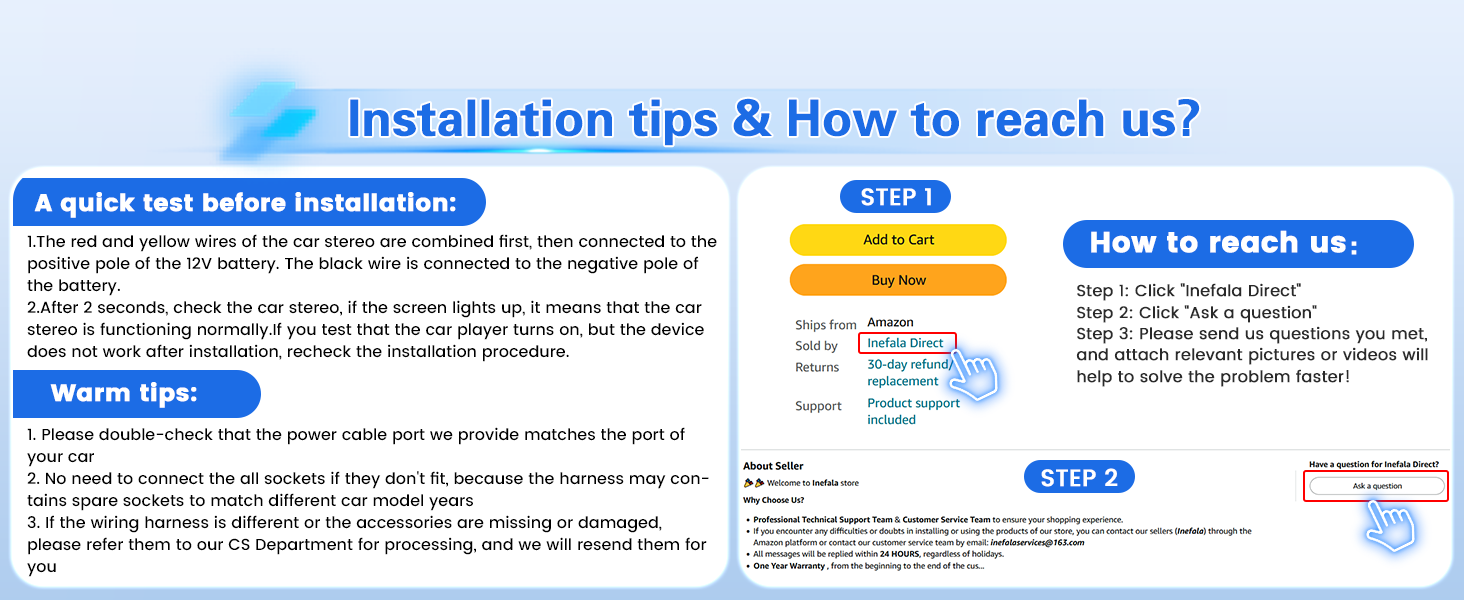
Image: Customer support contact information.