
Streamlight 88817
ຄູ່ມືຜູ້ໃຊ້ໄຟສາຍ Streamlight 88817 ແບບຮູບຊົງ Wedge Flat ພົກພາໄດ້ທຸກໆມື້
ແບບ: 88817
1. ບົດແນະນຳ
This manual provides detailed instructions for the safe and effective use of your Streamlight Wedge Everyday Carry Flashlight. The Wedge is designed for reliable performance and durability, suitable for daily use, professional tasks, and outdoor activities.

ຮູບພາບ 1.1: ດ້ານຫນ້າ view of the Streamlight Wedge Flashlight.
2. ເນື້ອໃນຊຸດ
ກວດສອບວ່າລາຍການທັງຫມົດແມ່ນມີຢູ່ໃນຊຸດຂອງທ່ານ:
- Streamlight Wedge Flashlight (with integrated Lithium Polymer battery)
- ສາຍ USB-C
- Pocket Clip (pre-installed or included)
- ສາຍຮັດຂໍ້ມື
- ຄູ່ມືຜູ້ໃຊ້ (ເອກະສານນີ້)
3. ຄຸນນະສົມບັດທີ່ສໍາຄັນ
- Dual-Mode Brightness: Offers a standard 300 Lumens constant-on mode and a 1,000-Lumen THRO (Temporarily Heightened Regulated Output) burst mode for quick, intense illumination.
- Slim EDC Design: ຜູ້ຊ່ຽວຊານດ້ານ Ergonomicfile for comfortable handling and discreet pocket carry. Includes a deep-carry pocket clip that can be attached to either side.
- Intuitive Thumb-Rotary Control: Seamless, one-handed operation with a tactile rotary switch for mode selection and battery-level feedback.
- USB-C ສາມາດສາກໄຟໄດ້: Integrated battery recharges via USB-C in approximately 3 hours. An LED indicator shows charging status.
- ການກໍ່ສ້າງທົນທານ: Made from rugged Type II MIL-Spec anodized aluminum housing with a polycarbonate lens. IPX7-rated for waterproofing (up to 1 meter) and drop-tested to 1 meter.

Image 3.1: The intuitive rotating thumb switch provides tactile control over light modes.
4. ການຕັ້ງຄ່າ: ການສາກໄຟເບື້ອງຕົ້ນ
Before first use, fully charge your Streamlight Wedge flashlight.
- Locate the USB-C charging port on the end of the flashlight.
- Connect the provided USB-C cable to the flashlight's charging port.
- ເຊື່ອມຕໍ່ອີກສົ້ນຂອງສາຍ USB-C ກັບແຫຼ່ງພະລັງງານ USB ທີ່ເຂົ້າກັນໄດ້ (ເຊັ່ນ: ອະແດັບເຕີຝາ, ພອດ USB ຂອງຄອມພິວເຕີ).
- ສັງເກດເບິ່ງຕົວຊີ້ວັດ LED:
- ສີແດງຄົງທີ່: ຊີ້ບອກວ່າແບັດເຕີຣີ ກຳ ລັງສາກຢູ່.
- ສີຂຽວ: ສະແດງວ່າແບັດເຕີຣີສາກໄຟເຕັມ.
- ກະພິບສີແດງ: Indicates low battery and requires charging soon.
- ໂດຍປົກກະຕິການສາກເຕັມຈະໃຊ້ເວລາປະມານ 3 ຊົ່ວໂມງ.

Image 4.1: LED indicator for battery status during charging.

Image 4.2: The USB-C charging port for convenient recharging.
5. ຄໍາແນະນໍາການດໍາເນີນງານ
5.1 ເປີດ/ປິດ ແລະເລືອກໂໝດ
The Streamlight Wedge features a thumb-rotary switch for easy operation.
- Standard Mode (300 Lumens): Rotate the thumb switch forward to the first detent. The flashlight will activate in standard mode, providing 300 lumens of constant illumination.
- THRO Mode (1,000 Lumens Burst): From the off position, rotate and hold the thumb switch fully forward past the first detent. The flashlight will activate in THRO mode, providing a temporary burst of 1,000 lumens. Release the switch to return to the off position. This mode is designed for short, intense illumination needs.
- ປິດ: Rotate the thumb switch backward to the off position.
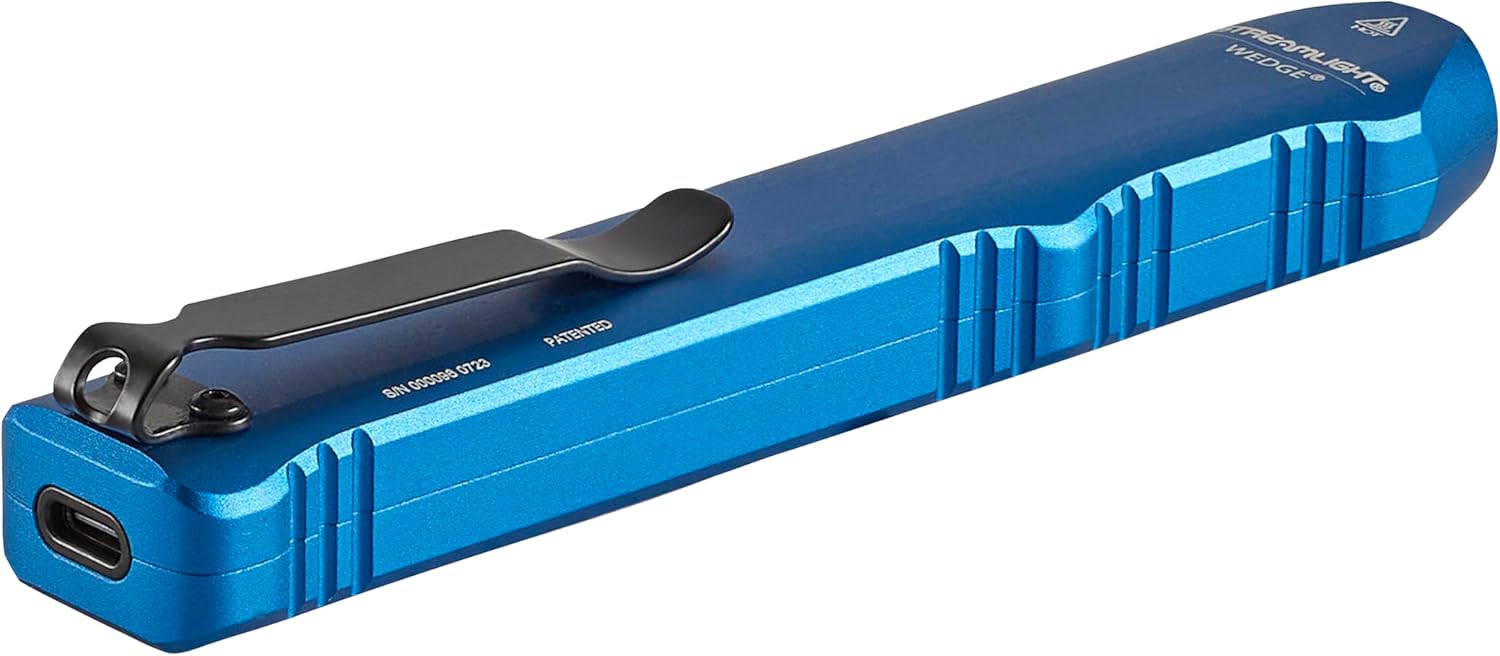
Image 5.1: Operating the flashlight with a single hand.

Image 5.2: Activating THRO (Temporarily Heightened Regulated Output) mode for 1000 lumens.
5.2 Pocket Clip Installation
The deep-carry pocket clip can be reversed to suit your preferred carry method.
- Using a small Phillips head screwdriver, carefully remove the two screws securing the pocket clip.
- ເອົາ clip ຖົງ.
- Align the pocket clip on the opposite side of the flashlight.
- Re-insert and tighten the two screws to secure the clip. Do not overtighten.

Image 5.3: The strong pocket clip allows for secure carry in a pocket or attached to gear.
6. ບໍາລຸງຮັກສາ
- ທໍາຄວາມສະອາດ: ເຊັດຮ່າງກາຍໄຟສາຍດ້ວຍຄວາມອ່ອນ, ງamp ຜ້າ. ຢ່າໃຊ້ເຄື່ອງເຮັດຄວາມສະອາດຂັດຫຼືສານລະລາຍ.
- ການດູແລເລນ: Clean the polycarbonate lens with a soft, lint-free cloth. For stubborn dirt, use a small amount of mild soap and water.
- ຊ່ອງສາກໄຟ: ຮັກສາຊ່ອງສຽບ USB-C ບໍ່ໃຫ້ມີສິ່ງເສດເຫຼືອ.
- ການເກັບຮັກສາ: Store the flashlight in a cool, dry place when not in use for extended periods. Recharge the battery periodically to maintain its health.
7. ການແກ້ໄຂບັນຫາ
- ໄຟສາຍບໍ່ເປີດ:
- Ensure the battery is charged. Connect the flashlight to a USB-C power source and check the LED indicator.
- Verify the thumb switch is fully rotated to the desired mode (Standard or THRO).
- ຜົນຜະລິດແສງສະຫວ່າງມືດມົວ:
- ແບັດເຕີຣີອາດຈະອ່ອນ. ໃຫ້ສາກໄຟສາຍຄືນໃໝ່.
- ໃຫ້ແນ່ໃຈວ່າເລນສະອາດ ແລະ ບໍ່ມີສິ່ງກີດຂວາງ.
- ໄຟສາຍບໍ່ສາມາດສາກໄຟໄດ້:
- Check the USB-C cable for damage and ensure it is securely connected to both the flashlight and the power source.
- ລອງໃຊ້ສາຍ USB-C ຫຼືອະແດັບເຕີໄຟອື່ນ.
- Ensure the charging port on the flashlight is clean.
8. ຂໍ້ມູນຈໍາເພາະ
| ຄຸນສົມບັດ | ລາຍລະອຽດ |
|---|---|
| ໝາຍເລກຕົວແບບ | 88817 |
| ແຫຼ່ງແສງ | LED |
| ຄວາມສະຫວ່າງ (ມາດຕະຖານ) | 300 Lumens |
| Brightness (THRO Burst) | 1000 Lumens |
| Beam Distance (Standard) | 69 ແມັດ |
| ແຄນເດລາ | ປີ 1200 Candela |
| ແຫຼ່ງພະລັງງານ | Integrated Lithium Polymer Battery |
| ເວລາເພີ່ມເຕີມ | Approx. 3 Hours (via USB-C) |
| Runtime (Standard) | 3 ຊົ່ວໂມງ |
| ວັດສະດຸ | ອະລູມີນຽມ Anodized |
| ການຕໍ່ຕ້ານນ້ໍາ | IPX7 (Waterproof up to 1 Meter) |
| ຄວາມຕ້ານທານຜົນກະທົບ | Drop-tested to 1 Meter |
| ຂະໜາດ | 5.46"D x 0.6"W x 1"H |
| ນ້ໍາຫນັກລາຍການ | 3.2 ອອນ |
| ການຢັ້ງຢືນ | ANSI FL1, CE, IPX7 |
9. ການຮັບປະກັນແລະການສະຫນັບສະຫນູນ
9.1 ຂໍ້ມູນການຮັບປະກັນ
The Streamlight Wedge Flashlight is covered by a ການຮັບປະກັນຕະຫຼອດຊີວິດທີ່ຈໍາກັດ. For specific details regarding warranty coverage and claims, please refer to the official Streamlight webເວັບໄຊ ຫຼືຕິດຕໍ່ບໍລິການລູກຄ້າຂອງເຂົາເຈົ້າ.
9.2 ສະຫນັບສະຫນູນລູກຄ້າ
For technical assistance, service, or further inquiries, please visit the ສະຕຣີມໄຟ webເວັບໄຊ or contact their customer support department.
Ask a question about this manual
Ask about setup, troubleshooting, compatibility, parts, safety, or missing instructions. Manuals+ will review the question and use this page’s manual context to help answer it.