
MACALLY BTZKEY
MACALLY BTZKEY Bluetooth Full-size Keyboard User Manual
Model: BTZKEY
1. ບົດແນະນຳ
This manual provides detailed instructions for the MACALLY BTZKEY Bluetooth Full-size Keyboard, designed for seamless integration with Apple devices. It features a Japanese layout, a numeric keypad, and multi-pairing capabilities for up to three devices. Please read this manual thoroughly before using the product to ensure proper operation and longevity.

Figure 1: MACALLY BTZKEY Bluetooth Full-size Keyboard
2. ເນື້ອໃນຊຸດ
ກະລຸນາກວດສອບເນື້ອໃນຂອງຊຸດເພື່ອໃຫ້ແນ່ໃຈວ່າລາຍການທັງຫມົດມີຢູ່:
- MACALLY BTZKEY Bluetooth Full-size Keyboard
- ສາຍສາກ USB-C
- ຄູ່ມືຜູ້ໃຊ້
3. ຕັ້ງຄ່າ
3.1 ການສາກແປ້ນພິມ
The keyboard comes with a built-in 780mAh rechargeable battery. Before initial use, it is recommended to fully charge the keyboard.
- Connect the included USB-C cable to the charging port on the keyboard.
- Connect the other end of the USB-C cable to a USB power adapter (not included) or a powered USB port on your computer.
- ໄຟສະແດງການສາກຈະສະຫວ່າງຂຶ້ນໃນລະຫວ່າງການສາກ ແລະ ຈະດັບລົງເມື່ອສາກເຕັມ.
ໝາຍເຫດ: The USB-C cable provided is for charging only and does not support data transfer.

Figure 2: Charging the MACALLY BTZKEY Keyboard
3.2 ການຈັບຄູ່ກັບອຸປະກອນ
The MACALLY BTZKEY keyboard supports pairing with up to three Bluetooth-enabled devices (MacBook, iMac, iPhone, iPad). You can easily switch between these devices.
- ໃຫ້ແນ່ໃຈວ່າແປ້ນພິມໄດ້ສາກໄຟ ແລະ ເປີດຢູ່.
- Enable Bluetooth on your device (Mac, iPad, iPhone).
- On the keyboard, press and hold one of the dedicated device keys (B1, B2, or B3) for 3-5 seconds until the corresponding indicator light above the key flashes rapidly. This indicates the keyboard is in pairing mode.
- On your device, go to Bluetooth settings and select "BTZKEY" from the list of available devices.
- Once connected, the indicator light will stop flashing and remain solid for a few seconds, then turn off.
- To switch between paired devices, simply press the corresponding device key (B1, B2, or B3). The keyboard will automatically connect to the last paired device on that channel.
ຄໍາແນະນໍາການແກ້ໄຂບັນຫາ: If pairing fails, it is recommended to delete all existing pairing records for the keyboard on your device and attempt to reconnect.

Figure 3: Multi-Sync Bluetooth Functionality
4. ຄໍາແນະນໍາການດໍາເນີນງານ
4.1 Mac-Specific Layout and Shortcut Keys
This keyboard is designed with a 111-key macOS-specific layout, providing a familiar and efficient typing experience for Apple users. It includes 14 dedicated shortcut keys for quick access to common Mac functions.
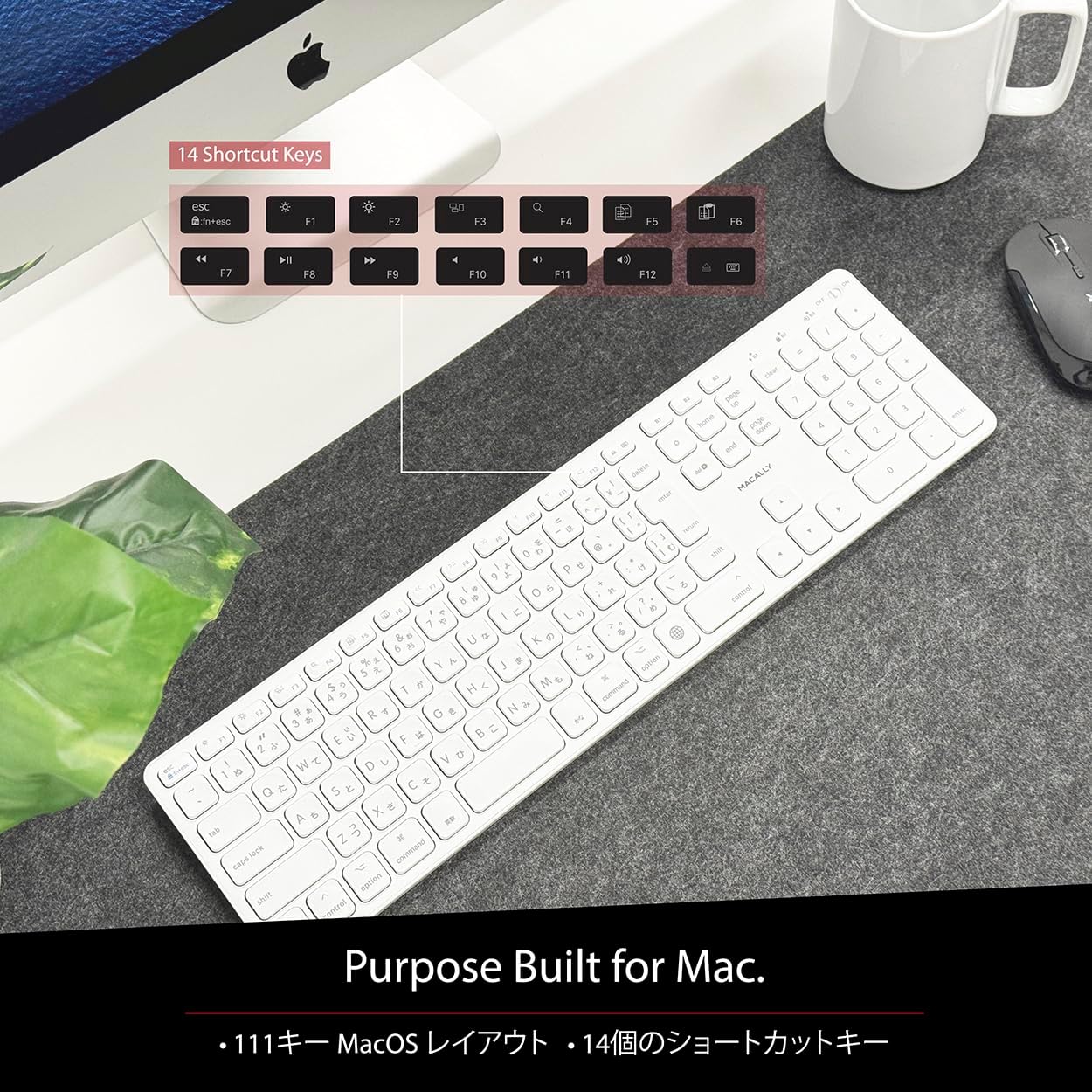
Figure 4: Mac-Specific Layout and Shortcut Keys
4.2 Scissor-Switch Keycaps
The keyboard utilizes quiet scissor-switch keys, offering a smooth, tactile, and quiet typing experience. This design ensures comfortable and efficient typing, whether for extended periods or quick tasks.
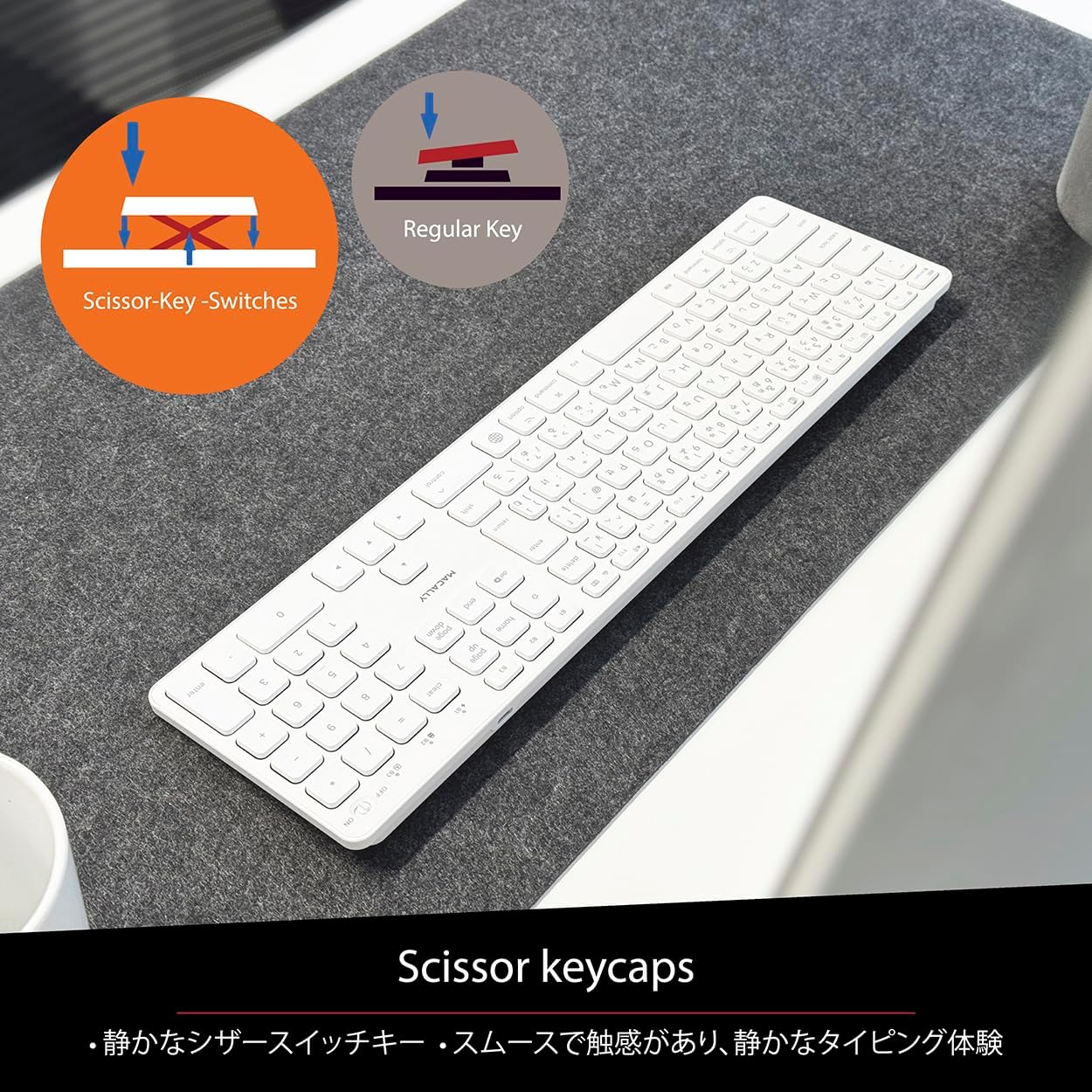
Figure 5: Scissor-Key-Switches Mechanism
4.3 Ergonomics and Design
The keyboard features an integrated kickstand for comfortable typing angles, reducing strain during use. Its slim profile, approximately 0.8 inches (2cm) thick, ensures portability and ergonomic use, complementing any workspace.
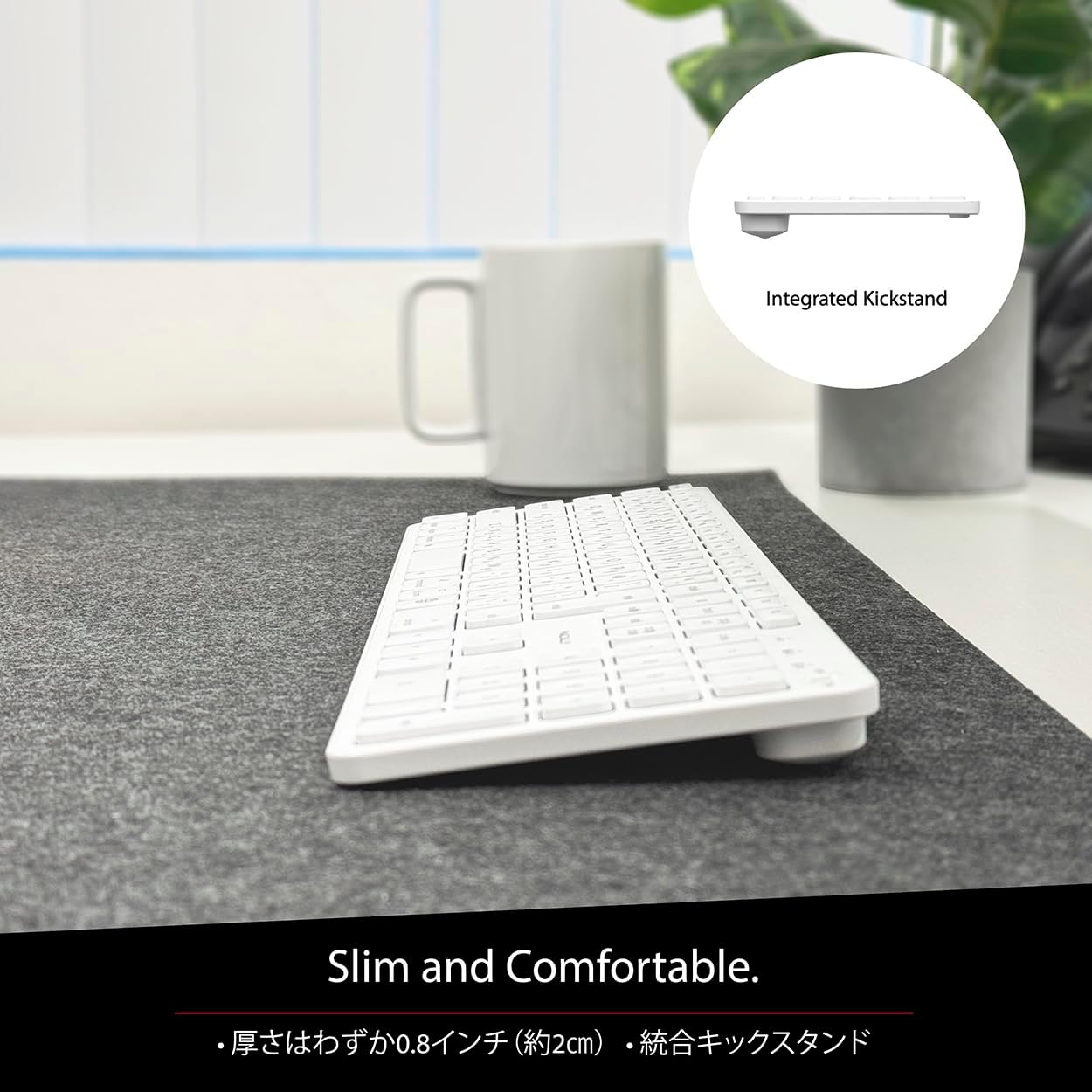
Figure 6: Slim Design with Integrated Kickstand
5. ບໍາລຸງຮັກສາ
ເພື່ອຮັບປະກັນອາຍຸການໃຊ້ງານທີ່ຍາວນານ ແລະ ປະສິດທິພາບທີ່ດີທີ່ສຸດຂອງແປ້ນພິມຂອງທ່ານ, ໃຫ້ປະຕິບັດຕາມຄຳແນະນຳການບຳລຸງຮັກສາເຫຼົ່ານີ້:
- ທໍາຄວາມສະອາດ: ໃຊ້ຜ້າແພທີ່ອ່ອນໆ ທີ່ບໍ່ມີເສັ້ນດ່າງ dampເຊັດດ້ວຍນໍ້າ ຫຼື ນໍ້າຢາທໍາຄວາມສະອາດອ່ອນໆເພື່ອເຊັດພື້ນຜິວຂອງແປ້ນພິມ. ຫຼີກລ່ຽງສານເຄມີທີ່ຮຸນແຮງ ຫຼື ວັດສະດຸຂັດ.
- ການກຳຈັດຂີ້ຝຸ່ນ: ໃຊ້ອາກາດບີບອັດເພື່ອເອົາຂີ້ຝຸ່ນ ແລະສິ່ງເສດເຫຼືອອອກຈາກລະຫວ່າງກະແຈ.
- ການດູແລຫມໍ້ໄຟ: Avoid exposing the keyboard to extreme temperatures. Charge the keyboard regularly, even if not in frequent use, to maintain battery health.
- ການເກັບຮັກສາ: ເມື່ອບໍ່ໄດ້ໃຊ້ເປັນເວລາດົນ, ໃຫ້ເກັບຮັກສາແປ້ນພິມໄວ້ໃນບ່ອນທີ່ເຢັນ, ແຫ້ງ ແລະ ຫຼີກລ່ຽງແສງແດດໂດຍກົງ.
6. ການແກ້ໄຂບັນຫາ
If you encounter issues with your MACALLY BTZKEY keyboard, please refer to the following common problems and solutions:
| ບັນຫາ | ສາເຫດທີ່ເປັນໄປໄດ້ | ການແກ້ໄຂ |
|---|---|---|
| Keyboard not connecting/pairing | Bluetooth off, low battery, pairing conflict | Ensure Bluetooth is enabled on device. Charge keyboard. Delete existing pairing records on device and re-pair. |
| Keys unresponsive or repeating characters | Low battery, software glitch, interference | Charge keyboard. Restart device. Re-pair keyboard. Minimize interference from other wireless devices. |
| ບໍ່ສາມາດສະຫຼັບລະຫວ່າງອຸປະກອນໄດ້ | Device not properly paired to channel | Ensure each device is paired to a unique channel (B1, B2, B3). Re-pair if necessary. |
| ອາຍຸແບັດເຕີຣີສັ້ນ | Frequent use, aging battery | Ensure full charge before use. Reduce backlight usage if applicable (not on this model). Battery life may decrease over time. |
ຖ້າບັນຫາຍັງຄົງຢູ່ຫຼັງຈາກພະຍາຍາມແກ້ໄຂເຫຼົ່ານີ້, ກະລຸນາຕິດຕໍ່ຝ່າຍຊ່ວຍເຫຼືອລູກຄ້າ.
7. ຂໍ້ມູນຈໍາເພາະ
| ຄຸນສົມບັດ | ລາຍລະອຽດ |
|---|---|
| ຍີ່ຫໍ້ | Macally |
| ຜູ້ຜະລິດ | ແມວ |
| ຊຸດ | BTZKEY |
| ຂະໜາດສິນຄ້າ (L x W x H) | 42 x 14 x 2 cm |
| ຈຳ ນວນຕົວແບບຜະລິດຕະພັນ | BTZKEY |
| ສີ | ສີຂາວ |
| ແບດເຕີລີ່ລວມ | ແມ່ນແລ້ວ |
| ຊຸດຫມໍ້ໄຟ Lithium | ແບດເຕີຣີທີ່ມີຢູ່ໃນອຸປະກອນ |
| ນ້ຳໜັກແບັດ Lithium | 2 g |
| ນ້ໍາຫນັກລາຍການ | 610 g |
| ອຸປະກອນທີ່ເຂົ້າກັນໄດ້ | Laptop (MacBook Pro/Air, iMac, Mac Mini, Mac Pro, iPad, iPhone) |
| ເຕັກໂນໂລຊີການເຊື່ອມຕໍ່ | Bluetooth |
| ຄຳອະທິບາຍແປ້ນພິມ | ແປ້ນພິມຫ້ອງການ |
| ການນໍາໃຊ້ທີ່ແນະນໍາສໍາລັບຜະລິດຕະພັນ | ທຸລະກິດ |
| ຄຸນນະສົມບັດພິເສດ | ສາມາດສາກໄຟໄດ້ |
| ຈໍານວນກະແຈ | 111 |
| ອົງປະກອບລວມ | ສາຍ USB |
8. ການຮັບປະກັນແລະການສະຫນັບສະຫນູນ
For detailed warranty information, technical support, and customer service, please refer to the official MACALLY website or contact their support channels directly. It is recommended to keep your purchase receipt as proof of purchase for any warranty claims.
9. ວິດີໂອຜະລິດຕະພັນຢ່າງເປັນທາງການ
Official product videos, if available and relevant, would be embedded here to provide visual guidance on setup, features, or troubleshooting. Please note that video content is subject to availability and may require an internet connection to view.
(No official seller videos were available in the provided product data to embed at this time.)
Ask a question about this manual
Ask about setup, troubleshooting, compatibility, parts, safety, or missing instructions. Manuals+ will review the question and use this page’s manual context to help answer it.