
1. ບົດແນະນຳ
This manual provides essential information for the safe and effective operation of your Mastech MS8301A Digital Multimeter. Please read this manual thoroughly before using the device to ensure proper functionality and to prevent potential hazards. Keep this manual for future reference.
2. ຂໍ້ມູນຄວາມປອດໄພ
Always adhere to the following safety precautions to avoid electric shock or personal injury, and to prevent damage to the multimeter or the equipment under test.
- ອ່ານຄໍາແນະນໍາ: Understand all instructions and safety information before use.
- ອັນດັບທີtage: ຫ້າມໃຊ້ຫຼາຍກ່ວາ voltage, as marked on the multimeter, between the terminals or between any terminal and ground.
- ການທົດສອບນໍາພາ: ກວດສອບສາຍທົດສອບເພື່ອຊອກຫາວັດສະດຸກັນຄວາມຮ້ອນທີ່ເສຍຫາຍ ຫຼື ໂລຫະທີ່ຖືກເປີດເຜີຍ. ປ່ຽນໃໝ່ຖ້າເສຍຫາຍ.
- Circuit Disconnection: ຖອດສາຍໄຟວົງຈອນອອກ ແລະປ່ອຍກະແສໄຟສູງທັງໝົດtage capacitors ກ່ອນທີ່ຈະທົດສອບຄວາມຕ້ານທານ, ຄວາມຕໍ່ເນື່ອງ, diodes, ຫຼື capacitance.
- ການເລືອກຟັງຊັນ: ໃຫ້ແນ່ໃຈວ່າສະວິດຟັງຊັນຢູ່ໃນຕຳແໜ່ງທີ່ຖືກຕ້ອງສຳລັບການວັດແທກທີ່ກຳລັງປະຕິບັດ.
- ວົງຈອນສົດ: Do not measure current on a live circuit with the test leads connected in parallel.
- ສະພາບແວດລ້ອມການດໍາເນີນງານ: Do not operate the multimeter in explosive gas, vapor, or damp ສະພາບແວດລ້ອມ.
- ອຸປະກອນປ້ອງກັນສ່ວນບຸກຄົນ: Always wear appropriate personal protective equipment, such as safety glasses, when working with electrical circuits.
- ການຈັດອັນດັບຄວາມປອດໄພ: This device is rated for CAT III 600V. Do not exceed this rating.
3. ຜະລິດຕະພັນເກີນview
3.1 ຄຸນສົມບັດ
The Mastech MS8301A Digital Multimeter offers a range of features for various electrical measurements:
- ຈໍສະແດງຜົນ: 2000 ນັບ
- ການຖືຂໍ້ມູນ: ຢຸດການອ່ານທີ່ສະແດງໄວ້ເພື່ອຄວາມສະດວກໃນການບັນທຶກ.
- Battery Tester: For 1.5V and 9V batteries.
- ການອອກແບບກະທັດຮັດ: Product Size: 150mm x 74mm x 48mm (5.9" x 2.9" x 1.7")
- ນ້ຳໜັກເບົາ: Product Weight: 220g (0.48lb)

Image: Detailed features and specifications of the Mastech MS8301A multimeter, including display count, data hold, battery test function, and physical dimensions.
3.2 ອົງປະກອບ
The Mastech MS8301A package typically includes the following components:
- Mastech MS8301A Digital Multimeter Unit
- ການທົດສອບນໍາພາ (ສີແດງແລະສີດໍາ)
- AAA Batteries (2x1.5V)
- Calibration Certificate (if applicable)
- ຄູ່ມືເລີ່ມຕົ້ນດ່ວນ
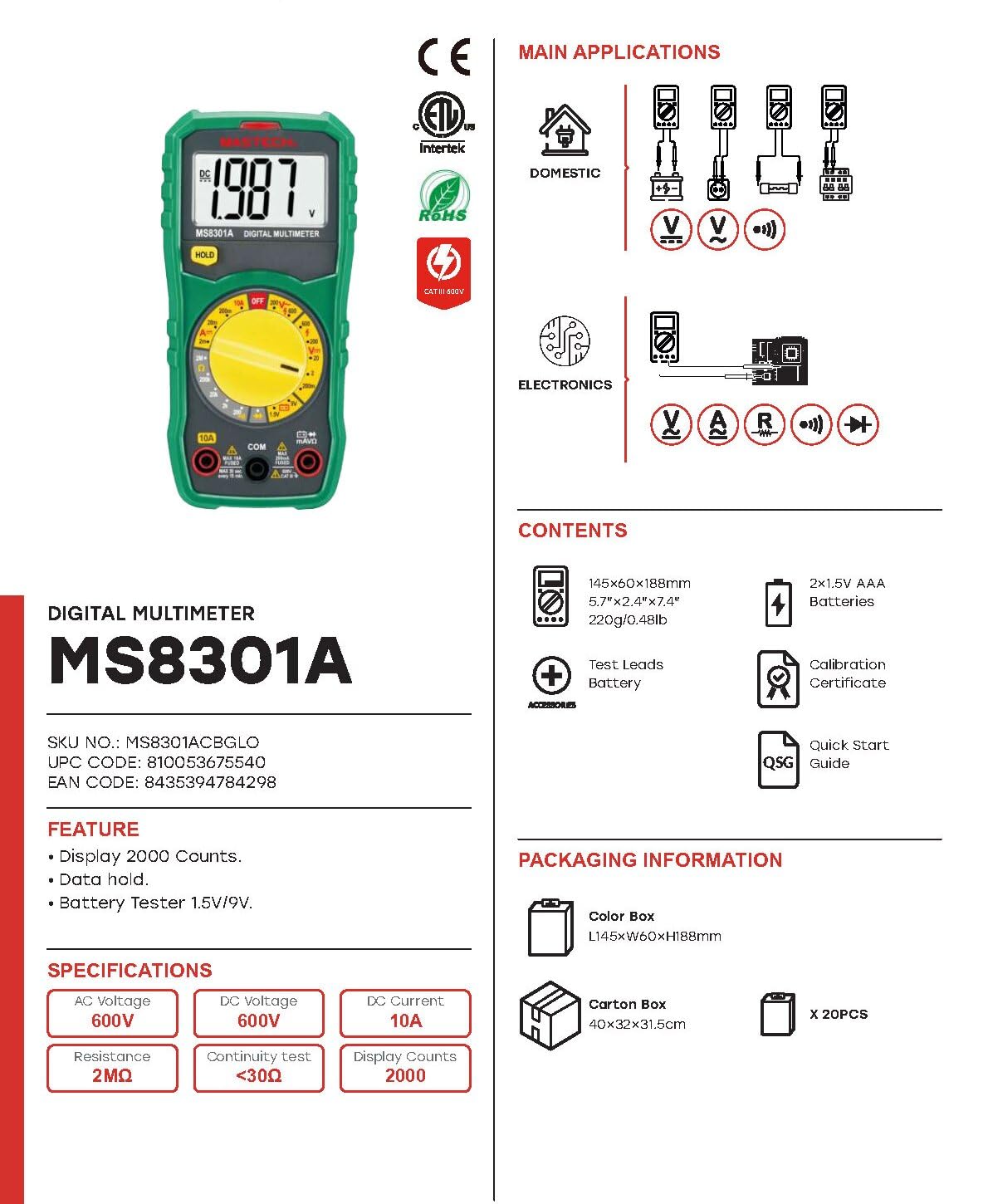
Image: The Mastech MS8301A Digital Multimeter showing its front panel, rotary switch, display, input jacks, and a list of included accessories such as test leads and batteries.
4. ຕັ້ງຄ່າ
4.1 ການຕິດຕັ້ງຫມໍ້ໄຟ
- Ensure the multimeter is turned off and disconnect any test leads.
- ຊອກຫາຝາປິດຊ່ອງໃສ່ແບັດເຕີຣີຢູ່ດ້ານຫຼັງຂອງເຄື່ອງວັດມັນຕິມີເຕີ.
- ໝຸນສະກູອອກ ແລະ ເອົາຝາປິດອອກ.
- ໃສ່ແບັດເຕີຣີ AAA 1.5V ສອງກ້ອນ, ໂດຍສັງເກດເບິ່ງຂົ້ວທີ່ຖືກຕ້ອງ (+ ແລະ -) ຕາມທີ່ລະບຸໄວ້ພາຍໃນຊ່ອງ.
- ປ່ຽນຝາປິດຊ່ອງໃສ່ໝໍ້ໄຟ ແລະຍຶດມັນດ້ວຍສະກູ.
4.2 ການເຊື່ອມຕໍ່ຜູ້ນໍາການທົດສອບ
ເຊື່ອມຕໍ່ສາຍທົດສອບເຂົ້າກັບຊ່ອງສຽບຂາເຂົ້າທີ່ເໝາະສົມໃນເຄື່ອງວັດໄຟຟ້າ:
- ໃສ່ ສີດໍາ ສາຍທົດສອບເຂົ້າໄປໃນ COM (ທົ່ວໄປ) ແຈັກ.
- ສຳລັບການວັດແທກສ່ວນໃຫຍ່ (Voltage, Resistance, Diode, Continuity, Temperature, Battery Test), insert the ສີແດງ ສາຍທົດສອບເຂົ້າໄປໃນ VΩmA jack.
- For high current measurements (up to 10A), insert the ສີແດງ ສາຍທົດສອບເຂົ້າໄປໃນ 10A jack.
5. ຄໍາແນະນໍາການດໍາເນີນງານ
Before taking any measurement, ensure the test leads are correctly connected and the rotary switch is set to the desired function.
5.1 ການວັດແທກ DC Voltagອີ (V=)
- ຕັ້ງສະວິດໝຸນໄປທາງທີ່ຕ້ອງການ V= range (e.g., 20V for measuring up to 20V DC).
- ເຊື່ອມຕໍ່ສາຍທົດສອບສີແດງເຂົ້າກັບດ້ານບວກ (+) ຂອງວົງຈອນ ແລະ ສາຍທົດສອບສີດຳເຂົ້າກັບດ້ານລົບ (-).
- ອ່ານ voltage ມູນຄ່າໃນການສະແດງຜົນ.
5.2 ການວັດແທກ AC Voltage (V~)
- ຕັ້ງສະວິດໝຸນໄປທາງທີ່ຕ້ອງການ V~ range (e.g., 200V for measuring up to 200V AC).
- ເຊື່ອມຕໍ່ຕົວນໍາການທົດສອບໃນທົ່ວ AC voltage ແຫຼ່ງ.
- ອ່ານ voltage ມູນຄ່າໃນການສະແດງຜົນ.
5.3 ການວັດແທກກະແສໄຟຟ້າ DC (A=)
- ສຳຄັນ: ຕັດການເຊື່ອມຕໍ່ພະລັງງານກັບວົງຈອນກ່ອນທີ່ຈະເຊື່ອມຕໍ່ multimeter ເປັນຊຸດ.
- ຕັ້ງສະວິດໝຸນໄປທາງທີ່ຕ້ອງການ A= range (e.g., 200mA or 10A). Remember to move the red lead to the 10A jack for high current.
- Open the circuit where current is to be measured.
- ເຊື່ອມຕໍ່ມັນຕິມີເຕີຕາມຊຸດກັບວົງຈອນ, ຮັບປະກັນວ່າກະແສໄຟຟ້າໄຫຼຜ່ານມັນຕິມີເຕີ.
- ນຳໃຊ້ພະລັງງານໃສ່ວົງຈອນ ແລະ ອ່ານຄ່າກະແສໄຟຟ້າຢູ່ໜ້າຈໍສະແດງຜົນ.
5.4 ການວັດແທກຄວາມຕ້ານທານ (Ω)
- ສຳຄັນ: ໃຫ້ແນ່ໃຈວ່າວົງຈອນຖືກ de-energized ແລະ capacitor ທັງຫມົດຖືກປ່ອຍອອກກ່ອນທີ່ຈະວັດແທກຄວາມຕ້ານທານ.
- ຕັ້ງສະວິດໝຸນໄປທາງທີ່ຕ້ອງການ Ω ຊ່ວງ.
- ເຊື່ອມຕໍ່ຕົວນໍາການທົດສອບໃນທົ່ວອົງປະກອບທີ່ຈະວັດແທກ.
- ອ່ານຄ່າການຕໍ່ຕ້ານໃນຈໍສະແດງຜົນ.
5.5 ການທົດສອບໄດໂອດ (→ |)
- ສຳຄັນ: ໃຫ້ແນ່ໃຈວ່າໄດໂອດຖືກຕັດການເຊື່ອມຕໍ່ອອກຈາກວົງຈອນ.
- ຕັ້ງຄ່າຫມຸນຫມຸນໄປ ທົດສອບ Diode ຕໍາແຫນ່ງ.
- ເຊື່ອມຕໍ່ສາຍທົດສອບສີແດງເຂົ້າກັບຂົ້ວບວກ ແລະ ສາຍທົດສອບສີດຳເຂົ້າກັບຂົ້ວລົບຂອງໄດໂອດ. ໜ້າຈໍຈະສະແດງແຮງດັນໄປໜ້າtage ຫຼຸດລົງ.
- ປີ້ນສາຍໄຟ. ຈໍສະແດງຜົນຄວນສະແດງ "OL" (ວົງວຽນເປີດ) ສຳລັບໄດໂອດທີ່ດີ.
5.6 ການທົດສອບຄວາມຕໍ່ເນື່ອງ ())))
- ສຳຄັນ: ໃຫ້ແນ່ໃຈວ່າວົງຈອນຖືກ de-energized.
- ຕັ້ງຄ່າຫມຸນຫມຸນໄປ ການທົດສອບຕໍ່ເນື່ອງ ຕໍາແຫນ່ງ.
- Connect the test leads across the component or wire to be tested.
- ຖ້າຄວາມຕ້ານທານຕໍ່າກວ່າປະມານ 30Ω, ສຽງກະດິ່ງຈະດັງຂຶ້ນ, ສະແດງເຖິງຄວາມຕໍ່ເນື່ອງ. ໜ້າຈໍສະແດງຜົນຍັງຈະສະແດງຄ່າຄວາມຕ້ານທານອີກດ້ວຍ.
5.7 Battery Test (1.5V/9V)
- ຕັ້ງຄ່າຫມຸນຫມຸນໄປ 1.5V or 9V battery test position, corresponding to the battery type.
- Connect the red test lead to the positive (+) terminal of the battery and the black test lead to the negative (-) terminal.
- ອ່ານຫມໍ້ໄຟ voltage ໃນຈໍສະແດງຜົນ.
5.8 ການຖືຂໍ້ມູນ
ກົດປຸ່ມ "HOLD" ເພື່ອຢຸດການອ່ານຄ່າປັດຈຸບັນຢູ່ເທິງໜ້າຈໍ. ກົດມັນອີກຄັ້ງເພື່ອປ່ອຍຟັງຊັນ hold ແລະສືບຕໍ່ການອ່ານຄ່າສົດ.
6. ຂໍ້ມູນຈໍາເພາະ
| ການວັດແທກ | ຊ່ວງ | ຄວາມລະອຽດ |
|---|---|---|
| ຊິງຕັນດີຊີ Voltage | 200mV / 2V / 20V / 200V / 600V | 100µV / 1mV / 10mV / 100mV / 1V |
| AC Voltage | 200V / 600V | 100mV / 1V |
| ກະແສໄຟຟ້າ DC | 2mA / 20mA / 200mA / 10A | 1µA / 10µA / 100µA / 10mA |
| ການຕໍ່ຕ້ານ | 200Ω / 2kΩ / 20kΩ / 200kΩ / 2MΩ | 0.1Ω / 1Ω / 10Ω / 100Ω / 1kΩ |
| ການທົດສອບຕໍ່ເນື່ອງ | Buzzer sounds at <30Ω | — |
| ທົດສອບ Diode | Vol ຕໍ່tage ຫຼຸດລົງ | — |
| ການທົດສອບຫມໍ້ໄຟ | 1.5V / 9V | — |
ຂໍ້ມູນຈໍາເພາະທົ່ວໄປ
- ຈໍສະແດງຜົນ: 2000 ນັບ
- ການສະຫນອງພະລັງງານ: ແບັດເຕີຣີ 2 x 1.5V AAA
- ຂະໜາດ: 150mm x 74mm x 48mm (5.9 "x 2.9" x 1.7 ")
- ນ້ຳໜັກ: 220g (0.48lb)
- ການຈັດອັນດັບຄວາມປອດໄພ: CAT III 600V
- ວັດສະດຸ: Acrylonitrile Butadiene Styrene (ABS)
- ສີ: ສີຟ້າ

Image: A table detailing manual ranging specifications for various Mastech digital multimeters, including the MS8301A, showing display counts, safety ratings, and measurement capabilities.
7. ບໍາລຸງຮັກສາ
7.1 ການທົດແທນຫມໍ້ໄຟ
When the battery low indicator appears on the display, replace the batteries immediately to ensure accurate readings. Follow the steps outlined in Section 4.1 for battery installation.
7.2 ການທໍາຄວາມສະອາດ
ເຊັດກໍລະນີທີ່ມີໂຄສະນາamp cloth and mild detergent. Do not use abrasives or solvents. Ensure the multimeter is completely dry before use.
7.3 ການເກັບຮັກສາ
ຖ້າ multimeter ບໍ່ໄດ້ໃຊ້ສໍາລັບໄລຍະເວລາທີ່ຍາວນານ, ເອົາຫມໍ້ໄຟອອກເພື່ອປ້ອງກັນການຮົ່ວໄຫຼແລະຄວາມເສຍຫາຍຕໍ່ອຸປະກອນ. ເກັບຮັກສາໄວ້ໃນບ່ອນທີ່ເຢັນ, ແຫ້ງ, ຫ່າງຈາກແສງແດດໂດຍກົງ.
8. ການແກ້ໄຂບັນຫາ
| ບັນຫາ | ສາເຫດທີ່ເປັນໄປໄດ້ | ການແກ້ໄຂ |
|---|---|---|
| ບໍ່ມີຈໍສະແດງຜົນ ຫຼື ມືດ | Dead or low batteries; incorrect battery polarity. | ປ່ຽນແບັດ; ກວດເບິ່ງທິດທາງຫມໍ້ໄຟ. |
| "OL" (Overload) ສະແດງ | Measurement exceeds selected range; open circuit. | Select a higher range; check for open circuit in the component or leads. |
| ການອ່ານບໍ່ຖືກຕ້ອງ | Incorrect function selected; poor test lead connection; damaged test leads. | Verify function switch position; ensure secure lead connection; inspect and replace damaged leads. |
| ບໍ່ມີສຽງບີບຕໍ່ເນື່ອງ | ເປີດວົງຈອນ; ຄວາມຕ້ານທານສູງເກີນໄປ. | Check for breaks in the circuit; ensure resistance is below 30Ω. |
9. ການຮັບປະກັນແລະການສະຫນັບສະຫນູນ
Mastech products are designed for reliability and performance. For specific warranty information, please refer to the warranty card included with your product or contact Mastech customer support. Keep your purchase receipt as proof of purchase.
For technical support or service inquiries, please visit the official Mastech webເວັບໄຊ ຫຼືຕິດຕໍ່ສູນບໍລິການທີ່ໄດ້ຮັບອະນຸຍາດຂອງເຂົາເຈົ້າ.