
KALI AUDIO IN-8W V2
ຄູ່ມືຜູ້ໃຊ້ Kali Audio IN-8W V2 ຈໍສະຕູດິໂອ 3 ທາງ ຂະໜາດ 8 ນິ້ວ
Model: IN-8W V2
1. ບົດແນະນຳ
The Kali Audio IN-8W V2 is a 3-way powered studio monitor designed for critical listening and mixing applications. It features an 8-inch woofer, a 4-inch midrange driver, and a 1-inch soft dome tweeter, with the midrange and tweeter arranged coaxially for precise imaging. These near-field monitors deliver accurate, extended low frequencies and detailed high frequencies with low distortion, suitable for monitoring at various volume levels. With a flat frequency response and neutral tonality, the IN-8W V2 allows users to hear subtle details in their mixes. Its balanced XLR and 1/4" TRS inputs, along with RCA inputs, ensure easy integration into any studio setup.

ດ້ານໜ້າ view of the Kali Audio IN-8W V2 8-inch powered 3-way studio monitor in white, showcasing the coaxial midrange and tweeter above the main woofer.
2. ຄໍາແນະນໍາຄວາມປອດໄພທີ່ສໍາຄັນ
- Read these instructions thoroughly before operating the product.
- ຮັກສາຄໍາແນະນໍາເຫຼົ່ານີ້ສໍາລັບການອ້າງອີງໃນອະນາຄົດ.
- ປະຕິບັດຕາມຄໍາເຕືອນທັງຫມົດກ່ຽວກັບຜະລິດຕະພັນແລະໃນຄໍາແນະນໍາການດໍາເນີນງານ.
- Follow all instructions for safe use and operation.
- ຢ່າໃຊ້ອຸປະກອນນີ້ຢູ່ໃກ້ກັບນ້ໍາຫຼືຄວາມຊຸ່ມຊື່ນ.
- ເຮັດຄວາມສະອາດດ້ວຍຜ້າແຫ້ງເທົ່ານັ້ນ.
- ຫ້າມປິດຊ່ອງລະບາຍອາກາດໃດໆ. ຕິດຕັ້ງຕາມຄໍາແນະນໍາຂອງຜູ້ຜະລິດ.
- ຫ້າມຕິດຕັ້ງໃກ້ກັບແຫຼ່ງຄວາມຮ້ອນເຊັ່ນລັງສີ, ເຄື່ອງບັນທຶກຄວາມຮ້ອນ, ເຕົາຫຼືອຸປະກອນອື່ນໆ (ລວມທັງ. amplifiers) ທີ່ຜະລິດຄວາມຮ້ອນ.
- ຢ່າທຳລາຍຈຸດປະສົງດ້ານຄວາມປອດໄພຂອງປລັກຂົ້ວໂລກ ຫຼື ປະເພດດິນ. ປລັກຂົ້ວມີສອງໃບມີໃບໜຶ່ງກວ້າງກວ່າອີກແຜ່ນໜຶ່ງ. ປລັກສາຍດິນມີສອງໃບ ແລະ ງ່າເຂົ້າດິນທີສາມ. ແຜ່ນໃບກວ້າງຫຼືງ່າທີສາມແມ່ນສະຫນອງໃຫ້ເພື່ອຄວາມປອດໄພຂອງທ່ານ. ຖ້າປລັກສຽບທີ່ໃຫ້ມານັ້ນບໍ່ພໍດີກັບປລັກສຽບໄຟຂອງທ່ານ, ໃຫ້ປຶກສາກັບຊ່າງໄຟຟ້າເພື່ອທົດແທນປລັກສຽບທີ່ໝົດແລ້ວ.
- ປົກປ້ອງສາຍໄຟຈາກການຖືກສຽບ ຫຼື ສຽບ, ໂດຍສະເພາະຢູ່ປລັກສຽບ, ກ່ອງຮັບສະດວກ, ແລະຈຸດທີ່ພວກມັນອອກຈາກອຸປະກອນ.
- ໃຊ້ໄຟລ໌ແນບ/ອຸປະກອນເສີມທີ່ຜູ້ຜະລິດລະບຸໄວ້ເທົ່ານັ້ນ.
- ຖອດອຸປະກອນນີ້ອອກໃນລະຫວ່າງການມີພາຍຸຟ້າຜ່າ ຫຼືເມື່ອບໍ່ໄດ້ໃຊ້ເປັນເວລາດົນນານ.
- ອ້າງອີງການບໍລິການທັງໝົດໃຫ້ກັບພະນັກງານບໍລິການທີ່ມີຄຸນວຸດທິ. ການບໍລິການແມ່ນຕ້ອງການເມື່ອອຸປະກອນໄດ້ຮັບຄວາມເສຍຫາຍໃນທາງໃດກໍ່ຕາມເຊັ່ນ: ສາຍໄຟຫຼືປລັກສຽບຖືກເສຍຫາຍ, ແຫຼວຮົ່ວໄຫຼຫຼືສິ່ງຂອງຕົກເຂົ້າໄປໃນອຸປະກອນ, ອຸປະກອນຖືກຝົນຫຼືຄວາມຊຸ່ມຊື່ນ, ບໍ່ເຮັດວຽກຕາມປົກກະຕິ. , ຫຼືໄດ້ຖືກຫຼຸດລົງ.
3. ເນື້ອໃນຊຸດ
Upon unpacking your Kali Audio IN-8W V2 studio monitor, please ensure all items are present and in good condition:
- One Kali Audio IN-8W V2 Studio Monitor
- ສາຍໄຟສາຍໜຶ່ງ
4. ຄຸນນະສົມບັດທີ່ສໍາຄັນ
- ປະສິດທິພາບທີ່ມີປະສິດທິພາບ: 140-watt Class D digital amplifier system delivers clear and accurate sound for studio mixing and mastering.
- ການຄວບຄຸມທີ່ຊັດເຈນ: Independent level controls, low-cut filters, and input selection allow customization of the monitors for any application or room environment.
- Studio Reference: 8-inch woofer, 4-inch midrange driver, and 1-inch soft dome tweeter (coaxially mounted) reproduce a wide frequency response from 42Hz to 22kHz.
- ການເຊື່ອມຕໍ່ອະເນກປະສົງ: Balanced XLR and 1/4" TRS inputs, along with unbalanced RCA inputs, ensure broad compatibility with studio equipment.

ດ້ານໜ້າມຸມ view of the Kali Audio IN-8W V2 studio monitor, highlighting its sleek design and driver arrangement.
5. ຕັ້ງຄ່າ
5.1 ການຈັດວາງ
Proper placement of your studio monitors is crucial for accurate sound reproduction. Position the monitors to form an equilateral triangle with your listening position. The tweeters should ideally be at ear level. Avoid placing monitors directly against walls or in corners without utilizing the boundary compensation settings.
5.2 ການເຊື່ອມຕໍ່
The IN-8W V2 offers three types of audio inputs:
- XLR Input (+4 dBu): For balanced professional audio equipment.
- TRS Input (+4 dBu): For balanced or unbalanced 1/4-inch connections.
- RCA Input (-10 dBV): For unbalanced consumer audio equipment.
Connect your audio source to one of these inputs. Only use one input at a time. Ensure the volume knob on the monitor is set to its lowest position before connecting the power cable.
5.3 ການເປີດເຄື່ອງ
After connecting your audio source, plug the power cable into the monitor and then into a suitable AC outlet. Flip the power switch to the 'On' position. The LED indicator on the front of the monitor will illuminate.
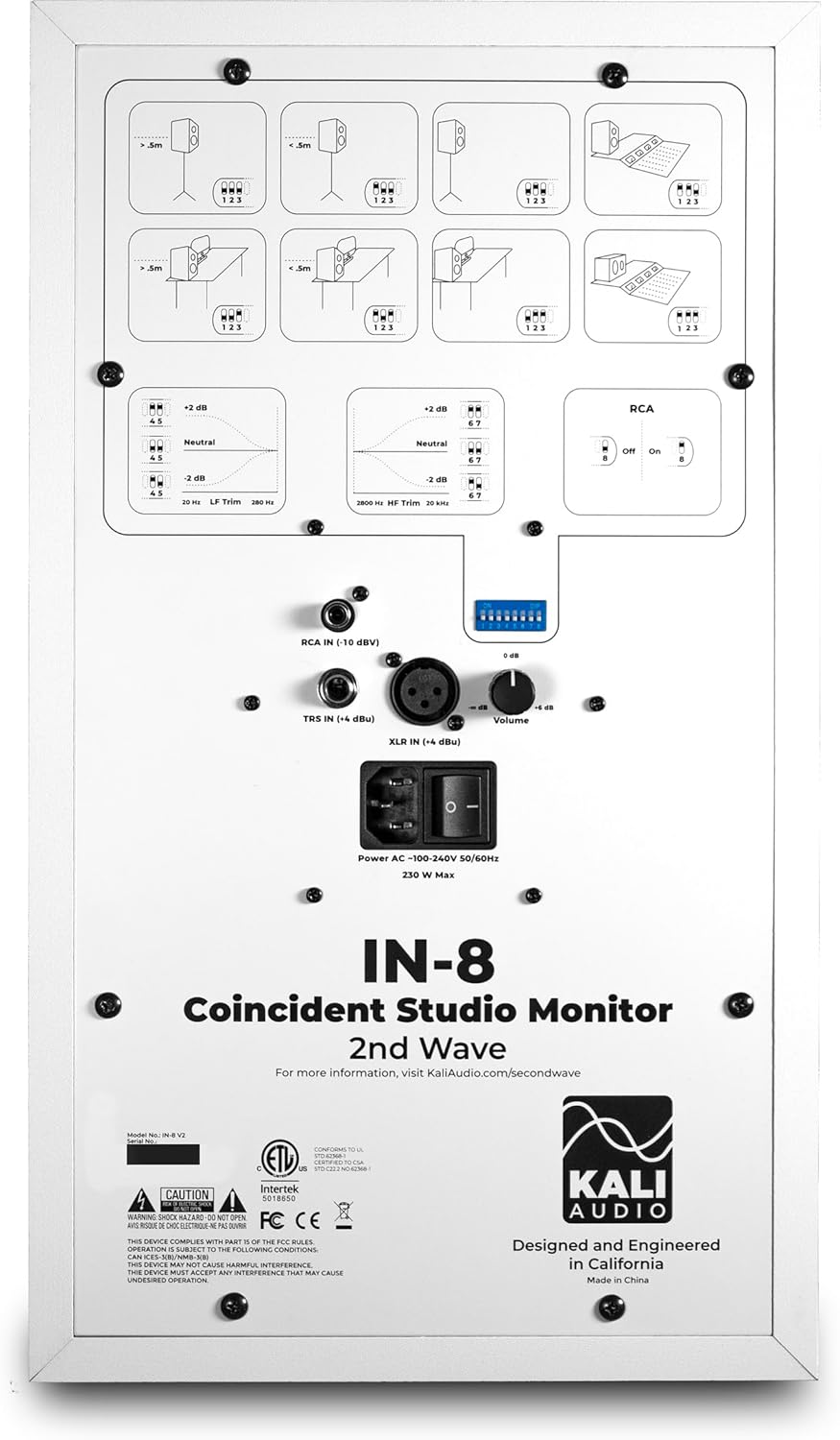
ລະອຽດ view of the rear panel of the Kali Audio IN-8W V2 studio monitor, displaying input connections (XLR, TRS, RCA), volume control, and DIP switches for boundary compensation and EQ settings.
6. ຄໍາແນະນໍາການດໍາເນີນງານ
6.1 ການຄວບຄຸມປະລິມານ
The large knob on the rear panel controls the output volume of the monitor. Start with a low volume and gradually increase it to a comfortable listening level.
6.2 ການຄັດເລືອກການປ້ອນຂໍ້ມູນ
The IN-8W V2 automatically detects which input is active. If multiple inputs are connected, ensure only one source is playing audio at a time to avoid signal conflicts.
6.3 Boundary Compensation EQ Settings
The IN-8W V2 features a series of DIP switches on the rear panel to adjust the monitor's frequency response based on its placement in your room. These settings help to compensate for acoustic anomalies caused by boundaries (walls, desks, etc.). Refer to the diagrams printed on the rear panel for recommended settings based on your monitor's position.
- LF Trim: ປັບການຕອບສະໜອງຄວາມຖີ່ຕໍ່າ.
- HF Trim: ປັບການຕອບສະໜອງຄວາມຖີ່ສູງ.
- RCA Input On/Off: Activates or deactivates the RCA input. Ensure this is set correctly if using RCA.
Experiment with these settings to achieve the most neutral and accurate sound in your listening environment.
7. ບໍາລຸງຮັກສາ
7.1 ການທໍາຄວາມສະອາດ
To clean the monitor, use a soft, dry cloth. Do not use abrasive cleaners, waxes, or solvents, as these can damage the cabinet finish or drivers. Avoid spraying liquids directly onto the monitor.
7.2 ການເກັບຮັກສາ
If storing the monitor for an extended period, ensure it is powered off and disconnected from the power source. Store it in a cool, dry place, ideally in its original packaging, to protect it from dust and physical damage.
8. ການແກ້ໄຂບັນຫາ
| ບັນຫາ | ສາເຫດທີ່ເປັນໄປໄດ້ | ການແກ້ໄຂ |
|---|---|---|
| ບໍ່ມີສຽງ |
|
|
| ສຽງບິດເບືອນ |
|
|
| ສຽງດັງ ຫຼື ສຽງດັງ |
|
|
9. ຂໍ້ມູນຈໍາເພາະ
| ຊື່ຕົວແບບ | IN-8W V2 |
| ປະເພດລຳໂພງ | 3-Way Powered Studio Monitor |
| Woofer ເສັ້ນຜ່າສູນກາງ | 8 ນິ້ວ |
| ຄົນຂັບກາງ | 4 Inches (Coaxial) |
| Tweeter ເສັ້ນຜ່າສູນກາງ | 1 Inch (Coaxial) |
| Ampພະລັງງານຊີວິດ | 140 ວັດ (ຊັ້ນ D) |
| ການຕອບສະໜອງຄວາມຖີ່ | 42 Hz - 22 kHz |
| ວັດສະດຸປ້ອນ | XLR (+4 dBu), TRS (+4 dBu), RCA (-10 dBV) |
| ຂະໜາດສິນຄ້າ (ກວ້າງ x ຍາວ x ສູງ) | 10" x 15" x 12" |
| ນ້ໍາຫນັກລາຍການ | 25.9 ປອນ |
| ສີ | ສີຂາວ |
| ແຫຼ່ງພະລັງງານ | ໄຟຟ້າສາຍ |
10. ການຮັບປະກັນແລະການສະຫນັບສະຫນູນ
This Kali Audio IN-8W V2 studio monitor is covered by a manufacturer's warranty. For specific details regarding the warranty period and terms, please refer to the documentation included with your product or visit the official Kali Audio website. For technical support, troubleshooting assistance beyond this manual, or warranty claims, please contact Kali Audio customer service directly.
You can find more information and support resources on the official Kali Audio webເວັບໄຊ: www.kaliaudio.com