
Acekool 0XHWSTFL001
ຄູ່ມືຜູ້ໃຊ້ເຄື່ອງປັບອາກາດແບບພົກພາ Acekool
Model: 0XHWSTFL001
ແນະນຳ
This user manual provides detailed instructions for the operation, installation, and maintenance of your Acekool Portable Air Conditioner. Please read this manual thoroughly before using the appliance and retain it for future reference.
ສິນຄ້າເກີນview

Figure 1: Acekool Portable Air Conditioner and its remote control.
The Acekool Portable Air Conditioner is a versatile 3-in-1 unit designed to cool, dehumidify, and circulate air as a fan. It features an 8000 BTU ASHRAE cooling capacity, suitable for rooms up to 350 sq.ft. Key features include an LED control panel, remote control, sleep mode, and a 24-hour timer.
ແມ່ນຫຍັງຢູ່ໃນກ່ອງ

ຮູບທີ 2: ອົງປະກອບທັງໝົດລວມຢູ່ໃນຊຸດຜະລິດຕະພັນ.
- ເຄື່ອງປັບອາກາດແບບພົກພາ 1 ເຄື່ອງ
- ຊຸດປ່ອງຢ້ຽມ 1 x
- 1 x ຕົວເຊື່ອມຕໍ່ທໍ່
- 1 x Window Kit Adapter
- 1 x ທໍ່ລະບາຍອາກາດ
- ທໍ່ລະບາຍນ້ຳ 1 x
- 1 x ການຄວບຄຸມໄລຍະໄກ
- 1 x ສ້ອມ screws
- 1 x ຄູ່ມືຜູ້ໃຊ້
ການຕິດຕັ້ງແລະການຕິດຕັ້ງ
Follow these steps for proper setup and installation to ensure optimal performance of your portable air conditioner.

Figure 3: Visual guide for exhaust hose and window kit installation.
- ເຊື່ອມຕໍ່ສາຍຕໍ່ທໍ່ໃສ່ສົ້ນໜຶ່ງຂອງທໍ່ລະບາຍອາກາດ.
- ເຊື່ອມຕໍ່ອະແດບເຕີຊຸດປ່ອງຢ້ຽມກັບສົ້ນອື່ນຂອງທໍ່ລະບາຍອາກາດ.
- ແນບສາຍທໍ່ໃສ່ທໍ່ລະບາຍອາກາດຂອງເຄື່ອງປັບອາກາດ.
- Extend the adjustable window kits to fit your window in place and tighten the nuts.
- Install the window partitions to fit the window (suitable for horizontal or vertical slide windows).
- Insert the exhaust hose adapter into the window kit, then install the ventilation tube to the window partitions.
Video 1: Official product video demonstrating the features and setup of the 8000 BTU Air Conditioner.
ຄໍາແນະນໍາການດໍາເນີນງານ
ກະດານຄວບຄຸມແລະການຄວບຄຸມໄລຍະໄກ

Figure 4: LED Touch Panel with Remote Control functionality.
The unit can be operated using the LED touch control panel on top of the unit or the included wireless remote control. The control panel provides easy access to all functions.
ຮູບແບບການເຮັດວຽກ

Figure 5: Three-in-one modes: Cool, Dry, and Fan.
- ແບບເຢັນ: Provides powerful cooling for rooms up to 350 sq.ft., with adjustable temperature settings from 61°F to 88°F.
- ໂໝດແຫ້ງ (ເຄື່ອງດັບຄວາມຊຸ່ມ): Removes up to 45 pints of moisture per day, helping to reduce humidity in the room. Features self-evaporation technology.
- ແບບພັດລົມ: Circulates air with two adjustable wind speeds (Low/High) without cooling.
ຄຸນສົມບັດເພີ່ມເຕີມ
- ຮູບແບບການນອນ: Activates energy-saving operation with an ultra-low noise level of 50 dB for undisturbed sleep. Activated by pressing Increase and Speed simultaneously.
- ໂມງຈັບເວລາ 24 ຊົ່ວໂມງ: Allows you to customize the cooling duration to suit your schedule.
- ການໝຸນອາກາດອັດຕະໂນມັດ: Features automatic horizontal swing wind and manual vertical wind for widespread oscillation, cooling every corner of your room.
- ການພົກພາ: Equipped with 4 rotatable wheels for easy movement and storage.

Figure 6: Airflow direction control with automatic horizontal swing and manual vertical adjustment.
ບໍາລຸງຮັກສາ
ເຮັດຄວາມສະອາດເຄື່ອງກອງອາກາດ
Regular cleaning of the air filter is essential for maintaining the efficiency and longevity of your air conditioner.

Figure 7: Detachable and washable air filter location.
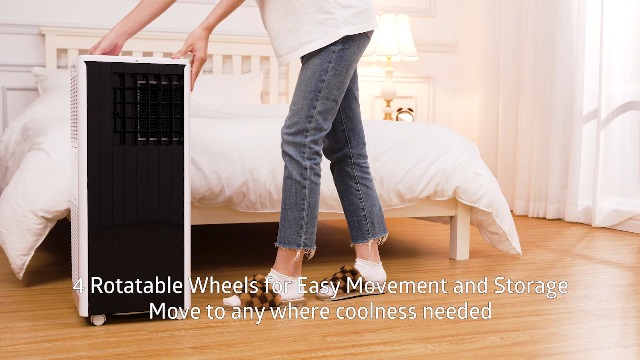
Figure 8: Cleaning the filter screen directly under water.
- Locate the air filter on the side of the unit.
- Gently pull out the filter screen.
- Wash the filter screen directly under running water.
- ປ່ອຍໃຫ້ການກັ່ນຕອງອາກາດແຫ້ງຫມົດກ່ອນທີ່ຈະໃສ່ມັນເຂົ້າໄປໃນຫນ່ວຍບໍລິການ.
- Reinsert the dry filter screen back into its slot.
ການລະບາຍນໍ້າ ໜ່ວຍ
The unit features self-evaporation technology, which atomizes condensed water. However, in high humidity environments, manual draining may be required. Use the provided drain pipe for this purpose.

Figure 9: Drainage hole for excess water removal.
ການແກ້ໄຂບັນຫາ
If you encounter any issues with your Acekool Portable Air Conditioner, please refer to the following common troubleshooting steps. For problems not listed here, contact customer support.
| ບັນຫາ | ສາເຫດທີ່ເປັນໄປໄດ້ | ການແກ້ໄຂ |
|---|---|---|
| ຫນ່ວຍບໍລິການບໍ່ເປີດ | ບໍ່ມີການສະຫນອງພະລັງງານ; ສາຍໄຟບໍ່ໄດ້ສຽບ; ເຄື່ອງຕັດວົງຈອນປິດ. | Ensure unit is plugged into a working outlet; Check circuit breaker; Press the power button. |
| ໜ່ວຍຄວາມເຢັນບໍ່ມີປະສິດທິພາບ | Air filter is dirty; Exhaust hose not properly installed; Room size too large; Doors/windows open. | Clean the air filter; Ensure exhaust hose is securely connected and vented outside; Close all doors and windows; Verify room size is within specifications. |
| ໜ່ວຍ ງານມີສຽງລົບກວນ | Unit not on a flat surface; Obstruction in fan/air intake. | ວາງເຄື່ອງໄວ້ເທິງພື້ນຜິວທີ່ຮາບພຽງ ແລະ ໝັ້ນຄົງ; ກວດສອບ ແລະ ເອົາສິ່ງກີດຂວາງອອກ. |
| ນ້ໍາຮົ່ວ | Drain plug not secured; Water tank full (in high humidity). | Ensure drain plug is tightly closed; Drain the water tank if full. |
ຂໍ້ມູນຈໍາເພາະ
| ຄຸນສົມບັດ | ລາຍລະອຽດ |
|---|---|
| ຍີ່ຫໍ້ | Acekool |
| ຕົວແບບ | Portable Air Conditioner (0XHWSTFL001) |
| ພະລັງງານຄວາມເຢັນ | 8000 BTU (ASHRAE) / 5000 BTU (DOE) |
| ພື້ນທີ່ຄອບຄຸມ | ເຖິງ 350 sq.ft. |
| ຟັງຊັນ | ເຢັນ, Dehumidify, ພັດລົມ |
| ຄວາມອາດສາມາດ Dehumidification | 45 Pints/ມື້ |
| ລະດັບສຽງ | 45 dB (50 dB in Sleep Mode) |
| ສະບັບtage | 115 ໂວນ |
| ວັດtage | 699 ວັດ |
| ຕູ້ເຢັນ | R32 |
| ຂະ ໜາດ (D x W x H) | 11.3" x 11.7" x 27.4" |
| ນ້ໍາຫນັກລາຍການ | 47.5 ປອນ |
ການຮັບປະກັນແລະການສະຫນັບສະຫນູນ
Your Acekool Portable Air Conditioner comes with a standard manufacturer's warranty. For detailed warranty information, product support, or service inquiries, please refer to the warranty card included in your package or visit the official Acekool website. You can also contact customer support through the retailer where you purchased the product.
ສຳລັບຂໍ້ມູນເພີ່ມເຕີມ ແລະ ການສະໜັບສະໜູນ, ເຂົ້າເບິ່ງທີ່ ຮ້ານ Acekool ໃນ Amazon.
Ask a question about this manual
Ask about setup, troubleshooting, compatibility, parts, safety, or missing instructions. Manuals+ will review the question and use this page’s manual context to help answer it.