
1. ບົດແນະນຳ
The Haibro P20 Pro Smart Battery Charger Maintainer is a versatile 3-in-1 device designed to charge, maintain, and desulfate various 12-volt and 24-volt batteries. This fully-automatic smart charger is suitable for lead-acid (AGM, GEL, SLA, Flooded), lithium-ion, and LiFePO4 batteries found in cars, trucks, SUVs, motorcycles, boats, golf carts, and lawn mowers.
It features intelligent control functions, multi-stage charging, pulse repair technology, and multiple safety protections to ensure efficient and safe battery management. This manual provides detailed instructions for the proper use and maintenance of your P20 Pro charger.

Image 1.1: The Haibro P20 Pro Smart Battery Charger Maintainer with its integrated handle and alligator clips.
2. ຂໍ້ມູນຄວາມປອດໄພ
Always read and understand all safety warnings and instructions before using the P20 Pro Smart Battery Charger. Failure to follow these instructions may result in electric shock, fire, or serious injury.
- ການລະບາຍອາກາດ: Ensure adequate ventilation when charging batteries, especially lead-acid batteries, as they can produce explosive gases.
- ການປົກປ້ອງຕາແລະຜິວຫນັງ: Always wear eye protection and gloves when working with batteries. Battery acid is corrosive.
- ລຳດັບການເຊື່ອມຕໍ່: Connect the charger to the battery terminals before plugging it into an AC power outlet. Disconnect in reverse order.
- ປົກປັກຮັກສາ Polar ປີ້ນກັບກັນ: The charger has built-in reverse polarity protection, but always double-check connections to prevent sparks.
- ແບດເຕີຣີທີ່ເສຍຫາຍ: Do not attempt to charge frozen, damaged, or totally dead batteries.
- ການນໍາໃຊ້ພາຍໃນ: This charger is designed for indoor use. Do not expose it to rain or excessive moisture.
- ເດັກນ້ອຍແລະສັດລ້ຽງ: ຮັກສາສາຍສາກ ແລະໝໍ້ໄຟໃຫ້ໄກຈາກເດັກນ້ອຍ ແລະສັດລ້ຽງ.
- ສາຍໄຟ: ຢ່າໃຊ້ເຄື່ອງສາກດ້ວຍສາຍໄຟ ຫຼືປລັກສຽບທີ່ເສຍຫາຍ.
3. ຄຸນລັກສະນະຂອງຜະລິດຕະພັນ
The P20 Pro Smart Battery Charger is equipped with advanced features for optimal battery care:
- ຟັງຊັນ 3-in-1: Acts as a quick battery charger, maintainer, and desulfator.
- ຄວາມເຂົ້າກັນໄດ້ຢ່າງກວ້າງຂວາງ: Supports 12V/20Amp and 24V/10Amp output for lead-acid (AGM, GEL, SLA, Flooded), lithium-ion, and LiFePO4 batteries.
- Adjustable Charging Current: Offers three selectable current levels:
- LOW: 12V/5A, 24V/3A
- MEDIUM: 12V/10A, 24V/5A
- HIGH: 12V/20A, 24V/10A
- Pulse Repair Technology: High-frequency and low-frequency pulse repair mode to activate and restore old or idle batteries.
- 9-ສtage Precision Charging Program: Intelligent control system for optimized charging, including Battery Desulfation, Soft Start, Bulk Charge, Absorption, Trickle Charge, Battery Test, Recondition, Float, and Pulse Maintenance.
- ການປົກປ້ອງຫຼາຍ: Built-in MCU controller provides protection against overcharge, over-voltage, over-temperature, sparks, short circuit, and reverse polarity.
- ຈໍ LCD ຂະຫນາດໃຫຍ່: Clearly shows charging voltage, current, power percentage, battery full status, and temperature.
- ການອອກແບບແບບພົກພາ: Features a foldable handle for easy carrying and integrated clip organizer for tidy storage.
- Automatic Temperature Detection: Automatically adjusts charging parameters for optimal performance in winter and summer modes.

Image 3.1: The charger automatically identifies 12V or 24V battery types, supporting Lithium, LiFePO4, and Lead-acid batteries.
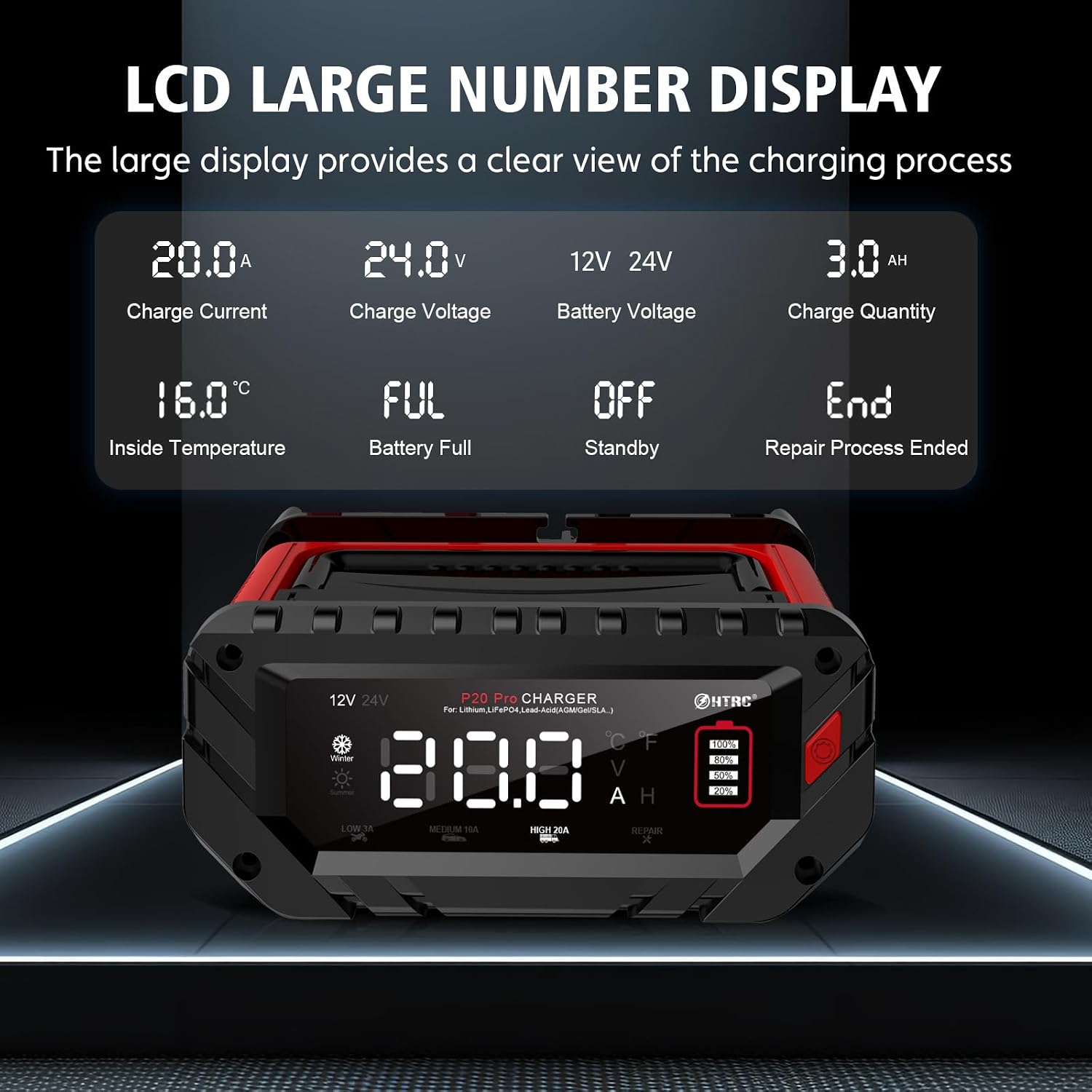
Image 3.2: The large LCD display provides clear information on charge current, voltage, ຫມໍ້ໄຟ voltage, charge quantity, and internal temperature.

Image 3.3: The charger features a portable design with a foldable handle, convenient storage clips for the battery clamps, and integrated harness storage to keep cables tidy.
4. ຕັ້ງຄ່າ
Before connecting the charger, ensure the battery terminals are clean and free of corrosion. Wear appropriate safety gear.
- ການກະກຽມຫມໍ້ໄຟ: If the battery is in a vehicle, ensure the vehicle's ignition is off and the parking brake is engaged. For marine applications, ensure the boat is securely moored.
- ເຊື່ອມຕໍ່ Cl ບວກamp: ເຊື່ອມຕໍ່ ສີແດງ ບວກ (+) clamp ໄປທີ່ຈຸດບວກ (+) ຂອງຫມໍ້ໄຟ.
- ເຊື່ອມຕໍ່ Cl ລົບamp: ເຊື່ອມຕໍ່ ດຳ ລົບ (-) clamp to the negative (-) terminal of the battery. If connecting to a vehicle battery, connect the negative clamp ໄປຫາຕົວຖັງລົດ ຫ່າງຈາກແບັດເຕີຣີ ແລະ ທໍ່ນໍ້າມັນເຊື້ອໄຟ.
- Plug in Charger: ເມື່ອ clamps are securely connected to the battery, plug the charger's AC power cord into a standard 100-240V AC electrical outlet.
- ການສະແດງເບື້ອງຕົ້ນ: The LCD display will illuminate, showing the current battery voltage and automatically detecting the battery type (12V or 24V).
Note: The charger will not send power unless the connections are correctly attached, thanks to its reverse polarity protection.
5. ຄໍາແນະນໍາການດໍາເນີນງານ
The P20 Pro charger operates largely automatically, but you can select charging modes and current levels.
5.1 ການສາກໄຟອັດຕະໂນມັດ
After connecting the charger and plugging it in, the device will automatically detect the battery voltage (12V or 24V) and begin the appropriate 9-stage charging process. The LCD screen will display real-time charging status.

ຮູບພາບ 5.1: ຮູບ 9-stage smart charging process optimizes battery power precisely and gently, ensuring thorough and safe charging.
5.2 Selecting Charging Current
Press the "MODE" button (usually indicated by a gear icon or similar) to cycle through the available charging current levels:
- ຕ່ຳ: 12V/5A, 24V/3A (Suitable for smaller batteries like motorcycles)
- ຂະໜາດກາງ: 12V/10A, 24V/5A (General purpose charging)
- ສູງ: 12V/20A, 24V/10A (For faster charging of larger batteries)
Select the current appropriate for your battery's capacity and type. The selected current will be displayed on the LCD.

Image 5.2: The charger allows selection between Low (3A), Medium (10A), High (20A) current modes, and also features a dedicated Repair mode.
5.3 Pulse Repair Mode
If a battery has been idle or old for a long time and is not holding a charge, you can attempt to activate it using the "REPAIR" mode. Press the "MODE" button until "REPAIR" is indicated on the display.
- The repair process uses high-frequency and low-frequency pulses to desulfate and recondition the battery.
- This mode can help restore lost battery performance for stronger engine starts.
- Note: This mode cannot activate or charge totally dead batteries (those with 0V or severely damaged cells).
5.4 Winter and Summer Modes
ເຄື່ອງສາກໄຟຈະກວດຫາອຸນຫະພູມອ້ອມຂ້າງໂດຍອັດຕະໂນມັດ ແລະ ປັບລະດັບຄວາມແຮງຂອງການສາກໄຟtage accordingly to optimize charging performance in different climates. This ensures efficient charging whether in cold winter conditions or hot summer environments.

Image 5.3: The charger automatically detects ambient temperature, switching between Winter mode (for cold environments) and Summer mode (for warm environments) to optimize charging.
5.5 Disconnecting the Charger
Once charging is complete (indicated by "FUL" on the display), or if you need to disconnect the charger:
- ຖອດສາຍໄຟ AC ອອກຈາກປລັກໄຟຟ້າ.
- Remove the negative (-) clamp from the battery terminal or vehicle chassis.
- Remove the positive (+) clamp ຈາກສະຖານີຫມໍ້ໄຟ.
6. ບໍາລຸງຮັກສາ
Proper maintenance ensures the longevity and optimal performance of your P20 Pro Smart Battery Charger.
- ທໍາຄວາມສະອາດ: Clean the charger's casing ດ້ວຍຜ້າອ່ອນ, ແຫ້ງ. ຢ່າໃຊ້ເຄື່ອງເຮັດຄວາມສະອາດຂັດຫຼືສານລະລາຍ.
- ການດູແລສາຍໄຟ: ກວດສອບສາຍໄຟ ແລະ ແບັດເຕີຣີamps regularly for any signs of damage, fraying, or corrosion. Replace if necessary.
- ການເກັບຮັກສາ: Store the charger in a cool, dry place when not in use. Utilize the integrated clip organizer and harness storage to keep cables neat and prevent damage.
- ການບໍາລຸງຮັກສາຫມໍ້ໄຟ: Regularly check battery terminals for corrosion and clean them as needed. Ensure battery fluid levels (for flooded lead-acid batteries) are adequate.
- Trickle Charge/Maintenance: For batteries stored for extended periods, use the trickle charge or maintenance mode to keep them fully charged and prevent sulfation.
7. ການແກ້ໄຂບັນຫາ
If you encounter issues with your P20 Pro charger, refer to the following common problems and solutions:
| ບັນຫາ | ສາເຫດທີ່ເປັນໄປໄດ້ | ການແກ້ໄຂ |
|---|---|---|
| Charger not turning on/LCD blank. | No power from AC outlet; loose connection; charger fault. | Check AC outlet with another device. Ensure power cord is fully plugged in. Verify battery clamps are securely connected. |
| ສະແດງ "FUL" ແຕ່ແບັດເຕີຣີບໍ່ໄດ້ສາກເຕັມ. | Battery may be sulfated or damaged; incorrect battery type selected (if applicable). | Try using the "REPAIR" mode. Test battery with a dedicated battery tester. Ensure battery type is compatible. |
| Charger shows error code or warning. | Reverse polarity; short circuit; over-temperature; over-voltage. | Disconnect charger immediately. Check clamp connections for correct polarity. Inspect cables for damage or short circuits. Allow charger to cool down if hot. |
| ແບັດເຕີຣີບໍ່ສາກ ຫຼື ສາກຊ້າ. | Poor connection; battery severely discharged/damaged; incorrect current setting. | ຮັບປະກັນ clamps are clean and tightly connected. Try "REPAIR" mode. Select a higher charging current if appropriate for your battery. Battery may be beyond repair. |
| LCD screen hard to read outdoors. | Direct sunlight or bright ambient light. | Shade the screen with your hand or move to a less brightly lit area for better visibility. |
If the problem persists after trying these solutions, please contact Haibro customer support for assistance.
8. ຂໍ້ມູນຈໍາເພາະ
| ຄຸນສົມບັດ | ລາຍລະອຽດ |
|---|---|
| ຍີ່ຫໍ້ | Haibro |
| ຕົວແບບ | 12V /20A & 24V/10A Trickle Charger |
| ການປ້ອນຂໍ້ມູນ Voltage | 100-240V AC |
| ຜົນໄດ້ຮັບ Voltage | 12V / 24V (Auto-detection) |
| Max Output Current (12V) | 20 Amps |
| Max Output Current (24V) | 10 Amps |
| ພະລັງງານການປ້ອນຂໍ້ມູນສູງສຸດ | 280W |
| ປະເພດແບດເຕີລີ່ສະຫນັບສະຫນູນ | Lead-Acid (AGM, GEL, SLA, Flooded), Lithium-ion, LiFePO4 |
| ການສາກໄຟ Stages | 9-ສtage ການສາກໄຟອັດສະລິຍະ |
| ໃບຢັ້ງຢືນຄວາມປອດໄພ | CE, FCC, RoHS, UKCA, PSE |
| ຂະໜາດສິນຄ້າ | 23D x 11W x 18.5H cm (ປະມານ 23 x 11 x 18.5 cm) |
| ນ້ໍາຫນັກລາຍການ | 1.2 ກິໂລກຣາມ |
| ສີ | ສີແດງ |
9. ການຮັບປະກັນແລະການສະຫນັບສະຫນູນ
For warranty information and technical support, please refer to the documentation included with your purchase or contact Haibro customer service directly. Keep your purchase receipt as proof of purchase for warranty claims.
ຕິດຕໍ່ບໍລິການລູກຄ້າ: Please refer to the contact information provided on the product packaging or the official Haibro webເວັບໄຊ.