
ແນະນຳ
The M-VAVE SMK-25 MINI is a compact and portable 25-key USB MIDI keyboard controller designed for music production on Mac and PC. It features velocity-sensitive keys, assignable controls, pitch and modulation functions, and versatile connectivity options including USB and Bluetooth. This manual provides detailed instructions for setting up, operating, maintaining, and troubleshooting your device.

Image: The M-VAVE SMK-25 MINI MIDI Keyboard Controller, showcasing its compact design and 25 velocity-sensitive keys.
ຕັ້ງຄ່າ
1. ເປີດເຄື່ອງ
The SMK-25 MINI features a built-in rechargeable battery. To power on the device, press and hold the power button located on the side or top panel until the indicator light illuminates.
2. ການເຊື່ອມຕໍ່ USB
For a wired connection to your computer (Mac or PC), use the provided USB-C cable. Connect one end to the USB-C port on the SMK-25 MINI and the other end to an available USB port on your computer. The device is plug-and-play, requiring no additional drivers for basic functionality.

Image: Illustration of the plug-and-play USB connection process for the MIDI keyboard controller to a computer.
3. ການເຊື່ອມຕໍ່ບູທູດ
ເພື່ອເຊື່ອມຕໍ່ໄຮ້ສາຍຜ່ານ Bluetooth:
- Ensure the SMK-25 MINI is powered on.
- ກົດ BT button on the controller to activate Bluetooth pairing mode. The Bluetooth indicator light will flash.
- On your computer or mobile device, navigate to Bluetooth settings and select "SMK-25 MINI" from the list of available devices.
- ເມື່ອເຊື່ອມຕໍ່ແລ້ວ, ໄຟຕົວຊີ້ວັດ Bluetooth ຈະກາຍເປັນແຂງ.
4. Software Setup (DAW Compatibility)
The SMK-25 MINI is compatible with various Digital Audio Workstations (DAWs) such as Ableton Live, GarageBand, Logic Pro, Studio One, Cubase, Pro Tools, and Reason Studios. After connecting the controller, open your preferred DAW and ensure the SMK-25 MINI is recognized as a MIDI input device in the software's preferences or settings.

Image: The M-VAVE SMK-25 MINI shown with various DAW logos, indicating broad software compatibility.
ຄໍາແນະນໍາການດໍາເນີນງານ
1. ການຄວບຄຸມພື້ນຖານ
- ກະແຈທີ່ລະອຽດອ່ອນຄວາມໄວ: The 25 keys respond to how hard you press them, allowing for dynamic expression in your playing.
- Pitch Bend Buttons: ໃຊ້ Pitch UP ແລະ PITCH ລົງ buttons to momentarily raise or lower the pitch of notes.
- Modulation Button: ໄດ້ MOD button can be assigned to control various parameters within your DAW or instrument, such as vibrato or filter cutoff.
- ປຸ່ມຮັກສາ: ກົດ SUS button to sustain notes, similar to a piano sustain pedal. An external sustain pedal can also be connected via the 3.5mm port.
- Shift Octave: ໃຊ້ OC+ ແລະ OC- buttons to shift the keyboard's octave range up or down.
- Customization Knob: The rotary knob typically controls volume or can be assigned to other MIDI CC parameters for real-time control.

ຮູບພາບ: ໃກ້ຊິດ view of the M-VAVE SMK-25 MINI's control panel, highlighting the pitch, mod, sustain, arpeggiator, and octave shift buttons.
2. ຄຸນສົມບັດຂັ້ນສູງ
- Arpeggiator: ກົດ ARP button to activate the arpeggiator. You can then use the keys and other controls to adjust arpeggio patterns, tempo, gate length, and octave range. Refer to your DAW's manual for specific arpeggiator synchronization settings.
- Smart Chord & Scale Modes: ໄດ້ SC/CH button enables Smart Chord and Smart Scale modes. These modes assist in playing harmonically correct notes and chords within a selected scale, simplifying music creation.
ບໍາລຸງຮັກສາ
To ensure the longevity and optimal performance of your M-VAVE SMK-25 MINI, follow these maintenance guidelines:
- ທໍາຄວາມສະອາດ: ໃຊ້ຜ້າອ່ອນໆແຫ້ງເພື່ອທຳຄວາມສະອາດພື້ນຜິວຂອງຕົວຄວບຄຸມ. ຫຼີກລ່ຽງນໍ້າຢາທຳຄວາມສະອາດທີ່ມີສີຂັດ, ຕົວລະລາຍ ຫຼື ຂີ້ເຜີ້ງ.
- ການເກັບຮັກສາ: ເກັບຮັກສາອຸປະກອນໄວ້ໃນບ່ອນທີ່ເຢັນ, ແຫ້ງ, ຫ່າງຈາກແສງແດດໂດຍກົງ, ອຸນຫະພູມທີ່ຮຸນແຮງ, ແລະຄວາມຊຸ່ມຊື່ນສູງ.
- ການຈັດການ: ຈັບຕົວຄວບຄຸມດ້ວຍຄວາມລະມັດລະວັງ. ຫຼີກລ້ຽງການປະຖິ້ມມັນຫຼືການຮັບຜົນກະທົບທີ່ເຂັ້ມແຂງ.
- ການດູແລຫມໍ້ໄຟ: ເພື່ອອາຍຸການໃຊ້ງານຂອງແບັດເຕີຣີທີ່ດີທີ່ສຸດ, ຄວນຫຼີກລ່ຽງການສາກແບັດເຕີຣີຈົນໝົດເລື້ອຍໆ. ໃຫ້ສາກອຸປະກອນເປັນປະຈຳ, ໂດຍສະເພາະຖ້າມັນຈະຖືກເກັບໄວ້ເປັນເວລາດົນນານ.
ການແກ້ໄຂບັນຫາ
| ບັນຫາ | ສາເຫດທີ່ເປັນໄປໄດ້ | ການແກ້ໄຂ |
|---|---|---|
| ອຸປະກອນບໍ່ເປີດ. | ບັນຫາແບັດເຕີຣີ ຫຼື ພະລັງງານຕໍ່າ. | Charge the device using the USB-C cable. Ensure the power button is pressed correctly. |
| ບໍ່ມີສຽງ ຫຼື MIDI input ໃນ DAW. | Incorrect connection or software settings. | Verify USB or Bluetooth connection. Check your DAW's MIDI input settings to ensure the SMK-25 MINI is selected and enabled. |
| ການເຊື່ອມຕໍ່ Bluetooth ລົ້ມເຫລວ. | Pairing mode not active or interference. | ຮັບປະກັນ BT button is pressed and flashing. Move closer to the host device. Try restarting both devices. |
| Keys are unresponsive or inconsistent. | Software issue or physical obstruction. | Restart your DAW and the controller. Ensure no debris is lodged under the keys. |
ຂໍ້ມູນຈໍາເພາະ
| ຄຸນສົມບັດ | ລາຍລະອຽດ |
|---|---|
| ຕົວແບບ | SMK-25 ມິນິ |
| ຈໍານວນກະແຈ | 25, Velocity-Sensitive |
| ການເຊື່ອມຕໍ່ | USB-C, Bluetooth |
| MIDI Ports | 3.5mm MIDI Out (TRS Type A compatible) |
| Sustain Pedal Input | 3.5mm (shared with MIDI Out) |
| ການຄວບຄຸມ | Pitch Up/Down, Mod, Sustain, Arpeggiator, Smart Chord/Scale, Octave Up/Down, Customization Knob |
| ແບັດເຕີຣີ | Built-in, 780 mAh Lithium |
| ເວລາສາກໄຟ | ປະມານ 5 ຊົ່ວໂມງ |
| ເວລາເຮັດວຽກ | ປະມານ 30 ຊົ່ວໂມງ |
| ເວລາສະແຕນບາຍ | ປະມານ 40 ຊົ່ວໂມງ |
| ອຸປະກອນທີ່ເຂົ້າກັນໄດ້ | PC, Mac, ແທັບເລັດ, ໂທລະສັບສະຫຼາດ |
| ຂະໜາດ | 15.12 x 5.63 x 2.64 ນິ້ວ (ປະມານ) |
| ນ້ຳໜັກ | 1.2 ປອນ (ປະມານ) |
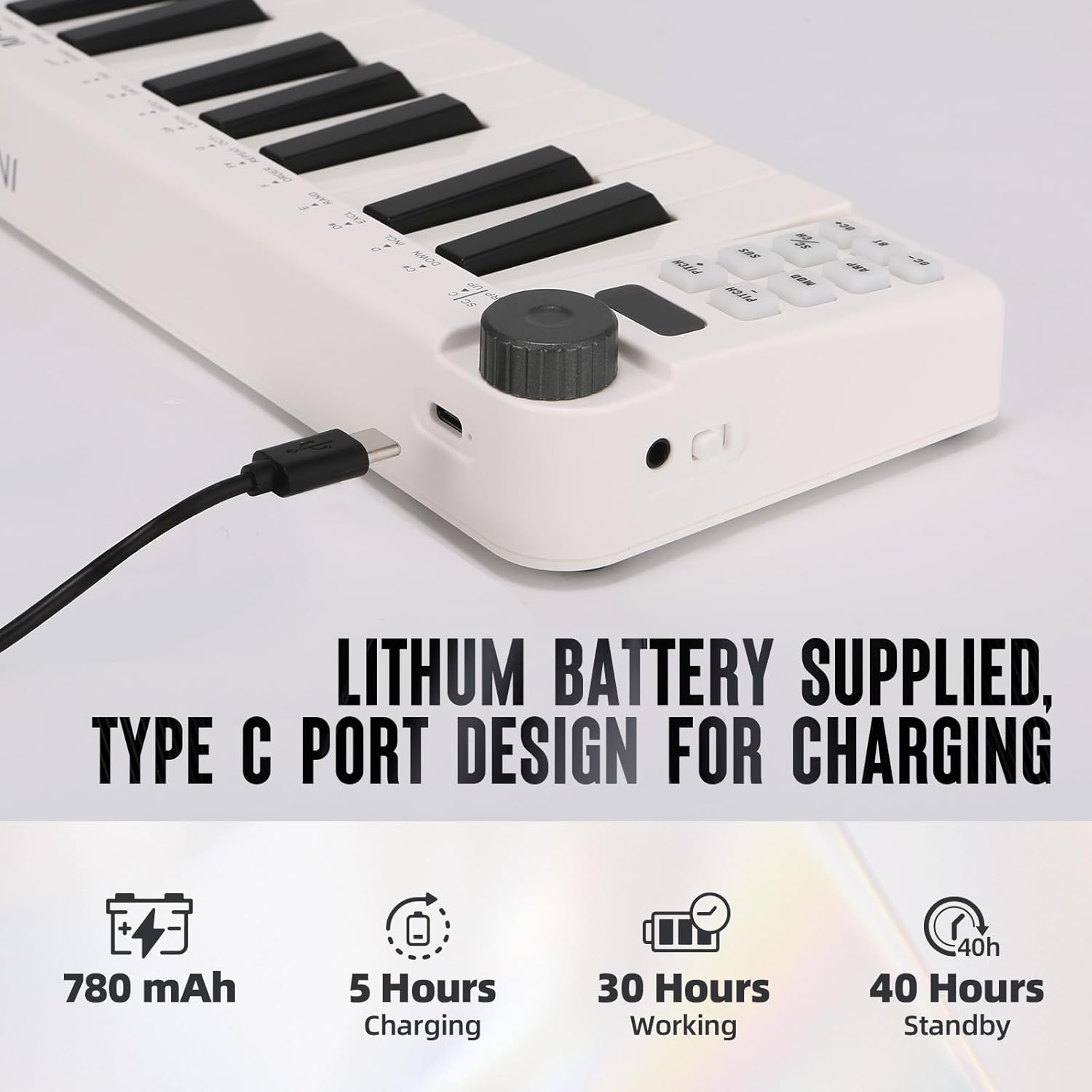
Image: Visual representation of the M-VAVE SMK-25 MINI's battery capacity, charging time, working time, and standby time.
ການຮັບປະກັນແລະການສະຫນັບສະຫນູນ
M-VAVE products are designed for reliability and performance. For warranty information, technical support, or service inquiries, please refer to the official M-VAVE website ຫຼືຕິດຕໍ່ສະຫນັບສະຫນູນລູກຄ້າຂອງເຂົາເຈົ້າໂດຍກົງ. ຮັກສາໃບຮັບເງິນການຊື້ຂອງທ່ານໄວ້ເປັນຫຼັກຖານການຊື້ສໍາລັບການຮ້ອງຂໍການຮັບປະກັນ.
M-VAVE aims to provide high-quality audio equipment and instruments. For assistance, their professional sales support team can address questions within 24 hours.
ຢ້ຽມຢາມ ຮ້ານ M-VAVE ໃນ Amazon ສໍາລັບຂໍ້ມູນເພີ່ມເຕີມ.