
ແນະນຳ
This manual provides essential information for the safe and efficient operation, installation, and maintenance of your new Carrier 1.5 Ton 5 Star Window Inverter Air Conditioner, Model ESTRELLA EXI 5 STAR. Please read this manual thoroughly before using the appliance and retain it for future reference.
Your Carrier air conditioner is designed to provide optimal cooling comfort with advanced features such as Flexicool inverter technology, a 5-star energy rating, and a durable copper condenser coil with Aqua Clear Protection.
ຂໍ້ມູນຄວາມປອດໄພທີ່ສໍາຄັນ
ປະຕິບັດຕາມຄວາມລະມັດລະວັງດ້ານຄວາມປອດໄພຂັ້ນພື້ນຖານສະເໝີເມື່ອໃຊ້ເຄື່ອງໃຊ້ໄຟຟ້າເພື່ອຫຼຸດຜ່ອນຄວາມສ່ຽງຕໍ່ການເກີດອັກຄີໄພ, ໄຟໄໝ້ ຫຼື ການບາດເຈັບ.
- ອ່ານຄໍາແນະນໍາທັງຫມົດກ່ອນທີ່ຈະໃຊ້ເຄື່ອງປັບອາກາດ.
- ໃຫ້ແນ່ໃຈວ່າການສະຫນອງພະລັງງານກົງກັບ voltage ລະບຸໄວ້ໃນປ້າຍການຈັດອັນດັບຂອງຫົວໜ່ວຍ.
- ຫ້າມໃຊ້ເຄື່ອງປັບອາກາດດ້ວຍສາຍໄຟ ຫຼືປລັກສຽບທີ່ເສຍຫາຍ.
- ຫ້າມໃສ່ນິ້ວມື ຫຼືສິ່ງຂອງເຂົ້າໄປໃນຊ່ອງສຽບຂອງອາກາດ.
- ໃຫ້ເດັກນ້ອຍຢູ່ຫ່າງຈາກຫນ່ວຍງານ.
- ຢ່າພະຍາຍາມສ້ອມແປງຫຼືດັດແປງເຄື່ອງດ້ວຍຕົນເອງ. ຕິດຕໍ່ພະນັກງານບໍລິການທີ່ມີຄຸນວຸດທິ.
- ຮັບປະກັນການຕໍ່ຫນ້າດິນທີ່ເຫມາະສົມເພື່ອປ້ອງກັນການຊ໊ອກໄຟຟ້າ.
- ປິດແຫຼ່ງຈ່າຍໄຟກ່ອນທຳຄວາມສະອາດ ຫຼື ບຳລຸງຮັກສາ.
ຄຸນສົມບັດຜະລິດຕະພັນ
Your Carrier ESTRELLA EXI 5 STAR Window Inverter Air Conditioner comes equipped with several advanced features for enhanced performance and comfort:
- Flexicool Inverter Technology: Variable speed compressor adjusts power based on heat load, offering Convertible 4-in-1 cooling and up to 50% energy savings.
- 100% Copper Condenser Coil: Ensures better cooling efficiency, durability, and low maintenance, protected by Aqua Clear Protection against rust and corrosion.
- ລະດັບພະລັງງານ 5 ດາວ: High energy efficiency for reduced electricity consumption.
- ການກັ່ນຕອງຂີ້ຝຸ່ນ: Helps in filtering out dust particles for cleaner air.
- Turbo Cool: Provides faster cooling when rapid temperature reduction is desired.
- Hydro Blue Coating: Enhances the lifespan of the unit and provides long-lasting comfort.
- Refrigerant Leakage Detector: Alerts you to potential refrigerant leaks.
- Auto Cleanser: Helps maintain the cleanliness of the indoor unit.
- ADC Sensor: Advanced sensor technology for precise temperature control.

ຮູບພາບ: ທາງຫນ້າ view of the Carrier ESTRELLA EXI 5 STAR Window Inverter Air Conditioner, showcasing the front grille and Carrier logo.

Image: Energy efficiency label (BEE 5 Star rating) for the Carrier Window AC, detailing ISEER and annual energy consumption.
ການຕິດຕັ້ງແລະການຕິດຕັ້ງ
Proper installation is crucial for the optimal performance and longevity of your air conditioner. It is highly recommended to have the unit installed by a qualified technician.
ການກວດສອບກ່ອນການຕິດຕັ້ງ:
- ຄວາມເຂົ້າກັນໄດ້ຂອງປ່ອງຢ້ຽມ: Ensure your window opening meets the minimum height (32 cm) and width (96 cm) requirements for the unit.
- ການສະຫນອງພະລັງງານ: Verify that a dedicated 230V AC power outlet with proper grounding is available near the installation site.
- ສະຫນັບສະຫນູນໂຄງສ້າງ: The window frame and surrounding structure must be strong enough to support the unit's weight (approximately 37 kg).
- ການລະບາຍນໍ້າ: Ensure there is a slight tilt to the unit after installation to allow for proper condensate drainage.
General Installation Steps (for qualified technicians):
- ກະກຽມຊ່ອງເປີດປ່ອງຢ້ຽມ, ຮັບປະກັນວ່າມັນສະອາດ ແລະ ບໍ່ມີສິ່ງກີດຂວາງ.
- Carefully lift and place the air conditioner into the window opening.
- Secure the unit firmly using mounting brackets and screws provided, ensuring it is level or slightly tilted outwards for drainage.
- Seal any gaps around the unit with weatherstripping or insulation to prevent air leakage.
- ເຊື່ອມຕໍ່ສາຍໄຟເຂົ້າກັບປລັກໄຟຟ້າທີ່ມີສາຍດິນ.
- Perform a test run to ensure all functions are operating correctly and there are no unusual noises or vibrations.
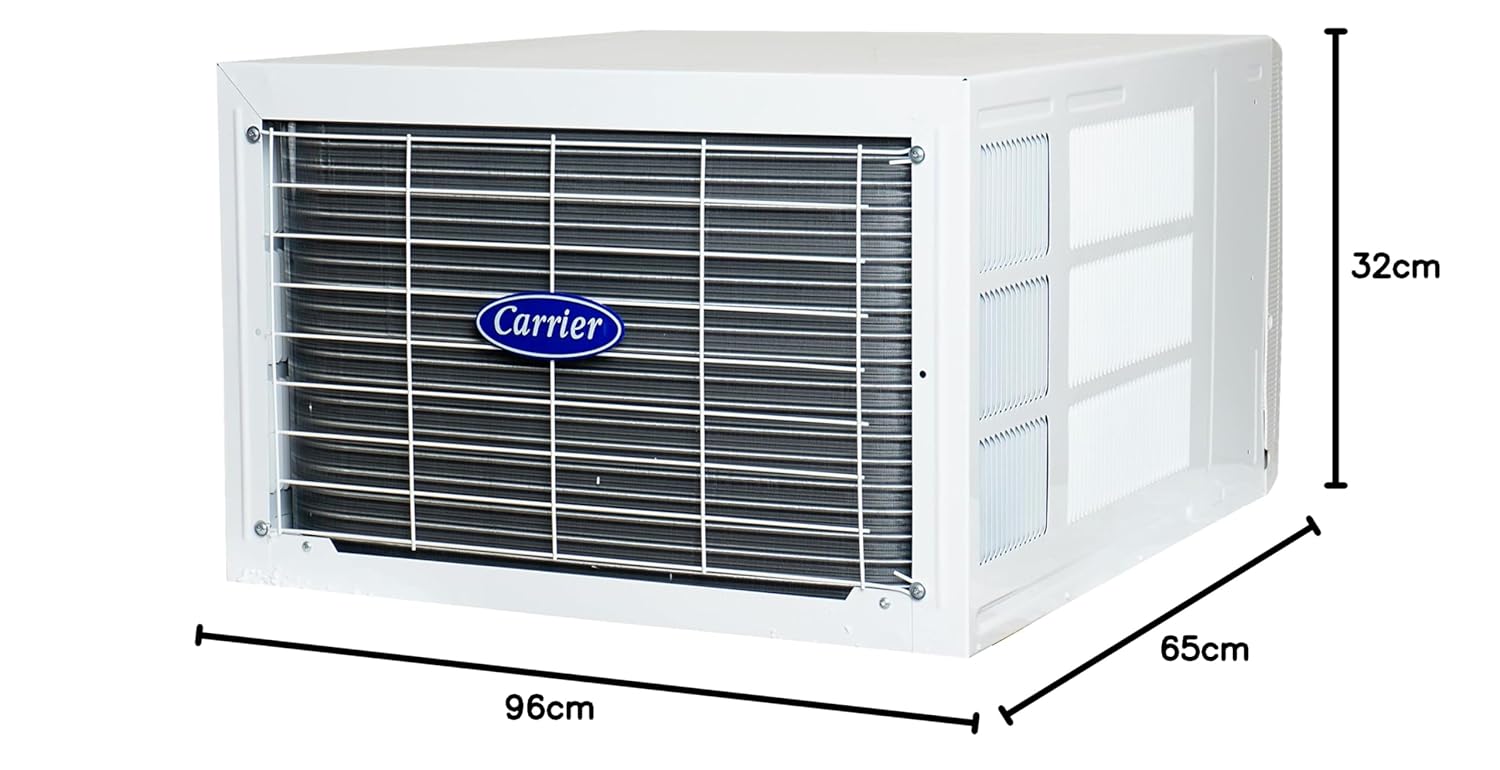
Image: Diagram showing the dimensions of the Carrier Window Inverter Air Conditioner: 96cm (width), 65cm (depth), 32cm (height).

Image: A Carrier Window AC unit shown installed in a window, illustrating its placement.
ຄໍາແນະນໍາການດໍາເນີນງານ
Your air conditioner can be operated using the control panel on the unit or the provided remote control.
ກະດານຄວບຄຸມ:

Image: Close-up of the control panel on the Carrier Window AC, showing buttons for mode, fan speed, turbo, power, swing, sleep, timer, and temperature adjustment.
The control panel provides direct access to basic functions. Refer to the labels next to each button for specific operations.
ການຄວບຄຸມໄລຍະໄກ:

Image: The remote control for the Carrier Window Inverter Air Conditioner, featuring buttons for power, mode, fan speed, temperature, swing, sleep, timer, and turbo cool.
The remote control offers full functionality and convenience. Ensure batteries are correctly inserted.
ການດໍາເນີນງານພື້ນຖານ:
- ເປີດ/ປິດ: ກົດ ພະລັງງານ ປຸ່ມເພື່ອເປີດຫຼືປິດເຄື່ອງ.
- ການເລືອກໂໝດ: ກົດ ໂໝດ button to cycle through modes: Cool, Dry, Fan.
- ແບບເຢັນ: ສໍາລັບການເຮັດຄວາມເຢັນຫ້ອງ. ປັບອຸນຫະພູມໂດຍໃຊ້ TEMP/TIME ປຸ່ມ.
- ແບບແຫ້ງແລ້ງ: ສຳລັບການຫຼຸດຄວາມຊຸ່ມ.
- ແບບພັດລົມ: ໄຫຼວຽນຂອງອາກາດໂດຍບໍ່ມີການເຢັນ.
- ການປັບອຸນຫະພູມ: ໃຊ້ TEMP/TIME ລູກສອນຂຶ້ນ / ລົງເພື່ອກໍານົດອຸນຫະພູມທີ່ທ່ານຕ້ອງການ.
- ຄວາມໄວພັດລົມ: ກົດ ຄວາມໄວຂອງພັດລົມ button to select fan speed (Low, Medium, High, Auto).
- ໂໝດ Turbo: ກົດ TURBO ເຢັນ for rapid cooling.
- ຟັງຊັນ Swing: ກົດ ແກວ່ງ to activate or deactivate the automatic air swing.
- ຮູບແບບການນອນ: ກົດ ນອນ for comfortable sleeping conditions with gradual temperature adjustments.
- ຟັງຊັນຈັບເວລາ: ໃຊ້ ເວລາເປີດ/ປິດ buttons to set a specific time for the unit to turn on or off.
ບໍາລຸງຮັກສາ
Regular maintenance ensures efficient operation and extends the lifespan of your air conditioner. Always disconnect power before performing any maintenance.
ການເຮັດຄວາມສະອາດການກັ່ນຕອງອາກາດ:
- ປິດເຄື່ອງປັບອາກາດແລະຕັດການເຊື່ອມຕໍ່ຈາກການສະຫນອງພະລັງງານ.
- ເປີດແຜງດ້ານຫນ້າຂອງຫນ່ວຍງານ.
- Carefully remove the dust filter(s).
- Clean the filter(s) using a vacuum cleaner or wash them with lukewarm water and a mild detergent.
- Rinse thoroughly and allow the filter(s) to dry completely in a shaded area before re-installing.
- Close the front panel and restore power.
ຄວາມຖີ່: ທຳຄວາມສະອາດຕົວກອງອາກາດທຸກໆສອງອາທິດ ຫຼື ເລື້ອຍໆກວ່ານັ້ນ ຖ້າເຄື່ອງນີ້ຖືກນຳໃຊ້ໃນສະພາບແວດລ້ອມທີ່ມີຝຸ່ນຫຼາຍ.
ທໍາຄວາມສະອາດທົ່ວໄປ:
- ເຊັດດ້ານນອກຂອງຫນ່ວຍງານດ້ວຍຄວາມອ່ອນໂຍນ, ງamp ຜ້າ. ຢ່າໃຊ້ສານເຄມີທີ່ຮຸນແຮງຫຼືເຄື່ອງເຮັດຄວາມສະອາດຂັດ.
- Ensure the drainage pan and hose are clear of obstructions to prevent water leakage.
- Periodically check the condenser coils at the back of the unit for dirt and debris. If heavily soiled, professional cleaning may be required.
ໝາຍເຫດ: For internal cleaning or any complex maintenance, contact authorized Carrier service personnel.
ການແກ້ໄຂບັນຫາ
ກ່ອນທີ່ຈະຕິດຕໍ່ບໍລິການ, ເບິ່ງຕາຕະລາງຕໍ່ໄປນີ້ສໍາລັບບັນຫາທົ່ວໄປແລະການແກ້ໄຂຂອງພວກເຂົາ.
| ບັນຫາ | ສາເຫດທີ່ເປັນໄປໄດ້ | ການແກ້ໄຂ |
|---|---|---|
| ຫນ່ວຍງານບໍ່ເລີ່ມຕົ້ນ | No power supply; Power cord unplugged; Blown fuse/tripped breaker; Remote control batteries dead. | Check power connection; Plug in power cord; Reset breaker/replace fuse; Replace remote control batteries. |
| ຄວາມເຢັນບໍ່ພຽງພໍ | Dirty air filter; Blocked air intake/outlet; Room too large; Doors/windows open; Temperature setting too high. | Clean air filter; Clear obstructions; Ensure room size is appropriate; Close doors/windows; Lower temperature setting. |
| ນ້ໍາຮົ່ວ | Unit not tilted correctly for drainage; Drain pan/hose blocked. | Adjust unit tilt; Clear drain pan/hose. |
| ສຽງຜິດປົກກະຕິ | Loose parts; Unit not installed securely; Fan obstruction. | Check for loose parts; Ensure secure installation; Remove any fan obstructions. |
| ການຄວບຄຸມໄລຍະໄກບໍ່ເຮັດວຽກ | ແບັດເຕີຣີໝົດ ຫຼື ໃສ່ບໍ່ຖືກຕ້ອງ; ມີສິ່ງກີດຂວາງລະຫວ່າງຣີໂໝດ ແລະ ເຄື່ອງ. | ປ່ຽນແບັດເຕີຣີ; ຮັບປະກັນຂົ້ວທີ່ຖືກຕ້ອງ; ເອົາສິ່ງກີດຂວາງອອກ. |
If the problem persists after attempting these solutions, please contact Carrier customer support.
ຂໍ້ມູນຈໍາເພາະ
Detailed technical specifications for the Carrier ESTRELLA EXI 5 STAR Window Inverter Air Conditioner:
- ຍີ່ຫໍ້: ຜູ້ໃຫ້ບໍລິການ
- ຊື່ຕົວແບບ: ESTRELLA EXI 5 STAR
- ຄວາມອາດສາມາດ: 1.5 ໂຕນ
- ພະລັງງານເຮັດຄວາມເຢັນ: 18000 ໜ່ວຍຄວາມຮ້ອນຂອງອັງກິດ
- BEE Star Rating: 5 ດາວ
- ອັດຕາສ່ວນປະສິດທິພາບພະລັງງານຕາມລະດູການ (SEER): 3.85
- ການບໍລິໂພກພະລັງງານປະຈໍາປີ: 620 ກິໂລວັດ
- ຂະໜາດສິນຄ້າ (D x W x H): 65D x 96W x 32H ຊມ
- ນ້ໍາຫນັກລາຍການ: 37000 ກຣາມ (37 ກິໂລ)
- ສີ: ສີຂາວ
- ລະດັບສຽງລົບກວນ: 48 Decibels
- ຕູ້ເຢັນ: R-32
- ປະເພດ Inverter: Has Inverter
- ປະເພດການຕິດຕັ້ງ: ປ່ອງຢ້ຽມ
- ປະເພດເຄື່ອງອັດ: ມ້ວນໝຸນ
- ສະບັບtage: 230 ໂວນ (AC)
- ວິທີການຄວບຄຸມ: ການຄວບຄຸມໄລຍະໄກ
- ຄຸນນະສົມບັດພິເສດ: Dust Filter, Flexicool Inverter Compressor, Convertible 4-in-1 cooling, HD Filter, Turbo Cool, Hydro Blue Coating, Refrigerant Leakage Detector, Auto Cleanser, ADC Sensor.
ການຮັບປະກັນແລະການສະຫນັບສະຫນູນ
ຂໍ້ມູນການຮັບປະກັນ:
Your Carrier air conditioner comes with the following warranty:
- 1 ປີຮັບປະກັນຜູ້ຜະລິດ on the entire unit.
- 5 Years Warranty on PCB (Printed Circuit Board).
- 10 Years Warranty on Compressor.
Additionally, you are entitled to 2 Free Preventive Maintenance Services during the warranty period. Please retain your purchase receipt for warranty claims.
ການຊ່ວຍເຫຼືອລູກຄ້າ:
For any service requests, technical assistance, or warranty claims, please contact Carrier customer care:
- ໝາຍເລກການດູແລລູກຄ້າ: 18001033333
- ທີ່ຢູ່ຜູ້ຜະລິດ: Carrier Midea India Pvt. Ltd., 1st Floor, Pearl Tower, Plot no. 51, Sector-32, Gurgaon-122001
You can also visit the official Carrier webເວັບໄຊທ໌ສໍາລັບຂໍ້ມູນເພີ່ມເຕີມແລະຊັບພະຍາກອນສະຫນັບສະຫນູນ.