1. ບົດແນະນຳ
This manual provides detailed instructions for the setup, operation, and maintenance of your Cheerlux C50 Projector. Please read this manual thoroughly before using the product to ensure proper function and to prevent damage.
The Cheerlux C50 is a high-performance projector featuring Android 9.0, Wi-Fi 5.0G, Bluetooth 5.1, autofocus, and 4P keystone correction. It offers a brightness of 4000 Lumens and a contrast ratio of 2500:1, delivering a full HD 1920x1080 resolution display.
2. ຂໍ້ມູນຄວາມປອດໄພ
- Do not block the ventilation openings of the projector. Ensure adequate space around the device for proper airflow.
- ຫຼີກເວັ້ນການເບິ່ງໂດຍກົງໃນເລນໂປເຈັກເຕີໃນເວລາທີ່ lamp ເປີດຢູ່, ເນື່ອງຈາກແສງສະຫວ່າງສາມາດເຮັດໃຫ້ເກີດຄວາມເສຍຫາຍຕໍ່ຕາ.
- Do not place the projector on unstable surfaces.
- ຮັກສາໂປເຈັກເຕີໃຫ້ຫ່າງຈາກນ້ໍາ, ຄວາມຊຸ່ມຊື່ນ, ແລະອຸນຫະພູມທີ່ຮຸນແຮງ.
- ໃຊ້ພຽງແຕ່ອະແດັບເຕີໄຟທີ່ສະໜອງໃຫ້ກັບໂປເຈັກເຕີເທົ່ານັ້ນ.
- ຢ່າພະຍາຍາມຖອດປະກອບ ຫຼື ສ້ອມແປງໂປເຈັກເຕີດ້ວຍຕົວທ່ານເອງ. ຕິດຕໍ່ພະນັກງານບໍລິການທີ່ມີຄຸນວຸດທິເພື່ອຂໍຄວາມຊ່ວຍເຫຼືອ.
- ຮັກສາໃຫ້ໄກຈາກເດັກນ້ອຍ.
3. ເນື້ອໃນຊຸດ
ກວດສອບວ່າລາຍການທັງຫມົດແມ່ນມີຢູ່ໃນຊຸດ:
- ໂປເຈັກເຕີ Cheerlux C50
- ການຄວບຄຸມໄລຍະໄກ
- ປັPowerກໄຟຟ້າ
- ສາຍສັນຍານ AV
- ຄູ່ມືຜູ້ໃຊ້ (ເອກະສານນີ້)
- Support Base (1x)
- ເຄື່ອງເຮັດຄວາມສະອາດເລນ
- ສາຍ VGA
- ຊຸດທຳຄວາມສະອາດ
4. ຜະລິດຕະພັນເກີນview
ເຮັດຄວາມຄຸ້ນເຄີຍກັບອົງປະກອບ ແລະພອດຂອງໂປເຈັກເຕີ.
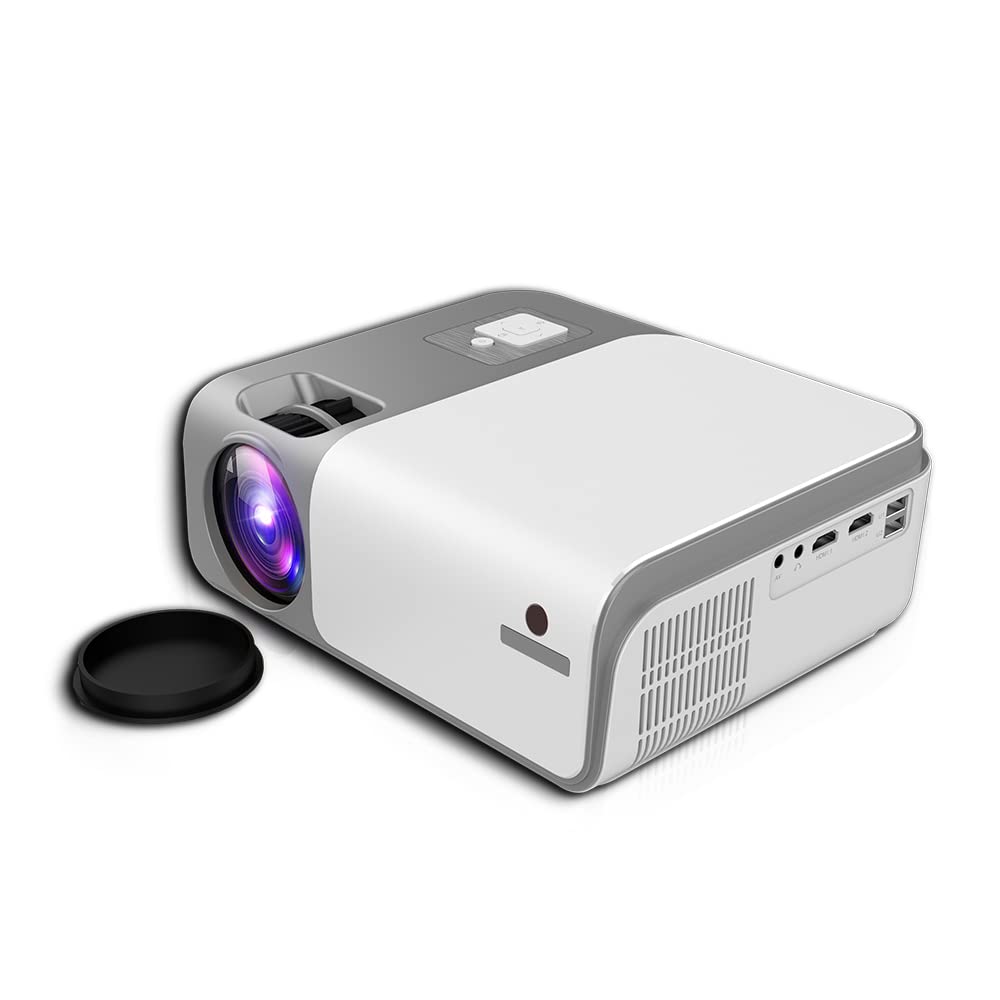
ຮູບທີ 4.1: ດ້ານໜ້າ ແລະ ຂ້າງ view of the Cheerlux C50 Projector. This image shows the projector's lens, ventilation grilles, and various input ports on the side, including USB and HDMI.

ຮູບທີ 4.2: The Cheerlux C50 Projector demonstrating screen mirroring with a smartphone. A wireless signal icon indicates the mirroring function, allowing content from a mobile device to be displayed on the projector.
ຜອດຂາເຂົ້າ/ອອກ:
- 2x USB Sockets: ສຳລັບເຊື່ອມຕໍ່ໄດຣຟ໌ USB ຫຼືອຸປະກອນ USB ອື່ນໆ.
- 2x HDMI Sockets: For connecting HDMI-enabled devices like laptops, gaming consoles, or media players.
- 1x Composite AV Socket: For connecting older devices using AV cables.
- ເຕົ້າຮັບຫູຟັງ: ສຳລັບການເຊື່ອມຕໍ່ອຸປະກອນສຽງພາຍນອກ ຫຼື ຫູຟັງ.
5. ຕັ້ງຄ່າ
5.1 ການຈັດວາງ
Position the projector on a stable, flat surface or mount it securely. Ensure the projector lens is perpendicular to the projection surface for optimal image quality.
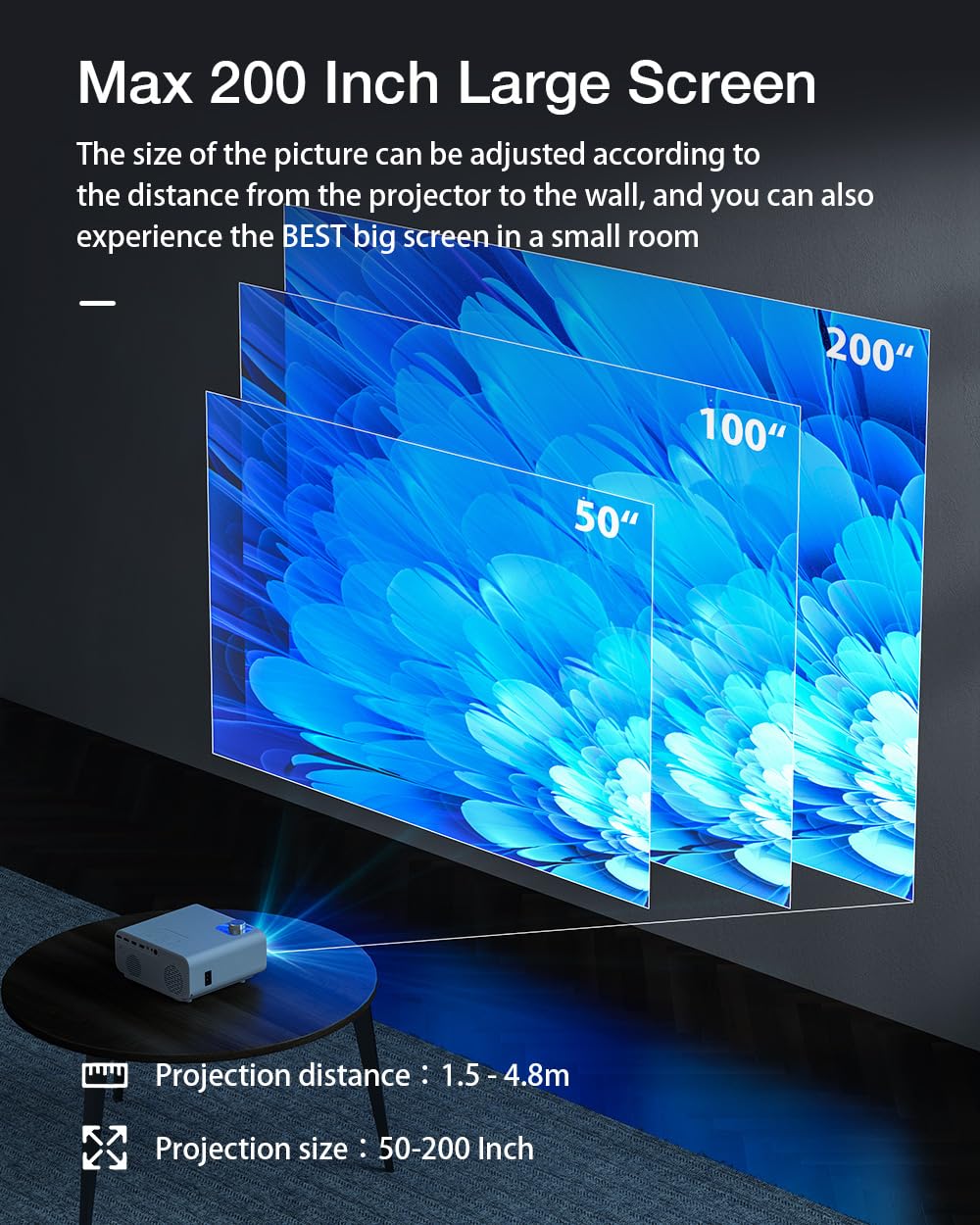
ຮູບທີ 5.1: Projection distance and screen size guide. The projector can achieve a screen size of 50 to 200 inches with a projection distance ranging from 1 to 8 meters (approximately 3.3 to 26.2 feet).
- ໄລຍະການຄາດຄະເນ: 1 - 8 meters (3.3 - 26.2 feet)
- ຂະໜາດຮູບທີ່ຄາດໄວ້: 50 - 200 ນິ້ວ
- ອັດຕາສ່ວນ: 16:9
5.2 ການເຊື່ອມຕໍ່ພະລັງງານ
- ເຊື່ອມຕໍ່ສາຍໄຟເຂົ້າກັບພອດປ້ອນຂໍ້ມູນພະລັງງານຂອງໂປເຈັກເຕີ.
- ສຽບປາຍອື່ນໆຂອງສາຍໄຟເຂົ້າໄປໃນປ່ຽງໄຟຟ້າທີ່ເຫມາະສົມ.
- ດອກໄຟຊີ້ບອກພະລັງງານຢູ່ໃນໂປເຈັກເຕີຄວນສະຫວ່າງ.
5.3 ຈຸດສຸມແລະການແກ້ໄຂ Keystone
- ໂຟກັສອັດຕະໂນມັດ: The Cheerlux C50 features an autofocus function. The projector will automatically adjust the image clarity upon startup or movement.
- 4P Keystone Correction: If the projected image appears distorted (trapezoidal), use the 4P keystone correction feature to adjust each corner of the image independently until it forms a perfect rectangle. This is particularly useful when the projector is not perfectly aligned with the screen. Refer to the on-screen menu for keystone adjustment options.
6. ຄໍາແນະນໍາການດໍາເນີນງານ
6.1 ເປີດ/ປິດ
- ເປີດ: Press the power button on the projector or the remote control. The projector will start up and display the Android 9.0 home screen.
- ປິດພະລັງງານ: Press the power button again. A shutdown confirmation prompt may appear. Select "Power Off" to safely shut down the projector.
ລະບົບປະຕິບັດການ Android 6.2 9.0
The Cheerlux C50 Projector runs on Android 9.0, providing access to a smart interface and various applications.

ຮູບທີ 6.1: The Android 9.0 operating system interface on the Cheerlux C50 Projector. The screen shows various streaming and social media application icons, indicating smart functionality.
- ການນໍາທາງ: Use the remote control to navigate through the Android interface.
- ແອັບພລິເຄຊັນ: Access pre-installed applications or download new ones from the app store (if available) to watch videos, browse the internet, and more.
- ການຕັ້ງຄ່າ: Adjust system settings, network connections, display options, and other preferences through the settings menu.
6.3 ການສະທ້ອນໜ້າຈໍ
The projector supports screen mirroring from compatible smartphones and tablets.
- Ensure both your mobile device and the projector are connected to the same Wi-Fi network.
- On the projector's Android interface, select the "Mirroring" or "Screen Share" application.
- On your mobile device, activate its screen mirroring feature (e.g., "Smart View"ໃນ Samsung, "Screen Cast" ໃນ Android, "AirPlay" ໃນ iOS).
- Select the projector's name from the list of available devices on your mobile device.
- The mobile device's screen content will now be displayed on the projector.
7. ການເຊື່ອມຕໍ່
7.1 ການເຊື່ອມຕໍ່ Wi-Fi
Connect the projector to a wireless network to access online content and enable screen mirroring.
- Go to the projector's "Settings" menu.
- Select "Network & Internet" or "Wi-Fi".
- ເປີດ Wi-Fi ແລະເລືອກເຄືອຂ່າຍທີ່ທ່ານຕ້ອງການຈາກລາຍຊື່.
- Enter the Wi-Fi password if prompted and connect.
7.2 ການເຊື່ອມຕໍ່ Bluetooth
Connect Bluetooth speakers, headphones, or other compatible devices for audio output.
- Go to the projector's "Settings" menu.
- Select "Connected Devices" or "Bluetooth".
- Turn on Bluetooth and put your Bluetooth device into pairing mode.
- Select your device from the list of available devices on the projector and pair.
7.3 Wired Connections (HDMI, USB, AV)
- HDMI: Connect an HDMI cable from your source device (e.g., laptop, gaming console) to one of the projector's HDMI ports. Select the corresponding HDMI input source from the projector's input menu.
- USB: Insert a USB flash drive or external hard drive into a USB port. The projector's media player will typically detect the device, allowing you to browse and play media files.
- ຂອງ: Connect an AV cable from your source device to the projector's AV input. Select the AV input source from the projector's input menu.
8. ບໍາລຸງຮັກສາ
- ການອະນາໄມເລນ: Use the provided lens cleaning cloth or a soft, lint-free cloth to gently wipe the projector lens. Do not use abrasive cleaners or solvents.
- ການກຳຈັດຂີ້ຝຸ່ນ: Regularly clean the projector's ventilation openings with a soft brush or compressed air to prevent dust buildup, which can affect performance and lifespan.
- ການເກັບຮັກສາ: ເມື່ອບໍ່ໄດ້ໃຊ້ງານເປັນເວລາດົນ, ໃຫ້ເກັບຮັກສາໂປເຈັກເຕີໄວ້ໃນບ່ອນທີ່ເຢັນ, ແຫ້ງ, ປ້ອງກັນຝຸ່ນ ແລະ ແສງແດດໂດຍກົງ.
9. ການແກ້ໄຂບັນຫາ
- ບໍ່ມີພະລັງງານ:
- Ensure the power cable is securely connected to both the projector and a working power outlet. Check if the power indicator light is on.
- ບໍ່ມີຮູບພາບ:
- Verify that the correct input source (HDMI, AV, USB) is selected. Check cable connections. Ensure the lens cap is removed.
- ຮູບມົວ:
- Allow the autofocus to adjust. If still blurry, manually adjust focus if an option is available, or ensure the projector is within the recommended projection distance.
- ຮູບພາບບິດເບືອນ (ຮູບຊົງຄາງກະໄຕ):
- Use the 4P keystone correction feature in the projector's settings menu to adjust the image corners.
- ບໍ່ມີສຽງ:
- Check the volume settings on both the projector and the source device. Ensure external speakers or headphones are properly connected if used. Verify that the correct audio output is selected in settings.
- ບັນຫາການສະທ້ອນໜ້າຈໍ:
- Ensure both devices are on the same Wi-Fi network. Restart both the projector and the mobile device. Check for compatibility issues with your mobile device's mirroring protocol.
10. ຂໍ້ມູນຈໍາເພາະ
| ຍີ່ຫໍ້ | ທົ່ວໄປ |
| ຊື່ຕົວແບບ | Cheerlux C50 |
| ລະບົບປະຕິບັດການ | Android 9.0 |
| ຄວາມສະຫວ່າງ | 4000 Lumens |
| ອັດຕາສ່ວນກົງກັນຂ້າມ | 2500:1 |
| ຄວາມລະອຽດເດີມ | 1920 x 1080 ພິກເຊລ (Full HD) |
| ປະເພດການສະແດງ | LED |
| ອັດຕາສ່ວນ | 16:9 |
| ໄລຍະການຄາດຄະເນ | 1 - 8 ແມັດ |
| Projected Image Size | 50 - 200 ນິ້ວ |
| ເຕັກໂນໂລຊີການເຊື່ອມຕໍ່ | Wi-Fi 5.0G, Bluetooth 5.1 |
| ການໂຕ້ຕອບຮາດແວ | 2x HDMI, 2x USB, 1x Composite AV, Headphone Socket |
| ຄຸນນະສົມບັດພິເສດ | Autofocus, 4P Keystone Correction, Screen Mirroring, Built-In Wi-Fi |
| ອຸປະກອນທີ່ເຂົ້າກັນໄດ້ | Gaming Console, Smartphone, Laptop, TV, Speakers |
| ຂະໜາດສິນຄ້າ | 260 x 210 x 102 ມມ (21 x 26 x 10 ຊຕມ) |
| ນ້ໍາຫນັກລາຍການ | 1 ກິໂລ |
| ວັດtage | 150 ວັດ |
| ອັດຕາການໂຫຼດຂໍ້ມູນຄືນໃໝ່ | 480 MHz |
11. ການຮັບປະກັນແລະການສະຫນັບສະຫນູນ
ສໍາລັບຂໍ້ມູນການຮັບປະກັນແລະການສະຫນັບສະຫນູນດ້ານວິຊາການ, ກະລຸນາເບິ່ງເອກະສານທີ່ສະຫນອງໃຫ້ໃນເວລາຊື້ຫຼືຕິດຕໍ່ຮ້ານຂາຍຍ່ອຍຂອງທ່ານ. ຮັກສາຫຼັກຖານການຊື້ຂອງທ່ານສໍາລັບການຮຽກຮ້ອງການຮັບປະກັນໃດໆ.