
1. ບົດແນະນຳ
The Getac K120 is a rugged 2-in-1 laptop designed for demanding environments. It combines the versatility of a tablet with the performance of a laptop, featuring a 12.5-inch Full HD touchscreen, an Intel Core i5-8250U processor, 16GB of RAM, and a 512GB SSD. This device operates on Windows 11 Pro and is built to withstand challenging conditions, making it suitable for various professional applications.
2. ຄຸນນະສົມບັດທີ່ສໍາຄັນ
- ການອອກແບບ Rugged: Built to MIL-STD 810G standards, capable of withstanding 6-foot drops, and features IP65 ingress protection against dust and water.
- 2-in-1 versatility: Functions as both a laptop with a detachable full-size backlit keyboard and a standalone tablet.
- ປະສິດທິພາບສູງ: Powered by an Intel Core i5-8250U processor, 16GB DDR4 RAM, and a 512GB SSD for fast boot-up and efficient multitasking.
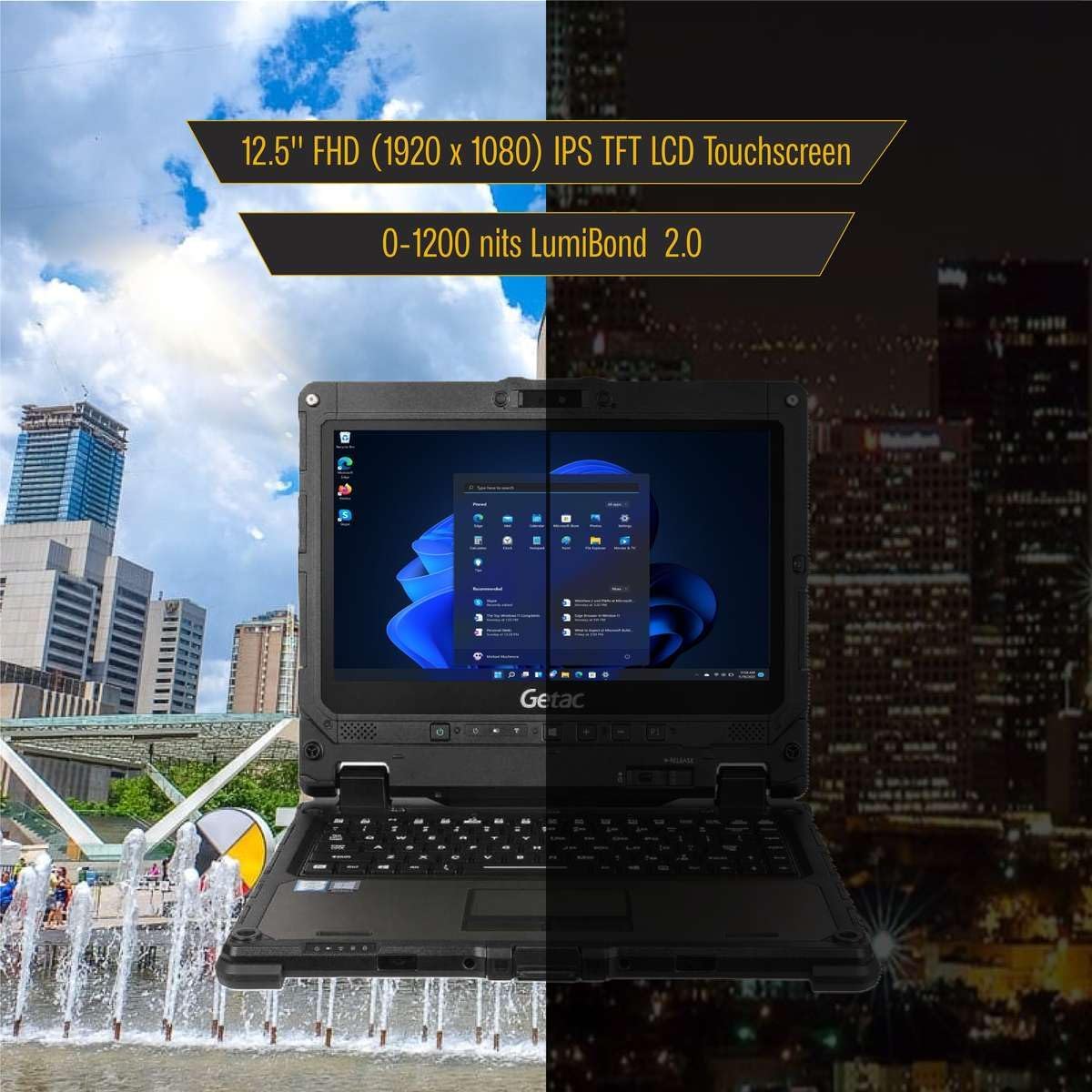
- ຈໍສະແດງຜົນທີ່ສົດໃສ: 12.5-inch Full HD (1920x1080) touchscreen with LumiBond 2.0 technology, supporting wet touch and glove operation.
- ລະບົບປະຕິບັດການ: Pre-installed with Windows 11 Pro 64-bit, offering enhanced security and management features with multi-language support.
- Integrated Cameras: Equipped with a 2MP front camera and an 8MP rear camera with LED flash.
- ແບດເຕີຣີສອງ: Features two Li-Ion batteries, supporting hot-swappable functionality for extended operation.


3. ຕັ້ງຄ່າ
- ການຫຸ້ມຫໍ່: Carefully remove the Getac K120 and all accessories from the packaging.
- ຄ່າ ທຳ ນຽມ: Connect the power adapter to the DC-in jack on either the tablet or the keyboard base and plug it into a power outlet. Allow the device to charge fully before first use.
- ເປີດ: ກົດປຸ່ມເປີດປິດເພື່ອເປີດອຸປະກອນ.
- ການຕິດຕັ້ງ Windows: ປະຕິບັດຕາມຄໍາແນະນໍາໃນຫນ້າຈໍເພື່ອເຮັດສໍາເລັດການຕິດຕັ້ງ Windows 11 Pro, ລວມທັງການເລືອກພາສາ, ການເຊື່ອມຕໍ່ເຄືອຂ່າຍ, ແລະການສ້າງບັນຊີຜູ້ໃຊ້.
- Keyboard Attachment (Optional): To use in laptop mode, align the tablet with the keyboard base and gently press until it clicks securely into place. Ensure the release button is engaged.
4. ຄໍາແນະນໍາການດໍາເນີນງານ
4.1. ຮູບແບບແທັບເລັດ
- Detaching the Tablet: Press the release button located on the keyboard base to separate the tablet from the keyboard.
- ການນຳທາງໜ້າຈໍສຳຜັດ: Use your finger or a compatible stylus for navigation, tapping, swiping, and pinch-to-zoom gestures. The display supports wet touch and glove input.
- ແປ້ນພິມໃນໜ້າຈໍ: When in tablet mode, the on-screen keyboard will automatically appear when text input is required.
4.2. Laptop Mode
- ຕິດແປ້ນພິມ: Align the tablet with the keyboard base and press firmly until it locks.
- ແປ້ນພິມ ແລະ Touchpad: Use the physical keyboard for typing and the integrated touchpad for cursor control. The keyboard is backlit for low-light conditions.
4.3. ການຄຸ້ມຄອງພະລັງງານ
- ຊີວິດຫມໍ້ໄຟ: The device features two Li-Ion batteries. Monitor battery levels through the Windows taskbar.
- Hot-Swappable Batteries: Batteries can be replaced without powering down the device, ensuring continuous operation.
- Sleep/Hibernate: Use Windows power settings to configure sleep or hibernate modes to conserve battery life.

5. ພອດແລະການເຊື່ອມຕໍ່
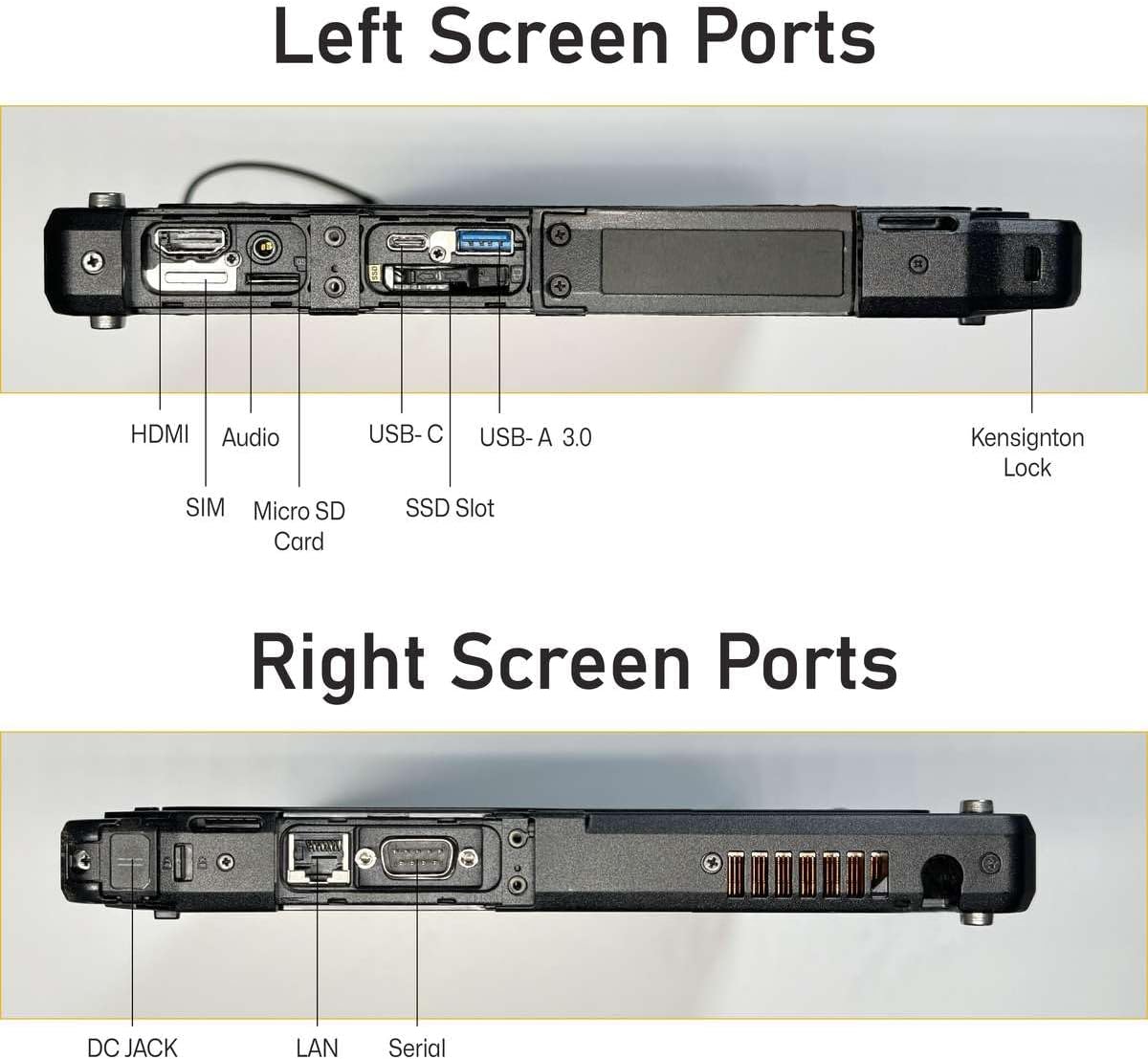
5.1. Tablet Ports
- DC in Jack x 1
- USB 3.0 x 1
- USB 3.1 Gen 1 Type-C x 1
- LAN (RJ-45) x 1
- HDMIx1
- MicroSD slot x 1
- ຕົວເຊື່ອມຕໍ່ບ່ອນຈອດ x 2
- Headphone out / mic-in combo x 1
- Serial Port
- 4G LTE (EM7511)
5.2. Keyboard Ports
- DC in Jack x 1
- USB 3.0 x 3
- LAN (RJ-45) x 1
- HDMIx1
- Serial port (9-pin; D-sub) x 1
- SDXC slot x 1
- VGA x 1

6. ຄຸນສົມບັດທາງເລືອກ
The Getac K120 offers various configurable options to enhance functionality:
- Barcode Reader (BCR)
- Second USB 2.0 port
- True Serial port
- Smart Card Reader (SCR)
- Contactless Smart Card Reader (Contactless SCR)
- Fingerprint Reader (FPR)
- ເຄືອຂ່າຍ Wide Area Network (WWAN)
- ລະບົບກຳນົດຕຳແໜ່ງທົ່ວໂລກ (GPS)
These options are typically configured at the time of purchase and may vary by model or region.
7. ບໍາລຸງຮັກສາ
- ທໍາຄວາມສະອາດ: ໃຊ້ອ່ອນ, ງamp cloth to clean the screen and exterior. Avoid harsh chemicals or abrasive materials. Ensure all port covers are securely closed before cleaning with liquids.
- ການດູແລຫມໍ້ໄຟ: For optimal battery longevity, avoid extreme temperatures. If storing the device for an extended period, ensure batteries are charged to approximately 50%.
- ອັບເດດຊອບແວ: Regularly check for and install Windows updates and driver updates to maintain performance and security.
- ການປົກປ້ອງສິ່ງແວດລ້ອມ: While rugged, avoid intentionally exposing the device to extreme conditions beyond its specified ratings (MIL-STD 810G, IP65). Ensure all port covers are sealed when operating in dusty or wet environments.
8. ການແກ້ໄຂບັນຫາ
- ອຸປະກອນບໍ່ເປີດ: ໃຫ້ແນ່ໃຈວ່າອຸປະກອນສາກໄຟແລ້ວ. ເຊື່ອມຕໍ່ອະແດບເຕີໄຟຟ້າ ແລະລໍຖ້າສອງສາມນາທີກ່ອນທີ່ຈະພະຍາຍາມເປີດເຄື່ອງອີກຄັ້ງ.
- ໜ້າຈໍສໍາຜັດບໍ່ຕອບສະໜອງ: Restart the device. If the issue persists, check for driver updates. Ensure the screen is clean and free of debris.
- Connectivity Issues (Wi-Fi/4G LTE): Verify that Wi-Fi or 4G LTE is enabled in Windows settings. Check network signal strength. For 4G LTE, ensure a valid SIM card is inserted and activated.
- ແປ້ນພິມບໍ່ຕອບສະໜອງ: Ensure the tablet is securely docked to the keyboard base. Restart the device.
- ປະສິດທິພາບຊ້າ: Close unnecessary applications. Check for available Windows updates. Ensure sufficient free space on the SSD.
9. ຂໍ້ມູນຈໍາເພາະ
| ຄຸນສົມບັດ | ຂໍ້ມູນຈໍາເພາະ |
|---|---|
| ຂະຫນາດຈໍສະແດງຜົນຢືນ | 12.5 ນິ້ວ |
| ຄວາມລະອຽດໜ້າຈໍ | 1920 x 1080 ພິກເຊລ (FHD) |
| ໂຮງງານຜະລິດ | Intel Core i5-8250U (1.6 GHz to 3.40 GHz) |
| RAM | 16 GB DDR4 |
| ຮາດດິດ | SSD 512 GB |
| Graphics Coprocessor | Intel HD Graphics 520 |
| ລະບົບປະຕິບັດການ | Windows 11 Pro |
| ນ້ໍາຫນັກລາຍການ | 9.28 ປອນ |
| ຂະໜາດສິນຄ້າ | 12 x 1 x 8 ນິ້ວ |
| ສີ | ດຳ |
| ຄຸນນະສົມບັດພິເສດ | ການຮົ່ວໄຫຼທົນທານຕໍ່ |
10. ການຮັບປະກັນແລະການສະຫນັບສະຫນູນ
This Getac K120 device is offered as an Amazon Renewed product. It comes with a 90-day return policy, allowing for refunds or replacements if issues arise within this period.
Additionally, various protection plans are available for purchase to extend coverage beyond the initial return period. Please refer to the product listing for details on available 2-Year, 4-Year, or Complete Protect plans.
For technical support or warranty claims, please contact the seller or refer to the Amazon Renewed program guidelines.


