
1. ເກີນview
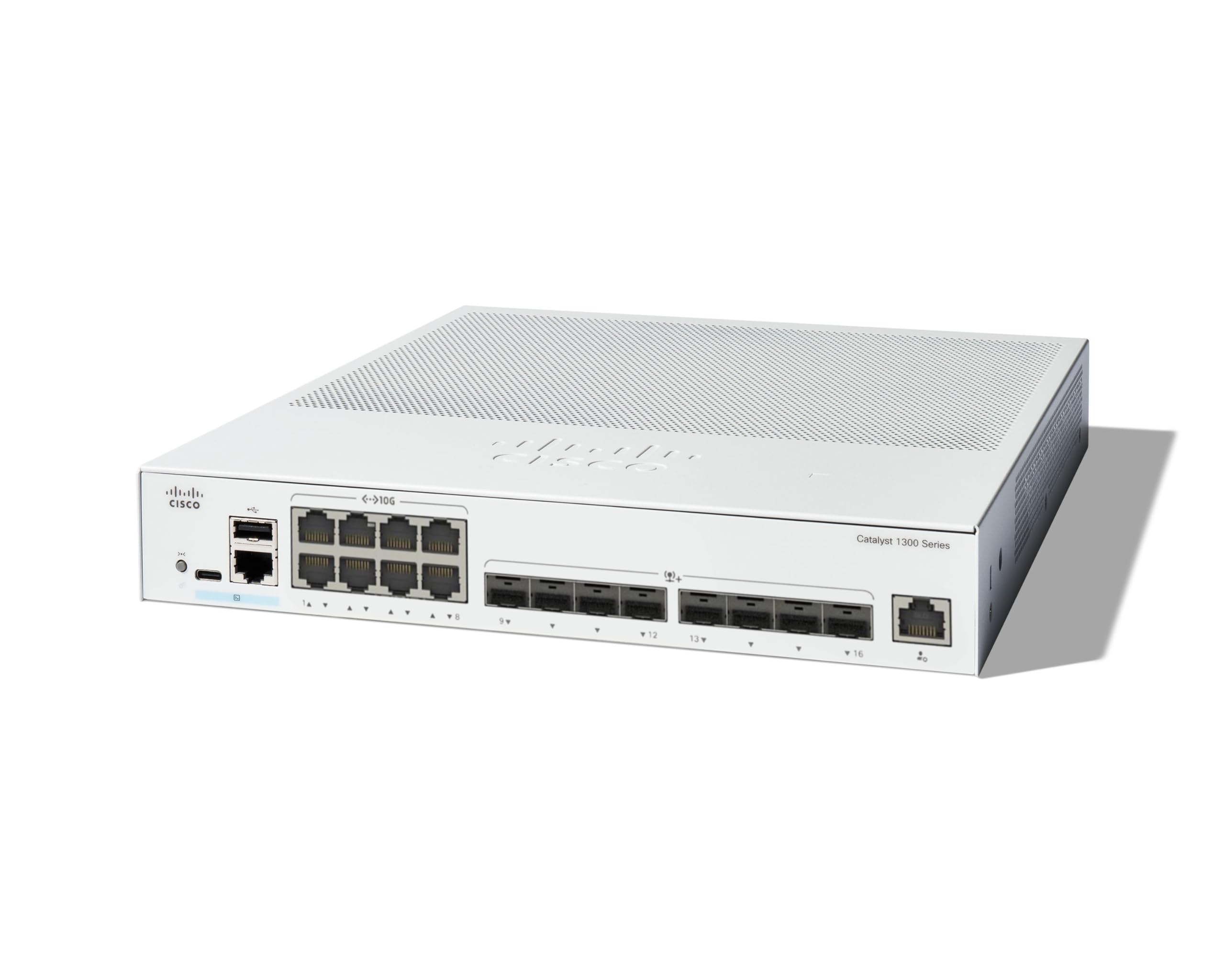
The Cisco Catalyst 1300-16XTS is a fully managed switch designed to provide reliable and secure connectivity for small business networks. This switch offers full Layer 2/3 capabilities, an intuitive web dashboard, advanced networking features, and Power over Ethernet Plus (PoE+) support.
ຄຸນນະສົມບັດທີ່ສໍາຄັນປະກອບມີ:
- ສະຫຼັບຜອດ: 8 ports 10G Copper + 8x 10GE SFP+ ports + 1x GE Management Port.
- ການຈັດການແບບງ່າຍດາຍ: Intuitive Cisco Business mobile app and local web interface for setup, management, and monitoring.
- ຄວາມປອດໄພທີ່ປັບປຸງ: IP-MAC port binding and IPv6 First Hop Security for network protection.
- ປະສິດທິພາບພະລັງງານ: Optimizes power usage, compliant with IEEE 802.3az Energy Efficient Ethernet.
- Business Ready: No subscription or licenses required, includes limited lifetime hardware warranty and complimentary 1-year technical support.
2. ເນື້ອໃນຊຸດ
ກວດສອບວ່າຊຸດຂອງທ່ານມີລາຍການດັ່ງຕໍ່ໄປນີ້:
- Cisco Catalyst 1300-16XTS Managed Switch unit
- ສາຍໄຟ ຫຼືອະແດັບເຕີ
- ສາຍ USB Type-C
- ຮາດແວຕິດຕັ້ງ
If any items are missing or damaged, please contact your vendor or Cisco support.
3. ຕັ້ງຄ່າ
Follow these steps to set up your Cisco Catalyst 1300-16XTS Managed Switch:
- ເຊື່ອມຕໍ່ພະລັງງານ: Connect the power adapter to the switch's power input and then plug the power cord into an electrical outlet. Ensure the power LED on the switch illuminates.
- ເຊື່ອມຕໍ່ກັບ Router / ເຄືອຂ່າຍ: Use an Ethernet cable to connect one of the switch's 10G copper ports (or SFP+ ports with appropriate transceivers) to your router or existing network infrastructure.
- ເຊື່ອມຕໍ່ອຸປະກອນ: Connect your network devices (e.g., computers, servers, wireless access points) to the remaining available ports on the switch.
- Initial Configuration (Mobile App):
- Download the Cisco Business mobile app from your device's app store.
- Launch the app and follow the on-screen instructions to create your site and add your switch.
- The app will guide you through basic configuration, including setting up site credentials and adding wired/wireless devices.
- ການຕັ້ງຄ່າເບື້ອງຕົ້ນ (Web UI): Alternatively, you can access the switch's webການໂຕ້ຕອບຜູ້ໃຊ້ໂດຍອີງໃສ່ (Web UI) by connecting a computer directly to the switch and navigating to its default IP address (refer to the Quick Start Guide for details).

4. ຄໍາແນະນໍາການດໍາເນີນງານ
Once the switch is powered on and connected, it will begin forwarding network traffic. For advanced configuration and monitoring, use the following tools:
- Cisco Business Mobile App: Provides real-time monitoring of device status, network activity, and connected clients. It also allows for basic actions like rebooting devices and upgrading firmware.
- Web ສ່ວນຕິດຕໍ່ຜູ້ໃຊ້ (Web UI): Offers comprehensive configuration options for all Layer 2/3 features, including VLANs, QoS, security settings, and port management.
- Cisco Business Dashboard: For managing multiple Cisco Business devices across different sites, the Dashboard provides a centralized platform for monitoring, configuration, and troubleshooting.
Refer to the detailed documentation available via the QR code on the product packaging or the Cisco support website for in-depth configuration guides.
5. ບໍາລຸງຮັກສາ
To ensure optimal performance and longevity of your Cisco Catalyst 1300-16XTS switch, consider the following maintenance practices:
- ການອັບເດດເຟີມແວ: Regularly check for and apply the latest firmware updates to benefit from new features, performance improvements, and security patches.
- ເງື່ອນໄຂສິ່ງແວດລ້ອມ: Ensure the switch is operated within its specified temperature and humidity ranges. Avoid placing it in direct sunlight or near heat sources.
- ການກວດຮ່າງກາຍ: Periodically inspect the switch for any physical damage, loose cables, or excessive dust accumulation. Clean vents and ports as needed to maintain proper airflow.
- ການຕັ້ງຄ່າສໍາຮອງຂໍ້ມູນ: Regularly back up your switch configuration to prevent data loss in case of unexpected issues.
6. ການແກ້ໄຂບັນຫາ
If you encounter issues with your switch, try these basic troubleshooting steps:
- ບໍ່ມີພະລັງງານ: Verify that the power cord is securely connected to both the switch and the electrical outlet. Check the power adapter and outlet for functionality.
- ບໍ່ມີການເຊື່ອມຕໍ່ເຄືອຂ່າຍ:
- Check the Ethernet cables connecting devices to the switch and the switch to the router. Ensure they are securely plugged in and not damaged.
- Observe the link/activity LEDs on the switch ports. A solid green or amber light typically indicates a valid connection, while a blinking light indicates activity. No light may suggest a cable or device issue.
- Verify IP address settings on connected devices and the switch.
- ປະສິດທິພາບຊ້າ:
- Check for excessive network traffic or loops using the switch's management interface.
- Ensure all devices are connected at their optimal speed (e.g., 10G devices to 10G ports).
- Consider updating firmware.
- ການເຂົ້າເຖິງອິນເຕີເຟດການຄຸ້ມຄອງ: ຖ້າທ່ານບໍ່ສາມາດເຂົ້າເຖິງໄດ້ Web UI or mobile app, ensure your device is on the same network segment as the switch or connected directly. Verify the switch's IP address.
For more complex issues, refer to the comprehensive troubleshooting guides on the Cisco support webສະຖານທີ່ຫຼືຕິດຕໍ່ສະຫນັບສະຫນູນດ້ານວິຊາການ.
7. ຂໍ້ມູນຈໍາເພາະ
| ຄຸນສົມບັດ | ລາຍລະອຽດ |
|---|---|
| ຍີ່ຫໍ້ | ຊິສໂກ |
| ໝາຍເລກຕົວແບບ | C1300-16XTS |
| ຈໍານວນພອດ | 16 (8x 10G Copper, 8x 10GE SFP+) + 1x GE Management Port |
| ອັດຕາການໂອນຂໍ້ມູນ | 80 Gigabits ຕໍ່ວິນາທີ |
| ປະເພດສະຫຼັບ | ການຈັດການເຄືອຂ່າຍ Switch |
| ການໂຕ້ຕອບ | PoE, SFP |
| ຂະໜາດລາຍການ (L x W x H) | 11.81"L x 10.55"W x 1.73"H |
| ນ້ໍາຫນັກລາຍການ | 3.6 ກິໂລກຣາມ |
| Case Material Type | ທອງແດງ |
| UPC | 889728521482 |
8. ການຮັບປະກັນແລະການສະຫນັບສະຫນູນ
The Cisco Catalyst 1300-16XTS Managed Switch comes with a Limited Lifetime Hardware Warranty, which includes return-to-factory replacement. Additionally, you receive 1-year complimentary phone support to the Small Business Support Center.
For technical assistance, warranty claims, or to access additional resources, please visit the official Cisco support website or contact the Small Business Support Center.