
ແນະນຳ
Thank you for choosing the HyperGear Halo Waterproof LED Wireless Speaker. This manual provides essential information for setting up, operating, and maintaining your speaker to ensure optimal performance and longevity. The Halo speaker combines powerful HD sound with a vibrant 360° multicolor LED light show, designed for both indoor and outdoor use. Its IPX6 waterproof rating makes it suitable for various environments, from poolside parties to everyday listening.
ແມ່ນຫຍັງຢູ່ໃນກ່ອງ
- HyperGear Halo Waterproof LED Wireless Speaker
- ສາຍສາກ USB-C
- 3.5mm Aux Cord
ຄູ່ມືການຕິດຕັ້ງ
1. ການສາກໄຟ ລຳ ໂພງ
Before first use, fully charge your Halo speaker. Connect the included USB-C charging cable to the speaker's charging port and the other end to a USB power adapter (not included). The LED indicator will show charging status and turn off when fully charged.
2. ເປີດ / ປິດພະລັງງານ
Press and hold the Power button on the speaker's top panel to turn it on or off. A sound prompt will indicate the power status.
3. ການຈັບຄູ່ Bluetooth
- ກວດໃຫ້ແນ່ໃຈວ່າລຳໂພງເປີດຢູ່ ແລະຢູ່ໃນໂໝດການຈັບຄູ່ Bluetooth (ສະແດງດ້ວຍໄຟ LED ກະພິບ).
- ໃນອຸປະກອນຂອງທ່ານ (ໂທລະສັບສະຫຼາດ, ແທັບເລັດ, ຄອມພິວເຕີ), ເປີດ Bluetooth ແລະຊອກຫາອຸປະກອນທີ່ມີຢູ່.
- Select "HyperGear Halo" from the list.
- ເມື່ອຈັບຄູ່ແລ້ວ, ລຳໂພງຈະສົ່ງສຽງຢືນຢັນ, ແລະໄຟ LED ຈະຢຸດກະພິບ.
ລຳໂພງຈະເຊື່ອມຕໍ່ຄືນໃໝ່ໂດຍອັດຕະໂນມັດກັບອຸປະກອນທີ່ຈັບຄູ່ສຸດທ້າຍເມື່ອເປີດເຄື່ອງ, ຖ້າຢູ່ໃນຂອບເຂດ.

The top panel of the HyperGear Halo speaker, showing controls and its connection to a smartphone via Bluetooth.
ຄໍາແນະນໍາການດໍາເນີນງານ
ການຄວບຄຸມພື້ນຖານ
| ປຸ່ມ/ຟັງຊັນ | ການປະຕິບັດ |
|---|---|
| ປຸ່ມເປີດປິດ | Press and hold to Power On/Off |
| ຫຼິ້ນ/ຢຸດຊົ່ວຄາວ | Press once to Play/Pause music |
| ປະລິມານຂຶ້ນ (+) | ກົດຄັ້ງດຽວເພື່ອເພີ່ມສຽງ |
| ບໍລິມາດລົງ (-) | ກົດຄັ້ງດຽວເພື່ອຫຼຸດລະດັບສຽງ |
| ຕິດຕາມຕໍ່ໄປ | Press and hold Volume Up (+) |
| ເພງກ່ອນໜ້າ | Press and hold Volume Down (-) |
| ຕອບ/ວາງສາຍ | ກົດປຸ່ມຫຼິ້ນ/ຢຸດຊົ່ວຄາວໜຶ່ງຄັ້ງ |
| ປະຕິເສດການໂທ | Press and hold Play/Pause button |
| ປຸ່ມໂໝດແສງ | ກົດເພື່ອຮອບວຽນຜ່ານ 6 ໂໝດໄຟ LED |
Party Mode (Stereo Pairing)
To achieve immersive stereo sound, you can pair two HyperGear Halo speakers together:
- Ensure both Halo speakers are powered on and not connected to any other Bluetooth device.
- On one speaker (this will be the primary speaker), double-press the Power button. It will enter pairing mode for Party Mode.
- ລຳໂພງສອງຕົວຈະເຊື່ອມຕໍ່ກັນໂດຍອັດຕະໂນມັດ. ສຽງຢືນຢັນຈະຊີ້ບອກວ່າການຈັບຄູ່ສຳເລັດແລ້ວ.
- Now, connect your device to the primary speaker via Bluetooth as described in the 'Bluetooth Pairing' section. Both speakers will play synchronized audio and light shows.

Two HyperGear Halo speakers paired together for Party Mode, offering synchronized audio and light effects.
Alternative Playback Modes

The side panel of the HyperGear Halo speaker, revealing the AUX, microSD, and USB-C ports for versatile connectivity.
- Aux-In: Connect your device using the included 3.5mm Aux cord to the speaker's AUX port for a wired audio connection.
- ກາດ microSD: Insert a microSD card loaded with audio files into the designated slot. The speaker will automatically play music from the card.
ຄຸນນະສົມບັດຫຼາຍກວ່າview
- ລະດັບກັນນໍ້າ IPX6: Designed to withstand splashes, rain, and spills, making it ideal for outdoor adventures and poolside use.
- Powerful 5W Front-Firing Sound: Equipped with a 52mm full-range driver for rich, dynamic audio with pulse-pounding bass. The front-firing design ensures clearer sound projection.
- 360° Multicolor LED Lights: Features a vibrant light ring that synchronizes with your music, offering 6 different lighting modes to enhance your listening experience.
- ໄມໂຄຣໂຟນໃນຕົວ: Allows for convenient hands-free calling.
- ເທັກໂນໂລຍີ Bluetooth 5.3: Provides a stable, stutter-free wireless connection with a range of up to 33 feet.
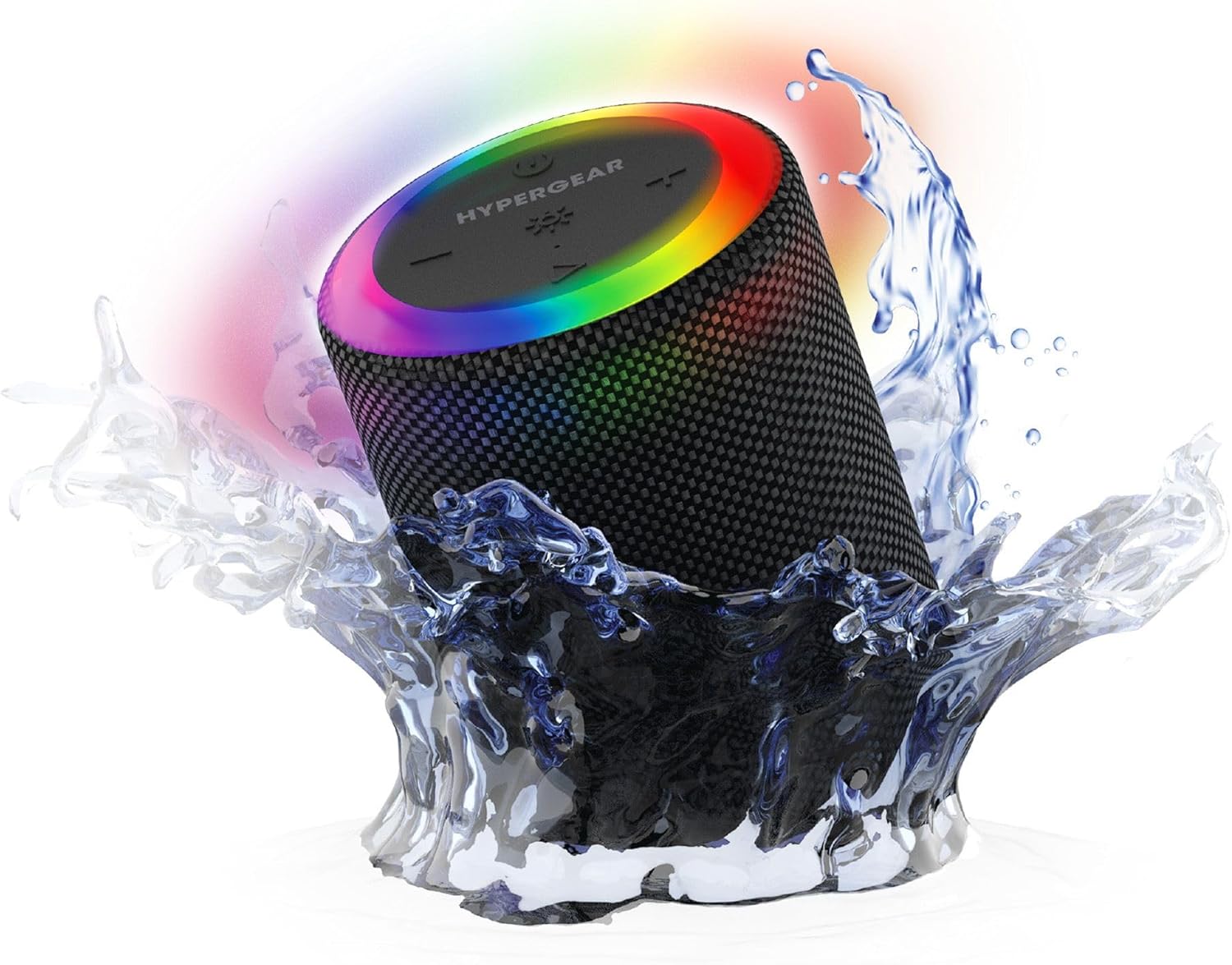
The HyperGear Halo speaker immersed in water, highlighting its robust waterproof design.

Visual representation of the HyperGear Halo speaker's powerful audio features, including its 5W output and 52mm driver.

The HyperGear Halo speaker showcasing its beat-synced 360° multicolor LED light ring with various lighting modes.
ຂໍ້ມູນຈໍາເພາະ
| ຄຸນສົມບັດ | ລາຍລະອຽດ |
|---|---|
| ຊື່ຕົວແບບ | Halo Waterproof LED Wireless Speaker |
| ປະເພດລຳໂພງ | ມັນຕິມີເດຍ |
| ເຕັກໂນໂລຊີການເຊື່ອມຕໍ່ | Bluetooth 5.3 |
| ຮູບແບບການອອກສຽງ | Mono (Stereo with Party Mode) |
| ລຳໂພງກຳລັງຜົນຜະລິດສູງສຸດ | 5 ວັດ |
| ຂະໜາດໄດເວີສຽງ | 52 ມິນລິແມັດ |
| ລະດັບຄວາມຕ້ານທານນ້ໍາ | ກັນນໍ້າ IPX6 |
| ຂະໜາດສິນຄ້າ | 3.27"D x 3.27"W x 4.13"H |
| ນ້ໍາຫນັກລາຍການ | 1.05 ປອນ |
| ແຫຼ່ງພະລັງງານ | ພະລັງງານຫມໍ້ໄຟ |
| ອົງປະກອບລວມ | USB-C Charging Cable, 3.5mm Aux Cord |
| ວິທີການຄວບຄຸມ | ປຸ່ມ |
| UPC | 633755158858 |
ບໍາລຸງຮັກສາ
- ທໍາຄວາມສະອາດ: ເຊັດລໍາໂພງດ້ວຍສຽງອ່ອນ, ງamp ຜ້າ. ຢ່າໃຊ້ສານເຄມີທີ່ຮຸນແຮງຫຼືເຄື່ອງເຮັດຄວາມສະອາດຂັດ.
- ການເກັບຮັກສາ: ເກັບຮັກສາລຳໂພງໄວ້ໃນບ່ອນທີ່ເຢັນ, ແຫ້ງ, ຫ່າງຈາກແສງແດດໂດຍກົງ ແລະ ອຸນຫະພູມທີ່ຮ້າຍກາດ.
- ການດູແລຫມໍ້ໄຟ: ເພື່ອຮັກສາອາຍຸການໃຊ້ງານຂອງແບັດເຕີຣີ, ໃຫ້ຫຼີກລ່ຽງການຄາຍປະຈຸໄຟຂອງລຳໂພງອອກຈົນໝົດເລື້ອຍໆ. ໃຫ້ສາກໄຟເປັນປະຈຳ, ເຖິງແມ່ນວ່າຈະບໍ່ໄດ້ໃຊ້ເປັນເວລາດົນກໍຕາມ.
- ປະທັບຕາກັນນ້ໍາ: Ensure the silicone cover for the charging and AUX ports is securely closed when near water to maintain its IPX6 rating.
ການແກ້ໄຂບັນຫາ
| ບັນຫາ | ການແກ້ໄຂທີ່ເປັນໄປໄດ້ |
|---|---|
| ລຳໂພງບໍ່ເປີດ. | ໃຫ້ແນ່ໃຈວ່າລຳໂພງສາກໄຟແລ້ວ. ເຊື່ອມຕໍ່ມັນກັບແຫຼ່ງພະລັງງານ ແລະ ລອງອີກຄັ້ງ. |
| ບໍ່ສາມາດຈັບຄູ່ກັບອຸປະກອນ Bluetooth ໄດ້. | Make sure the speaker is in pairing mode (flashing LED). Turn off and on Bluetooth on your device. Ensure no other devices are connected to the speaker. Move speaker closer to your device. |
| ບໍ່ມີສຽງຈາກລຳໂພງ. | Check volume levels on both the speaker and your device. Ensure the correct input mode (Bluetooth, Aux, MicroSD) is selected. If using Aux, ensure the cable is fully inserted. |
| Party Mode not working. | Ensure both speakers are fully charged and not connected to any other Bluetooth devices. Try resetting both speakers by powering them off and on, then re-attempt Party Mode pairing. |
| ໄຟ LED ບໍ່ເຮັດວຽກ. | Press the Light Mode button to cycle through modes. Ensure the speaker is powered on. |
ການຮັບປະກັນແລະການສະຫນັບສະຫນູນ
The HyperGear Halo Waterproof LED Wireless Speaker comes with a ການຮັບປະກັນຈໍາກັດ. For specific details regarding warranty coverage, duration, and claims, please refer to the warranty card included with your product or visit the official HyperGear website. For technical support or further assistance, please contact HyperGear customer service through their official channels.