
Toputure TP8
Toputure TP8 Electric Treadmill User Manual
Brand: Toputure | Model: TP8
ແນະນຳ
Thank you for choosing the Toputure TP8 Electric Treadmill. This manual provides essential information for the safe and efficient use, setup, operation, and maintenance of your new fitness equipment. Please read this manual thoroughly before first use and keep it for future reference.
ຂໍ້ມູນຄວາມປອດໄພທີ່ສໍາຄັນ
- ປຶກສາກັບຜູ້ຊ່ຽວຊານດ້ານສຸຂະພາບສະເໝີ ກ່ອນທີ່ຈະເລີ່ມໂຄງການອອກກຳລັງກາຍໃໝ່.
- ໃຫ້ແນ່ໃຈວ່າ treadmill ໄດ້ຖືກວາງຢູ່ເທິງພື້ນຜິວທີ່ຮາບພຽງ, ມີຄວາມຫມັ້ນຄົງດ້ວຍການເກັບກູ້ຢ່າງພຽງພໍ.
- ຮັກສາເດັກນ້ອຍ ແລະສັດລ້ຽງຢູ່ຫ່າງຈາກເຄື່ອງແລ່ນ ໃນລະຫວ່າງການປະຕິບັດງານ.
- ຫ້າມແລ່ນເຄື່ອງແລ່ນຖ້າມັນຖືກເສຍຫາຍ ຫຼືເຮັດວຽກຜິດປົກກະຕິ.
- Always use the safety key/lanyard during operation. The treadmill will not start without it.
- ໃສ່ເກີບກິລາທີ່ເຫມາະສົມ.
ເນື້ອໃນຊຸດ
ເມື່ອແກະກ່ອງອອກແລ້ວ, ກະລຸນາກວດສອບວ່າລາຍການທັງໝົດຕໍ່ໄປນີ້ໄດ້ລວມຢູ່ໃນກ່ອງຂອງທ່ານແລ້ວ:
- Toputure TP8 Electric Treadmill
- Tool Kit (for minor adjustments)
- ສາຍໄຟ
- ການຄວບຄຸມໄລຍະໄກ
- ນ້ຳມັນເຄື່ອງ
- ຄູ່ມືຜູ້ໃຊ້

ຮູບທີ 1: Included accessories with the Toputure TP8 Electric Treadmill.
ຕັ້ງຄ່າ
The Toputure TP8 Electric Treadmill features a no-installation design, making it ready for use almost immediately after unboxing.
Unfolding and Positioning
- ລະມັດລະວັງເອົາເຄື່ອງແລ່ນອອກຈາກເຄື່ອງຫຸ້ມຫໍ່ຂອງມັນ.
- Place the treadmill on a flat, level surface. Ensure there is at least 0.6 meters (2 feet) of clear space on all sides and 2 meters (6.5 feet) behind the treadmill for safety.
- If using the handlebar, lift it into the upright position and secure it using the provided locking pins or screws.
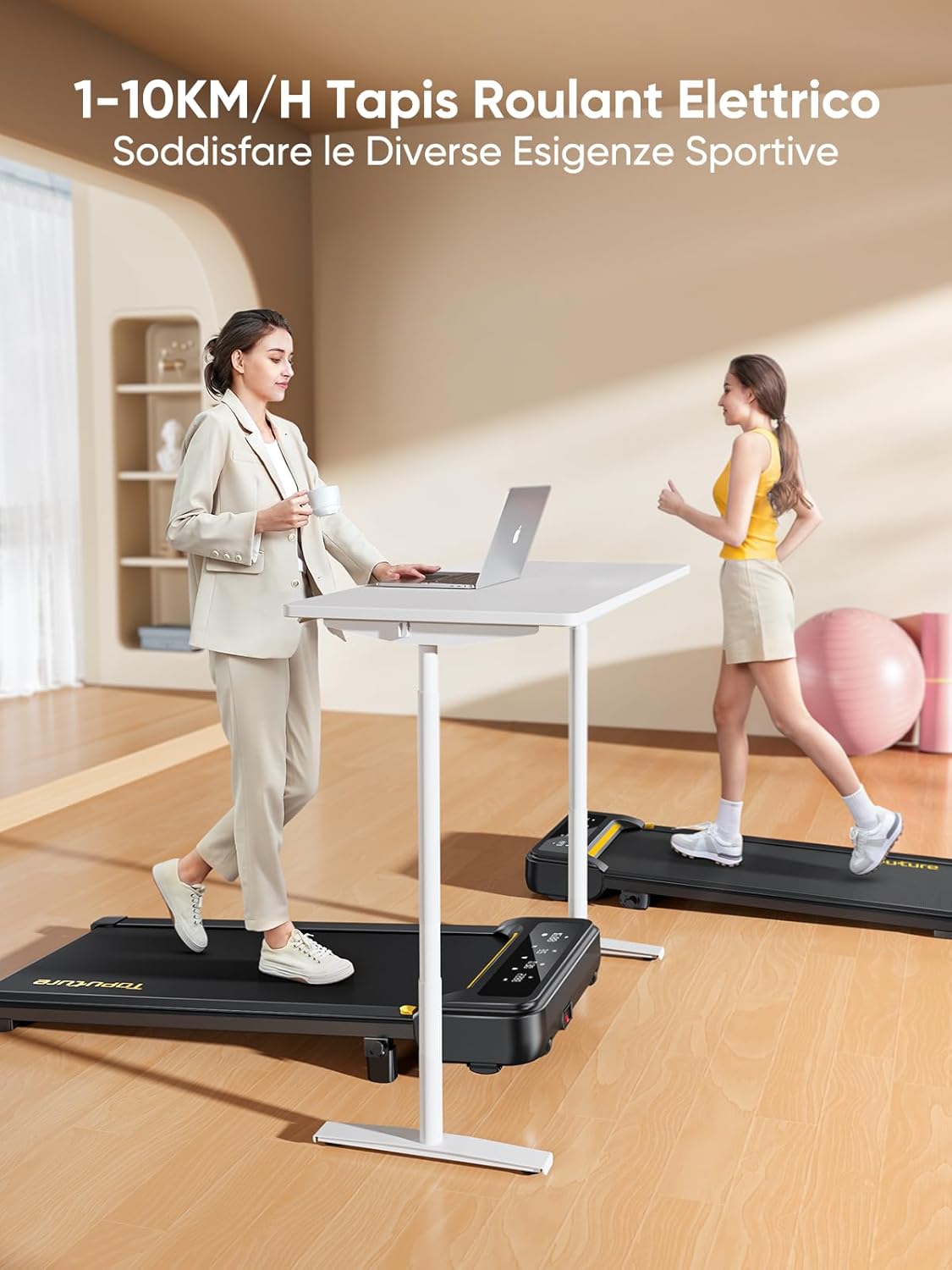
ຮູບທີ 2: Treadmill ready for use in a home environment.
ການປັບຕົວ Incline
The treadmill offers a 10% incline feature, adjustable in 2 steps to simulate varied terrain and increase calorie burn. To adjust the incline:
- ຊອກຫາກົນໄກການປັບຄວາມອຽງຢູ່ດ້ານຫຼັງຂອງເຄື່ອງແລ່ນ.
- Pull out the bolt and rotate the incline block to the desired position.
- Insert the bolt securely into the corresponding hole to lock the incline in place.

ຮູບທີ 3: Manual incline adjustment mechanism.
ການເຊື່ອມຕໍ່ພະລັງງານ
Connect the power cable to the treadmill and then to a suitable power outlet. Ensure the power switch is in the 'OFF' position before plugging in.
ຄໍາແນະນໍາການດໍາເນີນງານ
ເລີ່ມ Treadmill
- Ensure the safety key is properly inserted into its designated slot on the console. The treadmill will not operate without it.
- ກ້າວໃສ່ສາຍແອວ treadmill.
- Press the 'Start' button on the console or remote control. The treadmill will begin at a low speed.
Adjusting Speed and Mode
The speed range is 1-10 km/h, suitable for walking, jogging, and running. You can adjust the speed using the console buttons or the remote control.
- ຄອນໂຊ: Use the '+' and '-' buttons to increase or decrease speed.
- ການຄວບຄຸມໄລຍະໄກ: The remote allows for easy speed adjustments and stopping the machine. It features magnets on the back for convenient attachment to the treadmill, preventing loss.
- ຟັງຊັນຊົ່ວຄາວ: The remote control includes a pause button. Pressing this button will temporarily stop the belt while preserving your workout data.

ຮູບທີ 4: Multifunction LED display and remote control storage.
ຈໍສະແດງຜົນ LED ຫຼາຍໜ້າທີ່
The integrated LED display clearly shows real-time workout data, including time, distance, speed, and calories burned, providing a clear overview of your exercise progress.

ຮູບທີ 5: Clear display of workout metrics.
Smart App Connectivity
This walking pad can connect to multiple exercise apps, offering various training courses and allowing you to interact with other users online. Refer to the app's instructions for pairing and usage.

ຮູບທີ 6: Treadmill connected to a smart fitness app.
Stopping the Treadmill
To stop the treadmill, press the 'Stop' button on the console or remote control. For emergency stops, pull the safety key from its slot.
ບໍາລຸງຮັກສາ
Regular maintenance ensures the longevity and optimal performance of your Toputure TP8 Electric Treadmill.
ທໍາຄວາມສະອາດ
- ຖອດປລັກເຄື່ອງແລ່ນກ່ອນທຳຄວາມສະອາດທຸກຄັ້ງ.
- ເຊັດໜ້າ console ແລະ exterior ດ້ວຍຄວາມອ່ອນໂຍນ, ງamp ຜ້າ. ຫຼີກລ້ຽງການເຮັດຄວາມສະອາດຂັດຫຼືສານລະລາຍ.
- ສູນຍາກາດເປັນໄລຍະໆພາຍໃຕ້ເຄື່ອງແລ່ນເພື່ອປ້ອງກັນການເກີດຂີ້ຝຸ່ນ ແລະສິ່ງເສດເຫຼືອ.
ການລະບາຍນ້ໍາ
The unique lubrication hole design makes maintenance more convenient. Apply the provided lubrication oil to the running belt as instructed in the detailed manual or when the treadmill indicates it's needed. Proper lubrication reduces friction and extends belt life.
ການປັບສາຍແອວ
If the running belt becomes misaligned or too loose/tight, refer to the detailed manual for instructions on how to adjust it using the included tool kit. Incorrect adjustment can damage the treadmill.
ການແກ້ໄຂບັນຫາ
This section addresses common issues you might encounter with your treadmill. For problems not listed here, please contact customer support.
| ບັນຫາ | ສາເຫດທີ່ເປັນໄປໄດ້ | ການແກ້ໄຂ |
|---|---|---|
| Treadmill ບໍ່ເລີ່ມຕົ້ນ | Safety key not inserted; Power cable not connected; Power switch off. | Insert safety key; Check power connections; Turn power switch ON. |
| Belt slips or hesitates | ສາຍແອວວ່າງເກີນໄປ; ບໍ່ມີການຫລໍ່ລື່ນພຽງພໍ. | Adjust belt tension (refer to manual); Apply lubrication oil. |
| ສິ່ງລົບກວນຜິດປົກກະຕິໃນລະຫວ່າງການປະຕິບັດງານ | ອົງປະກອບວ່າງ; ສາຍແອວ misalignment; ບັນຫາມໍເຕີ. | Check and tighten all bolts; Adjust belt alignment; Contact customer support. |
ຂໍ້ມູນຈໍາເພາະ
| ຄຸນສົມບັດ | ລາຍລະອຽດ |
|---|---|
| ຍີ່ຫໍ້ | Toputure |
| ໝາຍເລກຕົວແບບ | TP8 |
| ປະເພດຜະລິດຕະພັນ | ເຄື່ອງແລ່ນໄຟຟ້າ |
| ສີ | ດຳ |
| ວັດສະດຸ | ເຫຼັກໂລຫະປະສົມ |
| ຂະໜາດສິນຄ້າ (L x W x H) | 130P x 60l x 14H cm (ປະມານ 51.2 x 23.6 x 5.5 ນິ້ວ) |
| ນ້ໍາຫນັກລາຍການ | 34.5 ກິໂລກຣາມ (ປະມານ 76 lbs) |
| ຄວາມໄວສູງສຸດ | 10 ກິໂລແມັດຕໍ່ຊົ່ວໂມງ |
| ຄວາມໄວຕໍ່າສຸດ | 1 Kilometer per hour |
| Incline Percen ສູງສຸດtage | 9% (manual adjustment) |
| ພະລັງງານມໍເຕີ | 2.5 ແຮງມ້າ |
| ນ້ຳໜັກສູງສຸດທີ່ແນະນຳ | 130 kg (ປະມານ 300 lbs) |
| ຄວາມຍາວຂອງດາດແລ່ນ | 100 ຊັງຕີແມັດ (ປະມານ 39.4 ນິ້ວ) |
| ຄວາມກວ້າງຂອງດາດຟ້າແລ່ນ | 40 ຊັງຕີແມັດ (ປະມານ 15.7 ນິ້ວ) |
| ປະເພດການສະແດງ | LED |
| ເຕັກໂນໂລຊີການເຊື່ອມຕໍ່ | Power Cable (App connectivity via Bluetooth) |
| ຈໍານວນໂຄງການ | 12 |
| ຄຸນນະສົມບັດພິເສດ | Pre-installed workouts, Wheels for portability, Compact design, Manual incline, Portable |
| ການນໍາໃຊ້ທີ່ແນະນໍາ | Walking, jogging, running, home workouts, office workouts |
| ຜູ້ຊົມເປົ້າໝາຍ | ຜູ້ໃຫຍ່ |
| ຕ້ອງການສະພາແຫ່ງ | ບໍ່ |
ການຮັບປະກັນແລະການສະຫນັບສະຫນູນ
ການຮັບປະກັນຜະລິດຕະພັນ
The Toputure TP8 Electric Treadmill comes with a ຮັບປະກັນ 2 ປີ ຈາກວັນທີ່ຊື້. ການຮັບປະກັນນີ້ກວມເອົາຄວາມບົກຜ່ອງດ້ານການຜະລິດແລະການເຮັດວຽກຜິດປົກກະຕິພາຍໃຕ້ການນໍາໃຊ້ປົກກະຕິ. ກະລຸນາຮັກສາຫຼັກຖານການຊື້ຂອງທ່ານສໍາລັບການຮຽກຮ້ອງການຮັບປະກັນ.
ການຊ່ວຍເຫຼືອລູກຄ້າ
For any questions, technical assistance, or warranty claims, please contact Toputure customer support through the retailer's platform or the official Toputure website. Our support team is available to assist you with any issues you may encounter.
ຊັບພະຍາກອນເພີ່ມເຕີມ
ສິນຄ້າເກີນview ວິດີໂອ
ວິດີໂອ 1: ຫຼາຍກວ່າview of the WalkingPad foldable electric treadmill, demonstrating its compact design, ease of use, and various features. This video highlights how the treadmill can be easily stored and used in different home or office settings.
Ask a question about this manual
Ask about setup, troubleshooting, compatibility, parts, safety, or missing instructions. Manuals+ will review the question and use this page’s manual context to help answer it.