
1. ບົດແນະນຳ
Thank you for choosing the Hoco HC17 Mini Portable Speaker. This manual provides essential information for the safe and efficient operation of your device. Please read it carefully before use and retain it for future reference.
2. ຂໍ້ມູນຄວາມປອດໄພ
- ຢ່າເຮັດໃຫ້ລໍາໂພງຖືກອຸນຫະພູມທີ່ຮຸນແຮງ, ແສງແດດໂດຍກົງ, ຫຼືຄວາມຊຸ່ມຊື່ນສູງ.
- ຫຼີກລ່ຽງການລຸດລົງ ຫຼື ວາງລຳໂພງຕໍ່ກັບຜົນກະທົບທີ່ຮຸນແຮງ.
- ຢ່າຖອດປະກອບ, ສ້ອມແປງ ຫຼື ດັດແປງອຸປະກອນດ້ວຍຕົວທ່ານເອງ. ຕິດຕໍ່ພະນັກງານບໍລິການທີ່ມີຄຸນວຸດທິເພື່ອຂໍຄວາມຊ່ວຍເຫຼືອ.
- ຮັກສາລໍາໂພງໃຫ້ຫ່າງຈາກນ້ໍາແລະຂອງແຫຼວອື່ນໆ.
- ໃຊ້ພຽງແຕ່ສາຍສາກທີ່ສະໜອງໃຫ້ ຫຼືສາຍທຽບເທົ່າທີ່ໄດ້ຮັບການຮັບຮອງ.
3. ເນື້ອໃນຊຸດ
ໃຫ້ແນ່ໃຈວ່າທຸກລາຍການຢູ່ໃນຊຸດ:
- Hoco HC17 Mini Portable Speaker
- ສາຍສາກ USB
- ຄູ່ມືຜູ້ໃຊ້ (ເອກະສານນີ້)

Image: The Hoco HC17 Mini Portable Speaker shown in its retail packaging, highlighting its compact size and clip design.
4. ຜະລິດຕະພັນເກີນview
The Hoco HC17 is a compact and versatile portable speaker designed for on-the-go audio. It features Bluetooth 5.3 connectivity, a built-in microphone for hands-free calls, and multiple playback options including FM radio, TF card, and USB flash drive support. Its clip design enhances portability.

ຮູບພາບ: A ລາຍລະອຽດ view of the grey Hoco HC17 speaker, showcasing its textured grille, control buttons, and integrated carabiner clip.

Image: A display of the Hoco HC17 speaker available in multiple vibrant color options, each with a metallic carabiner clip.
5. ຕັ້ງຄ່າ
5.1 ກຳລັງສາກລຳໂພງ
- ເຊື່ອມຕໍ່ສາຍສາກ USB ທີ່ໃຫ້ມາກັບຊ່ອງສາກໄຟຂອງລຳໂພງ.
- ເຊື່ອມຕໍ່ອີກສົ້ນຂອງສາຍ USB ກັບອະແດັບເຕີໄຟ USB (ບໍ່ລວມ) ຫຼືພອດ USB ຂອງຄອມພິວເຕີ.
- ໄຟຕົວຊີ້ວັດການສາກໄຟຈະສະຫວ່າງ. ເມື່ອສາກເຕັມແລ້ວ, ແສງອາດຈະປ່ຽນສີ ຫຼືປິດລົງ.
- ການສາກເຕັມໃຫ້ເວລາຫຼິ້ນໄດ້ເຖິງ 2 ຊົ່ວໂມງ.
5.2 ການເປີດ/ປິດ
- To power on: Press and hold the Power button for a few seconds until you hear an audible prompt or see an indicator light.
- To power off: Press and hold the Power button again for a few seconds until the speaker powers down.
5.3 ການຈັບຄູ່ Bluetooth
- ໃຫ້ແນ່ໃຈວ່າລຳໂພງເປີດຢູ່ ແລະ ຢູ່ໃນໂໝດຈັບຄູ່ Bluetooth (ໂດຍປົກກະຕິແລ້ວຈະມີໄຟ LED ກະພິບ).
- ໃນອຸປະກອນຂອງທ່ານ (ໂທລະສັບສະຫຼາດ, ແທັບເລັດ, ແລະອື່ນໆ), ເປີດໃຊ້ Bluetooth ແລະຊອກຫາອຸປະກອນທີ່ມີຢູ່.
- Select "HC17" from the list of found devices.
- ເມື່ອຈັບຄູ່ແລ້ວ, ລຳໂພງຈະຢືນຢັນດ້ວຍສຽງເຕືອນ, ແລະໄຟ LED ຈະຢຸດກະພິບ.
- ລຳໂພງຈະເຊື່ອມຕໍ່ຄືນໃໝ່ໂດຍອັດຕະໂນມັດກັບອຸປະກອນທີ່ຈັບຄູ່ສຸດທ້າຍເມື່ອເປີດເຄື່ອງ, ຖ້າຢູ່ໃນຂອບເຂດ.
5.4 TF Card / USB Flash Drive Playback
- Insert a TF card or USB flash drive (with supported audio files) into the corresponding slot on the speaker.
- The speaker will automatically detect the storage device and begin playing music.
- Use the speaker's control buttons to navigate tracks and adjust volume.
5.5 ການດໍາເນີນງານວິທະຍຸ FM
- Switch the speaker to FM radio mode (this might be a dedicated button or a mode cycle button).
- Press the Play/Pause button to initiate an automatic station scan. The speaker will save available stations.
- Use the Next/Previous track buttons to switch between saved FM stations.
6. ປະຕິບັດການລໍາໂພງ
6.1 ການຄວບຄຸມການຫຼິ້ນເພງ
- ຫຼິ້ນ/ຢຸດ: ກົດປຸ່ມຫຼິ້ນ/ຢຸດຊົ່ວຄາວໜຶ່ງຄັ້ງ.
- ເພງຕໍ່ໄປ: ກົດປຸ່ມ "+".
- ຕິດຕາມກ່ອນ ໜ້າ ນີ້: ກົດປຸ່ມ "-".
- ປະລິມານຂຶ້ນ: ກົດປຸ່ມ "+" ຄ້າງໄວ້.
- ປະລິມານລົງ: ກົດປຸ່ມ "-" ຄ້າງໄວ້.
6.2 ໂທຟຣີ
ເມື່ອເຊື່ອມຕໍ່ຜ່ານ Bluetooth ກັບສະມາດໂຟນ:
- ຮັບສາຍ: Press the Play/Pause button once when an incoming call rings.
- ສິ້ນສຸດການໂທ: ກົດປຸ່ມຫຼິ້ນ/ຢຸດຊົ່ວຄາວໜຶ່ງຄັ້ງໃນລະຫວ່າງການໂທ.
- ປະຕິເສດການໂທ: Press and hold the Play/Pause button for 2 seconds when an incoming call rings.
- ໄມໂຄໂຟນໃນຕົວຊ່ວຍໃຫ້ການສື່ສານທີ່ຊັດເຈນ.
7. ບໍາລຸງຮັກສາ
- ທໍາຄວາມສະອາດ: ໃຊ້ຜ້າປຽກແຫ້ງເພື່ອເຮັດຄວາມສະອາດພື້ນຜິວຂອງລໍາໂພງ. ຢ່າໃຊ້ເຄື່ອງເຮັດຄວາມສະອາດຂັດຫຼືສານລະລາຍ.
- ການເກັບຮັກສາ: ເກັບຮັກສາລຳໂພງໄວ້ໃນບ່ອນທີ່ເຢັນ, ແຫ້ງ, ຫ່າງຈາກແສງແດດໂດຍກົງ ແລະ ອຸນຫະພູມສູງສຸດເມື່ອບໍ່ໄດ້ໃຊ້ເປັນເວລາດົນ.
- ການດູແລຫມໍ້ໄຟ: ເພື່ອຍືດອາຍຸແບັດເຕີລີ, ຫຼີກເວັ້ນການຖອດແບດເຕີລີ່ເຕັມເລື້ອຍໆ. ສາກລໍາໂພງຢ່າງເປັນປົກກະຕິ, ເຖິງແມ່ນວ່າບໍ່ໄດ້ໃຊ້.
8. ການແກ້ໄຂບັນຫາ
| ບັນຫາ | ສາເຫດທີ່ເປັນໄປໄດ້ | ການແກ້ໄຂ |
|---|---|---|
| ລຳໂພງບໍ່ເປີດ. | ແບັດເຕີຣີຕໍ່າ. | ສາກລຳໂພງໃຫ້ເຕັມ. |
| ບໍ່ສາມາດຈັບຄູ່ຜ່ານ Bluetooth ໄດ້. | ລຳໂພງບໍ່ຢູ່ໃນໂໝດຈັບຄູ່; ອຸປະກອນ Bluetooth ປິດ; ຫ່າງກັນເກີນໄປ. | Ensure speaker is in pairing mode. Turn on Bluetooth on your device. Move speaker closer to device (within 10 meters). |
| ບໍ່ມີສຽງໃນລະຫວ່າງການຫຼິ້ນ. | ລະດັບສຽງຕໍ່າເກີນໄປ; ບໍ່ໄດ້ເຊື່ອມຕໍ່ລຳໂພງ; ແຫຼ່ງທີ່ມາບໍ່ຖືກຕ້ອງ. | Increase volume on both speaker and connected device. Re-pair Bluetooth. Ensure correct input source (Bluetooth, TF, USB, FM) is selected. |
| ການຮັບວິທະຍຸ FM ບໍ່ດີ. | ສັນຍານອ່ອນ; ການແຊກແຊງສິ່ງແວດລ້ອມ. | ຍ້າຍໄປຢູ່ບ່ອນເປີດ. ລອງສະແກນຫາສະຖານີຄືນໃໝ່. |
9. ຂໍ້ມູນຈໍາເພາະ
- ຕົວແບບ: HC17
- ລຸ້ນ Bluetooth: 5.3
- ໜ່ວຍລຳໂພງ: 45ມມ
- ຄວາມອາດສາມາດຫມໍ້ໄຟ: 500mAh
- ເວລາຫຼິ້ນ: ສູງສຸດ 2 ຊົ່ວໂມງ
- ການເຊື່ອມຕໍ່: Bluetooth, FM, TF Card, USB Flash Drive
- ໄມໂຄຣໂຟນໃນຕົວ: ແມ່ນແລ້ວ (ສຳລັບການໂທແບບບໍ່ຕ້ອງໃຊ້ມື)
- ຂະໜາດ: ປະມານ 13.3D x 8.5W x 4.9H ຊັງຕີແມັດ
- ອົງປະກອບລວມ: USB Charger (cable)
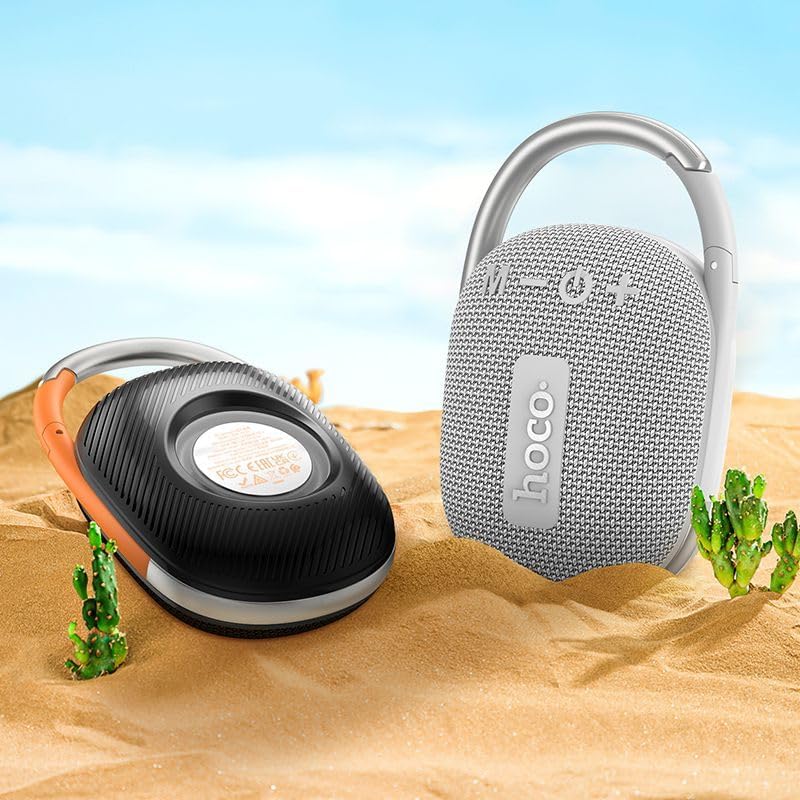
Image: The Hoco HC17 speaker positioned on sand with small cacti, illustrating its portability and suitability for outdoor use.
10. ການຮັບປະກັນແລະການສະຫນັບສະຫນູນ
This product comes with a standard manufacturer's warranty. For detailed warranty terms and conditions, please refer to the warranty card included with your purchase or contact your retailer. For technical support or service inquiries, please contact the point of purchase or the official Hoco support channels.