
EYEZON UNO
EYEZON UNO IP Hybrid Professional Grade Alarm Panel User Manual
Model: UNO
1. ບົດແນະນຳ
The EYEZON UNO IP Hybrid Professional Grade Alarm Panel is a powerful, TCP-IP based security system designed for comprehensive home and business protection. It offers extensive expandability, supporting up to 128 zones and users, and integrates seamlessly with home automation platforms. This manual provides detailed instructions for the installation, operation, and maintenance of your UNO alarm panel.

Figure 1: The EYEZON UNO IP Hybrid Professional Grade Alarm Panel installed within a standard security enclosure, showing connected wiring and a backup battery.
2. ຄຸນນະສົມບັດທີ່ສໍາຄັນ
- TCP-IP Based Communication: Utilizes your existing internet connection for alarm signals, eliminating the need for traditional phone lines.
- ຄວາມອາດສາມາດສູງ: Supports up to 8 partitions, 128 zones, 128 users, and multiple FOBs, suitable for various installation sizes.
- ການຄວບຄຸມໂທລະສັບສະຫຼາດ: Full remote control and monitoring via a user-friendly app for iPhone and Android devices.
- Home Automation Integration: Compatible with platforms such as Amazon Alexa and Google Home.
- Dual-Path Communication Option: Expandable with a Sidekick LTE module for cellular backup, ensuring alarm transmission even if the internet is down.
- ໂປຣແກມງ່າຍ: All panel programming is performed conveniently through the app, eliminating complex keypad keystrokes.
- Remote Upgradability: Ensures your system is always up-to-date with the latest features and security enhancements.
- Standard Enclosure Compatibility: Designed to fit most standard DSC or Honeywell security enclosures for easy retrofitting.
ວິດີໂອ 1: ວິດີໂອນີ້ສະຫນອງໃຫ້ຫຼາຍກວ່າview of the EYEZON UNO IP Hybrid Professional Grade Alarm Panel, highlighting its key features and capabilities, including a look at the UNO8 Zone Expander and Sidekick LTE Communicator.
3. ການຕິດຕັ້ງແລະການຕິດຕັ້ງ
3.1. ການຕິດຕັ້ງທາງດ້ານຮ່າງກາຍ
The UNO panel is designed for easy installation and can be mounted in most standard DSC or Honeywell security enclosures. Ensure the enclosure is securely fastened to a wall in a dry, protected area, away from direct sunlight and extreme temperatures.

Figure 2: The EYEZON UNO IP Hybrid Professional Grade Alarm Panel circuit board.
3.2. ການເຊື່ອມຕໍ່ສາຍໄຟ
Refer to the wiring diagram below for proper connection of power, battery, bell/siren, and zone circuits. Ensure all connections are secure before applying power.
- ໄຟຟ້າ AC: Connect a 16V AC transformer to the AC terminals.
- ແບັດເຕີຣີ: Connect a 12V 7Ah rechargeable sealed lead-acid battery to the +BAT and -BAT terminals.
- Bell/Siren: Connect your bell or siren to the BELL terminals.
- Zone Circuits: Connect your wired sensors to the Z1-Z8 and COM terminals. The panel supports normally open (NO) or normally closed (NC) contacts with or without end-of-line resistors.
- ຜົນຜະລິດ PGM: The panel includes 2 on-board high-powered PGM outputs (PGM1, PGM2) for controlling external devices. More PGM outputs are available with expansion modules.
- Keypads & Accessory Modules: Connect compatible keypads and accessory modules to the KBUS terminals.

Figure 3: Wiring diagram for the EYEZON UNO IP Hybrid Alarm Panel.
3.3. ການເຊື່ອມຕໍ່ເຄືອຂ່າຍ
Connect an Ethernet cable from your router or network switch to the RJ45 port on the UNO panel. The UNO panel automatically seeks an IP address, requiring no manual router programming. This provides the primary communication path for your system.
3.4. Initial Configuration (App-based Programming)
All programming and configuration of the UNO panel are done through the EYEZON App. Download the EYEZON App from the Google Play Store or Apple App Store. Follow the in-app instructions to connect to your panel and begin programming zones, users, and system settings. This eliminates the need for cryptic keypad keystrokes.
4. ການດໍາເນີນງານຂອງລະບົບ
4.1. Using the EYEZON App
The EYEZON App provides full remote control of all panel features. You can arm/disarm your system, check system status, view event logs, and receive notifications from anywhere.
- ແຂນ/ປົດອາວຸດ: Easily arm or disarm your system with a tap in the app.
- ການຕິດຕາມສະຖານະ: View the real-time status of all zones and partitions.
- ບັນທຶກເຫດການ: Access a full event log to review system activities and alerts.
- ການແຈ້ງເຕືອນ: Receive push notifications, email, or SMS text messages for alarm events and system changes.
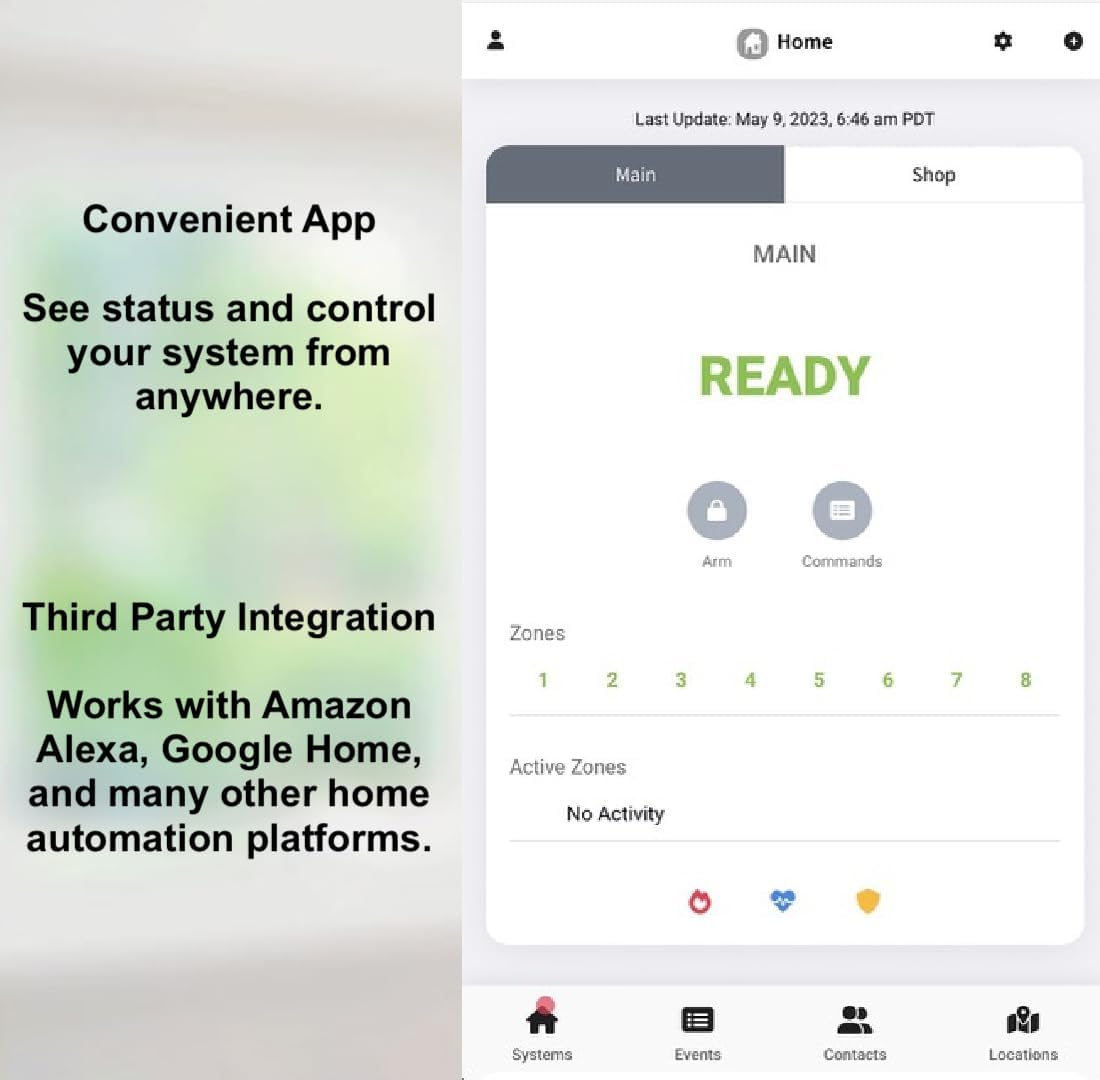
Figure 4: The EYEZON App interface for convenient system control and status monitoring.
4.2. Zone and User Management
The UNO panel supports up to 128 zones and 128 users. Manage these through the EYEZON App to customize security settings for different areas and individuals.
4.3. Home Automation Integration
The UNO panel works with various home automation platforms, including Amazon Alexa and Google Home. Refer to the EYEZON website for specific integration guides and updates.
5. ການຂະຫຍາຍລະບົບ
The UNO panel is designed for expandability, allowing you to customize your security system with additional modules and sensors.
5.1. Compatible Keypads and Modules
The UNO panel is compatible with many existing DSC PowerSeries keypads and modules, allowing for seamless upgrades of older systems.

Figure 5: Compatible DSC PowerSeries keypad.

Figure 6: UNO panel with optional keypads and enclosure.
5.2. UNO8 Zone Expander
The UNO8 Zone Expander module allows you to add up to 8 additional hardwired zones to your UNO panel. A visual representation of this module can be seen in the 'UNO IP Alarm Panel Overview' video (Video 1).
5.3. UNO RF433 Module and Wireless Sensors
To integrate SOLO wireless sensors with your UNO panel, an UNO RF433 module or an UNO5500RF keypad is required. This allows for flexible placement of motion detectors, door/window contacts, and other wireless security devices.

Figure 7: SOLO Wireless Sensors compatible with the UNO panel.
5.4. Sidekick LTE Communicator for Dual-Path Solution
For a complete dual-path alarm solution, add a Sidekick LTE module. This module ensures that alarm signals are transmitted over LTE cellular if your internet connection is unavailable. The Sidekick LTE module is also featured in the 'UNO IP Alarm Panel Overview' video (Video 1).
6. ບໍາລຸງຮັກສາ
6.1. ອັບເດດເຟີມແວ
The UNO panel supports remote firmware upgrades, ensuring your system is always running the latest software with improved features and security patches. Updates are managed automatically or can be initiated through the EYEZON portal.
6.2. ການທົດແທນຫມໍ້ໄຟ
The backup battery (12V 7Ah) should be checked periodically and replaced as needed, typically every 3-5 years, to ensure continuous operation during power outages. Refer to the wiring diagram (Figure 3) for battery connection details.
7. ການແກ້ໄຂບັນຫາ
If you encounter issues with your EYEZON UNO panel, consider the following common troubleshooting steps:
- ບໍ່ມີການເຊື່ອມຕໍ່ເຄືອຂ່າຍ:
- Verify the Ethernet cable is securely connected to both the panel and your router/switch.
- Check your internet connection status.
- Ensure your router's DHCP server is enabled, as the UNO panel obtains an IP address automatically.
- ບັນຫາການເຊື່ອມຕໍ່ແອັບ:
- ກວດໃຫ້ແນ່ໃຈວ່າສະມາດໂຟນຂອງເຈົ້າມີການເຊື່ອມຕໍ່ອິນເຕີເນັດທີ່ໃຊ້ຢູ່.
- Verify the EYEZON App is updated to the latest version.
- ຣີສະຕາດແອັບ ຫຼືສະມາດໂຟນຂອງທ່ານ.
- Zone Faults:
- Check the physical connections of the affected sensor(s).
- Ensure doors/windows are fully closed for contact sensors.
- Inspect wiring for any damage or loose connections.
- ບັນຫາພະລັງງານ:
- Confirm the AC transformer is plugged in and receiving power.
- Check the backup battery for proper connection and charge.
For further assistance, please contact EYEZON support.
8. ຂໍ້ມູນຈໍາເພາະ
| ຍີ່ຫໍ້ | EYEZON |
| ໝາຍເລກຕົວແບບ | UNO |
| ແຫຼ່ງພະລັງງານ | AC Transformer (16 Volts AC) |
| ອຸປະກອນທີ່ເຂົ້າກັນໄດ້ | Smartphone (iPhone, Android), DSC PowerSeries Keypads, Amazon Alexa, Google Home |
| ຂະໜາດລາຍການ (L x W x H) | 7.5 x 3.75 x 1.25 ນິ້ວ |
| ເຕັກໂນໂລຊີການເຊື່ອມຕໍ່ | Wired (Ethernet RJ45) |
| ປະເພດການຕິດຕັ້ງ | Screw-In (fits standard security enclosures) |
| ປະເພດ Alert | Motion, Zone Trigger, System Status |
| ນ້ໍາຫນັກລາຍການ | 7.4 ອອນສ໌ (0.21 ກິໂລກຣາມ) |
| ວິທີການຄວບຄຸມ | App, Touch (via compatible keypads) |
| ອົງປະກອບລວມ | Plastic stand-offs, Resistor Pack, UNO IP Panel |
| Max Zones Supported | 128 |
| ຜູ້ໃຊ້ສູງສຸດສະຫນັບສະຫນູນ | 128 |
| UPC | 181875000309 |
9. ການຮັບປະກັນແລະການສະຫນັບສະຫນູນ
For warranty information, please refer to the documentation included with your product or visit the official EYEZON website. For technical support, questions, or inquiries, please contact EYEZON directly:
- ອີເມວ: enquiries@eyezon.com
- ໂທລະສັບ: 647-503-3400
- Webເວັບໄຊ: www.eyezon.com (for latest updates and compatibility information)
Ask a question about this manual
Ask about setup, troubleshooting, compatibility, parts, safety, or missing instructions. Manuals+ will review the question and use this page’s manual context to help answer it.