
ແນະນຳ
ຂອບໃຈສໍາລັບການຊື້asing the BlitzWolf BW-S25 75W Wall Charger. This manual provides important information regarding the setup, operation, maintenance, and troubleshooting of your device. Please read this manual thoroughly before using the product to ensure safe and optimal performance.
ຂໍ້ມູນຄວາມປອດໄພ
- ຢ່າປ່ອຍໃຫ້ສາຍສາກຖືກນໍ້າ, ຄວາມຊຸ່ມຊື່ນ, ຫຼືອຸນຫະພູມທີ່ຮຸນແຮງ.
- ຫຼີກລ່ຽງການລຸດ ຫຼື ວາງສາຍສາກໃຫ້ເກີດຜົນກະທົບທີ່ຮຸນແຮງ.
- Do not disassemble, modify, or attempt to repair the charger yourself. This will void the warranty and may cause electric shock or fire.
- ຮັກສາໃຫ້ໄກຈາກເດັກນ້ອຍ.
- ໃຫ້ແນ່ໃຈວ່າປລັກສຽບໄຟ voltage is compatible with the charger's input specifications (100-240V AC).
- ຖອດສາຍສາກອອກໃນເວລາມີພາຍຸຟ້າຜ່າ ຫຼືເມື່ອບໍ່ໄດ້ໃຊ້ເປັນເວລາດົນນານ.
- ໃຊ້ກັບອຸປະກອນ ແລະສາຍທີ່ເຂົ້າກັນໄດ້ເທົ່ານັ້ນ.
ສິນຄ້າເກີນview
The BlitzWolf BW-S25 is a powerful 75W wall charger designed to efficiently charge multiple devices simultaneously. It features a versatile port configuration to accommodate various modern electronics.
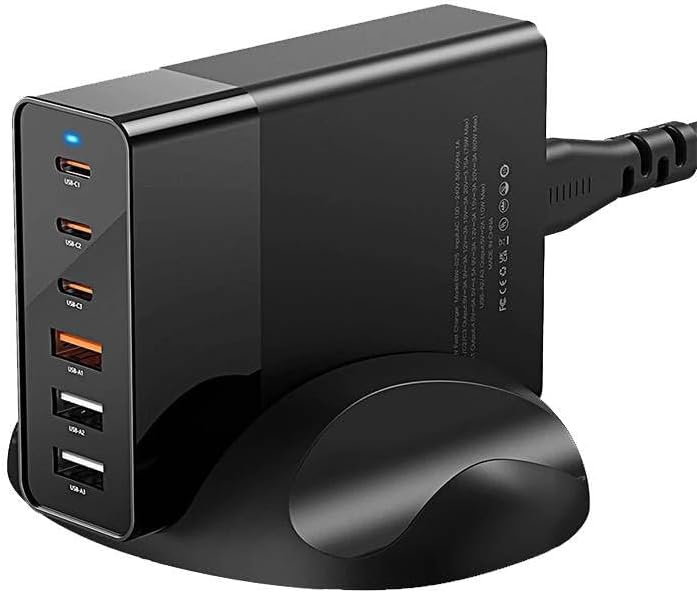
ຮູບພາບ: ທາງຫນ້າ view of the BlitzWolf BW-S25 wall charger, clearly showing its three USB-C ports and three standard USB-A ports, along with a blue LED indicator light.
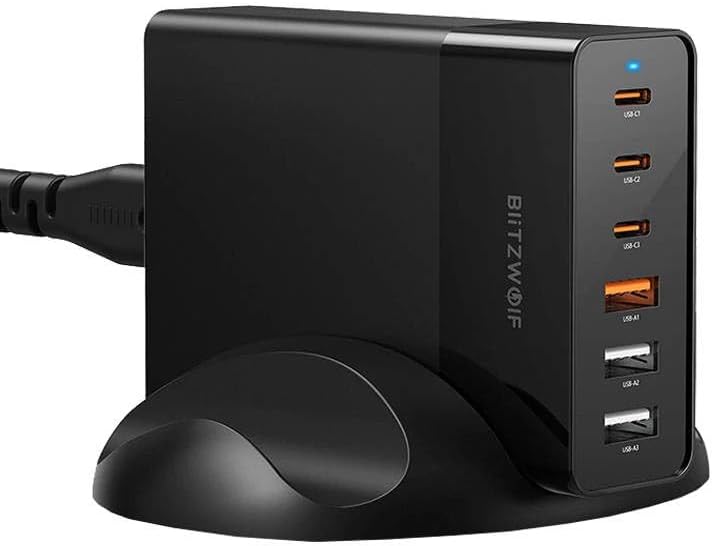
ຮູບພາບ: ຂ້າງ view of the BlitzWolf BW-S25 wall charger, highlighting the "BlitzWolf" brand logo vertically printed on its side, confirming its authenticity.
ການຕັ້ງຄ່າພອດ:
- 3 x USB-C Ports: For fast charging compatible devices like laptops, tablets, and smartphones.
- 3 x USB-A Ports: For charging a wide range of standard USB devices.
ຕັ້ງຄ່າ
- ແກະກ່ອງ: Carefully remove the BlitzWolf BW-S25 charger from its packaging.
- ເຊື່ອມຕໍ່ກັບພະລັງງານ: Plug the charger's integrated power cord into a standard AC wall outlet (100-240V).
- ແສງຕົວຊີ້ວັດ: A blue LED indicator light on the charger will illuminate, indicating that the charger is powered on and ready for use.
ຄໍາແນະນໍາການດໍາເນີນງານ
- ເຊື່ອມຕໍ່ອຸປະກອນ: Use appropriate charging cables to connect your devices to the available USB-C or USB-A ports on the charger.
- ການສາກໄຟ: The charger will automatically detect your device and deliver the optimal charging current up to its maximum output. The total output power is 75W shared across all active ports.
- ອຸປະກອນຫຼາຍອັນ: When charging multiple devices, the 75W power output will be intelligently distributed among the connected devices. For optimal fast charging, consider the power requirements of each device.
- ຕັດການເຊື່ອມຕໍ່: Once your devices are fully charged, disconnect them from the charger.
ໝາຍເຫດ: For best performance and safety, always use certified charging cables that are compatible with your devices and the charger.
ບໍາລຸງຮັກສາ
- ທໍາຄວາມສະອາດ: ຖອດສາຍສາກຈາກປລັກສຽບໄຟກ່ອນທຳຄວາມສະອາດ. ໃຊ້ຜ້າປຽກອ່ອນໆເຊັດພື້ນຜິວ. ຢ່າໃຊ້ເຄື່ອງເຮັດຄວາມສະອາດຂອງແຫຼວຫຼື aerosols.
- ການເກັບຮັກສາ: ເກັບຮັກສາເຄື່ອງສາກໄຟໄວ້ໃນບ່ອນທີ່ເຢັນ, ແຫ້ງ ແລະ ຫ່າງຈາກແສງແດດໂດຍກົງ ແລະ ອຸນຫະພູມສູງສຸດເມື່ອບໍ່ໄດ້ໃຊ້ງານ.
- ການດູແລສາຍໄຟ: ຫຼີກລ່ຽງການງໍ ຫຼື ບີບສາຍໄຟຫຼາຍເກີນໄປ.
ການແກ້ໄຂບັນຫາ
| ບັນຫາ | ສາເຫດທີ່ເປັນໄປໄດ້ | ການແກ້ໄຂ |
|---|---|---|
| Charger not powering on (no LED light) | ບໍ່ມີໄຟຟ້າຈາກປລັກສຽບ; ການເຊື່ອມຕໍ່ວ່າງ; ເຄື່ອງສາກໄຟມີບັນຫາ. | Check if the outlet is working by plugging in another device. Ensure the charger is firmly plugged in. If the issue persists, contact support. |
| ອຸປະກອນບໍ່ສາກໄຟ ຫຼື ກຳລັງສາກຊ້າ | Faulty cable; incompatible device; device's charging port issue; charger overloaded. | Try a different charging cable. Ensure your device is compatible. Try charging fewer devices simultaneously to reduce load. Clean device's charging port. |
| ເຄື່ອງສາກຮູ້ສຶກອົບອຸ່ນໃນລະຫວ່າງການໃຊ້ງານ | ການດໍາເນີນງານປົກກະຕິພາຍໃຕ້ການໂຫຼດ. | It is normal for chargers to generate some heat during operation, especially when charging multiple devices or high-power devices. If it becomes excessively hot or emits smoke/smell, unplug immediately and contact support. |
ຂໍ້ມູນຈໍາເພາະ
| ຍີ່ຫໍ້ | BlitzWolf |
| ຕົວແບບ | BW-S25 |
| ຜົນຜະລິດພະລັງງານທັງ ໝົດ | 75 ວັດ |
| ພອດ USB-C | 3 |
| ພອດ USB-A | 3 |
| ສີ | ດຳ |
| ການປ້ອນຂໍ້ມູນ Voltage | 100-240V AC |
ການຮັບປະກັນແລະການສະຫນັບສະຫນູນ
The BlitzWolf BW-S25 charger comes with a standard manufacturer's warranty. Please refer to the warranty card included in your product packaging for specific terms and conditions. For technical support, troubleshooting assistance, or warranty claims, please contact the retailer or BlitzWolf customer service through their official webເວັບໄຊ.
ກະລຸນາຮັກສາຫຼັກຖານການຊື້ຂອງທ່ານໄວ້ເພື່ອຈຸດປະສົງການຮັບປະກັນ.