
1. ບົດແນະນຳ
This manual provides detailed instructions for the installation, operation, and maintenance of your Active Pixel A9 Triple Lens WiFi Outdoor Security Camera. Please read this manual thoroughly before using the product to ensure proper function and safety. This camera is designed for outdoor surveillance, offering a wide field of view, advanced detection features, and robust weather resistance.
2. ເນື້ອໃນຊຸດ
ກວດສອບວ່າລາຍການທັງຫມົດແມ່ນມີຢູ່ໃນຊຸດຂອງທ່ານ:
- 1x Active Pixel A9 Camera
- 1x ຂາຕັ້ງ
- 1x ຕົວແປງໄຟ
- 1x ຄູ່ມືຜູ້ໃຊ້ (ເອກະສານນີ້)
- 1x Screw Kit for installation
3. ຄຸນສົມບັດຜະລິດຕະພັນຫຼາຍກວ່າview
The Active Pixel A9 camera offers a range of features for comprehensive outdoor security:
- Triple Lens Ultra-Wide 4MP Clarity: Three lenses provide a dramatically wider area coverage with sharper details and expanded angle monitoring.
- ວິໄສທັດກາງຄືນເຕັມສີ: Equipped with 8 high-power LEDs for clear, full-color video even in complete darkness.
- 360° PTZ Surveillance: Remotely pan, tilt, and zoom the camera to monitor every corner without blind spots.
- Smart Motion Tracking & Human Detection: AI-powered detection identifies human movement accurately and automatically tracks moving subjects.
- WiFi Enabled with Two-Way Audio: Stable 2.4GHz WiFi connectivity with a built-in microphone and speaker for remote communication.
- Waterproof Outdoor Build (IP66): Designed to withstand rain, dust, heat, and harsh outdoor conditions.
- ທາງເລືອກການເກັບຮັກສາຄູ່: Supports local SD card storage (up to 128GB) and secure cloud backup.
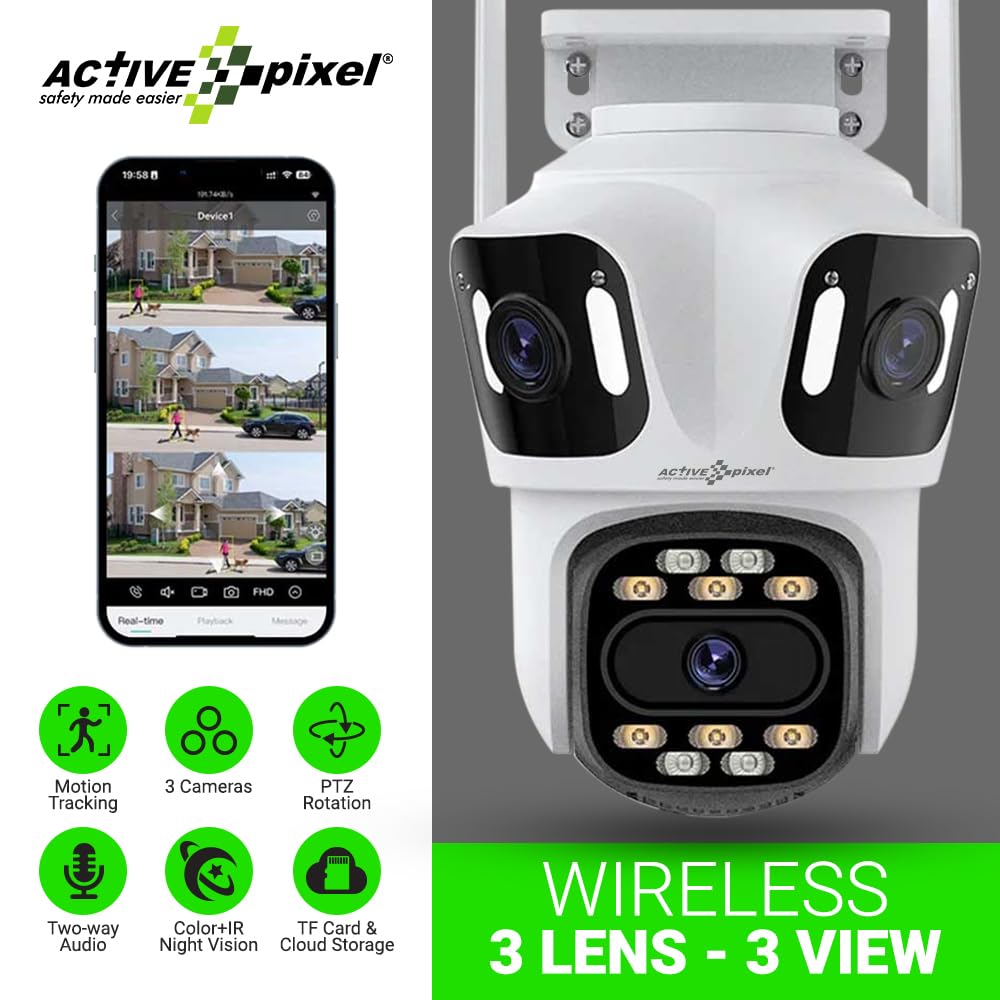
Figure 3.1: Active Pixel A9 Camera highlighting key features and mobile app view.

Figure 3.2: Illustration of the 3-Lens, 3-Screen panoramic viewຄວາມສາມາດ.

Figure 3.3: The camera's weatherproof design ensures durability in various conditions.
4. ຄໍາແນະນໍາການຕິດຕັ້ງ
4.1 ການຕິດຕັ້ງທາງດ້ານຮ່າງກາຍ
- ເລືອກສະຖານທີ່: ເລືອກສະຖານທີ່ກາງແຈ້ງທີ່ສະຫນອງຄວາມຕ້ອງການ viewing angle and is within range of your WiFi network. Ensure the camera is mounted securely and has access to a power outlet.
- ຕິດກ້ອງ: Use the provided screw kit to securely attach the mounting stand to a wall or ceiling. Attach the camera to the stand. Refer to the camera dimensions for proper placement.
- ເຊື່ອມຕໍ່ພະລັງງານ: Plug the power adapter into the camera and then into a suitable power outlet. The camera will power on and initiate its startup sequence.

Figure 4.1: Camera dimensions for installation planning.
4.2 ການດາວໂຫຼດແອັບ ແລະ ການສ້າງບັນຊີ
- ດາວໂຫລດ App ໄດ້: ຊອກຫາ the recommended mobile application (e.g., "ICSEE" or as specified in the camera packaging) on your smartphone's app store (Google Play Store or Apple App Store).
- ສ້າງບັນຊີ: Open the app and follow the on-screen instructions to register a new account.
4.3 ການຈັບຄູ່ກ້ອງຖ່າຍຮູບ
The camera supports both wireless (WiFi) and wired connections:
- ການເຊື່ອມຕໍ່ໄຮ້ສາຍ:
- ໃຫ້ແນ່ໃຈວ່າໂທລະສັບຂອງທ່ານເຊື່ອມຕໍ່ກັບເຄືອຂ່າຍ WiFi 2.4GHz ແລ້ວ.
- In the app, select "Add Device" and choose the wireless connection option.
- Follow the app's prompts to connect the camera to your WiFi network. This usually involves scanning a QR code displayed on your phone with the camera or entering WiFi credentials.
- ການເຊື່ອມຕໍ່ແບບມີສາຍ (ທາງເລືອກ):
- Connect an Ethernet cable from your router to the camera's LAN port.
- In the app, select "Add Device" and choose the wired connection option. The camera should be automatically detected.

Figure 4.2: Connection methods for the Active Pixel A9 camera.
5. ຄໍາແນະນໍາການດໍາເນີນງານ
5.1 ດໍາລົງຊີວິດ View and Multi-Screen Monitoring
ເມື່ອເຊື່ອມຕໍ່ແລ້ວ, ເປີດແອັບເພື່ອ view ດໍາລົງຊີວິດ footage from your camera. The triple-lens design allows for multi-screen viewing within the app, providing a comprehensive panoramic perspective.
Figure 5.1: Multi-screen live view from the triple-lens camera.
5.2 ການຄວບຄຸມ PTZ
Use the directional controls within the app to remotely pan (horizontal rotation), tilt (vertical rotation), and zoom the camera to adjust your viewing area. This allows for dynamic monitoring of your surroundings.
5.3 ສຽງສອງທາງ
Tap the microphone icon in the app to speak through the camera's speaker, and listen to audio from the camera's microphone. This feature enables real-time communication with visitors or deterrence of intruders.
5.4 ໂໝດວິໄສທັດກາງຄືນ
The camera automatically switches to night vision in low-light conditions. The 8 high-power LEDs provide full-color night vision, ensuring clear visibility after dark.
5.5 ການກວດຈັບ ແລະ ຕິດຕາມການເຄື່ອນໄຫວ
Enable motion detection in the app settings. The camera will send alerts to your phone when motion is detected. With human detection enabled, the camera can distinguish human shapes from other movements, reducing false alarms. The smart tracking feature will automatically follow detected human subjects.

Figure 5.2: Human detection and automatic tracking in action.
5.6 ການບັນທຶກແລະການຫຼິ້ນ
ກ້ອງຖ່າຍຮູບຮອງຮັບສອງວິທີການບັນທຶກສຽງຄື:
- ບ່ອນຈັດເກັບຂໍ້ມູນ SD: Insert a Micro SD card (up to 128GB, not included) into the designated slot on the camera. Recordings will be saved locally.
- Cloud Storage: Subscribe to the cloud storage service through the app for secure off-site backup of your recordings.
ການເຂົ້າເຖິງບັນທຶກ footage via the playback function in the mobile app.

Figure 5.3: Dual storage options: TF card and cloud.
6. ບໍາລຸງຮັກສາ
6.1 ການທໍາຄວາມສະອາດກ້ອງຖ່າຍຮູບ
ເຮັດຄວາມສະອາດເລນກ້ອງຖ່າຍຮູບ ແລະ ທີ່ຢູ່ອາໃສເປັນໄລຍະໆດ້ວຍເຄື່ອງອ່ອນ, ງamp cloth. Do not use harsh chemicals or abrasive cleaners, as these can damage the lens or finish. Ensure the camera is powered off before cleaning.
6.2 ການອັບເດດເຟີມແວ
Check the mobile app regularly for available firmware updates. Keeping your camera's firmware up-to-date ensures optimal performance, security, and access to new features. Follow the in-app instructions for firmware updates.
6.3 ການຈັດການ SD Card
If using an SD card, it is recommended to format it periodically through the camera's settings in the app to maintain optimal recording performance. Replace the SD card if it shows signs of corruption or failure.
7. ການແກ້ໄຂບັນຫາ
- ກ້ອງຖ່າຍຮູບບໍ່ໄດ້ເຊື່ອມຕໍ່ກັບ WiFi:
- ໃຫ້ແນ່ໃຈວ່າເຄືອຂ່າຍ WiFi ຂອງທ່ານແມ່ນ 2.4GHz. ກ້ອງຖ່າຍຮູບບໍ່ຮອງຮັບເຄືອຂ່າຍ 5GHz.
- Check WiFi signal strength at the camera's location.
- Verify the WiFi password entered in the app is correct.
- ຣີສະຕາດ router ແລະກ້ອງຖ່າຍຮູບຂອງທ່ານ.
- ຄຸນນະພາບຮູບພາບທີ່ບໍ່ດີ:
- ເຮັດຄວາມສະອາດເລນກ້ອງຖ່າຍຮູບ.
- ຮັບປະກັນໃຫ້ມີແສງສະຫວ່າງພຽງພໍ, ໂດຍສະເພາະສຳລັບວິໄສທັດໃນຕອນກາງຄືນ.
- ກວດເບິ່ງຄວາມໄວການເຊື່ອມຕໍ່ອິນເຕີເນັດຂອງທ່ານ.
- ການກວດຈັບການເຄື່ອນໄຫວບໍ່ເຮັດວຽກ ຫຼື ມີສັນຍານເຕືອນທີ່ບໍ່ຖືກຕ້ອງຫຼາຍເກີນໄປ:
- ປັບຄວາມອ່ອນໄຫວໃນການກວດຈັບການເຄື່ອນໄຫວໃນແອັບ.
- Ensure human detection is enabled if you wish to filter out non-human movements.
- Define specific detection zones to exclude areas with constant, irrelevant movement (e.g., busy roads).
- ບັນຫາສຽງສອງທາງ:
- ກວດເບິ່ງການອະນຸຍາດໄມໂຄຣໂຟນ ແລະລຳໂພງສຳລັບແອັບໃນໂທລະສັບຂອງທ່ານ.
- Ensure volume levels are adjusted correctly on both the app and your phone.
- ກວດສອບຄວາມໝັ້ນຄົງຂອງເຄືອຂ່າຍ.
8. ຂໍ້ມູນຈໍາເພາະ
| ຄຸນສົມບັດ | ລາຍລະອຽດ |
|---|---|
| ຍີ່ຫໍ້ | Active Pixel |
| ຊື່ຕົວແບບ | WIFI Triple LENS |
| ໝາຍເລກຕົວແບບ | A9 |
| ການນໍາໃຊ້ທີ່ແນະນໍາ | ຄວາມປອດໄພກາງແຈ້ງ |
| ສະພາບແວດລ້ອມການນໍາໃຊ້ | ກາງແຈ້ງ |
| ເຕັກໂນໂລຊີການເຊື່ອມຕໍ່ | ໄຮ້ສາຍ (Wi-Fi 2.4GHz) |
| ຄຸນນະສົມບັດພິເສດ | Triple Lens, Full-Color Night Vision, 360° PTZ, Motion Tracking, Human Detection, Two-Way Audio |
| ປະເພດການຕິດຕັ້ງ | ໂພງ |
| ຄວາມລະອຽດການຖ່າຍວິດີໂອ | 1536P |
| ຮູບແບບການຖ່າຍຮູບວິດີໂອ | 4MP |
| ແຫຼ່ງພະລັງງານ | Adapter (No Batteries Required) |
| ຂະໜາດລາຍການ (L x W x H) | 15 x 10 x 8 ຊັງຕີແມັດ |
| ນ້ໍາຫນັກລາຍການ | 400 ກຣາມ |
| ເນື້ອໃນຊຸດ | 1x Camera, 1x Stand, 1x Adapter, 1x Manual, 1x Screw Kit |
9. ການຮັບປະກັນແລະການສະຫນັບສະຫນູນ
9.1 ຂໍ້ມູນການຮັບປະກັນ
This product may be eligible for an extended warranty. For details on warranty coverage and terms, please refer to any warranty cards included in your package or contact customer support. An optional 1-Year Extended Warranty by Onsitego may be available for purchase.
9.2 ສະຫນັບສະຫນູນລູກຄ້າ
For technical assistance, troubleshooting, or any product-related inquiries, please contact Active Pixel customer care:
- ໂທລະສັບ: 9321367328
- ຜູ້ຜະລິດ / ຜູ້ ນຳ ເຂົ້າ: Glorious Digital Solution Pvt Ltd, Mumbai, India.