
1. ຜະລິດຕະພັນເກີນview
The LIORQUE Digital Kitchen Timer Model YGH5249 is a multi-functional device designed to assist with various timing needs. It features a large LCD display, adjustable alarm volume, and multiple placement options. This timer can function as a countdown timer, a count-up stopwatch, and a digital clock.

ຮູບພາບ 1.1: ດ້ານຫນ້າ view of the LIORQUE Digital Kitchen Timer, highlighting its large LCD screen and control buttons.
ຄຸນນະສົມບັດທີ່ສໍາຄັນ:
- ຟັງຊັນ 3-in-1: Timer, Stopwatch, and Clock modes.
- ຈໍ LCD ຂະຫນາດໃຫຍ່: Ensures clear readability of time.
- ປັບລະດັບສຽງປຸກໄດ້: Three levels (Mute, Low, High) to suit different environments.
- ແບບລູກຄ້າ: Save frequently used countdown times for quick access.
- ການຈັດວາງທີ່ຫຼາກຫຼາຍ: Magnetic back, foldable stand, and lanyard hole for flexible use.
- Delay Reminder: Automatically starts counting up after countdown finishes.
- Auto-Restore: Remembers the last set countdown time.

Image 1.2: Visual representation of the timer's main features and functions.
2. ການຕິດຕັ້ງແລະການຕິດຕັ້ງຫມໍ້ໄຟ
The timer requires 2 AAA batteries (included) for operation. Follow these steps to install them:
- ຊອກຫາຝາປິດຊ່ອງໃສ່ແບັດເຕີຣີຢູ່ດ້ານຫຼັງຂອງໂມງຈັບເວລາ.
- ເລື່ອນຝາປິດເປີດ.
- ໃສ່ໝໍ້ໄຟ AAA ສອງໜ່ວຍ, ຮັບປະກັນການຂົ້ວທີ່ຖືກຕ້ອງ (+ ແລະ -) ຕາມທີ່ລະບຸໄວ້ພາຍໃນຊ່ອງ.
- ປິດຝາປິດຊ່ອງໃສ່ຫມໍ້ໄຟຢ່າງປອດໄພ.
The timer will power on automatically once batteries are installed.
3. ຄໍາແນະນໍາການດໍາເນີນງານ
3.1 Switching Modes (Timer/Stopwatch/Clock)
The LIORQUE timer offers three modes: Timer (countdown), Stopwatch (count-up), and Clock. To switch between Timer mode and Clock mode, press and hold the ST/SP button for 2 seconds. The timer will display the current time in Clock mode or the timer interface in Timer mode.

Image 3.1: Switching between Counting Mode and Clock Mode.
3.2 Setting Countdown Timer
- Ensure the timer is in Timer mode (displaying H:M:S).
- ໃຊ້ 1H, 5M, 1M, ແລະ 5S buttons to set the desired countdown time. Each press adds the corresponding time increment.
- ກົດ ST/SP ປຸ່ມເພື່ອເລີ່ມຕົ້ນການນັບຖອຍຫຼັງ.
- To pause the countdown, press ST/SP ອີກເທື່ອຫນຶ່ງ. ກົດມັນອີກຄັ້ງເພື່ອສືບຕໍ່.
- To reset the timer to zero, press the ຣີເຊັດ ປຸ່ມ.
- When the countdown reaches zero, the alarm will sound for 1 minute.
3.3 Using Stopwatch (Count-Up)
- Ensure the timer is in Timer mode and reset to 00:00:00.
- ກົດ ST/SP button to start counting up.
- ເພື່ອຢຸດໂມງຈັບເວລາ, ກົດ ST/SP ອີກເທື່ອຫນຶ່ງ. ກົດມັນອີກຄັ້ງເພື່ອສືບຕໍ່.
- ເພື່ອຣີເຊັດໂມງຈັບເວລາເປັນສູນ, ໃຫ້ກົດທີ່ປຸ່ມ ຣີເຊັດ ປຸ່ມ.

Image 3.2: Illustration of Count-up and Countdown modes.
3.4 Shortcut Setting
The timer allows for quick setting of common intervals:
- ກົດ 1H ເປັນເວລາ 1 ຊົ່ວໂມງ.
- ກົດ 5M ສໍາລັບ 5 ນາທີ.
- ກົດ 1M ເປັນເວລາ 1 ນາທີ.
- ກົດ 5S ເປັນເວລາ 5 ວິນາທີ.

ຮູບພາບ 3.3: ຕົວຢ່າງamples of using shortcut buttons for quick time setting.
3.5 ໂໝດກຳນົດເອງ
The Custom Mode allows you to save a frequently used countdown time for instant recall.
- In Timer mode, set your desired countdown time using the 1H, 5M, 1M, ແລະ 5S ປຸ່ມ.
- ກົດຄ້າງໄວ້ ກຳນົດເອງ button for 2 seconds. The timer will remember this setting.
- Each subsequent short press of the ກຳນົດເອງ button will automatically load the saved time.

Image 3.4: Setting and recalling a custom timer value.
3.6 ການປັບລະດັບສຽງເຕືອນ
The timer features a 3-level alarm volume adjustment (Mute, Low, High). A switch on the side of the timer allows you to select the desired volume level.

Image 3.5: Volume adjustment switch and its three settings.
3.7 ຕົວເລືອກການຈັດວາງ
The LIORQUE timer offers flexible placement options:
- ແມ່ເຫຼັກ: Attach the timer to metal surfaces like refrigerators using its strong magnetic back.
- ຢືນ: Use the integrated foldable stand to place the timer on any flat surface, such as a countertop or desk.
- Lanyard Hole: Hang the timer using a rope through the designated lanyard hole.
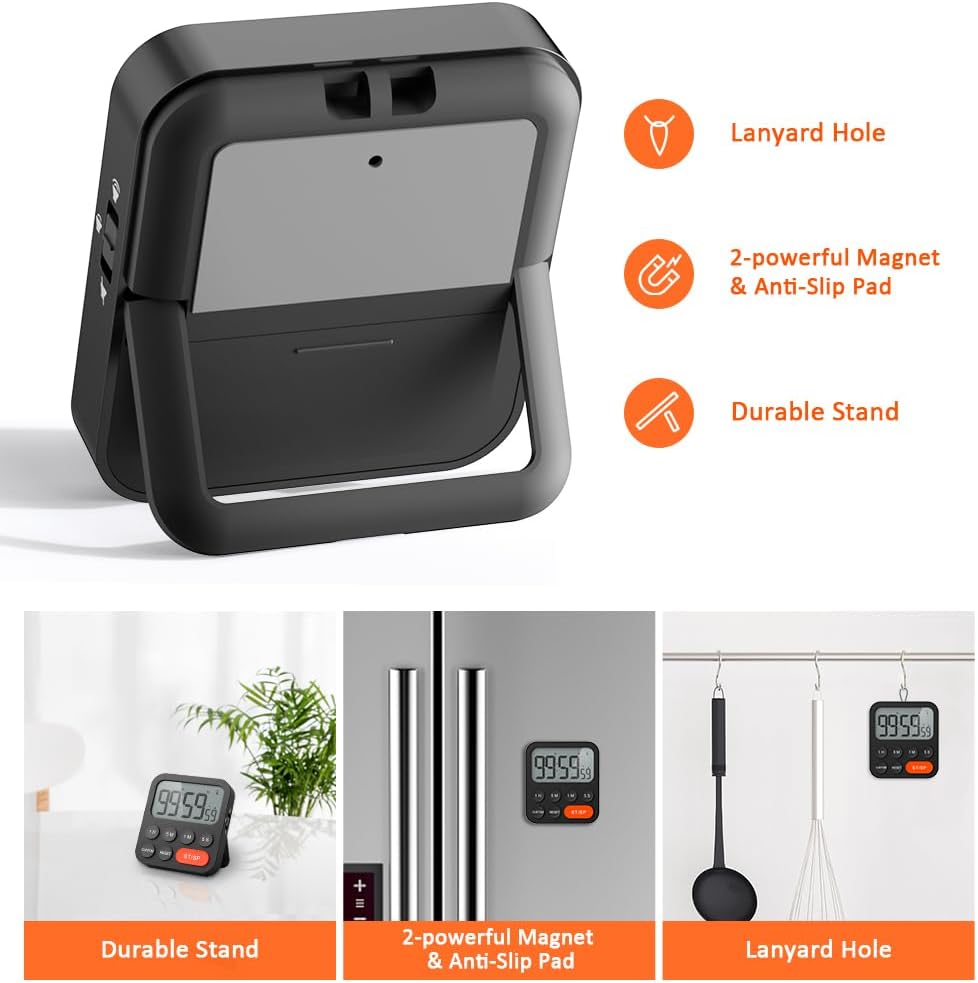
Image 3.6: Various ways to place and use the timer.
3.8 ຫນ້າທີ່ເພີ່ມເຕີມ
- Delay Reminder: After a countdown finishes, the timer will automatically start counting up, indicating the elapsed time since the alarm.
- Auto-Restore: Once a countdown is complete and the alarm has sounded, pressing the ST/SP button will restore the timer to the last set countdown time, making it convenient for repetitive tasks.

Image 3.7: Explanation of Delay Reminder and Auto-restore features.
4. ບໍາລຸງຮັກສາ
- Clean the timer with a soft, dry cloth. Do not use abrasive cleaners or immerse in water.
- Replace batteries when the display becomes dim or the timer functions erratically.
- ເກັບຮັກສາໂມງຈັບເວລາໄວ້ໃນບ່ອນທີ່ເຢັນແລະແຫ້ງເມື່ອບໍ່ໄດ້ໃຊ້ງານເປັນເວລາດົນ.
5. ການແກ້ໄຂບັນຫາ
- Timer not responding: ກວດເບິ່ງວ່າແບດເຕີຣີຖືກຕິດຕັ້ງຢ່າງຖືກຕ້ອງແລະມີການສາກໄຟພຽງພໍ. ປ່ຽນແທນຖ້າຈໍາເປັນ.
- Alarm too quiet/loud: Adjust the volume switch on the side of the timer to your preferred level.
- ການສະແດງຫວ່າງເປົ່າ: Ensure batteries are installed and functional. If the issue persists, contact customer support.
6. ຂໍ້ມູນຈໍາເພາະ
| ຄຸນສົມບັດ | ລາຍລະອຽດ |
|---|---|
| ຍີ່ຫໍ້ | LIORQUE |
| ໝາຍເລກຕົວແບບ | YGH5249 |
| ສີ | ດຳ |
| ຂະໜາດສິນຄ້າ | 0.94" ເລິກ x 0.94" ສູງ |
| ນ້ໍາຫນັກລາຍການ | 4.2 ອອນ |
| ແຫຼ່ງພະລັງງານ | ໝໍ້ໄຟ AAA 2 ອັນ (ລວມ) |
| ຈໍານວນການຕັ້ງຄ່າ | 3 (ປະລິມານ) |
| ຂະໜາດໜ້າຈໍ | 1E+1 ຊັງຕີແມັດ |
7. ການຮັບປະກັນແລະການສະຫນັບສະຫນູນ
For warranty information or technical support, please refer to the product packaging or contact LIORQUE customer service through their official webເວັບໄຊທ໌ ຫຼື ຮ້ານຄ້າປີກທີ່ຊື້ຜະລິດຕະພັນ. ເກັບໃບຮັບເງິນການຊື້ຂອງທ່ານໄວ້ເພື່ອການຮຽກຮ້ອງການຮັບປະກັນ.