
1. ບົດແນະນຳ
The OSD Audio DAC-X200 is a powerful 2-channel Class D stereo amplifier designed to deliver high-fidelity audio. It features a built-in Hi-Res 24bit/192khz DAC, offering superior digital audio conversion. With versatile input options including USB, Optical, and RCA, and A/B speaker switching, this amplifier is suitable for various home audio setups, from driving bookshelf speakers to powering floorstanding units.
2. ຄໍາແນະນໍາຄວາມປອດໄພ
- ແຫຼ່ງພະລັງງານ: ເຊື່ອມຕໍ່ຫນ່ວຍບໍລິການພຽງແຕ່ກັບການສະຫນອງພະລັງງານທີ່ລະບຸໄວ້ voltage.
- ການລະບາຍອາກາດ: ຮັບປະກັນການລະບາຍອາກາດທີ່ພຽງພໍ. ຫ້າມປິດຊ່ອງລະບາຍອາກາດ.
- ນ້ໍາແລະຄວາມຊຸ່ມ: ຫ້າມບໍ່ໃຫ້ອຸປະກອນຖືກຝົນ, ຄວາມຊຸ່ມຊື່ນ, ຫຼືຄວາມຊຸ່ມຊື່ນຫຼາຍເກີນໄປ.
- ແຫຼ່ງຄວາມຮ້ອນ: ເກັບຮັກສາເຄື່ອງໃຫ້ຫ່າງຈາກແຫຼ່ງຄວາມຮ້ອນ ເຊັ່ນ: ໝໍ້ນ້ຳ, ເຄື່ອງບັນທຶກຄວາມຮ້ອນ, ເຕົາໄຟ ຫຼື ເຄື່ອງໃຊ້ໄຟຟ້າທີ່ຜະລິດຄວາມຮ້ອນອື່ນໆ.
- ທໍາຄວາມສະອາດ: ເຮັດຄວາມສະອາດດ້ວຍຜ້າແຫ້ງເທົ່ານັ້ນ.
- ການບໍລິການ: ຢ່າພະຍາຍາມບໍລິການຜະລິດຕະພັນນີ້ດ້ວຍຕົນເອງ. ອ້າງເຖິງການບໍລິການທັງtoົດໃຫ້ກັບພະນັກງານບໍລິການທີ່ມີຄຸນວຸດທິ.
- ການຈັດວາງ: Place the unit on a stable, flat surface. Avoid placing heavy objects on top of the ampມີຊີວິດຊີວາ.
3. ເນື້ອໃນຊຸດ
ກວດສອບວ່າລາຍການທັງຫມົດແມ່ນມີຢູ່ໃນຊຸດ:
- OSD Audio DAC-X200 Ampມີຊີວິດຊີວາ
- ຄູ່ມືເລີ່ມຕົ້ນດ່ວນ
- ສາຍໄຟ
- ຣີໂໝດຄວບຄຸມ (ຖ້າມາພ້ອມກັບຮຸ່ນຂອງທ່ານ)
4. ຜະລິດຕະພັນເກີນview
4.1 ກະດານດ້ານ ໜ້າ
ແຜງດ້ານໜ້າໃຫ້ການເຂົ້າເຖິງການຄວບຄຸມທີ່ຈຳເປັນສຳລັບການດຳເນີນງານປະຈຳວັນ.

ຮູບທີ 4.1: ດ້ານໜ້າ view of the DAC-X200 amplifier, showing the power button, speaker selectors, balance, and volume controls.

ຮູບທີ 4.2: Detail of the front panel, highlighting the Power button and Speaker A/B selection buttons.

ຮູບທີ 4.3: Detail of the front panel, showing the Balance and Volume control knobs.
4.2 ແຜງດ້ານຫລັງ
The rear panel houses all input and output connections for audio sources and speakers.
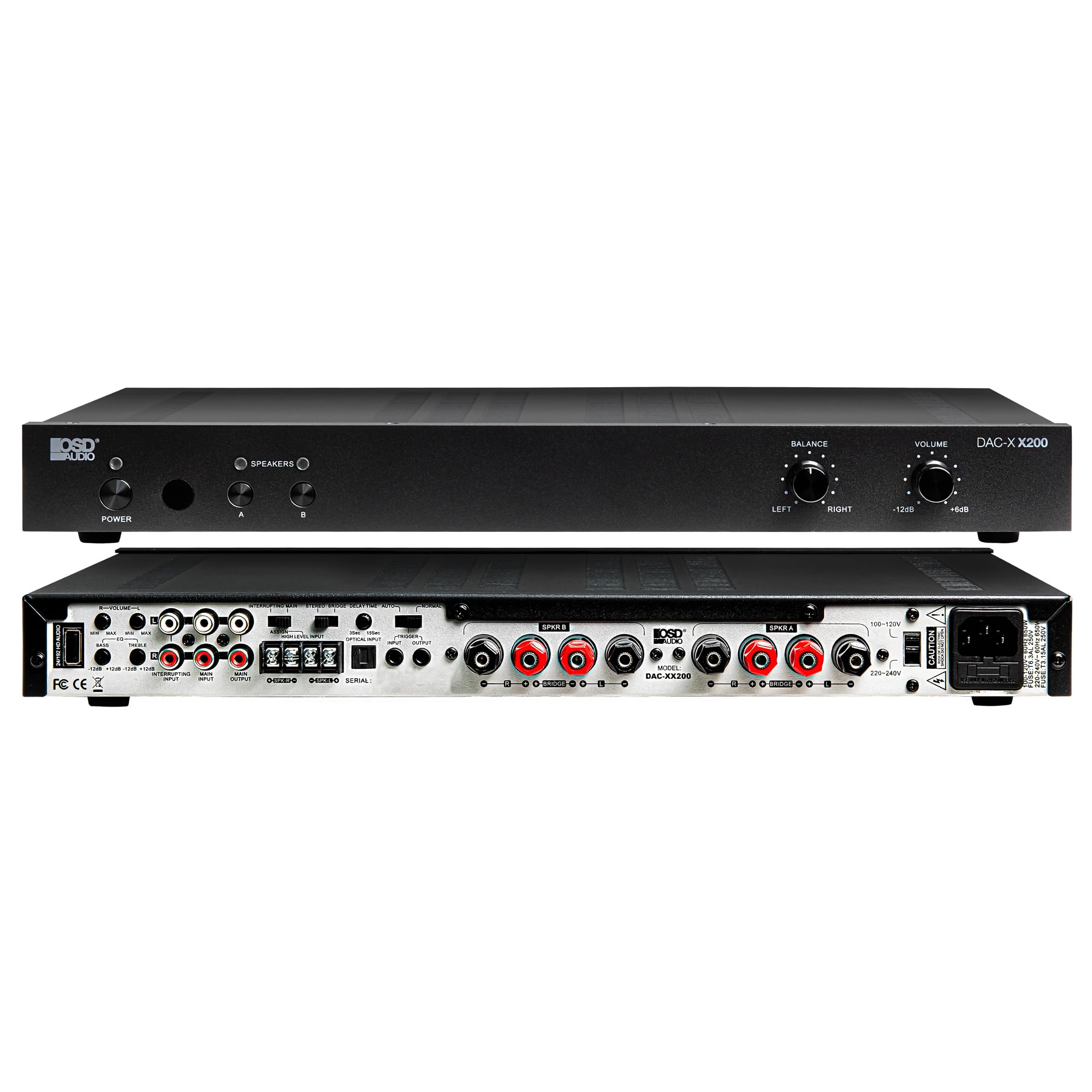
ຮູບທີ 4.4: ຫລັງ view of the DAC-X200 amplifier, displaying various audio inputs (USB, Optical, RCA), speaker outputs, and power input.

ຮູບທີ 4.5: Detail of the rear panel inputs, including USB, Optical, and RCA connections.

ຮູບທີ 4.6: Detail of the rear panel speaker output terminals for Speaker A and Speaker B.
5. ຕັ້ງຄ່າ
5.1 ການຈັດວາງ
Place the DAC-X200 on a flat, stable surface with adequate space around it for ventilation. Avoid enclosed cabinets or areas with poor airflow to prevent overheating.
5.2 ເຊື່ອມຕໍ່ລໍາໂພງ
- ຮັບປະກັນ ampເຄື່ອງຂະຫຍາຍສຽງຖືກປິດ ແລະ ຖອດປລັກອອກ.
- ເຊື່ອມຕໍ່ລໍາໂພງຕົວຕັ້ງຕົວຕີຂອງທ່ານກັບ ລໍາໂພງ ກ ແລະ/ຫຼື ລໍາໂພງ ຂ terminals on the rear panel. Observe correct polarity (+ to + and - to -).
- For optimal performance, use high-quality speaker wire.
5.3 ການເຊື່ອມຕໍ່ແຫຼ່ງສຽງ
The DAC-X200 supports multiple input types:
- ການປ້ອນຂໍ້ມູນ USB: Connect a computer or other USB audio source using a Type A to Type A USB 2.0 cable.
- Optical Input: Connect digital audio sources like TVs or CD players using an optical cable.
- ວັດສະດຸປ້ອນ RCA: Connect analog audio sources such as music streamers, turntables (with a pre-amp), or other devices using RCA cables.
5.4 ການເຊື່ອມຕໍ່ພະລັງງານ
After all audio and speaker connections are made, connect the supplied power cable to the ampສຽບໄຟຟ້າຂອງເຄື່ອງຂະຫຍາຍສຽງ ແລະ ຈາກນັ້ນໄປຫາປລັກໄຟຟ້າ AC ທີ່ເໝາະສົມ.
6. ຄໍາແນະນໍາການດໍາເນີນງານ
6.1 ເປີດ/ປິດ
ກົດ ພະລັງງານ ປຸ່ມຢູ່ແຖບດ້ານຫນ້າເພື່ອຫັນ ampເປີດ ຫຼື ປິດເຄື່ອງ. ໄຟສະແດງພະລັງງານຈະສະຫວ່າງຂຶ້ນເມື່ອເຄື່ອງເປີດ.
6.2 ການຄັດເລືອກການປ້ອນຂໍ້ມູນ
The DAC-X200 features smart source switching, automatically detecting and switching to an active input. If multiple inputs are active, you may need to manually select the desired input using the remote control (if applicable) or by cycling through inputs.
6.3 ການຄວບຄຸມປະລິມານ
Adjust the overall output volume using the ປະລິມານ knob on the front panel. Rotate clockwise to increase volume and counter-clockwise to decrease it.
6.4 ການຄວບຄຸມສຽງ
ໃຊ້ ຍອດເງິນ knob to adjust the left/right channel balance. The DAC-X200 also includes bass and treble adjustment knobs (located on the rear panel or accessible via remote, depending on model variation) to fine-tune the sound to your preference or room acoustics.
6.5 A/B Speaker Switching
ກົດ A or B buttons on the front panel to select which set of speakers (Speaker A, Speaker B, or both) are active. This allows for multi-room audio configurations.
7. ບໍາລຸງຮັກສາ
- ທໍາຄວາມສະອາດ: ໃຊ້ຜ້າແຫ້ງທີ່ອ່ອນໆເພື່ອເຮັດຄວາມສະອາດພາຍນອກ ampເຄື່ອງພົ່ນນໍ້າ. ຢ່າໃຊ້ນໍ້າຢາທໍາຄວາມສະອາດທີ່ເປັນຂອງແຫຼວ ຫຼື ນໍ້າຢາສີດ.
- ການລະບາຍອາກາດ: ກວດເບິ່ງເປັນໄລຍະວ່າຊ່ອງລະບາຍອາກາດມີຂີ້ຝຸ່ນແລະສິ່ງເສດເຫຼືອ.
- ການເກັບຮັກສາ: ຖ້າເກັບຮັກສາເຄື່ອງເປັນເວລາດົນ, ຖອດປລັກອອກຈາກປລັກສຽບໄຟແລະເກັບຮັກສາໄວ້ໃນບ່ອນທີ່ເຢັນ, ແຫ້ງ.
8. ການແກ້ໄຂບັນຫາ
| ບັນຫາ | ສາເຫດທີ່ເປັນໄປໄດ້ | ການແກ້ໄຂ |
|---|---|---|
| ບໍ່ມີພະລັງງານ | Power cable not connected; Power outlet not active; Ampປິດຊີວິດ. | Check power cable connection; Test power outlet; Press the Power button. |
| ບໍ່ມີສຽງ | Incorrect input selected; Speaker cables loose; Volume too low; Speakers A/B not selected. | Select correct input; Check speaker connections; Increase volume; Ensure Speaker A or B is active. |
| ສຽງບິດເບືອນ | Input signal too high; Speaker impedance mismatch; Faulty cable. | Reduce source volume; Verify speaker impedance (8̣ or 4̣); Replace audio cables. |
| Input not switching automatically | Multiple active sources; Specific source not detected. | Manually select input; Ensure only one source is playing if auto-switching is desired. |
9. ຂໍ້ມູນຈໍາເພາະ
- ຕົວແບບ: DAC-X200
- ພະລັງງານອອກ: 100W RMS per channel at 8̣; 225W RMS per channel at 4̣; 450W bridged mono
- ຈຳນວນຊ່ອງ: 2
- DAC: Hi-Res 24bit/192khz, DSD formats supported
- ວັດສະດຸປ້ອນ: USB, Optical, RCA
- ເຂດລຳໂພງ: A/B Switching
- ຂະໜາດ (L x W x H): 16.7 x 10 x 2 ນິ້ວ
- ປະເພດວັດສະດຸ: ພາດສະຕິກ
- UPC: 810074881173
10. ຂໍ້ມູນການຮັບປະກັນ
OSD Audio products are designed for reliability and performance. This product is covered by a limited warranty against defects in materials and workmanship. Please refer to the official OSD Audio website or your purchase documentation for specific warranty terms and conditions, including duration and coverage details. Keep your proof of purchase for warranty claims.
11. ສະຫນັບສະຫນູນ
For technical assistance, troubleshooting not covered in this manual, or service inquiries, please contact OSD Audio customer support. You can find contact information, FAQs, and additional resources on the official OSD Audio webເວັບໄຊ.
Webເວັບໄຊ: www.osdaudio.com