
1. ບົດແນະນຳ
This manual provides essential information for the safe and efficient operation of your Sharp GX-BT190 Portable Bluetooth Speaker. Please read it thoroughly before using the device and retain it for future reference.
2. ຂໍ້ມູນຄວາມປອດໄພ
- ຢ່າເຮັດໃຫ້ລໍາໂພງຖືກອຸນຫະພູມທີ່ຮຸນແຮງ, ແສງແດດໂດຍກົງ, ຫຼືຄວາມຊຸ່ມຊື່ນສູງ.
- ຫ້າມຖອດປະກອບ, ສ້ອມແປງ ຫຼື ດັດແປງລຳໂພງ. ສິ່ງນີ້ອາດເຮັດໃຫ້ການຮັບປະກັນເປັນໂມຄະ ແລະ ມີຄວາມສ່ຽງດ້ານຄວາມປອດໄພ.
- Ensure the charging port cover is securely closed when using the speaker near water to maintain its IP67 rating.
- ໃຊ້ພຽງແຕ່ສາຍສາກທີ່ສະໜອງໃຫ້ ຫຼືສາຍທຽບເທົ່າທີ່ໄດ້ຮັບການຮັບຮອງ.
- ຮັກສາລໍາໂພງຢູ່ຫ່າງຈາກເດັກນ້ອຍ ແລະສັດລ້ຽງ.
- ຫຼີກເວັ້ນການຟັງໃນລະດັບສຽງສູງສໍາລັບໄລຍະເວລາທີ່ຂະຫຍາຍອອກໄປເພື່ອປ້ອງກັນຄວາມເສຍຫາຍຂອງການໄດ້ຍິນ.
3. ເນື້ອໃນຊຸດ
- Sharp GX-BT190 Portable Bluetooth Speaker
- ສາຍສາກ USB
- ສາຍສາກ
- ຄູ່ມືການສອນ
4. ຜະລິດຕະພັນເກີນview

ດ້ານໜ້າ view of the Sharp GX-BT190 speaker, showing the central speaker grille with the Sharp logo and the LED light ring.

ຂ້າງ view of the Sharp GX-BT190 speaker, highlighting the textured speaker grille and the integrated lanyard.
ຫລັງ view of the Sharp GX-BT190 speaker, showing the control buttons and the sealed charging port cover.
ການຄວບຄຸມ ແລະຕົວຊີ້ວັດ:
- ປຸ່ມເປີດປິດ: ກົດຄ້າງໄວ້ເພື່ອເປີດ/ປິດ.
- ປະລິມານຂຶ້ນ / ປຸ່ມຕິດຕາມຕໍ່ໄປ (+): ກົດສັ້ນເພື່ອປະລິມານຂຶ້ນ, ກົດຄ້າງໄວ້ສຳລັບເພງຕໍ່ໄປ.
- ປະລິມານລົງ / ປຸ່ມຕິດຕາມກ່ອນໜ້າ (-): ກົດສັ້ນເພື່ອປະລິມານລົງ, ກົດຄ້າງໄວ້ສຳລັບເພງກ່ອນໜ້າ.
- Play/Pause / Call Button (►||): ກົດສັ້ນໆເພື່ອຫຼິ້ນ/ຢຸດຊົ່ວຄາວ, ຮັບສາຍ/ວາງສາຍ. ກົດຄ້າງໄວ້ເພື່ອປະຕິເສດສາຍ.
- Mode / Light Button (M): Short press to cycle through LED light modes. Long press to turn off LED lights.
- ພອດສາກໄຟ USB-C: For charging the speaker. Ensure the rubber cover is sealed when not charging.
- ຕົວຊີ້ວັດ LED: Displays charging status and Bluetooth pairing status.
5. ຕັ້ງຄ່າ
5.1 ກຳລັງສາກລຳໂພງ
- Open the rubber cover on the back of the speaker to access the USB-C charging port.
- Connect the provided USB charging cable to the speaker's USB-C port.
- ເຊື່ອມຕໍ່ອີກສົ້ນຂອງສາຍ USB ກັບອະແດັບເຕີໄຟ USB (ບໍ່ລວມ) ຫຼືພອດ USB ຂອງຄອມພິວເຕີ.
- ໄຟ LED ຈະສະຫວ່າງຂຶ້ນໃນລະຫວ່າງການສາກໄຟ ແລະ ຈະດັບລົງເມື່ອສາກເຕັມແລ້ວ.
- Close the rubber cover securely after charging to maintain the speaker's waterproof rating.
5.2 ການເປີດ/ປິດ
- ເພື່ອເປີດເຄື່ອງ: ກົດປຸ່ມເປີດປິດຄ້າງໄວ້ປະມານ 3 ວິນາທີ. ທ່ານຈະໄດ້ຍິນສຽງແຈ້ງເຕືອນ, ແລະໄຟ LED ຈະກະພິບ.
- ປິດເຄື່ອງ: ກົດປຸ່ມເປີດປິດຄ້າງໄວ້ປະມານ 3 ວິນາທີ. ທ່ານຈະໄດ້ຍິນສຽງເຕືອນ, ແລະໄຟ LED ຈະດັບ.
5.3 ການຈັບຄູ່ Bluetooth
- Ensure the speaker is powered on and the LED indicator is flashing, indicating it is in pairing mode.
- ໃນອຸປະກອນມືຖືຂອງທ່ານ, ເປີດໃຊ້ Bluetooth ແລະຊອກຫາອຸປະກອນທີ່ມີຢູ່.
- Select "GX-BT190" from the list of devices.
- ເມື່ອຈັບຄູ່ແລ້ວ, ໄຟ LED ຈະຢຸດກະພິບ ແລະ ຍັງຄົງສະຫວ່າງຢູ່, ແລະ ທ່ານຈະໄດ້ຍິນສຽງຢືນຢັນ.
- ລຳໂພງຈະເຊື່ອມຕໍ່ຄືນໃໝ່ໂດຍອັດຕະໂນມັດກັບອຸປະກອນທີ່ຈັບຄູ່ສຸດທ້າຍເມື່ອເປີດ, ຖ້າອຸປະກອນຢູ່ໃນຂອບເຂດ ແລະ Bluetooth ຖືກເປີດໃຊ້.
5.4 True Wireless Stereo (TWS) ການຈັບຄູ່
TWS allows you to pair two GX-BT190 speakers together for a stereo audio experience.

Two Sharp GX-BT190 speakers, one red and one blue, positioned together, illustrating the True Wireless Stereo (TWS) pairing feature.
- Ensure both GX-BT190 speakers are powered on and not connected to any Bluetooth device.
- On one of the speakers (this will be the primary speaker), double-press the Power button. The speaker will enter TWS pairing mode.
- ລຳໂພງສອງຕົວຈະຄົ້ນຫາ ແລະ ເຊື່ອມຕໍ່ກັນໂດຍອັດຕະໂນມັດ. ທ່ານຈະໄດ້ຍິນສຽງຢືນຢັນເມື່ອການຈັບຄູ່ TWS ສຳເລັດແລ້ວ.
- Once TWS paired, connect your mobile device to the primary speaker via Bluetooth as described in section 5.3.
- To disconnect TWS, double-press the Power button on either speaker.
6. ການເຮັດວຽກ
6.1 ການຫຼິ້ນສຽງ
- ຫຼິ້ນ/ຢຸດ: ກົດປຸ່ມຫຼິ້ນ/ຢຸດຊົ່ວຄາວ.
- ປະລິມານຂຶ້ນ: ກົດປຸ່ມ '+' ສັ້ນ.
- ປະລິມານລົງ: ກົດປຸ່ມສັ້ນ '-'.
- ເພງຕໍ່ໄປ: ກົດປຸ່ມ '+' ຄ້າງໄວ້.
- ຕິດຕາມກ່ອນ ໜ້າ ນີ້: ກົດປຸ່ມ '-' ຄ້າງໄວ້.
6.2 ໂທຟຣີ
- ຮັບສາຍ: ກົດປຸ່ມຫຼິ້ນ/ຢຸດຊົ່ວຄາວເມື່ອມີສາຍໂທເຂົ້າດັງ.
- ສິ້ນສຸດການໂທ: ກົດປຸ່ມຫຼິ້ນ/ຢຸດຊົ່ວຄາວໃນລະຫວ່າງການໂທ.
- ປະຕິເສດການໂທ: ກົດປຸ່ມຫຼິ້ນ/ຢຸດຊົ່ວຄາວເມື່ອມີສາຍໂທເຂົ້າດັງ.
6.3 LED Mood Lights
- Short press the 'M' (Mode/Light) button to cycle through the 6 available LED mood light modes.
- Long press the 'M' button to turn off the LED lights.
6.4 ການນຳໃຊ້ກັນນ້ຳ ແລະ ກັນຝຸ່ນ (IP67)

The Sharp GX-BT190 speaker partially submerged in water, demonstrating its IP67 waterproof and dustproof capabilities.
The GX-BT190 speaker is rated IP67, meaning it is protected from dust ingress and can withstand immersion in water up to 1 meter for 30 minutes. To ensure this protection:
- Always ensure the rubber cover for the charging port is fully and securely sealed before exposing the speaker to water or dust.
- ຢ່າຈຸ່ມລຳໂພງລົງໃນນ້ຳເປັນເວລາດົນ ຫຼື ເກີນຄວາມເລິກທີ່ກຳນົດໄວ້.
- After exposure to water, wipe the speaker dry with a soft cloth before charging.
7. ບໍາລຸງຮັກສາ
7.1 ການທໍາຄວາມສະອາດ
- ເຊັດລໍາໂພງດ້ວຍສຽງອ່ອນ, ງamp ຜ້າ.
- ຢ່າໃຊ້ເຄື່ອງເຮັດຄວາມສະອາດຂັດ, ເຫຼົ້າ, ຫຼືສານລະລາຍສານເຄມີ.
- Ensure the speaker is dry before charging or storing.
7.2 ການເກັບຮັກສາ
- ເກັບຮັກສາລຳໂພງໄວ້ໃນບ່ອນທີ່ເຢັນ, ແຫ້ງ, ຫ່າງຈາກແສງແດດໂດຍກົງ ແລະ ອຸນຫະພູມທີ່ຮ້າຍກາດ.
- ຖ້າເກັບຮັກສາໄວ້ເປັນເວລາດົນ, ໃຫ້ສາກແບັດເຕີຣີເປັນໄລຍະໆ (ຕົວຢ່າງ, ທຸກໆ 3 ເດືອນ) ເພື່ອຮັກສາສຸຂະພາບຂອງແບັດເຕີຣີ.
8. ການແກ້ໄຂບັນຫາ
| ບັນຫາ | ການແກ້ໄຂ |
|---|---|
| ລຳໂພງບໍ່ເປີດ. | ໃຫ້ແນ່ໃຈວ່າໄດ້ສາກໄຟແລ້ວ. ເຊື່ອມຕໍ່ລຳໂພງກັບແຫຼ່ງພະລັງງານໂດຍໃຊ້ສາຍ USB. |
| ບໍ່ສາມາດຈັບຄູ່ຜ່ານ Bluetooth ໄດ້. | Ensure the speaker is in pairing mode (LED flashing). Turn off and on Bluetooth on your device. Move the speaker closer to your device. Clear previous Bluetooth connections on your device. |
| ບໍ່ມີສຽງ ຫຼືສຽງຕໍ່າ. | ເພີ່ມລະດັບສຽງໃນທັງລຳໂພງ ແລະ ອຸປະກອນທີ່ເຊື່ອມຕໍ່ຂອງທ່ານ. ໃຫ້ແນ່ໃຈວ່າລຳໂພງຖືກຈັບຄູ່ຢ່າງຖືກຕ້ອງແລ້ວ. |
| ຄຸນະພາບສຽງບໍ່ດີ. | Move the speaker closer to your device. Ensure there are no obstructions between the speaker and your device. Try playing a different audio source. |
| ການຈັບຄູ່ TWS ລົ້ມເຫລວ. | Ensure both speakers are GX-BT190 models and are not connected to any other Bluetooth device. Try powering both speakers off and on, then re-attempt TWS pairing. |
9. ຂໍ້ມູນຈໍາເພາະ

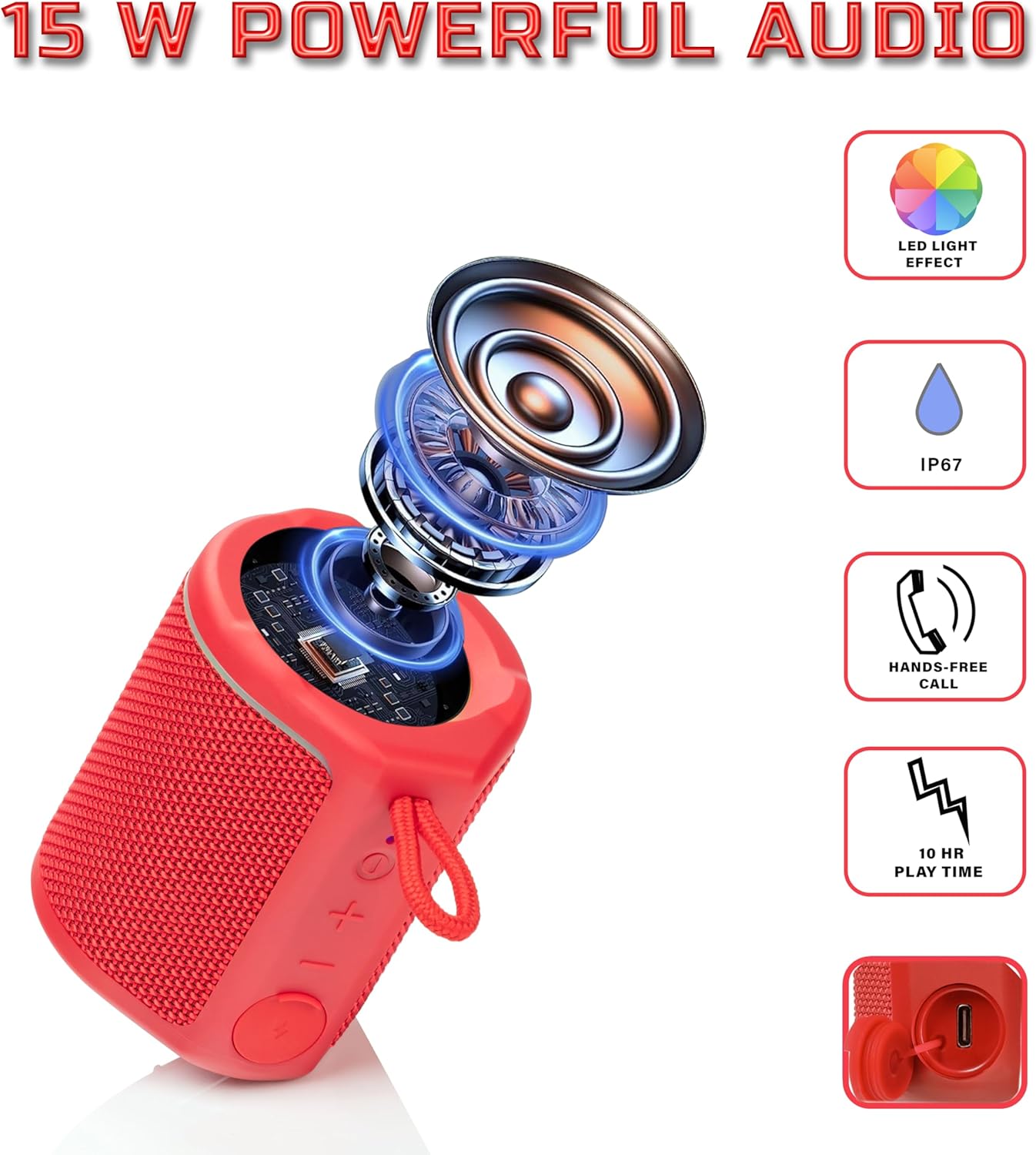
Diagram illustrating the internal components of the Sharp GX-BT190 speaker, including the speaker driver, and highlighting features like LED light effect, IP67 rating, hands-free call function, and battery life.
| ຄຸນສົມບັດ | ລາຍລະອຽດ |
|---|---|
| ໝາຍເລກຕົວແບບ | GX-BT190 |
| ເຕັກໂນໂລຊີການເຊື່ອມຕໍ່ | Bluetooth |
| ລຳໂພງກຳລັງຜົນຜະລິດສູງສຸດ | 10 ວັດ |
| ການປະເມີນກັນນ້ໍາ | IP67 |
| ຊີວິດຫມໍ້ໄຟ | ສູງສຸດ 15 ຊົ່ວໂມງ |
| ປະເພດຫມໍ້ໄຟ | 1 Lithium Ion (ລວມ) |
| ຄວາມອາດສາມາດຫມໍ້ໄຟ | 1200 mAh |
| ຂະໜາດສິນຄ້າ (ກວ້າງ x ຍາວ x ສູງ) | 7.5 x 7.5 x 7.5 cm (ປະມານ) |
| ນ້ໍາຫນັກລາຍການ | 226.8 g (8 ອອນສ໌) |
| Range ໄຮ້ສາຍ | ສູງເຖິງ 33 ຟຸດ |
| ຄຸນສົມບັດເພີ່ມເຕີມ | LED Light, True Wireless Stereo (TWS), Hands-Free Calling |
10. ການຮັບປະກັນ
The Sharp GX-BT190 Portable Bluetooth Speaker comes with a 1-Year Limited Warranty from the date of purchase. This warranty covers manufacturing defects under normal use. It does not cover damage caused by misuse, accidents, unauthorized modifications, or normal wear and tear. Please retain your proof of purchase for warranty claims.
11. ສະຫນັບສະຫນູນ
For technical assistance, warranty inquiries, or further information regarding your Sharp GX-BT190 speaker, please contact Sharp Inc. customer support:
- ຕິດຕໍ່ຜູ້ຜະລິດ: Sharp Inc
- ໂທລະສັບ: 1-800-BE-SHARP