
ແນະນຳ
ຂອບໃຈສໍາລັບການຊື້asing the Muse M-780 BTB Bluetooth Speaker. This portable speaker features 20W output, colored lights, IPX5 splash resistance, hands-free calling, and stereo pairing capabilities. It supports Bluetooth, Auxiliary input, and USB MP3 playback. Please read this manual carefully before use to ensure proper operation and to maximize your listening experience.
ຂໍ້ມູນຄວາມປອດໄພ
- ຢ່າເຮັດໃຫ້ອຸປະກອນຢູ່ໃນອຸນຫະພູມທີ່ຮຸນແຮງ, ແສງແດດໂດຍກົງ, ຫຼືຄວາມຊຸ່ມຊື່ນສູງ.
- ຫຼີກລ່ຽງການລຸດລົງ ຫຼື ວາງລຳໂພງຕໍ່ກັບຜົນກະທົບທີ່ຮຸນແຮງ.
- The speaker is IPX5 splash-resistant. Do not immerse it in water or expose it to strong jets of water.
- ຢ່າພະຍາຍາມຖອດປະກອບ ຫຼືດັດແປງລຳໂພງ. ນີ້ຈະເປັນການຍົກເລີກການຮັບປະກັນ.
- ໃຊ້ພຽງແຕ່ສາຍສາກທີ່ສະໜອງໃຫ້ ຫຼືໄດ້ຮັບການອະນຸມັດ.
- ຮັກສາໃຫ້ໄກຈາກເດັກນ້ອຍ.
ເນື້ອໃນຊຸດ
ກະລຸນາກວດເບິ່ງວ່າລາຍການທັງໝົດມີຢູ່:
- Muse M-780 BTB Bluetooth Speaker
- ສາຍສາກ USB-C
- ສາຍປ້ອນເຂົ້າຊ່ວຍ
- ຄູ່ມືແນະ ນຳ (ເອກະສານນີ້)
ສິນຄ້າເກີນview
ຄຸ້ນເຄີຍກັບການຄວບຄຸມ ແລະ ພອດຂອງລຳໂພງ.
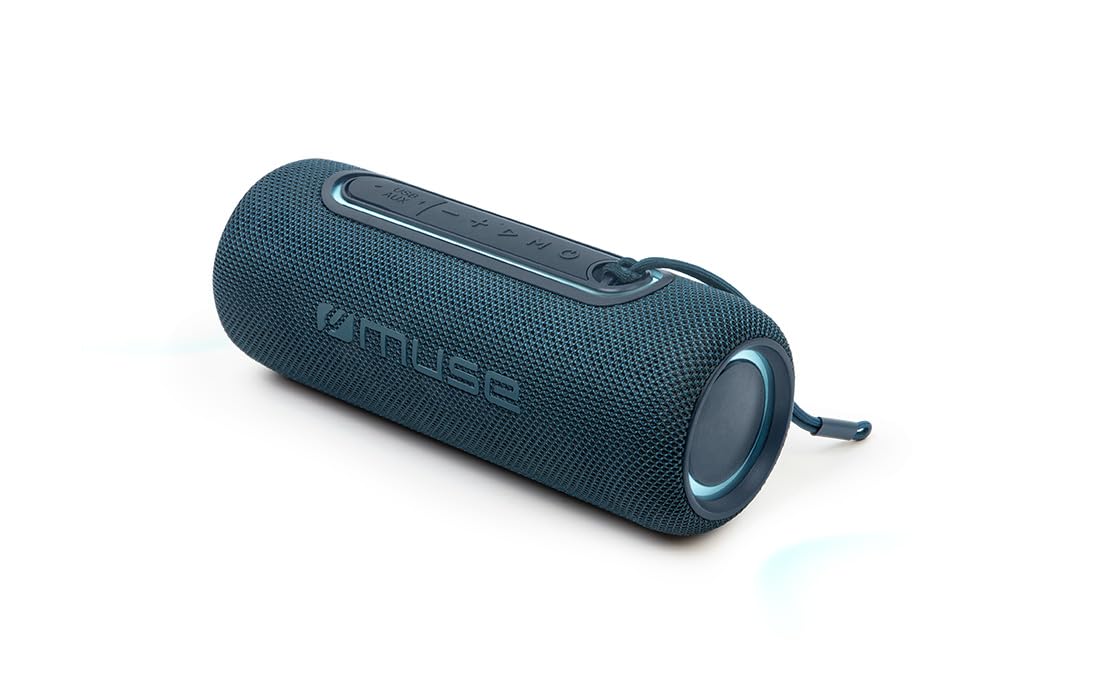
ຮູບທີ 1: ດ້ານໜ້າ view of the Muse M-780 BTB Bluetooth Speaker, showing the speaker grille and control buttons on top.
ການຄວບຄຸມ ແລະຕົວຊີ້ວັດ:
- ປຸ່ມເປີດປິດ: ກົດຄ້າງໄວ້ເພື່ອເປີດ/ປິດ.
- ປຸ່ມຫຼິ້ນ/ຢຸດຊົ່ວຄາວ: Press to play or pause music. Answer/end calls.
- ປະລິມານຂຶ້ນ (+): ກົດເພື່ອເພີ່ມລະດັບສຽງ. ກົດຄ້າງໄວ້ສຳລັບເພງຕໍ່ໄປ.
- ປະລິມານລົງ (-): ກົດເພື່ອຫຼຸດລະດັບສຽງ. ກົດຄ້າງໄວ້ສຳລັບເພງກ່ອນໜ້າ.
- ປຸ່ມໂໝດ (M): Press to switch between Bluetooth, Aux-in, and USB modes.
- ປຸ່ມແບບ Light: Press to cycle through different colored light effects.
- Bluetooth Pairing LED Indicator: ສະແດງສະຖານະການເຊື່ອມຕໍ່ Bluetooth.
- ຕົວຊີ້ບອກການສາກໄຟ LED: ສະແດງສະຖານະການສາກແບັດເຕີຣີ.
ພອດ:
- ພອດສາກໄຟ USB-C: ສໍາລັບການຊາດຫມໍ້ໄຟພາຍໃນ.
- ຜອດ AUX-IN: ສຳລັບການເຊື່ອມຕໍ່ອຸປະກອນສຽງພາຍນອກຜ່ານສາຍ 3.5 ມມ.
- ພອດ USB: For MP3 playback from a USB flash drive.
ຕັ້ງຄ່າ
1. ການສາກໄຟເບື້ອງຕົ້ນ
Before first use, fully charge the speaker. Connect the supplied USB-C cable to the speaker's USB-C charging port and the other end to a USB power adapter (not included) or a computer's USB port. The Charging LED indicator will illuminate during charging and turn off when fully charged. A full charge provides up to 10 hours of music playback.
2. ເປີດ / ປິດພະລັງງານ
ກົດຄ້າງໄວ້ ປຸ່ມເປີດປິດ for approximately 3 seconds to turn the speaker ON or OFF.
ຄໍາແນະນໍາການດໍາເນີນງານ
ການຈັບຄູ່ Bluetooth
- Turn on the speaker. It will automatically enter Bluetooth pairing mode, and the Bluetooth Pairing LED indicator will flash.
- Enable Bluetooth on your smartphone, tablet, or other Bluetooth-compatible device.
- ຊອກຫາ "M-780 BTB" in the list of available devices and select it to connect.
- Once successfully paired, the Bluetooth Pairing LED indicator will stop flashing and remain solid. You can now stream music wirelessly from your device within a range of up to 10 meters.
Auxiliary Input (AUX-IN)
- Connect one end of the supplied 3.5mm auxiliary cable to the AUX-IN port on the speaker.
- Connect the other end to the headphone jack or audio output of your external audio device.
- ກົດ ປຸ່ມໂໝດ (M) to switch to AUX-IN mode.
- ຄວບຄຸມການຫຼິ້ນ ແລະລະດັບສຽງຈາກອຸປະກອນພາຍນອກຂອງທ່ານ.
ຫຼິ້ນ MP3 ຜ່ານ USB
- ໃສ່ USB flash drive ທີ່ບັນຈຸສຽງ MP3 files ເຂົ້າໄປໃນພອດ USB ໃນລໍາໂພງ.
- ກົດ ປຸ່ມໂໝດ (M) ເພື່ອປ່ຽນເປັນໂໝດ USB.
- The speaker will automatically begin playing MP3 files ຈາກ USB drive.
- ໃຊ້ປຸ່ມຫຼິ້ນ/ຢຸດຊົ່ວຄາວ, ເພີ່ມສຽງຂຶ້ນ (+), ແລະ ຫຼຸດສຽງລົງ (-) ເພື່ອຄວບຄຸມການຫຼິ້ນຄືນ.
ໂທຟຣີ
ເມື່ອເຊື່ອມຕໍ່ຜ່ານ Bluetooth ກັບໂທລະສັບສະຫຼາດຂອງທ່ານ:
- ຮັບ/ສາຍໂທ: ກົດ ປຸ່ມຫຼິ້ນ/ຢຸດຊົ່ວຄາວ ຄັ້ງດຽວ.
- ປະຕິເສດການໂທ: ກົດຄ້າງໄວ້ ປຸ່ມຫຼິ້ນ/ຢຸດຊົ່ວຄາວ ເປັນເວລາ 2 ວິນາທີ.
Stereo Pairing (TWS - True Wireless Stereo)
You can pair two M-780 BTB speakers together for a true wireless stereo sound experience.
- Ensure both M-780 BTB speakers are turned on and not connected to any Bluetooth device.
- ໃນລໍາໂພງຫນຶ່ງ (ນີ້ຈະເປັນລໍາໂພງຕົ້ນຕໍ), ໃຫ້ກົດຄ້າງໄວ້ ປຸ່ມໂໝດ (M) for 2-3 seconds until you hear a confirmation tone. The speakers will attempt to pair with each other.
- Once successfully paired, you will hear another confirmation tone. The Bluetooth LED on the primary speaker will flash, and the LED on the secondary speaker will be solid.
- Now, connect your Bluetooth device to the primary speaker as described in the "Bluetooth Pairing" section. Both speakers will play audio in stereo.
ແສງສີ
ກົດ ປຸ່ມໂໝດແສງ to cycle through various colored light effects. Press again to change the effect or turn the lights off.
ກຳລັງສາກລຳໂພງ
When the battery is low, the speaker may emit an audible alert. Connect the USB-C charging cable to the speaker and a power source. The Charging LED indicator will show the charging status. Disconnect the cable once fully charged to preserve battery life.
ບໍາລຸງຮັກສາ
- ທໍາຄວາມສະອາດ: ໃຊ້ຜ້າປຽກແຫ້ງເພື່ອເຮັດຄວາມສະອາດພື້ນຜິວຂອງລໍາໂພງ. ຢ່າໃຊ້ເຄື່ອງເຮັດຄວາມສະອາດຂັດຫຼືສານລະລາຍ.
- ຄວາມຕ້ານທານນ້ໍາ: The M-780 BTB has an IPX5 splash-resistant rating, meaning it can withstand splashes of water. Do not submerge the speaker in water or expose it to running water. Ensure the port cover is securely closed to maintain water resistance.
- ການເກັບຮັກສາ: ເກັບຮັກສາລຳໂພງໄວ້ໃນບ່ອນເຢັນ ແລະແຫ້ງເມື່ອບໍ່ໄດ້ໃຊ້ເປັນເວລາດົນ.
ການແກ້ໄຂບັນຫາ
| ບັນຫາ | ສາເຫດທີ່ເປັນໄປໄດ້ | ການແກ້ໄຂ |
|---|---|---|
| ລຳໂພງບໍ່ເປີດ. | ແບັດເຕີຣີໝົດ. | ສາກລຳໂພງໂດຍໃຊ້ສາຍ USB-C. |
| ບໍ່ມີສຽງ. | ລະດັບສຽງຕໍ່າເກີນໄປ ຫຼືປິດສຽງໄວ້. ໂໝດປ້ອນຂໍ້ມູນບໍ່ຖືກຕ້ອງ. | Increase volume on both the speaker and the connected device. Press the Mode button to select the correct input (Bluetooth, AUX, USB). |
| ບໍ່ສາມາດຈັບຄູ່ຜ່ານ Bluetooth ໄດ້. | ລຳໂພງບໍ່ຢູ່ໃນໂໝດຈັບຄູ່. ອຸປະກອນຢູ່ໄກເກີນໄປ. ແຊກແຊງ. | Ensure speaker is in pairing mode (flashing LED). Move device closer to speaker (within 10m). Turn off other Bluetooth devices. |
| ການຈັບຄູ່ສະເຕຣິໂອບໍ່ເຮັດວຽກ. | Speakers not correctly paired. | Ensure both speakers are disconnected from other devices. Follow the stereo pairing instructions carefully. |
ຂໍ້ມູນຈໍາເພາະ
| ຊື່ຕົວແບບ: | M-780 BTB |
| ຍີ່ຫໍ້: | Muse |
| ພະລັງງານອອກ: | 20 ວັດ |
| ການເຊື່ອມຕໍ່: | Bluetooth, USB, AUX-IN |
| ລະດັບ Bluetooth: | ສູງເຖິງ 10 ແມັດ (33 ຟຸດ) |
| ຄວາມຕ້ານທານນ້ໍາ: | IPX5 Splash-Resistant |
| ເວລາຫຼິ້ນ: | ສູງສຸດ 10 ຊົ່ວໂມງ (ໃນລະດັບສຽງປານກາງ) |
| ຊ່ອງສາກໄຟ: | USB-C |
| ຂະໜາດ (L x W x H): | 24.2 x 9.2 x 9.2 ຊມ (9.5 x 3.6 x 3.6 ນິ້ວ) |
| ນ້ຳໜັກ: | 1 ກິໂລ (2.2 ປອນ) |
| ອຸປະກອນທີ່ເຂົ້າກັນໄດ້: | ໂທລະສັບສະຫຼາດ, ແທັບເລັດ, ແລັບທັອບ |
| ຄຸນນະສົມບັດພິເສດ: | Colored Lights, Hands-Free Calling, Stereo Pairing (TWS) |
ການຮັບປະກັນແລະການສະຫນັບສະຫນູນ
This product is covered by a standard manufacturer's warranty. For detailed warranty terms and conditions, please refer to the warranty card included with your purchase or contact your retailer. For technical support or service inquiries, please contact Muse customer service through their official webເວັບໄຊ ຫຼືຂໍ້ມູນຕິດຕໍ່ທີ່ສະໜອງໃຫ້ກັບຜະລິດຕະພັນຂອງເຈົ້າ.