ແນະນຳ
This manual provides detailed instructions for the Retevis RE3120 C-Type 2-Pin Walkie Talkie Earphone. This earphone is designed to enhance communication privacy and clarity when used with compatible two-way radios. It features a comfortable C-type design, a Push-to-Talk (PTT) button for easy operation, and a rotatable earhook for versatile wear.
ສິນຄ້າເກີນview
ຄຸນນະສົມບັດທີ່ສໍາຄັນ
- C-Type Earphone Design: Adapts comfortably to your ear, ensuring private and clear communication.
- ປຸ່ມ Push-to-Talk (PTT): Enables one-click calls, allowing for hands-free operation.
- 360° Rotatable Earhook: Can be worn on either the left or right ear for maximum comfort and flexibility.
- Integrated Cable Clip: Allows the earphone cable to be securely attached to clothing.
- ຄວາມເຂົ້າກັນໄດ້ຢ່າງກວ້າງຂວາງ: Compatible with 2-pin radios such as Retevis RT24, RT27, RT28, RT22, RT617, RT618, RT619, Baofeng BF-888S, BF-88E, and Kenwood models.
ອົງປະກອບ
The Retevis RE3120 earphone consists of the following main components:
- 2-Pin K-Type Connector: For connecting to compatible two-way radios.
- ປຸ່ມ Push-to-Talk (PTT): Activates the microphone for transmission.
- ໄມໂຄຣໂຟນ (MIC): ບັນທຶກສຽງຂອງທ່ານເພື່ອສົ່ງຕໍ່.
- C-Type Earhook: Holds the earphone securely on your ear.
- ຫູຟັງ: Delivers audio to your ear.
- Clip ສາຍ: For securing the cable to clothing.

Figure 1: Retevis RE3120 Earphone Components
ຕັ້ງຄ່າ
- ເຊື່ອມຕໍ່ຫາວິທະຍຸ: Insert the 2-pin K-type connector firmly into the earphone jack of your compatible two-way radio. Ensure a secure connection.

Figure 2: Connecting the Earphone to a Radio
- Position the Earhook: Place the C-type earhook over your ear. The earhook is designed to rotate 360 degrees, allowing you to adjust it for a comfortable fit on either your left or right ear. Adjust the earhook up or down as needed.
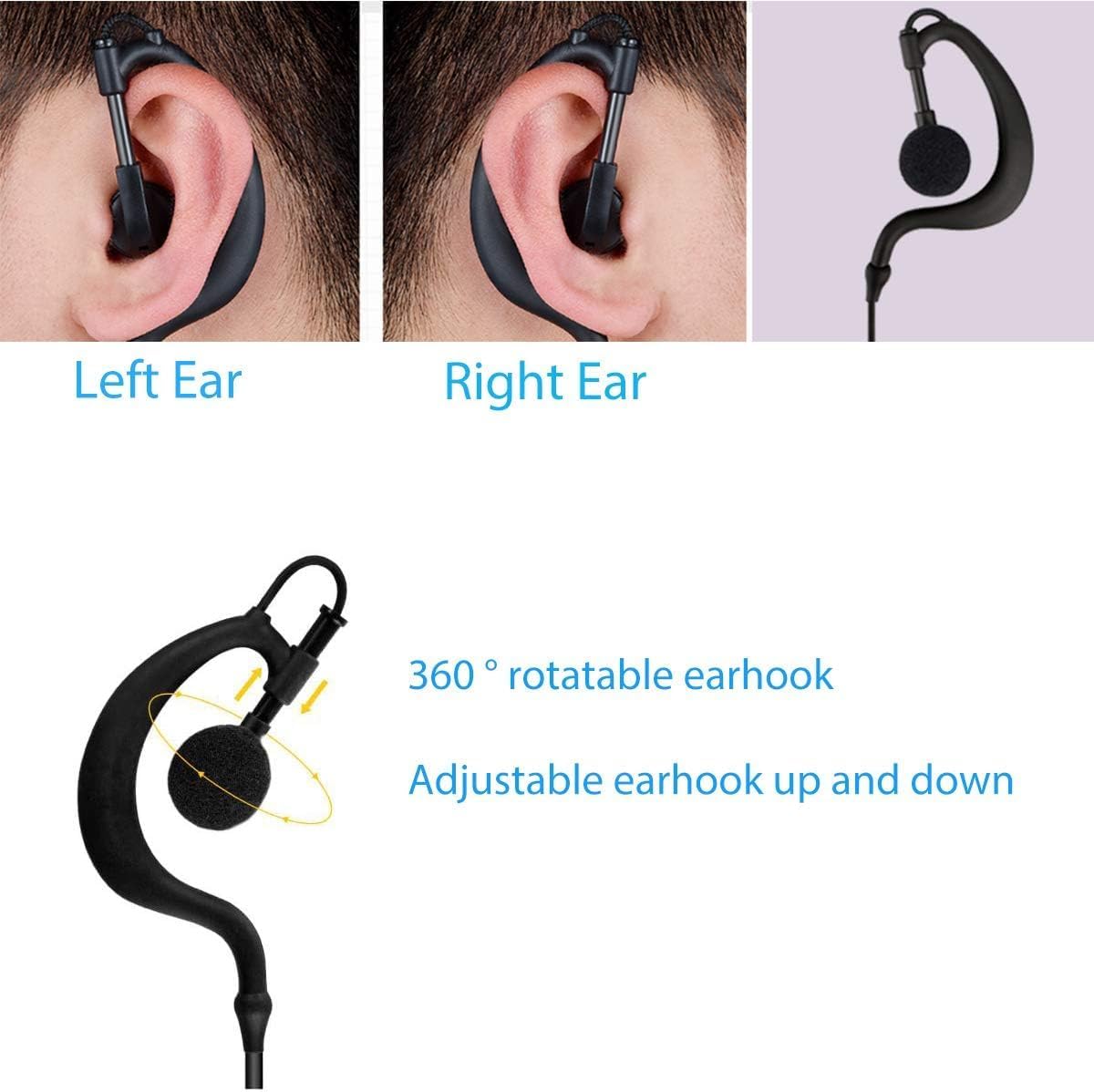
Figure 3: Earhook Adjustment
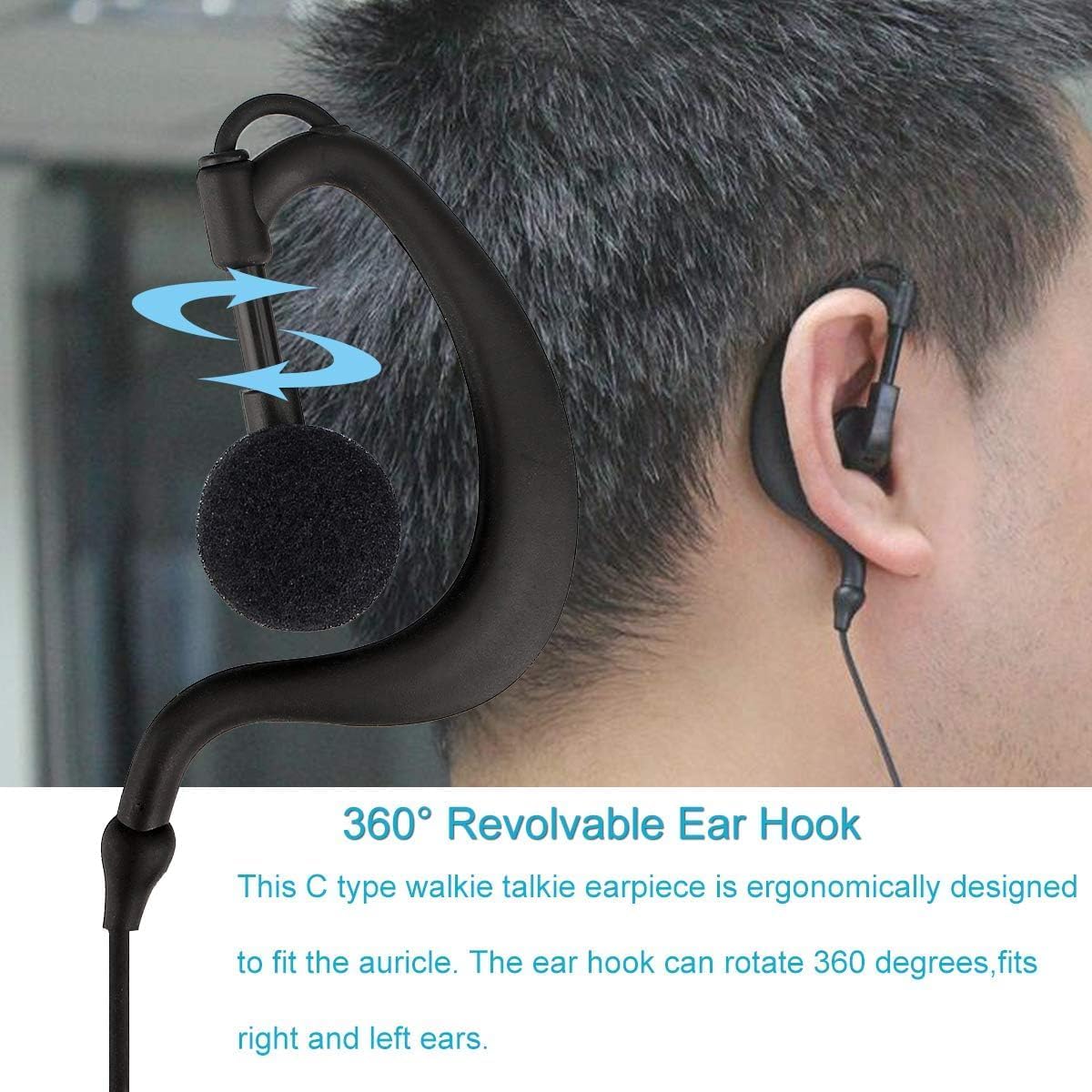
Figure 4: Earphone Worn on Ear
- ຮັບປະກັນສາຍເຄເບີ້ນ: Use the integrated clip on the cable to attach it to your clothing (e.g., collar, pocket) to prevent tangling and ensure stability during movement.

Figure 5: Using the Cable Clip
ຄໍາແນະນໍາການດໍາເນີນງານ
- ການຮັບສຽງ: Once connected, audio from your radio will be transmitted directly to the earphone. Adjust the radio's volume for comfortable listening.
- ການຖ່າຍທອດ (Push-to-Talk): To speak, press and hold the PTT button located on the cable. Speak clearly into the microphone. Release the PTT button when you have finished speaking to return to receive mode.
ບໍາລຸງຮັກສາ
- ທໍາຄວາມສະອາດ: Gently wipe the earphone and cable with a soft, dry cloth. Do not use harsh chemicals or abrasive cleaners.
- ການເກັບຮັກສາ: Store the earphone in a clean, dry place away from direct sunlight and extreme temperatures when not in use. Avoid tangling the cable.
- ຄວາມຕ້ານທານນ້ໍາ: This earphone is ບໍ່ທົນທານຕໍ່ນ້ໍາຫຼີກລ່ຽງການສຳຜັດກັບນໍ້າ ຫຼື ຄວາມຊຸ່ມຫຼາຍເກີນໄປ.
ການແກ້ໄຂບັນຫາ
- No Audio from Earphone:
- Ensure the 2-pin connector is fully inserted into the radio's jack.
- ກວດສອບລະດັບສຽງຂອງວິທະຍຸ.
- Test the earphone with another compatible radio if possible to rule out a radio issue.
- Unclear or Distorted Audio:
- Verify the connection to the radio is secure.
- Adjust the radio's squelch level if applicable.
- Ensure the earbud is clean and free of debris.
- PTT Button Not Functioning:
- Confirm the earphone is correctly connected to the radio.
- Ensure the radio is powered on and in an active channel.
ຂໍ້ມູນຈໍາເພາະ
| ໝາຍເລກຕົວແບບ | EUJ9118A |
| ຍີ່ຫໍ້ | Retevis |
| ວັດສະດຸ | Plastic, Silicone, Foam |
| ເຕັກໂນໂລຊີການເຊື່ອມຕໍ່ | ມີສາຍ |
| ປະເພດຕົວເຊື່ອມຕໍ່ | 2-Pin K-Type, 3.5 mm Audio Jack |
| ວິທີການຄວບຄຸມ | Push Button (PTT) |
| ລະດັບຄວາມຕ້ານທານນ້ໍາ | ບໍ່ທົນທານຕໍ່ນ້ໍາ |
| ນ້ຳໜັກສິນຄ້າ | 45 g |
| ຂະໜາດແພັກເກັດ | 15 x 12 x 1.7 cm |
| ອຸປະກອນທີ່ເຂົ້າກັນໄດ້ | Retevis RT24, RT27, RT28, RT22, RT617, RT618, RT619, Baofeng BF-888S, BF-88E, Kenwood (2-pin models) |

Figure 6: Earphone Cable Dimensions
ການຮັບປະກັນແລະການສະຫນັບສະຫນູນ
For warranty information and customer support, please refer to the documentation included with your purchase or visit the official Retevis webເວັບໄຊ. ນອກນັ້ນທ່ານຍັງສາມາດໄປຢ້ຽມຢາມໄດ້ ຮ້ານຂາຍເຄື່ອງຍີ່ຫໍ້ Retevis ໃນ Amazon ສໍາລັບຂໍ້ມູນເພີ່ມເຕີມຜະລິດຕະພັນແລະຊັບພະຍາກອນສະຫນັບສະຫນູນ.


