
1. ບົດແນະນຳ
This manual provides essential information for the safe and effective operation, maintenance, and troubleshooting of your SIMATE Self-Balancing Scooter. Please read this manual thoroughly before first use and retain it for future reference.
The SIMATE Scooter features a self-balancing control system, dual 250W motors, and all-terrain tires, designed for users of various ages. It includes integrated Bluetooth speakers and colorful LED lights for an enhanced riding experience.
2. ການຕິດຕັ້ງແລະການນໍາໃຊ້ຄັ້ງທໍາອິດ
2.1 Unboxing ແລະການກວດສອບອົງປະກອບ
ເອົາສ່ວນປະກອບທັງຫມົດອອກຈາກການຫຸ້ມຫໍ່ຢ່າງລະມັດລະວັງ. ກວດສອບວ່າລາຍການດັ່ງຕໍ່ໄປນີ້ແມ່ນລວມ:
- SIMATE Self-Balancing Scooter
- ເຄື່ອງຊາດ
- ຄູ່ມືຜູ້ໃຊ້ (ເອກະສານນີ້)
If any components are missing or damaged, please contact SIMATE customer support.
2.2 ການສາກໄຟເບື້ອງຕົ້ນ
Before first use, fully charge the scooter's battery. Locate the charging port, typically near the power switch. Connect the charger to the scooter and then to a power outlet. The battery indicator light will show charging status. Disconnect the charger once the battery is full.
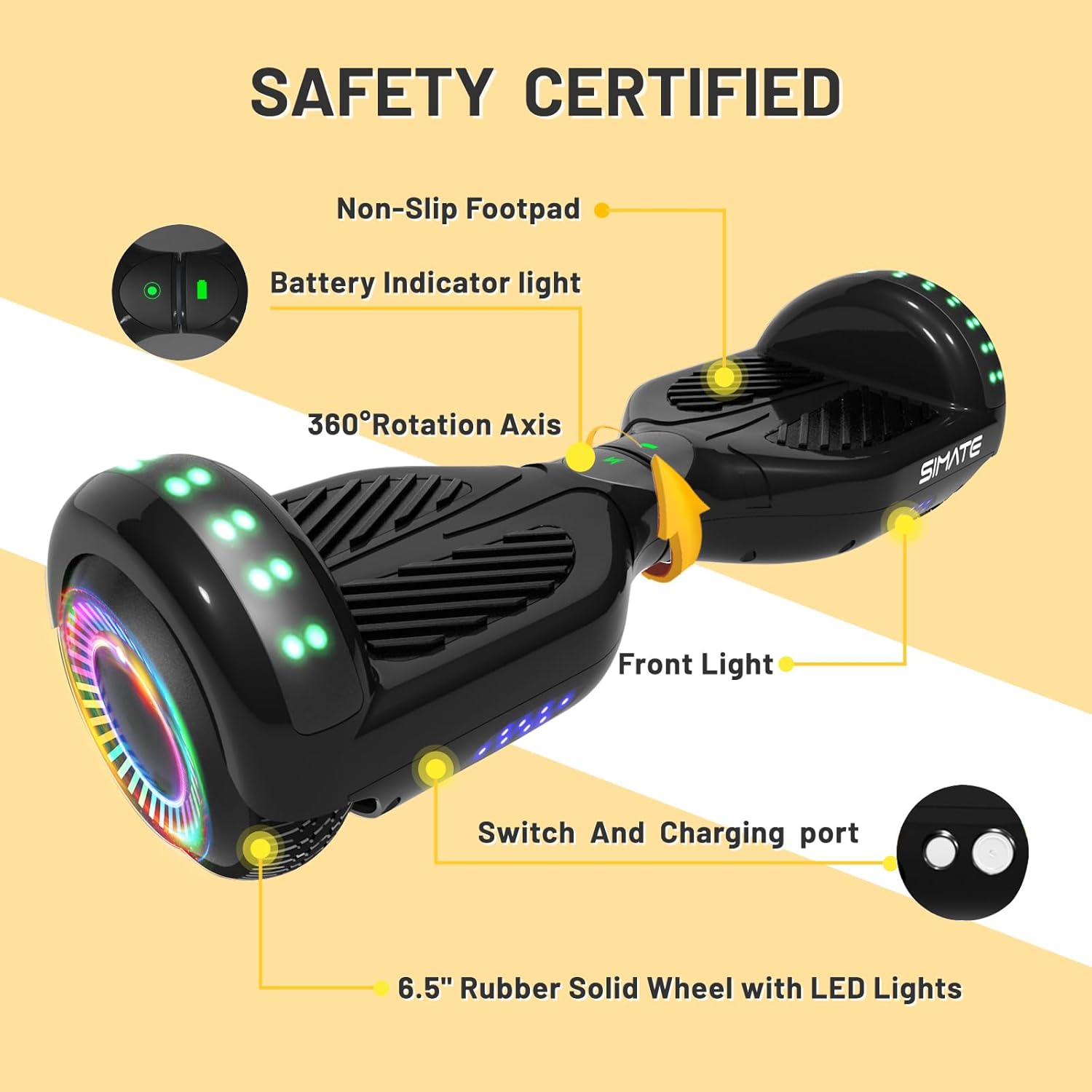
ຮູບພາບ: ຫຼາຍກວ່າview of the SIMATE Scooter highlighting key components including the charging port and battery indicator light.
3. ຄໍາແນະນໍາການດໍາເນີນງານ
3.1 ການດໍາເນີນງານພື້ນຖານ
The SIMATE Scooter utilizes a self-balancing system for intuitive control. To move forward, gently lean your body forward. To turn, apply slight pressure with your feet in the desired direction. Practice in a safe, open area until comfortable with the controls.

Image: Visual guide demonstrating the self-balancing system for forward movement, balance, and backward movement.
3.2 Speed Modes and Performance
The scooter features three adjustable speed modes, allowing for a top speed of 7.5 mph. It is powered by dual 250W motors, providing a range of approximately 7.5 miles on a full charge and capable of handling inclines up to 15 degrees. The maximum load capacity is 220 lbs.
3.3 Bluetooth Speaker and LED Lights
Your scooter is equipped with a built-in Bluetooth speaker and colorful LED lights. To activate the Bluetooth speaker, ensure the scooter is powered on. ຊອກຫາ "SIMATE Scooter" on your mobile device's Bluetooth settings and pair. The LED lights and flashing wheels activate automatically when the scooter is in use, enhancing visibility and enjoyment.

Image: The SIMATE Scooter showcasing its integrated Bluetooth speaker and vibrant LED lights.
3.4 APP Control (XsCar App)
For advanced control and monitoring, download the exclusive XsCar app. The app allows you to:
- Power the scooter on/off
- ປັບການຕັ້ງຄ່າໄຟ LED
- Monitor current speed and battery level
- Set different speed modes
- Access additional features

Image: The XsCar mobile application interface, demonstrating its control capabilities over the scooter's functions.
4. ບໍາລຸງຮັກສາ
4.1 ການທໍາຄວາມສະອາດ
ປົກກະຕິເຊັດລົງ scooter ດ້ວຍການໂຄສະນາamp cloth to remove dirt and dust. Avoid using harsh chemicals or abrasive materials that could damage the finish. Do not use high-pressure water jets or submerge the scooter in water.
4.2 ການດູແລຫມໍ້ໄຟ
To maximize battery life, charge the scooter fully before storage if it will not be used for an extended period. Recharge the battery at least once every three months to prevent deep discharge. Store the scooter in a cool, dry place away from direct sunlight and extreme temperatures.
4.3 ການກວດກາອົງປະກອບ
Periodically inspect the 6.5-inch solid rubber wheels for wear or damage. Check the non-slip footpads for secure attachment and any signs of deterioration. Ensure the aluminum frame is free from cracks or bends. If any issues are found, contact customer support for guidance.
5. ການແກ້ໄຂບັນຫາ
| ບັນຫາ | ສາເຫດທີ່ເປັນໄປໄດ້ | ການແກ້ໄຂ |
|---|---|---|
| Scooter ບໍ່ເປີດ. | ແບັດເຕີຣີເຫຼືອໜ້ອຍ ຫຼືໝົດແລ້ວ. | Charge the scooter fully. |
| ໄຟບໍ່ເຮັດວຽກ. | Scooter not powered on; internal connection issue. | Ensure scooter is on. If problem persists, contact support. |
| Bluetooth ບໍ່ເຊື່ອມຕໍ່. | Scooter not in pairing mode; device too far. | Ensure scooter is on and Bluetooth is enabled on your device. Move device closer. Restart both devices. |
| Scooter beeps constantly or is unstable. | Overload; uneven surface; sensor calibration issue. | Reduce load. Move to a flat surface. Recalibrate the scooter (refer to app or online resources for specific steps). |
For issues not listed here, or if solutions do not resolve the problem, please contact SIMATE customer support.
6. ຂໍ້ມູນຈໍາເພາະ
- ຊື່ຕົວແບບ: P6 Scooter
- ຍີ່ຫໍ້: SIMATE
- ສີ: ດຳ
- ວັດສະດຸ: ອະລູມິນຽມ, ຢາງ
- ພະລັງງານມໍເຕີ: ສອງ 250W
- ຄວາມໄວສູງສຸດ: 7.5 mph (12 km/h)
- ຊ່ວງສູງສຸດ: 7.5 ໄມ (12 ກິໂລແມັດ)
- ໂຫຼດສູງສຸດ: 220 lbs (100 ກິໂລ)
- ມຸມປີນ: ເຖິງ 15 ອົງສາ
- ຂະໜາດລໍ້: 6.5 ນິ້ວ (ຢາງແຂງ)
- ນ້ໍາຫນັກລາຍການ: 13 ປອນ (5.9 ກິໂລ)
- ຂະໜາດແພັກເກດ: 24.5 x 8.3 x 8 ນິ້ວ (62.2 x 21.1 x 20.3 cm)
- ຄຸນນະສົມບັດພິເສດ: Built-In Bluetooth speaker, LED Lights, Light Up Wheels, Lightweight, Long Battery Life
- ຜູ້ຜະລິດ: Jinhua Smart Electric Technology Co., Ltd
7. ການຮັບປະກັນແລະການສະຫນັບສະຫນູນ
7.1 ຂໍ້ມູນການຮັບປະກັນ
The SIMATE Scooter comes with a 1-year limited warranty from the date of purchase. This warranty covers manufacturing defects under normal use. It does not cover damage caused by misuse, accidents, unauthorized modifications, or normal wear and tear. Please retain your proof of purchase for warranty claims.
7.2 ສະຫນັບສະຫນູນລູກຄ້າ
SIMATE provides 7x24 hours online support for any inquiries or issues you may encounter. A 365-day after-sales service is also available. For assistance, please visit the official SIMATE website ຫຼືຕິດຕໍ່ຊ່ອງທາງການບໍລິການລູກຄ້າຂອງພວກເຂົາ.
ສໍາລັບຂໍ້ມູນເພີ່ມເຕີມ, ໄປຢ້ຽມຢາມ SIMATE Store on Amazon.