
1. ບົດແນະນຳ
This manual provides detailed instructions for the assembly, operation, and maintenance of your ErGear EGESD63B electric standing desk. Please read this manual thoroughly before assembly and use to ensure proper function and safety. Keep this manual for future reference.

Image 1.1: The ErGear EGESD63B electric standing desk in a typical office setup.
2. ຂໍ້ມູນຄວາມປອດໄພ
ເພື່ອຮັບປະກັນການດຳເນີນງານທີ່ປອດໄພ ແລະ ປ້ອງກັນການບາດເຈັບ ຫຼື ຄວາມເສຍຫາຍ, ກະລຸນາປະຕິບັດຕາມຄຳແນະນຳດ້ານຄວາມປອດໄພຕໍ່ໄປນີ້:
- Do not exceed the weight limit of 250 pounds (113 kg) on the desktop.
- Ensure the desk is properly anchored to the floor to prevent tipping, especially when at maximum height.
- Avoid use near water or in humid conditions to prevent electrical hazards.
- ໃຫ້ເດັກນ້ອຍ ແລະສັດລ້ຽງຢູ່ຫ່າງຈາກໂຕະເຮັດວຽກໃນລະຫວ່າງການເຮັດວຽກ.
- ໃຫ້ແນ່ໃຈວ່າບໍ່ມີສິ່ງກີດຂວາງທາງຍ່າງຂອງໂຕະໃນລະຫວ່າງການປັບຄວາມສູງ.
- ໃຊ້ພຽງແຕ່ອະແດບເຕີໄຟ ແລະ ອຸປະກອນຕ່າງໆທີ່ໃຫ້ມາເທົ່ານັ້ນ.
3. ເນື້ອໃນຊຸດ
Verify that all components are present and undamaged before beginning assembly. If any parts are missing or damaged, contact ErGear customer service.
- Desktop (One-piece)
- ຂາໂຕະ (2)
- ແຖບຂວາງ/ກອບ
- ກະດານຄວບຄຸມ
- ອະແດບເຕີສາຍໄຟ ແລະສາຍ
- ຖາດການຈັດການສາຍ
- Hardware Kit (screws, bolts, washers)
- ເຄື່ອງມືປະກອບ
- ຄູ່ມືການສອນລະອຽດ
4. ການຕິດຕັ້ງແລະການປະກອບ
Assembly requires one person and includes all necessary tools. Follow these general steps for setup:
- Unpack ອົງປະກອບ: ເອົາຊິ້ນສ່ວນທັງໝົດອອກຈາກເຄື່ອງຫຸ້ມຫໍ່ຢ່າງລະມັດລະວັງ ແລະ ວາງອອກເທິງພື້ນຜິວທີ່ສະອາດ, ອ່ອນນຸ້ມເພື່ອປ້ອງກັນຮອຍຂີດຂ່ວນ.
- ປະກອບກອບໂຕະ: Attach the desk legs to the crossbar according to the diagrams in the detailed manual. Ensure all screws are tightened securely.
- ແນບເດັສທັອບ: Place the one-piece desktop upside down on the soft surface. Carefully align the assembled frame with the pre-drilled holes on the desktop and secure it using the provided screws. The one-piece desktop design simplifies this step, allowing for faster installation.
- Install Control Panel and Cable Management: Mount the control panel to the underside of the desktop in the designated area. Attach the cable management tray.
- ເຊື່ອມຕໍ່ສາຍໄຟ: Connect the motor cables from the legs to the control box, and then connect the control panel to the control box. Finally, connect the power adapter to the control box and plug it into a power outlet.
- Initial Power-On and Calibration: Refer to the detailed manual for initial power-on and calibration steps, which typically involve pressing and holding a button to reset the desk to its lowest position.
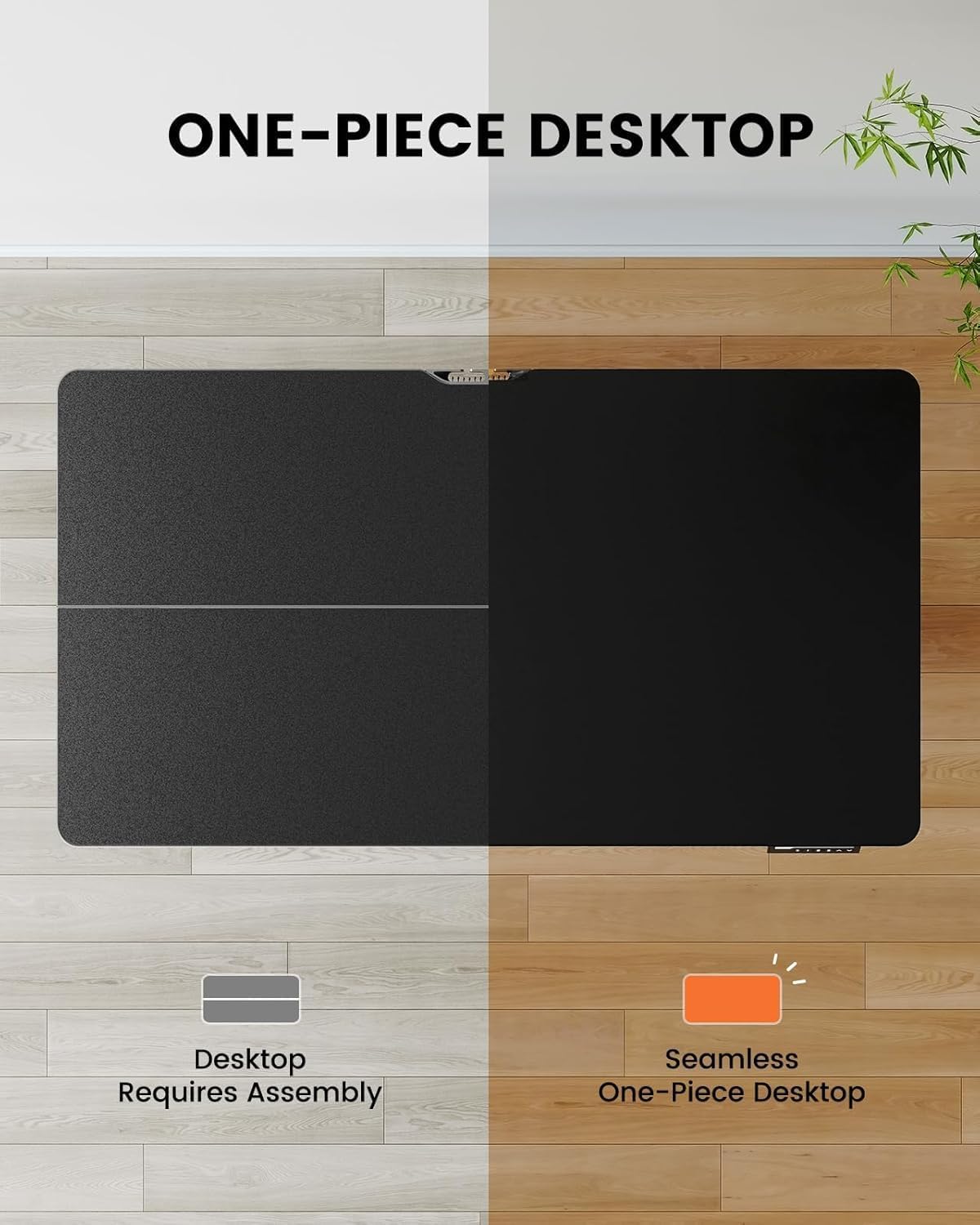
Image 4.1: Hassle-free assembly with the one-piece desktop.

Image 4.2: The ErGear EGESD63B features a seamless one-piece desktop for easier setup.
5. ຄໍາແນະນໍາການດໍາເນີນງານ
Your ErGear EGESD63B electric standing desk is designed for easy height adjustment to switch between sitting and standing positions.
5.1. ການປັບຄວາມສູງ
- ປຸ່ມຂຶ້ນ/ລົງ: Use the ▲ (Up) and ▼ (Down) buttons on the control panel to smoothly raise or lower the desk to your desired height. The desk adjusts from 27.9 inches to 46.9 inches.
5.2. ຕັ້ງຄ່າຄວາມຈຳໄວ້ລ່ວງໜ້າ
The control panel features three memory preset buttons (1, 2, 3) to store and recall your preferred sitting and standing heights.
- ເພື່ອຕັ້ງຄ່າລ່ວງໜ້າ: Adjust the desk to your desired height using the Up/Down buttons. Press the 'M' button, then immediately press one of the number buttons (1, 2, or 3) to save the current height to that preset. The display will show 'S-' followed by the number to confirm.
- ເພື່ອຈື່ຈໍາໄວ້ລ່ວງຫນ້າໄດ້: Simply press the corresponding number button (1, 2, or 3). The desk will automatically move to the saved height.

Image 5.1: Adjust the desk for sit and stand comfort.
6. ບໍາລຸງຮັກສາ
Regular maintenance helps ensure the longevity and smooth operation of your standing desk.
- ທໍາຄວາມສະອາດ: ເຊັດ desktop ແລະກອບດ້ວຍຜ້າອ່ອນ, damp ຜ້າ. ຫຼີກເວັ້ນການສານເຄມີທີ່ຮຸນແຮງຫຼືເຄື່ອງເຮັດຄວາມສະອາດຂັດ.
- ກວດສອບການເຊື່ອມຕໍ່: Periodically check all screws and electrical connections to ensure they are secure. Tighten any loose screws.
- ການຄຸ້ມຄອງສາຍໄຟ: Ensure cables are neatly organized within the cable management tray to prevent snagging during height adjustments.
7. ການແກ້ໄຂບັນຫາ
If you encounter issues with your ErGear EGESD63B desk, refer to the following common troubleshooting steps:
- ໂຕະບໍ່ຍ້າຍ:
- ກວດສອບວ່າສາຍໄຟໄດ້ສຽບເຂົ້າກັບທັງໂຕະ ແລະ ປລັກສຽບຝາຢ່າງແໜ້ນໜາແລ້ວ.
- ຮັບປະກັນວ່າບໍ່ມີສິ່ງກີດຂວາງການເຄື່ອນໄຫວ.
- Perform a reset: Unplug the power for 10 seconds, then plug it back in. Press and hold the 'Down' button until the desk reaches its lowest point and slightly rebounds.
- ລະຫັດຂໍ້ຜິດພາດໃນການສະແດງຜົນ:
- If an error code appears, refer to the detailed manual for specific code meanings and solutions. Often, a reset (as described above) can resolve minor errors.
- ການເຄື່ອນໄຫວບໍ່ສະເຫມີພາບ:
- ໃຫ້ແນ່ໃຈວ່າໂຕະຕັ້ງຢູ່ເທິງພື້ນລະດັບ.
- Check that all frame connections are tight.
If problems persist after attempting these steps, contact ErGear customer support for assistance.
8. ຂໍ້ມູນຈໍາເພາະ
| ຄຸນສົມບັດ | ຂໍ້ມູນຈໍາເພາະ |
|---|---|
| ຍີ່ຫໍ້ | ErGear |
| ຕົວແບບ | EGESD63B |
| ຂະໜາດໂຕະ (ຍາວ x ກວ້າງ) | 40 x 24 ນິ້ວ (101.6 x 61 ຊຕມ) |
| ຊ່ວງການປັບຄວາມສູງ | 27.9 - 46.9 ນິ້ວ (70.9 - 119.1 ຊຕມ) |
| ຄວາມອາດສາມາດນ້ໍາຫນັກ | 250 lbs (113 ກິໂລ) |
| ປະເພດມໍເຕີ | ມໍເຕີໄຟຟ້າ |
| ຈໍານວນຕໍາແໜ່ງຄວາມສູງ | 3 (ຄ່າທີ່ຕັ້ງໄວ້ລ່ວງໜ້າຂອງໜ່ວຍຄວາມຈຳ) |
| ວັດສະດຸ Desktop | ໄມ້ວິສະວະກໍາ |
| ວັດສະດຸກອບ | ສະແຕນເລດ |
| ສີ | ດຳ |
| ຕ້ອງການສະພາແຫ່ງ | Yes, with included tools |

Image 8.1: Product dimensions of the ErGear EGESD63B desk.
9. ການຮັບປະກັນແລະການສະຫນັບສະຫນູນ
ErGear provides a comprehensive warranty for your EGESD63B electric standing desk:
- ການຮັບປະກັນ 2 ປີຈໍາກັດ: Covers the motor, controller, and cables.
- ການຮັບປະກັນ 5 ປີຈໍາກັດ: Covers the desktop, frame, and other parts.
For warranty claims, technical support, or any questions regarding your product, please contact ErGear customer service through their official website or the retailer where the product was purchased. Please have your model number (EGESD63B) and proof of purchase ready.