
ແນະນຳ
Thank you for choosing the TECKNET Wireless Rechargeable Silent Mouse. This manual provides detailed instructions to help you get the most out of your new device. Please read it carefully before use and keep it for future reference.
ເນື້ອໃນຊຸດ
- TECKNET Wireless Rechargeable Silent Mouse
- ຕົວຮັບ USB
- ສາຍສາກ USB-C
- ຄູ່ມືຜູ້ໃຊ້ (ເອກະສານນີ້)
ສິນຄ້າເກີນview
Familiarize yourself with the mouse components:
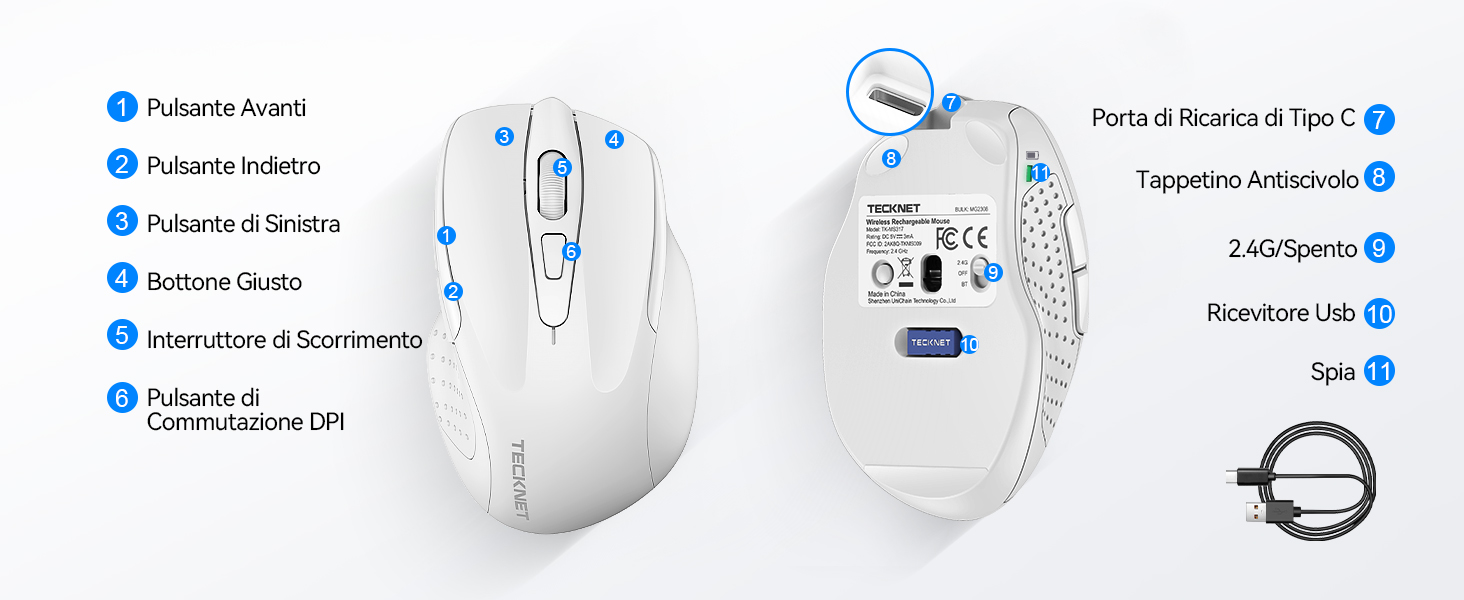
Figure 1: Mouse Components Diagram
- ປຸ່ມສົ່ງຕໍ່
- ປຸ່ມກັບຄືນ
- ປຸ່ມຊ້າຍ
- ປຸ່ມຂວາ
- ລໍ້ເລື່ອນ
- ປຸ່ມປ່ຽນ DPI
- Type-C ສາກໄຟສາກໄຟ
- ແຜ່ນຕ້ານການເລື່ອນ
- 2.4G/Off Switch
- ບ່ອນເກັບຂໍ້ມູນຕົວຮັບ USB
- ແສງຕົວຊີ້ວັດ
ຄໍາແນະນໍາການຕິດຕັ້ງ
1. ການສາກໄຟຂອງຫນູ
Before first use, it is recommended to fully charge the mouse. Connect the provided USB-C charging cable to the mouse's Type-C charging port and the other end to a USB power source (e.g., computer USB port, USB wall adapter).

The mouse features a 700mAh built-in battery, providing extended usage on a single charge. The indicator light will show charging status.
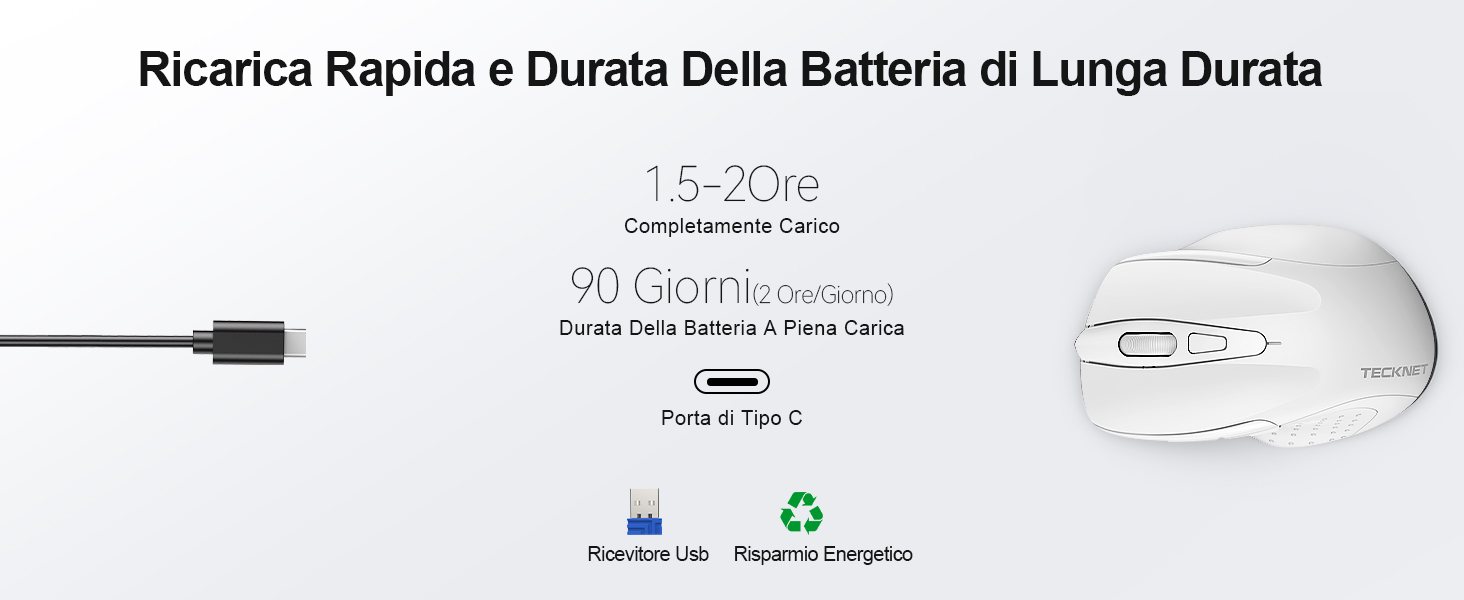
A full charge takes approximately 1.5-2 hours and can last up to 90 days (based on 2 hours/day usage).
2. ການເຊື່ອມຕໍ່ຕົວຮັບ USB
The mouse uses a 2.4GHz wireless connection for reliable data transmission.
- Locate the USB receiver stored in the compartment on the underside of the mouse.
- Plug the USB receiver into an available USB port on your computer (PC, laptop, Chromebook, etc.).
- Turn on the mouse using the 2.4G/Off switch located on the underside.
- Your computer should automatically detect and install the necessary drivers. The mouse is plug-and-play, requiring no additional software.

The effective working distance is up to 15 meters.

Ensure the mouse is switched on after plugging in the receiver.
ຄໍາແນະນໍາການດໍາເນີນງານ
ການປັບ DPI
The mouse features 6 adjustable DPI levels (800/1200/1600/2400/3200/4800) to suit various tasks, from precise targeting to fast gaming movements. Press the DPI switch button (Component 6 in Figure 1) to cycle through the DPI settings.

Adjust DPI for optimal cursor speed and precision.
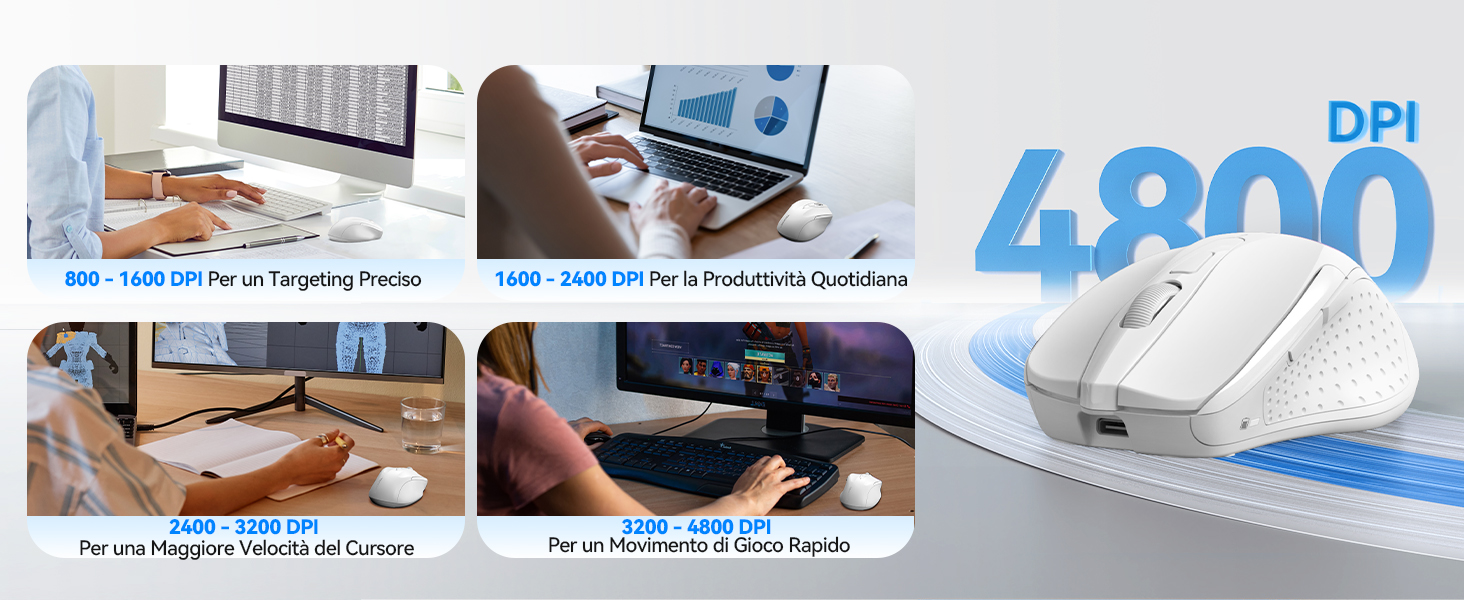
DPI settings for different usage scenarios.
Silent Click Feature
The mouse is designed for silent operation, reducing click noise by up to 90%. This allows for a quiet working environment without disturbing others.

Enjoy a quiet working experience.

Sound level comparison demonstrating reduced click noise.
ການອອກແບບ Ergonomic
The mouse is ergonomically designed to fit the natural curvature of your hand, reducing muscle pressure by up to 30% and ensuring comfortable use for extended periods. Soft natural rubber grips on the sides provide a secure and comfortable hold.

Ergonomic shape for comfortable use.
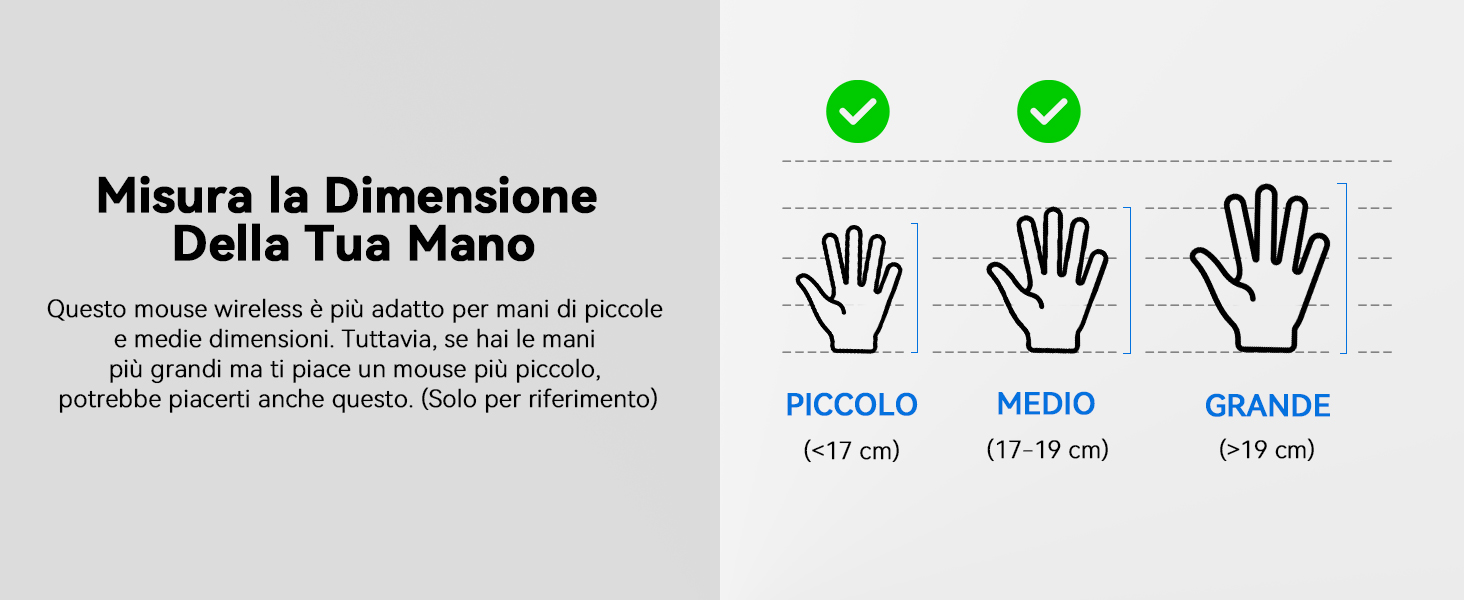
This mouse is suitable for small to medium hand sizes. Refer to the guide for reference.
ຄຸນນະສົມບັດການປະຫຍັດພະລັງງານ
The mouse includes intelligent power-saving features:
- ໂໝດນອນອັດຕະໂນມັດ: If inactive for 10 seconds, the mouse enters standby mode. After 10 minutes of inactivity, it enters deep sleep mode to conserve battery.
- ຟັງຊັນປຸກ: ກົດປຸ່ມໃດກໍໄດ້ເພື່ອປຸກເມົາສ໌ຈາກໂໝດນອນ.
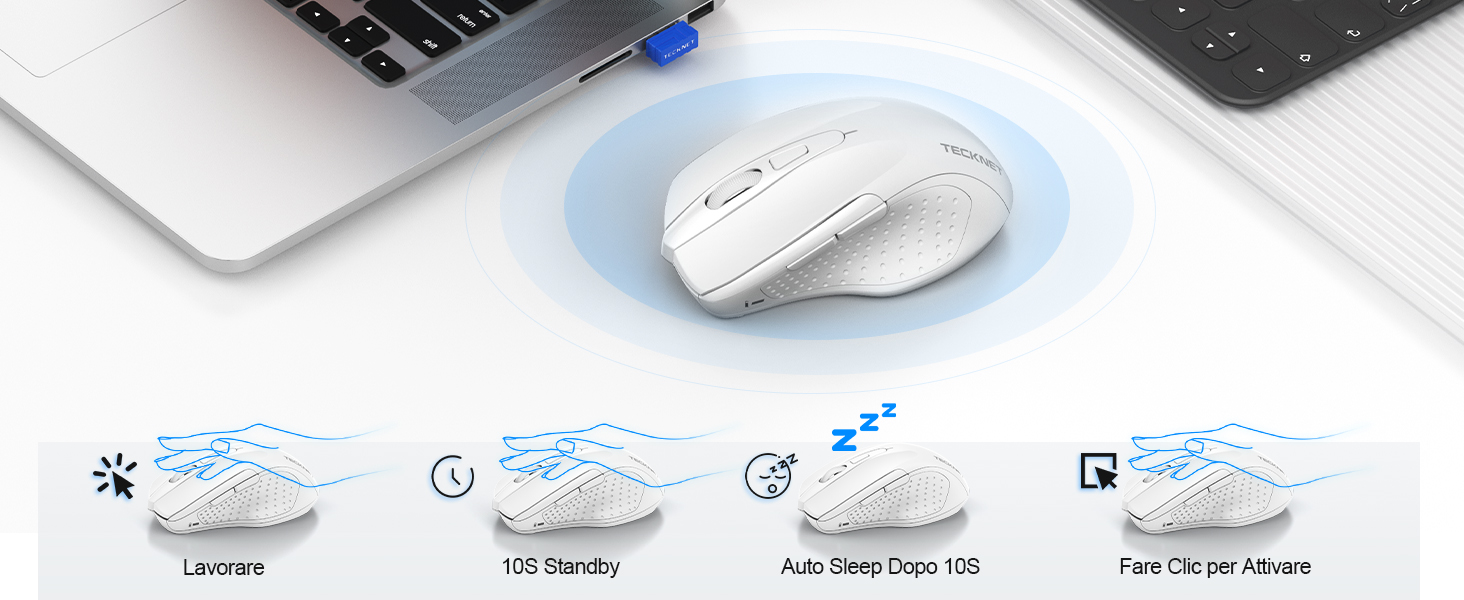
Power saving modes for extended battery life.
ບໍາລຸງຮັກສາ
- ທໍາຄວາມສະອາດ: ໃຊ້ຜ້າປຽກແຫ້ງເພື່ອເຮັດຄວາມສະອາດຫນູ. ສໍາລັບຝຸ່ນ stubborn, a ເລັກນ້ອຍ damp ຜ້າສາມາດນໍາໃຊ້ໄດ້, ຮັບປະກັນວ່າບໍ່ມີຄວາມຊຸ່ມຊື່ນເຂົ້າໄປໃນອຸປະກອນ.
- ການສາກໄຟ: Recharge the mouse when the indicator light signals low battery. Avoid completely draining the battery frequently to prolong its lifespan.
- ການເກັບຮັກສາ: When not in use for extended periods, turn off the mouse and store the USB receiver in its designated compartment.
ການແກ້ໄຂບັນຫາ
| ບັນຫາ | ສາເຫດທີ່ເປັນໄປໄດ້ | ການແກ້ໄຂ |
|---|---|---|
| ເມົ້າບໍ່ຕອບສະໜອງ | Low battery; USB receiver not connected; Mouse switched off; Driver issue. | Charge the mouse; Ensure USB receiver is securely plugged in; Turn on the mouse; Try a different USB port; Restart computer. |
| ການເຊື່ອມຕໍ່ບໍ່ສະໝໍ່າສະເໝີ ຫຼື ຊັກຊ້າ | Interference from other wireless devices; Distance from receiver; Obstructions. | Move closer to the receiver; Remove obstructions; Avoid using near other 2.4GHz devices; Try a different USB port. |
| ການເຄື່ອນໄຫວຂອງເຄີເຊີບໍ່ສະໝໍ່າສະເໝີ ຫຼື ບໍ່ແນ່ນອນ | Dirty optical sensor; Unsuitable surface; Incorrect DPI setting. | Clean the optical sensor; Use a mouse pad or a smooth, non-reflective surface; Adjust DPI settings. |
| Mouse does not charge | Faulty charging cable; Faulty USB port; Mouse issue. | Try a different USB-C cable; Try a different USB power source; Contact customer support if the issue persists. |
ຂໍ້ມູນຈໍາເພາະ
| ຍີ່ຫໍ້ | TECNET |
| ໝາຍເລກຕົວແບບ | TK-MS009 |
| ສີ | ສີຂາວ |
| ເຕັກໂນໂລຊີການເຊື່ອມຕໍ່ | 2.4GHz Wireless (ຕົວຮັບ USB) |
| ຄຸນນະສົມບັດພິເສດ | Rechargeable, Long Battery Life, Silent Click, Ergonomic Design |
| ເຕັກໂນໂລຍີກວດຈັບການເຄື່ອນໄຫວ | Optical |
| ຈໍານວນປຸ່ມ | 6 |
| ທິດທາງມື | ມືຂວາ |
| ອຸປະກອນທີ່ເຂົ້າກັນໄດ້ | Laptop, PC, Chromebook, Computer |
| ລະບົບປະຕິບັດການ | Windows 11/10/8.1/8/7/Vista/XP, Linux, Mac OS (side buttons not available on Mac OS) |
| ອາຍຸຫມໍ້ໄຟສະເລ່ຍ | 1050 Hours (approx. 1-2 months on 2-hour charge) |
| ຄວາມອ່ອນໄຫວສູງສຸດ | 4800 DPI |
| Range ໄຮ້ສາຍ | 15 ແມັດ |
| ຂະໜາດ (L x W) | ຂະໜາດ 10.6L x 6.8W cm |
| ວັດສະດຸ | ພາດສະຕິກ |
ການຮັບປະກັນແລະການສະຫນັບສະຫນູນ
TECKNET offers a ຮັບປະກັນ 36 ເດືອນ for registered users. If you encounter any issues during the use of your mouse, please contact our professional customer service team as soon as possible. We are committed to assisting you in resolving any problems.
For support, please visit the official TECKNET webເວັບໄຊ ຫຼືອ້າງອີງເຖິງຂໍ້ມູນການຕິດຕໍ່ທີ່ສະໜອງໃຫ້ກັບການຫຸ້ມຫໍ່ຜະລິດຕະພັນຂອງທ່ານ.
ຊັບພະຍາກອນອອນໄລນ໌: