
1. Introduction and Compatibility
This manual provides detailed instructions for the installation, operation, and maintenance of your autoabc Wireless CarPlay/Android Auto 8.9-inch Linux Touchscreen Multimedia Radio Receiver. This device is designed to upgrade your vehicle's infotainment system while retaining original car functionalities.
1.1. ຄວາມເຂົ້າກັນໄດ້ຂອງຍານພາຫະນະ
This product is specifically designed for the following BMW models with a CCC-System:
- BMW 3 Series: E90, E91, E92, E93 (2005-2010)
- BMW 5 Series: E60, E63, E64 (2005-2010)
ສຳຄັນ: Please verify your vehicle's system is a CCC-System before purchase and installation. If you are unsure, consult a professional or contact autoabc customer support.

Image 1.1: Compatibility chart for BMW E-series models and CCC system.
2. ຄຸນນະສົມບັດທີ່ສໍາຄັນ
The autoabc Multimedia Radio Receiver offers a range of advanced features to enhance your driving experience:
- Wireless and Wired CarPlay/Android Auto: Seamlessly integrate your smartphone for navigation, music, calls, and more using intelligent voice assistants.
- High-Definition 8.9-inch Touchscreen: A 1920 x 720 resolution LED display provides a clear and vibrant visual experience.
- Original Feature Retention: Maintains all original car functions, including radio, amplifier, joystick control, rearview camera, and vehicle information display (speed, fuel, oil pressure, safety warnings).
- ຫຼາຍວິທີການຄວບຄຸມ: Supports control via the original car knob, steering wheel buttons, and the new touchscreen interface.
- ການສະທ້ອນໜ້າຈໍ: Features Airplay and Autolink for mirroring your phone's screen, and supports USB media playback.
- ຮອງຮັບກ້ອງຖ່າຍຮູບ: Compatible with factory original reverse cameras, parking radar, and aftermarket front view DVR (AHD/CVBS).

Image 2.1: Control methods supported by the system, including original car knob, steering wheel buttons, and the new touchscreen. Also highlights camera support.

Image 2.2: Visual representation of screen mirroring capabilities (Airplay, Autolink) and USB media playback.
3. ການຕິດຕັ້ງແລະການຕິດຕັ້ງ
3.1. Pre-Installation Notice: AUX Function Activation
Due to the age of some compatible car models, the AUX function may not be active by default. It is crucial to activate the AUX function in your car before using this product to ensure audio output. You can activate the AUX function using a dedicated activator tool or by seeking assistance from a car dealership or a qualified car repair shop.
3.2. ການຕິດຕັ້ງຫຼາຍກວ່າview
Installation involves replacing the original display screen and connecting the new unit with the provided cables. While the installation is designed to be straightforward, professional installation is recommended if you are not familiar with car electronics. An installation video may be available; please check the product page or contact customer support for guidance.
ອົງປະກອບລວມ:
- ໜ່ວຍສະແດງຫຼັກ
- ສາຍໄຟ
- ສາຍ USB
- ສາຍ AUX
- ຄູ່ມືຜູ້ໃຊ້
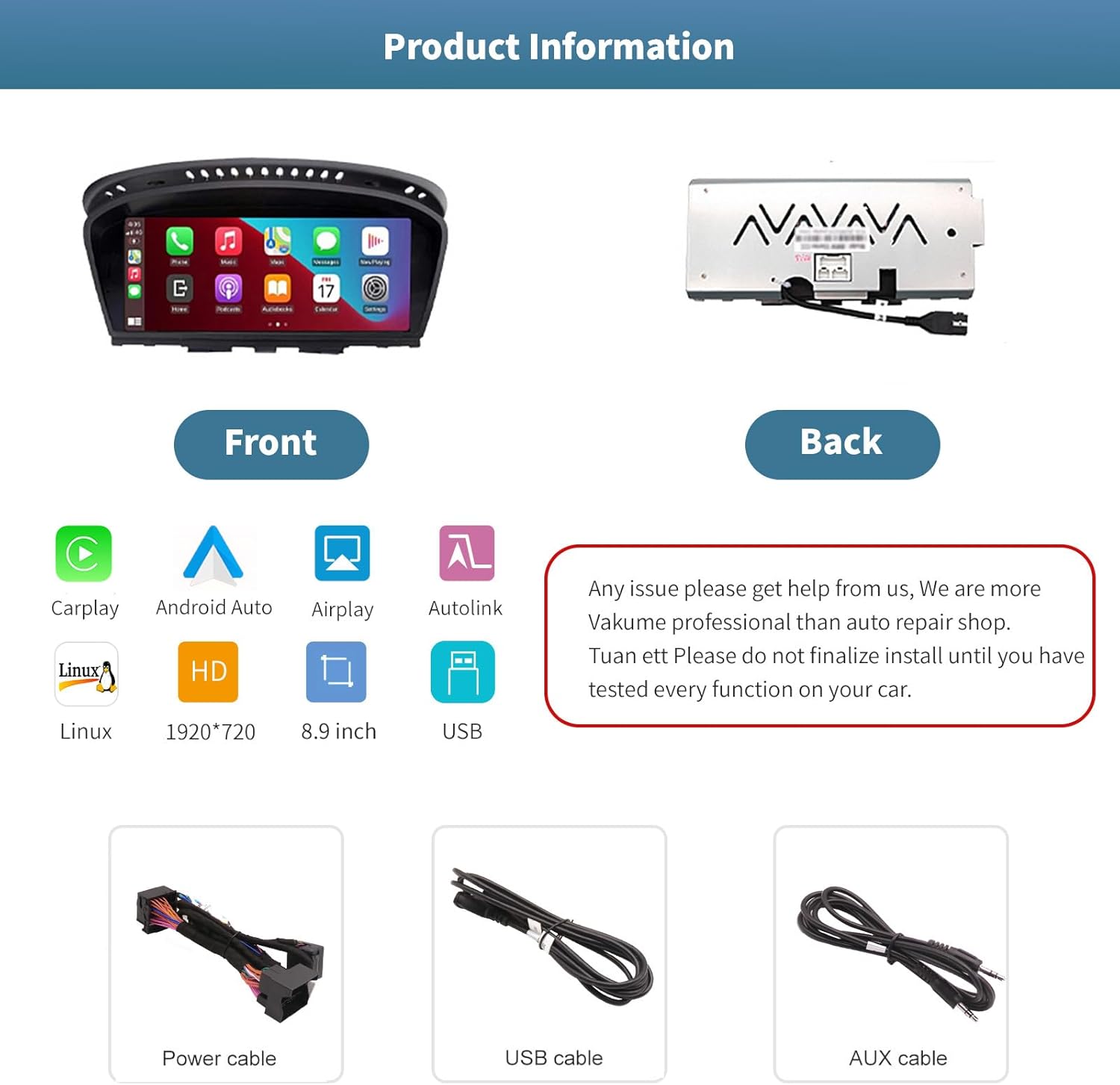
ຮູບພາບ 3.1: ດ້ານໜ້າ ແລະ ດ້ານຫຼັງ views of the autoabc multimedia receiver, along with the included power, USB, and AUX cables.
ໝາຍເຫດ: Do not finalize the installation until you have tested every function on your car. For any installation issues, please contact autoabc support.
4. ການດໍາເນີນງານ
4.1. ການປ່ຽນລະຫວ່າງລະບົບຕ່າງໆ
The unit allows for one-button switching between your original BMW iDrive system and the new Linux-based multimedia system. This ensures you can access all original car functions while enjoying the new features.

Image 4.1: Interface showing the option to switch between the original car system and the new Linux system.
4.2. Using CarPlay and Android Auto
Once connected wirelessly or via USB, CarPlay or Android Auto will launch, providing access to your phone's navigation, communication, and entertainment apps directly on the 8.9-inch touchscreen. Use voice commands or the touchscreen for safe operation while driving.

Image 4.2: The autoabc multimedia receiver installed in a BMW, showcasing the CarPlay/Android Auto interface.
4.3. Screen Mirroring (Airplay/Autolink)
Utilize Airplay for iOS devices or Autolink for Android devices to mirror your smartphone's screen onto the unit's display. This allows you to view photos, videos, and other content directly from your phone.
4.4. Customizing the Startup Screen
You can personalize the startup logo of your unit. Follow these steps:
- Create a PNG image with a resolution of 1920 x 720 pixels.
- Rename the image file to 'updatelogo.png'.
- Place the 'updatelogo.png' file in the root directory of a USB drive.
- Insert the USB drive into the reserved USB port on the unit. A prompt will confirm the logo change is successful.
- Restart the car to apply the new startup logo.

Image 4.3: Step-by-step guide for customizing the unit's startup logo.
5. ບໍາລຸງຮັກສາ
To ensure the longevity and optimal performance of your autoabc multimedia receiver, follow these general maintenance guidelines:
- ທໍາຄວາມສະອາດຫນ້າຈໍ: ໃຊ້ຜ້າແພທີ່ອ່ອນນຸ່ມ, ບໍ່ມີສານດ່າງເພື່ອເຊັດໜ້າຈໍສຳຜັດຄ່ອຍໆ. ສໍາລັບ smudges stubborn, ເລັກນ້ອຍ dampໃສ່ຜ້າດ້ວຍນ້ໍາຫຼືເຄື່ອງເຮັດຄວາມສະອາດຫນ້າຈໍທີ່ປອດໄພ. ຫຼີກເວັ້ນການສານເຄມີທີ່ຮຸນແຮງຫຼືວັດສະດຸຂັດ.
- ຫຼີກລ້ຽງການອຸນຫະພູມທີ່ຮ້າຍແຮງ: ຫ້າມບໍ່ໃຫ້ເຄື່ອງໃຊ້ຄວາມຮ້ອນ ຫຼື ເຢັນຫຼາຍເປັນເວລາດົນ, ເພາະວ່າອັນນີ້ອາດຈະສົ່ງຜົນກະທົບຕໍ່ອົງປະກອບເອເລັກໂຕຣນິກຂອງມັນ.
- ການຄຸ້ມຄອງສາຍໄຟ: Ensure all cables are securely connected and not pinched or strained, which could lead to damage or intermittent connectivity.
6. ການແກ້ໄຂບັນຫາ
If you encounter issues with your autoabc multimedia receiver, refer to the following common problems and solutions:
- ບໍ່ມີສຽງອອກ:
- Ensure the AUX function in your car's original system is activated. This is a common requirement for audio output.
- Check all audio cable connections, especially the AUX cable.
- ບັນຫາການເຊື່ອມຕໍ່ CarPlay/Android Auto:
- Verify your phone's Bluetooth and Wi-Fi are enabled and correctly paired with the unit.
- ຣີສະຕາດທັງໂທລະສັບ ແລະ ລະບົບ infotainment ຂອງລົດຂອງທ່ານ.
- ໃຫ້ແນ່ໃຈວ່າລະບົບປະຕິບັດການຂອງໂທລະສັບຂອງທ່ານແມ່ນອັບເດດແລ້ວ.
- Microphone Echo or Poor Call Quality:
- Check for any obstructions near the microphone.
- Adjust the microphone sensitivity settings if available in the unit's menu.
- Ensure your phone's volume is not excessively high, which can cause feedback.
- ໜ້າຈໍບໍ່ຕອບສະໜອງຕໍ່ການສຳຜັດ:
- ເລີ່ມຕົ້ນ ໃໝ່.
- ໃຫ້ແນ່ໃຈວ່າຫນ້າຈໍສະອາດແລະບໍ່ມີສິ່ງເສດເຫຼືອ.
- AirPlay/Autolink Connection Failure:
- Ensure both the unit and your phone are connected to the same Wi-Fi network (if applicable for the mirroring method).
- Follow the specific connection steps for AirPlay or Autolink as detailed in the unit's on-screen instructions or a supplementary guide.
If these steps do not resolve the issue, please contact autoabc customer support for further assistance.
7. ຂໍ້ມູນຈໍາເພາະ
| ຄຸນສົມບັດ | ຂໍ້ມູນຈໍາເພາະ |
|---|---|
| ຂະຫນາດຈໍສະແດງຜົນ | 8.9 ນິ້ວ |
| ຄວາມລະອຽດການສະແດງ | 1920 x 720 |
| ລະບົບປະຕິບັດການ | Linux (supports Android Auto, CarPlay) |
| ເຕັກໂນໂລຊີການເຊື່ອມຕໍ່ | Bluetooth, Wireless (for CarPlay/Android Auto) |
| ຄຸນນະສົມບັດພິເສດ | ໜ້າຈໍສຳຜັດ |
| ວິທີການຄວບຄຸມ | Touchscreen, Voice Command, Original Car Knob, Steering Wheel Buttons |
| ປະເພດການຕິດຕັ້ງ | ກະດານ Mount |
| ນ້ໍາຫນັກລາຍການ | 3.12 ປອນ (1.42 ກິໂລກຣາມ) |
| ຂະໜາດແພັກເກັດ | 11.81 x 7.24 x 6.73 ນິ້ວ |
8. ການຮັບປະກັນແລະການສະຫນັບສະຫນູນ
autoabc is committed to providing excellent customer service and support for your product.
8.1. ຂໍ້ມູນການຮັບປະກັນ
- One-Year Global Warranty: Your product is covered by a one-year global warranty from the date of purchase.
- 12 Months Replacement: Replacement is available within 12 months for eligible issues.
- 60 Days No Worry Return: ເພີດເພີນໄປກັບນະໂຍບາຍການສົ່ງຄືນພາຍໃນ 60 ວັນເພື່ອຄວາມສະຫງົບສຸກຂອງທ່ານ.
8.2. ສະຫນັບສະຫນູນດ້ານວິຊາການ
- LIFETIME Technical Service Support: autoabc provides lifetime technical support for your product.
- ຕອບກັບໄວ 24 ຊົ່ວໂມງ: Expect a quick response to your inquiries within 24 hours.
- ຕິດຕໍ່ພວກເຮົາ: For any questions, issues, or technical assistance, please contact us via Amazon Email. Our team is ready to provide reliable online technical support.

ຮູບພາບ 8.1: ຫຼາຍກວ່າview of autoabc's customer support and warranty commitments.