
1. ບົດແນະນຳ
Thank you for choosing the VOCOO Digital Kitchen Timer Model 5285W. This versatile timer is designed for various applications, including cooking, classroom management, home gym workouts, and more. Featuring an extra-large LED display, multiple alarm options, adjustable brightness, and convenient placement methods, it aims to simplify your timing needs.
2. ຄຸນນະສົມບັດທີ່ສໍາຄັນ
- Extra Large 7.8-inch LED Display: Clear, easy-to-read numbers visible from a distance.
- 3 ລະດັບຄວາມສະຫວ່າງ: Adjustable display brightness (Dim/Medium/Bright) to suit any environment.
- 4 Alarm Options with 3 Volume Levels: Choose from different melodies and adjust volume (Loud, Medium, Soft).
- Versatile Timing Modes: Countdown from 99 hours 59 minutes or count up (stopwatch) from 0 to 99 hours 59 minutes 59 seconds.
- ແບັດເຕີຣີທີ່ສາມາດສາກໄດ້: Powered by an included C battery, with a low power indicator.
- ຕົວເລືອກການຈັດວາງຫຼາຍອັນ: Strong silicone-covered magnets for metal surfaces, a fold-out stand for desktops, and a hanging hole.
- ການຄວບຄຸມ intuitive: Dedicated buttons for setting time, reset, and start/pause for ease of use.
3. ເນື້ອໃນຊຸດ
- VOCOO Digital Timer (Model 5285W)
- ສຽບ USB-C
- ສາຍສາກ USB-C
- ຄູ່ມືຜູ້ໃຊ້
4. ຜະລິດຕະພັນເກີນview
Familiarize yourself with the timer's display and control buttons.
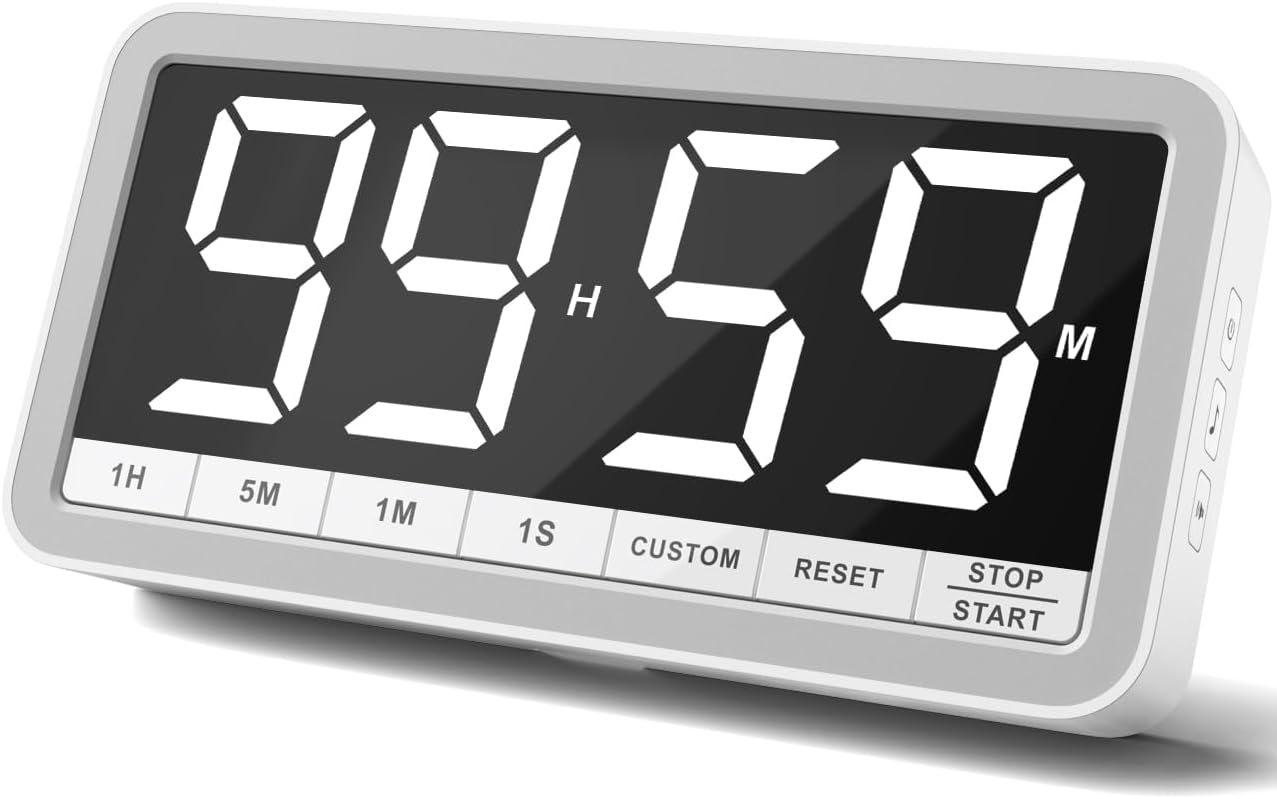
ປຸ່ມແນວ ໜ້າ:
- 1H: Add 1 hour
- 5M: ເພີ່ມ 5 ນາທີ
- 1M: ຕື່ມ 1 ນາທີ
- 1S: Add 1 second
- ລູກຄ້າ: Set/Recall custom time
- ຣີເຊັດ: Clear current time setting
- ຢຸດ/ເລີ່ມ: Begin or pause timing
Side Panel Buttons:
- ປຸ່ມເປີດປິດ: Turn the timer On/Off. Also cycles through brightness levels (Dim/Medium/Bright) when pressed briefly while on.
- Music Note Button: Cycle through 4 different alarm sounds.
- ປຸ່ມໄອຄອນລຳໂພງ: Cycle through 3 volume levels (Loud/Medium/Soft).
5. ຕັ້ງຄ່າ
- ຄ່າ ທຳ ນຽມ: Before first use, fully charge the timer using the provided USB-C cable and plug. A low power icon will indicate when charging is needed.
- ເປີດ: Press and hold the Power Button on the side for a few seconds to turn the timer on.
6. ຄໍາແນະນໍາການດໍາເນີນງານ
6.1. ໂໝດຈັບເວລານັບຖອຍຫຼັງ
- ຕັ້ງເວລາ: ໃຊ້ 1H, 5M, 1M, ແລະ 1S buttons to set your desired countdown time. The maximum time is 99 hours 59 minutes.
- Start Countdown: ກົດ ຢຸດ / ເລີ່ມຕົ້ນ ປຸ່ມເພື່ອເລີ່ມຕົ້ນການນັບຖອຍຫຼັງ.
- ຢຸດຊົ່ວຄາວ/ສືບຕໍ່: ກົດ ຢຸດ / ເລີ່ມຕົ້ນ again to pause or resume the countdown.
- ຕັ້ງຄ່າ ໃໝ່: ກົດ ຣີເຊັດ button to clear the current time and return to 00:00.
- 1-Minute Reminder: When the countdown reaches 1 minute, the display digits will turn red to provide a visual alert.
- ໂມງປຸກ: Once the timer reaches 00:00, the selected alarm will sound.

6.2. Count-Up Timer (Stopwatch) Mode
- Start Count-Up: Ensure the timer is at 00:00. Press the ຢຸດ / ເລີ່ມຕົ້ນ ປຸ່ມເພື່ອເລີ່ມນັບ.
- ຢຸດຊົ່ວຄາວ/ສືບຕໍ່: ກົດ ຢຸດ / ເລີ່ມຕົ້ນ again to pause or resume the count-up.
- ຕັ້ງຄ່າ ໃໝ່: ກົດ ຣີເຊັດ button to clear the count-up time and return to 00:00.
6.3. Custom Time Setting
ໄດ້ ກຳນົດເອງ button allows you to save and quickly recall a frequently used time setting. To set a custom time, first set the desired time using the 1H, 5M, 1M, 1S buttons, then press and hold the ກຳນົດເອງ button until the display flashes, indicating the time is saved. To recall, simply press the ກຳນົດເອງ ປຸ່ມສັ້ນໆ.
6.4. Adjusting Alarm and Volume
ໃຊ້ Music Note Button on the side to cycle through the 4 available alarm sounds. Use the Speaker Icon Button on the side to select one of the 3 volume levels (Loud, Medium, Soft).

6.5. ການປັບຄວາມສະຫວ່າງ
ຫຍໍ້ໆ ກົດເຂົ້າ ປຸ່ມເປີດປິດ on the side while the timer is on to cycle through the 3 brightness levels: Dim, Medium, and Bright.

7. ຕົວເລືອກການຈັດວາງ
The VOCOO Digital Kitchen Timer offers flexible placement options to suit your needs:
- ໄຟລ໌ແນບແມ່ເຫຼັກ: Two strong magnets covered with silicone on the back allow you to securely attach the timer to any metal surface, such as a refrigerator or whiteboard, without slipping or scratching.
- ໂຕະຕັ້ງໂຕະ: A built-in fold-out stand enables the timer to be placed upright on any flat surface, like a countertop or desk.
- ຫ້ອຍ: A hanging hole is provided on the back for wall mounting using a nail or hook.

8. ການສາກໄຟ
The timer is powered by a rechargeable battery. Use the included USB-C cable and a 5V (output voltage) power plug to charge it. A low power sign will appear on the display to remind you when charging is needed. Using a power plug higher than 5V may damage the battery.
9. ບໍາລຸງຮັກສາ
To ensure the longevity of your VOCOO Digital Kitchen Timer, follow these simple maintenance guidelines:
- Wipe the display and body with a soft, dry cloth.
- ຫຼີກເວັ້ນການນໍາໃຊ້ເຄື່ອງເຮັດຄວາມສະອາດຂັດຫຼືສານລະລາຍ.
- Keep the timer away from extreme temperatures and direct sunlight.
- ຢ່າເອົາເຄື່ອງຈັບເວລາລົງໃນນໍ້າ ຫຼືເຮັດໃຫ້ມີຄວາມຊຸ່ມຊື່ນຫຼາຍເກີນໄປ.
10. ການແກ້ໄຂບັນຫາ
If you encounter any issues with your timer, please refer to the following common solutions:
- ຈໍສະແດງຜົນບໍ່ເປີດ: Ensure the timer is charged. Connect it to the USB-C charger and allow it to charge for at least 30 minutes before attempting to power it on again.
- ໂມງປຸກບໍ່ດັງ: Check the volume level using the Speaker Icon Button on the side. Ensure it is not set to 'LO0' (silent).
- Incorrect time setting: Press the RESET button to clear the current setting, then re-enter the desired time using the 1H, 5M, 1M, and 1S buttons.
- Timer not responding: Try turning the timer off and then on again using the Power Button.
11. ຂໍ້ມູນຈໍາເພາະ
| ຄຸນລັກສະນະ | ລາຍລະອຽດ |
|---|---|
| ຍີ່ຫໍ້ | VOCOO |
| ໝາຍເລກຕົວແບບ | 5285W |
| ສີ | ສີຂາວ |
| ຂະໜາດໜ້າຈໍ | 7.8 ນິ້ວ |
| ຂະໜາດສິນຄ້າ | 1.38"D x 8.27"W x 4.13"H |
| ນ້ໍາຫນັກລາຍການ | 9.5 ອອນສ໌ (270 ກຣາມ) |
| ວັດສະດຸ | ຊິລິໂຄນ |
| ໝໍ້ໄຟ | ຕ້ອງການແບັດເຕີຣີ 1 ກ້ອນ C (ມີໃຫ້) |
12. ວິດີໂອຜະລິດຕະພັນຢ່າງເປັນທາງການ
13. ສະຫນັບສະຫນູນ
For any questions or support regarding your VOCOO Digital Kitchen Timer, please contact us at: support@vocoo.vip.com