
iFlight BLITZ Whoop VTX
iFlight 5.8Ghz 40CH 2.5W/ 4.9Ghz 8CH 2.5W 2-8S VTX BWhoop
ຄູ່ມືຜູ້ໃຊ້
1. ຜະລິດຕະພັນເກີນview
ລາຍລະອຽດ
The iFlight BLITZ Whoop VTX is a high-power video transmitter designed for FPV drones and quadcopters. It features a built-in microphone, multiple power levels up to 2500mW, and supports 2-8S VBAT input. The VTX includes an integrated cooling fan and CNC cooling casing for efficient heat dissipation. It utilizes an MMCX interface and has a 25.5x25.5mm mounting pattern. Control is managed via LED indicators and function buttons for power level, band, and channel selection, with IRC Tramp telemetry support.
ຄຸນນະສົມບັດທີ່ສໍາຄັນ
- Built-in microphone for audio transmission.
- ການປ້ອນຂໍ້ມູນ voltage range: 7V to 34V (2-8S VBAT).
- Four selectable power levels: PIT/25mW/400mW/1000mW/2500mW.
- 8 channels for 4.9Ghz and 40 channels for 5.8Ghz operation.
- CNC cooling casing with integrated cooling fan for dual heat dissipation.
- MMCX antenna interface.
- Compact dimensions: 50*30*16 mm, Lightweight: 32g.
- VTX telemetry: IRC Tramp.
ແມ່ນຫຍັງຢູ່ໃນກ່ອງ
- 1 x BLITZ Whoop 4.9G 2.5W VTX
- ສາຍໄຟທີ່ ຈຳ ເປັນ
- ສະກູຕິດ
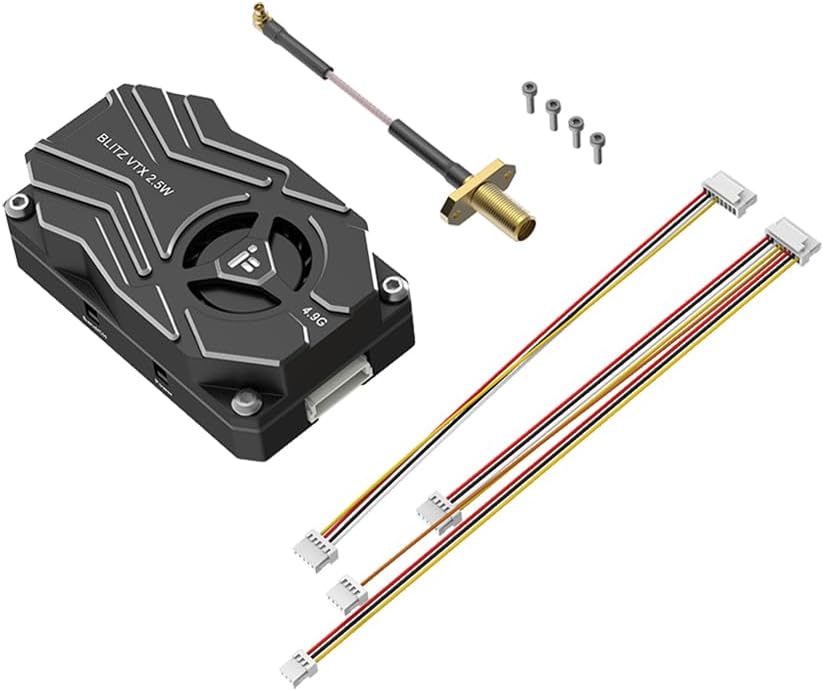
Figure 1.1: The iFlight BLITZ Whoop VTX module with its antenna cable, mounting screws, and wiring harnesses.
2. ຂໍ້ມູນຄວາມປອດໄພທີ່ສໍາຄັນ
ຄຳເຕືອນ: The VTX is set to 25mW by default. Power levels above 25mW require a HAM license or must be approved by local authorities. Always ensure you are flying legal frequencies and use the appropriate Betaflight VTX tables according to your region's regulations.
- Always read the instructions for proper wiring before connecting the VTX. Incorrect wiring can cause damage.
- Ensure the antenna is properly installed before powering on the VTX. Operating without an antenna can significantly shorten the module's lifespan.
- ຢືນຢັນ voltage range (7-34V DC) and polarity (positive/negative) before applying power to prevent component damage.
- When installing the VTX, ensure sufficient space around the module for air convection to facilitate proper heat dissipation.
- Failure to provide adequate cooling may cause the module to activate overheat protection, leading to reduced power transmission or complete shutdown.
3. ຄູ່ມືການຕິດຕັ້ງ
Wiring and Port Connections
The BLITZ Whoop VTX features clearly labeled ports for easy integration into your FPV system. Refer to the diagram below for correct connections.
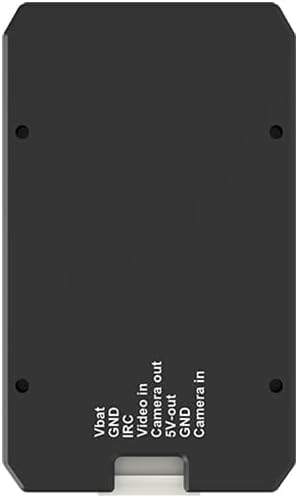
ຮູບທີ 3.1: ດ້ານລຸ່ມ view of the VTX showing port connections.
| Port Label | ລາຍລະອຽດ |
|---|---|
| VBAT | Positive input for 2-8S (7-34V DC) battery voltage. |
| GND | Negative ground connection. |
| IRC | IRC Tramp Signal Input for VTX control from flight controller. |
| ວິດີໂອໃນ | ສັນຍານວິດີໂອຈາກກ້ອງ FPV ຂອງທ່ານ. |
| Camera out | Camera video output (if applicable for pass-through). |
| 5V ອອກ | ແຮງດັນໄຟຟ້າ 5Vtage output for powering peripherals like an FPV camera. |
| ກ້ອງຖ່າຍຮູບໃນ | Camera video input (alternative to 'Video in' depending on setup). |
ການຕິດຕັ້ງ
The VTX has a mounting pattern of 25.5x25.5mm with Φ1.6mm holes. Ensure secure mounting using the provided screws. It is crucial to leave adequate space around the VTX for air circulation to allow the integrated cooling fan and CNC casing to dissipate heat effectively. This prevents the VTX from entering overheat protection mode.
4. ຄໍາແນະນໍາການດໍາເນີນງານ
ການທໍາງານຂອງປຸ່ມພະລັງງານ
The VTX features a 'Power' button to control its output power and PIT mode. Refer to the image below for button location.

ຮູບ 4.1: ຂ້າງ view of the VTX showing the 'Band/CH' and 'Power' buttons.
- ກົດຄ້າງໄວ້ 2 ວິນາທີ: Enters or exits PIT mode. A solid green LED light indicates that PIT mode is active.
- ກົດສັ້ນ: Changes the output power level. The number of green LED flashes indicates the current power setting:
- 1 flash = 25mW
- 2 flashes = 400mW
- 3 flashes = 1000mW
- 4 flashes = 2500mW
Band and Channel Button Functionality
The 'Band/CH' button allows you to cycle through the available bands and channels. Refer to Figure 4.1 for button location.
- ກົດສັ້ນ: Switches the channel. The number of blue LED flashes indicates the current channel (1 to 8 for 4.9Ghz, or 1 to 40 for 5.8Ghz depending on the selected band).
VTX Telemetry (IRC Tramp)
The BLITZ Whoop VTX supports IRC Tramp telemetry, allowing you to configure VTX settings directly from your flight controller's OSD (On-Screen Display) or Betaflight configurator. Connect the IRC pin on the VTX to a UART TX pad on your flight controller and configure the UART for VTX (Tramp) protocol in Betaflight.
5. ຂໍ້ກໍານົດດ້ານວິຊາການ
| ຂໍ້ມູນຈໍາເພາະ | ມູນຄ່າ |
|---|---|
| ການໂຕ້ຕອບ | MMCX |
| ລະດັບພະລັງງານ | PIT/25mW/400mW/1000mW/2500mW |
| ຮູບແບບການຕິດຕັ້ງ | 25.5x25.5mm / Φ1.6 |
| ຂະໜາດ | 50 x 30 x 16 ມມ |
| ນ້ຳໜັກ | 32g |
| VTX Telemetry | IRC Tramp |
| ການປ້ອນຂໍ້ມູນ Voltage (VBAT) | 2-8S (7-34V DC) |
| ຜູ້ຜະລິດ | IFlight |
| ອາຍຸທີ່ແນະນໍາ | 15 ປີຂຶ້ນໄປ |
6. ບໍາລຸງຮັກສາ
To ensure the longevity and optimal performance of your iFlight BLITZ Whoop VTX, follow these maintenance guidelines:
- ຮັກສາຄວາມສະອາດ: Regularly inspect the VTX for dust, dirt, or debris, especially around the cooling fan and heatsink fins. Use a soft brush or compressed air to gently clean these areas.
- ຮັບປະກັນຄວາມເຢັນທີ່ເຫມາະສົມ: Always ensure that the VTX has adequate airflow during operation. Avoid enclosing it in tight spaces without ventilation, as this can lead to overheating and performance degradation.
- ການເຊື່ອມຕໍ່ເສົາອາກາດ: Periodically check the MMCX antenna connection to ensure it is secure. A loose connection can lead to poor video quality and potential damage to the VTX.
- ກວດສອບສາຍໄຟ: Before each flight, visually inspect all wiring connected to the VTX for any signs of wear, fraying, or damage. Replace any damaged wires immediately.
7. ການແກ້ໄຂບັນຫາ
This section addresses common issues you might encounter with your iFlight BLITZ Whoop VTX.
| ບັນຫາ | ສາເຫດທີ່ເປັນໄປໄດ້ | ການແກ້ໄຂ |
|---|---|---|
| No video signal or very poor range | Antenna not connected or damaged; Incorrect channel/band; VTX in PIT mode; Overheating. | Ensure antenna is securely connected. Verify VTX channel/band matches receiver. Check if VTX is in PIT mode (solid green LED) and exit if necessary. Ensure adequate cooling. |
| VTX gets excessively hot, power output reduces or shuts off | Insufficient airflow/cooling; Operating at high power in confined space. | Ensure proper ventilation around the VTX. Consider reducing power output if operating in a hot environment or with limited airflow. |
| VTX does not power on or components are damaged | ບໍ່ຖືກຕ້ອງ voltage input; Reverse polarity; Short circuit. | Double-check all wiring for correct voltage (7-34V) and polarity before connecting power. Inspect for any short circuits. If components are burned, the VTX may need replacement. |
| Cannot change VTX settings via Betaflight OSD | IRC Tramp not configured correctly; Wiring issue to flight controller. | Verify the IRC pin is connected to a UART TX pad on your flight controller. Ensure the correct UART is enabled for VTX (Tramp) protocol in Betaflight configurator. |
8. ການຮັບປະກັນແລະການສະຫນັບສະຫນູນ
For warranty information, please refer to the official iFlight website or contact your point of purchase. Warranty terms typically cover manufacturing defects for a specified period from the date of purchase.
For technical support, troubleshooting assistance beyond this manual, or to inquire about spare parts, please visit the official iFlight support channels or their Amazon store page:
Visit the iFlight Store on Amazon
Please have your product model number (BLITZ Whoop VTX) and purchase details ready when contacting support.
9. ວິດີໂອຜະລິດຕະພັນຢ່າງເປັນທາງການ
No official product videos from the seller were provided for this manual. Please check the product listing or the manufacturer's official webເວັບໄຊທ໌ສໍາລັບຊັບພະຍາກອນວິດີໂອທີ່ມີຢູ່.
Ask a question about this manual
Ask about setup, troubleshooting, compatibility, parts, safety, or missing instructions. Manuals+ will review the question and use this page’s manual context to help answer it.