
1. ບົດແນະນຳ
Thank you for choosing the VXE Dragon Fly R1 PRO MAX Gaming Mouse. This manual provides detailed instructions for setting up, operating, and maintaining your new wireless gaming mouse. Please read this manual thoroughly before use to ensure optimal performance and longevity of your device.

Image 1: The VXE Dragon Fly R1 PRO MAX Gaming Mouse. This image displays the sleek, black design of the mouse from a top-down perspective.
2. ເນື້ອໃນຊຸດ
ໃຫ້ແນ່ໃຈວ່າທຸກລາຍການຢູ່ໃນຊຸດຂອງທ່ານ:
- VXE Dragon Fly R1 PRO MAX Gaming Mouse
- USB-A Dongle ໄຮ້ສາຍ
- ສາຍສາກ/ສາຍຂໍ້ມູນ USB-C ຫາ USB-A
- Grip Tape (pre-cut for mouse sides and buttons)
- Extra PTFE Mouse Skates/Sliders

Image 2: Contents of the VXE Dragon Fly R1 PRO MAX package. This image shows the black mouse, its USB-A wireless dongle, the braided USB-C charging cable, and sheets of grip tape and extra mouse feet.
3. ຜະລິດຕະພັນເກີນview ແລະຄຸນສົມບັດ
The VXE Dragon Fly R1 PRO MAX is engineered for high-performance gaming and productivity, featuring a lightweight design and versatile connectivity options.
ຄຸນນະສົມບັດທີ່ສໍາຄັນ:
- ການອອກແບບ Ultra Lightweight: Weighing approximately 48 grams, minimizing wrist fatigue during extended use.
- ຮູບຮ່າງທີ່ເຫມາະສົມ: Designed for comfortable grip and control.
- 5 ປຸ່ມຕັ້ງໂຄງການ: Left click, right click, clickable scroll wheel, and two side buttons.
- ການເຊື່ອມຕໍ່ອະເນກປະສົງ: Supports 2.4G wireless (via dongle), Bluetooth, and wired (USB-C) modes.
- ອັດຕາການລົງຄະແນນສຽງສູງ: Up to 4K polling rate for ultra-responsive tracking (requires separate 4K receiver).
- ຊີວິດຫມໍ້ໄຟຍາວ: Up to 75 hours of wireless usage on a single charge.
- ການເຄືອບທົນທານ: Features a 'Delicate Ice Feeling Coating' for a smooth, dirt-resistant, and easy-to-clean surface.

ຮູບພາບ 3: ມີການລະເບີດ view of the VXE Dragon Fly R1 PRO MAX mouse, highlighting its internal components such as the PAW3395/SE sensor, Kaihua GE Upgrade/TTC Silver Wheel, and Kaihua White Blade switches, along with its lightweight design and 2.4G storage. The image also indicates the weight of different R1 series models.
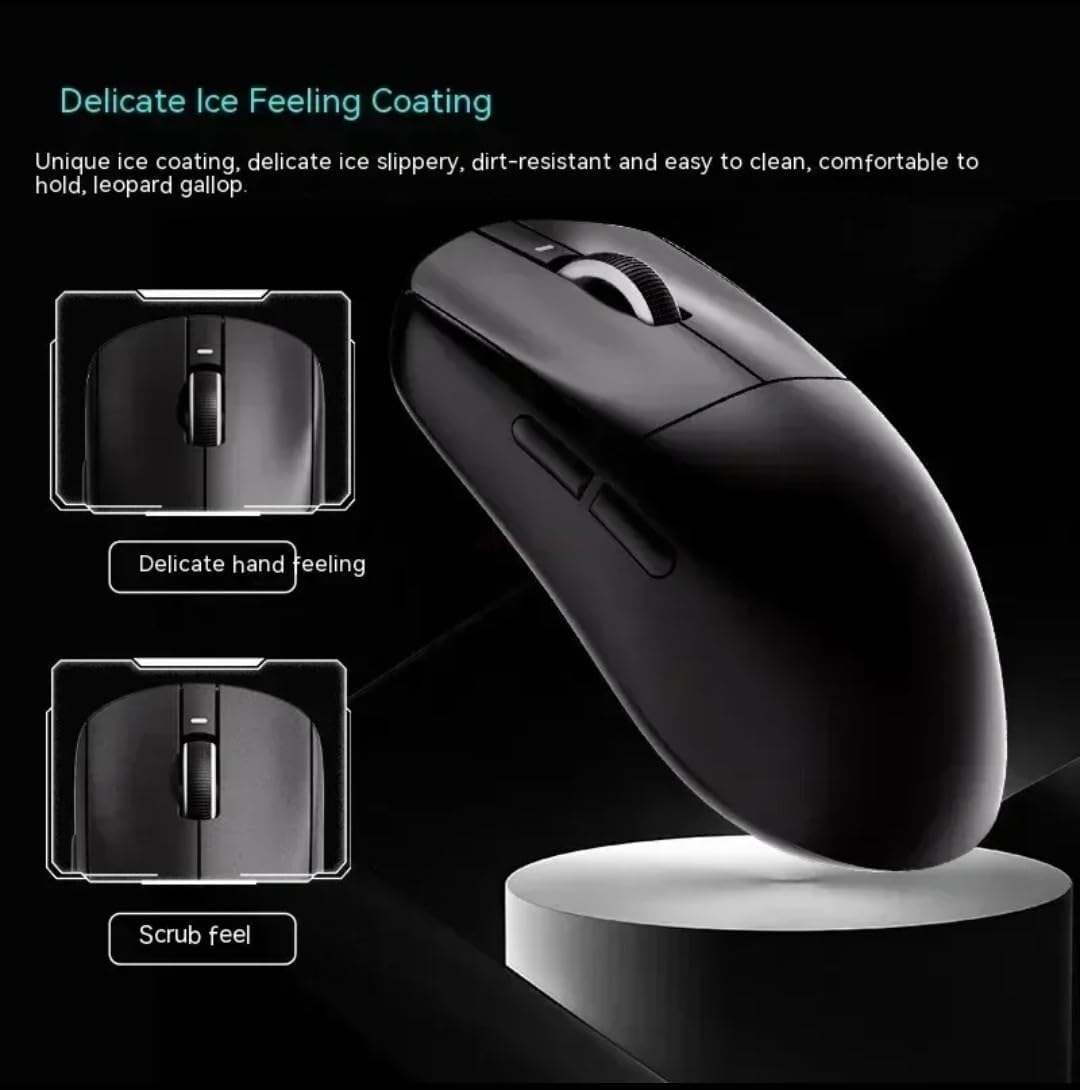
Image 4: Close-up of the VXE Dragon Fly R1 PRO MAX mouse, illustrating the 'Delicate Ice Feeling Coating' for a smooth, slippery, and dirt-resistant feel, alongside a 'Scrub feel' option.
4. ຕັ້ງຄ່າ
4.1 ການເປີດ/ປິດ
Locate the power switch on the underside of the mouse. Slide it to the 'ON' position to power on the mouse. To power off, slide it to the 'OFF' position.
4.2 ຕົວເລືອກການເຊື່ອມຕໍ່
Your mouse supports three connection modes:
- ໂໝດໄຮ້ສາຍ 2.4G:
- Remove the USB-A wireless dongle from its storage compartment on the underside of the mouse.
- Plug the dongle into an available USB-A port on your computer.
- Slide the power switch on the mouse to the '2.4G' position. The mouse should connect automatically.
- ແບບບູທູດ:
- Slide the power switch on the mouse to the 'Bluetooth' position.
- ໃນຄອມພິວເຕີຂອງທ່ານ, ໃຫ້ໄປທີ່ການຕັ້ງຄ່າ Bluetooth ແລະຄົ້ນຫາອຸປະກອນໃໝ່.
- Select 'VXE Dragon Fly R1' (or similar) from the list of available devices to pair.
- ແບບມີສາຍ:
- Connect the provided USB-C to USB-A cable to the USB-C port on the front of the mouse and to a USB-A port on your computer.
- ເມົ້າຈະເຮັດວຽກໃນໂໝດມີສາຍ ແລະ ສາກໄຟພ້ອມໆກັນ.
4.3 ການປັບ DPI
The mouse features a DPI adjustment button on its underside. Press this button to cycle through different DPI settings. An indicator light will change color to show the current DPI level (e.g., 400, 800, 1600, 3200 DPI). For more precise control, use the dedicated software.

Image 5: This image illustrates the 2K and 4K polling rate capabilities of the VXE Dragon Fly R1 PRO MAX mouse, indicating its high responsiveness for gaming.
5. ການດໍາເນີນງານຂອງຫນູ
5.1 ການທໍາງານຂອງປຸ່ມ
The mouse has 5 buttons:
- ຄລິກຊ້າຍ: Standard primary function.
- ກົດຂວາ: Standard secondary function.
- ລໍ້ເລື່ອນ: ເລື່ອນຂຶ້ນ/ລົງ, ແລະເຮັດໜ້າທີ່ເປັນປຸ່ມຄລິກກາງ.
- ປຸ່ມຂ້າງ: Default to forward/backward navigation in web browsers. These can be customized using the VXE software.
5.2 ການຄຸ້ມຄອງຫມໍ້ໄຟ
The mouse features a built-in rechargeable battery. When the battery is low, the LED indicator may change color or flash. Connect the USB-C cable to charge the mouse. You can continue to use the mouse in wired mode while it charges.
6. ບໍາລຸງຮັກສາ
- ຮັກສາຄວາມສະອາດຫນູໂດຍການເຊັດດ້ວຍຜ້າອ່ອນໆ, ແຫ້ງ.
- ຫຼີກລ່ຽງການໃຫ້ໜູຖືກອຸນຫະພູມ, ຄວາມຊຸ່ມຊື່ນ ຫຼື ແສງແດດໂດຍກົງ.
- ຢ່າຖອດເມົາສ໌ອອກ, ເພາະວ່ານີ້ອາດຈະເຮັດໃຫ້ການຮັບປະກັນເປັນໂມຄະ.
- Ensure the mouse feet are clean for optimal gliding performance. Replace extra PTFE mouse skates as needed.
7. ການແກ້ໄຂບັນຫາ
- ເມົ້າບໍ່ຕອບສະໜອງ: Ensure the mouse is powered on and correctly connected via 2.4G dongle, Bluetooth, or USB-C cable. Check battery level.
- ການຊັກຊ້າ ຫຼື ການຕັດການເຊື່ອມຕໍ່: Ensure the wireless dongle is close to the mouse and not obstructed. Avoid interference from other wireless devices. For Bluetooth, ensure your computer's Bluetooth is enabled and the mouse is paired.
- DPI ບໍ່ປ່ຽນແປງ: Press the DPI button firmly. If using software, ensure settings are applied correctly.
- ບັນຫາການສາກໄຟ: Ensure the USB-C cable is securely connected to both the mouse and the computer/charger.
8. ຂໍ້ມູນຈໍາເພາະ
| ຄຸນສົມບັດ | ຂໍ້ມູນຈໍາເພາະ |
|---|---|
| ຍີ່ຫໍ້ | VXE |
| ສີ | ດຳ |
| ເຕັກໂນໂລຊີການເຊື່ອມຕໍ່ | USB, Wireless (2.4G, Bluetooth) |
| ເຕັກໂນໂລຍີກວດຈັບການເຄື່ອນໄຫວ | Optical or Laser |
| ຈໍານວນປຸ່ມ | 5 |
| ອຸປະກອນທີ່ເຂົ້າກັນໄດ້ | ຄອມພິວເຕີສ່ວນບຸກຄົນ |
| ລະບົບປະຕິບັດການ | Windows |
| ເວທີຮາດແວ | PC |
| ຊ່ວງ | 10.0 ແມັດ |
| ມີຫມໍ້ໄຟລວມ | No (Rechargeable internal battery) |
| ຜູ້ຜະລິດ | VXE |
| ໝາຍເລກສ່ວນ Mfr | VEX R1 |
| ຈຳນວນຫົວໜ່ວຍ | 1.0 ນັບ |
9. ການຮັບປະກັນແລະການສະຫນັບສະຫນູນ
For warranty information, technical support, or further assistance, please refer to the official VXE webເວັບໄຊ ຫຼືຕິດຕໍ່ບໍລິການລູກຄ້າຂອງເຂົາເຈົ້າໂດຍກົງ. ຮັກສາໃບຮັບເງິນການຊື້ຂອງທ່ານສໍາລັບການຮ້ອງຂໍການຮັບປະກັນ.