
1. ຂໍ້ມູນຄວາມປອດໄພ
Please read all instructions and warnings carefully before using this product. Failure to follow these safety guidelines may result in fire, electric shock, property damage, or injury.
- Do not shine the flashlight directly into eyes. The powerful beam can cause temporary vision impairment or permanent eye damage.
- ຮັກສາໄຟສາຍໃຫ້ໄກຈາກເດັກນ້ອຍ.
- Do not disassemble the flashlight head as this may damage the reflector or LED.
- The flashlight may generate significant heat during prolonged use at high output levels. Handle with care to avoid burns.
- ໃຊ້ສະເພາະແບັດເຕີຣີ AA ທີ່ແນະນຳເທົ່ານັ້ນ. ຢ່າປະສົມແບັດເຕີຣີເກົ່າ ແລະ ແບັດເຕີຣີໃໝ່ ຫຼື ແບັດເຕີຣີປະເພດຕ່າງໆເຂົ້າກັນ.
- ໃຫ້ຖອດແບັດເຕີຣີອອກຖ້າບໍ່ໄດ້ໃຊ້ໄຟສາຍເປັນເວລາດົນເພື່ອປ້ອງກັນການຮົ່ວໄຫຼ.
2. ເນື້ອໃນຊຸດ
ກວດສອບວ່າລາຍການທັງຫມົດທີ່ລະບຸໄວ້ຂ້າງລຸ່ມນີ້ແມ່ນລວມຢູ່ໃນຊຸດຂອງທ່ານ:
- ThruNite Archer 2A V3 LED Flashlight x 1
- ຄລິບພົກພາ x 1
- Spare O-rings x 2
- ສາຍເຊືອກ x 1
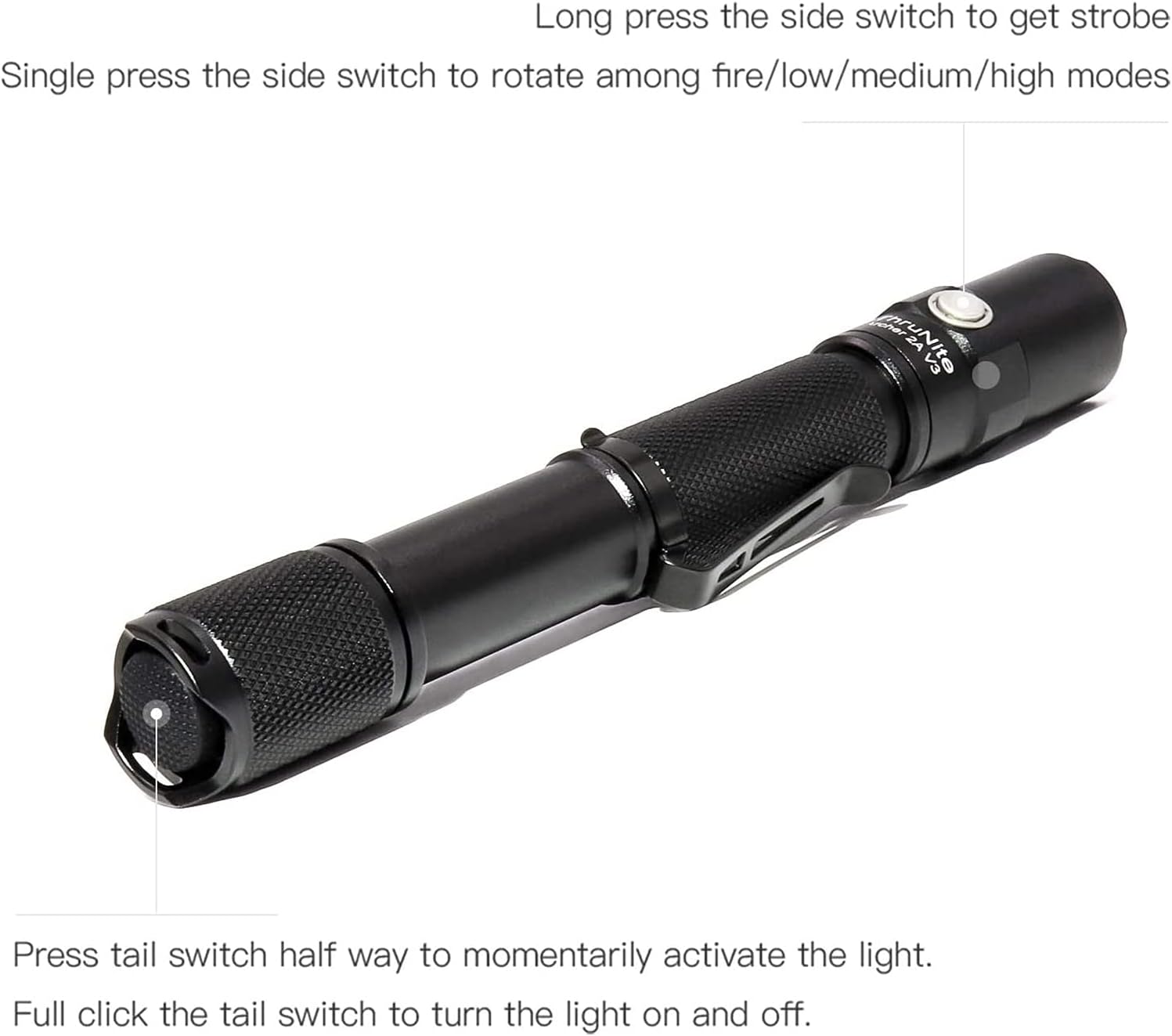
Image: All components included in the ThruNite Archer 2A V3 package, neatly laid out. This includes the flashlight body, a removable pocket clip, two spare O-rings for sealing, and a lanyard for secure carrying.
3. ຕັ້ງຄ່າ
3.1 ການຕິດຕັ້ງຫມໍ້ໄຟ
The ThruNite Archer 2A V3 operates on two AA batteries (not included). Ensure correct polarity during installation.
- ໝຸນຝາປິດຫາງຂອງໄຟສາຍອອກໂດຍການໝຸນມັນທວນກັບເຂັມໂມງ.
- Insert two AA batteries into the battery compartment with the positive (+) end facing towards the flashlight head.
- ຂັນຝາປິດຫາງກັບຄືນຕາມເຂັມໂມງຈົນກວ່າມັນຈະແໜ້ນດີ.
3.2 Attaching the Pocket Clip
The removable pocket clip can be attached to the flashlight body for convenient carrying.
- Slide the pocket clip onto the flashlight body, positioning it as desired.
- Ensure the clip is firmly seated in the groove to prevent accidental detachment.

ຮູບພາບ: A ລາຍລະອຽດ view of the ThruNite Archer 2A V3 flashlight, highlighting the textured grip and the securely attached removable pocket clip. This clip allows for easy attachment to clothing or gear.
4. ຄໍາແນະນໍາການດໍາເນີນງານ
The Archer 2A V3 features both a tail switch and a side switch for versatile operation.
4.1 ການດໍາເນີນງານພື້ນຖານ (ສະວິດຫາງ)
- Momentary Activation: Press the tail switch halfway to momentarily activate the light. Release to turn off.
- ເປີດ/ປິດຢ່າງຕໍ່ເນື່ອງ: Fully click the tail switch to turn the light on or off.
4.2 Mode Switching (Side Switch)
When the flashlight is on (via tail switch):
- ໂໝດຮອບວຽນ: Single press the side switch to cycle through the general modes: Low → Medium → High.
- ໂໝດ Strobe: Long press the side switch to activate Strobe mode. Single press again to return to the previously used general mode.

Image: An illustrative diagram demonstrating the operational controls of the ThruNite Archer 2A V3. It shows how to use the tail switch for momentary and constant on/off functions, and the side switch for cycling through brightness modes (Low, Medium, High) and activating the Strobe function with a long press.
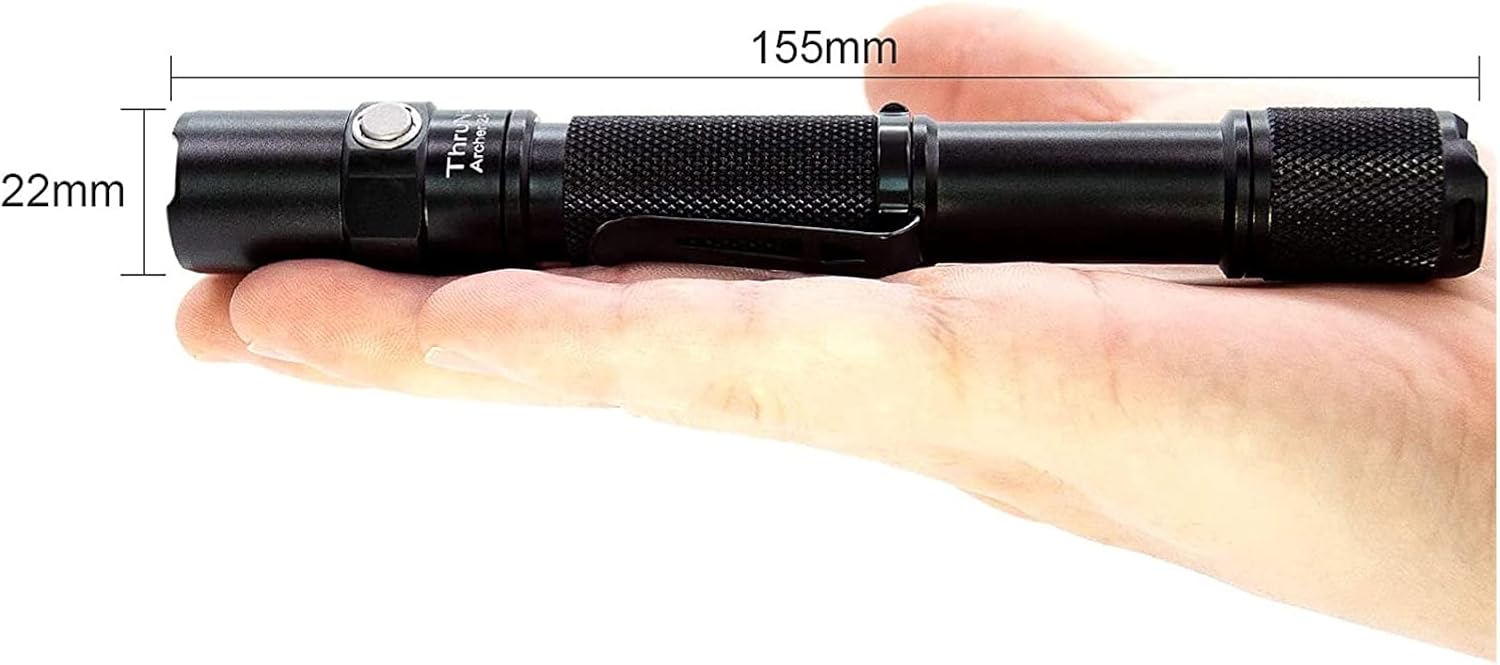
Image: A person is shown walking on a dark, unpaved path, illuminated by the powerful beam of the ThruNite Archer 2A V3 flashlight. The flashlight provides ample light to navigate the surroundings, demonstrating its effectiveness in low-light conditions.
5. ບໍາລຸງຮັກສາ
ການບຳລຸງຮັກສາທີ່ເໝາະສົມຮັບປະກັນອາຍຸການໃຊ້ງານທີ່ຍາວນານ ແລະ ປະສິດທິພາບທີ່ດີທີ່ສຸດຂອງໄຟສາຍຂອງທ່ານ.
- ທໍາຄວາມສະອາດ: Clean the body of the flashlight with a soft, damp ຜ້າ. ຢ່າໃຊ້ເຄື່ອງເຮັດຄວາມສະອາດຂັດຫຼືສານລະລາຍ.
- ເສັ້ນດ້າຍ ແລະ ວົງແຫວນ O: Periodically lubricate the threads and O-rings with silicone grease to maintain water resistance and smooth operation. Replace worn O-rings with the provided spares.
- ການດູແລຫມໍ້ໄຟ: Remove batteries if the flashlight is not used for extended periods to prevent corrosion. Store batteries in a cool, dry place.
- ການດູແລເລນ: Keep the lens clean. If it gets dirty, gently wipe it with a lens cleaning cloth.
6. ການແກ້ໄຂບັນຫາ
If you encounter issues with your ThruNite Archer 2A V3, try the following steps:
- ໄຟສາຍບໍ່ເປີດ:
- ກວດເບິ່ງວ່າໃສ່ແບັດເຕີລີ່ຖືກໃສ່ຢ່າງຖືກຕ້ອງດ້ວຍຈຸດບວກ (+) ຫັນໜ້າຫົວ.
- Ensure the batteries are not depleted. Replace with fresh AA batteries.
- Confirm the tail cap is fully tightened. A loose tail cap can prevent electrical contact.
- ເຮັດຄວາມສະອາດແຜ່ນຕິດແບັດເຕີລີ່ ແລະກະທູ້ດ້ວຍຜ້າສະອາດ.
- ແສງສະຫວ່າງຫຼື flickers:
- ແບັດເຕີຣີອາດຈະຕໍ່າ. ທົດແທນພວກມັນ.
- ໃຫ້ແນ່ໃຈວ່າຝາຫາງ ແລະຫົວຖືກຮັດແໜ້ນຢ່າງປອດໄພ.
- Clean battery contacts and threads.
- ນໍ້າເຂົ້າ:
- Check if O-rings are properly seated and not damaged. Replace if necessary.
- Ensure all parts are tightly screwed together.
ຖ້າຂັ້ນຕອນເຫຼົ່ານີ້ບໍ່ສາມາດແກ້ໄຂບັນຫາໄດ້, ກະລຸນາຕິດຕໍ່ຝ່າຍຊ່ວຍເຫຼືອລູກຄ້າ.
7. ຂໍ້ມູນຈໍາເພາະ
Detailed specifications for the ThruNite Archer 2A V3 LED Flashlight:
| ຄຸນສົມບັດ | ລາຍລະອຽດ |
|---|---|
| ແຫຼ່ງແສງ | XP-L V6 LED |
| ຜົນຜະລິດສູງສຸດ | 500 Lumens |
| ໄລຍະຫ່າງ Beam | 108 ແມັດ (354 ຟຸດ) |
| ແຫຼ່ງພະລັງງານ | 2 x AA ຫມໍ້ໄຟ (ບໍ່ລວມ) |
| ວັດສະດຸ | Aerospace Grade Aluminum with Type III Hard-Anodized Finish |
| ຄຸນນະສົມບັດພິເສດ | Lightweight, Removable Clip |
| ຂະໜາດ | Length: 155mm (6.1 inches), Diameter: 22mm (0.87 inches) |
| ນ້ໍາຫນັກລາຍການ | Approximately 500 Grams (1.1 pounds) |
| ໂໝດ | Low, Medium, High, Strobe |

Image: The ThruNite Archer 2A V3 flashlight displayed with its key dimensions: a length of 155mm and a diameter of 22mm, illustrating its compact and portable design.
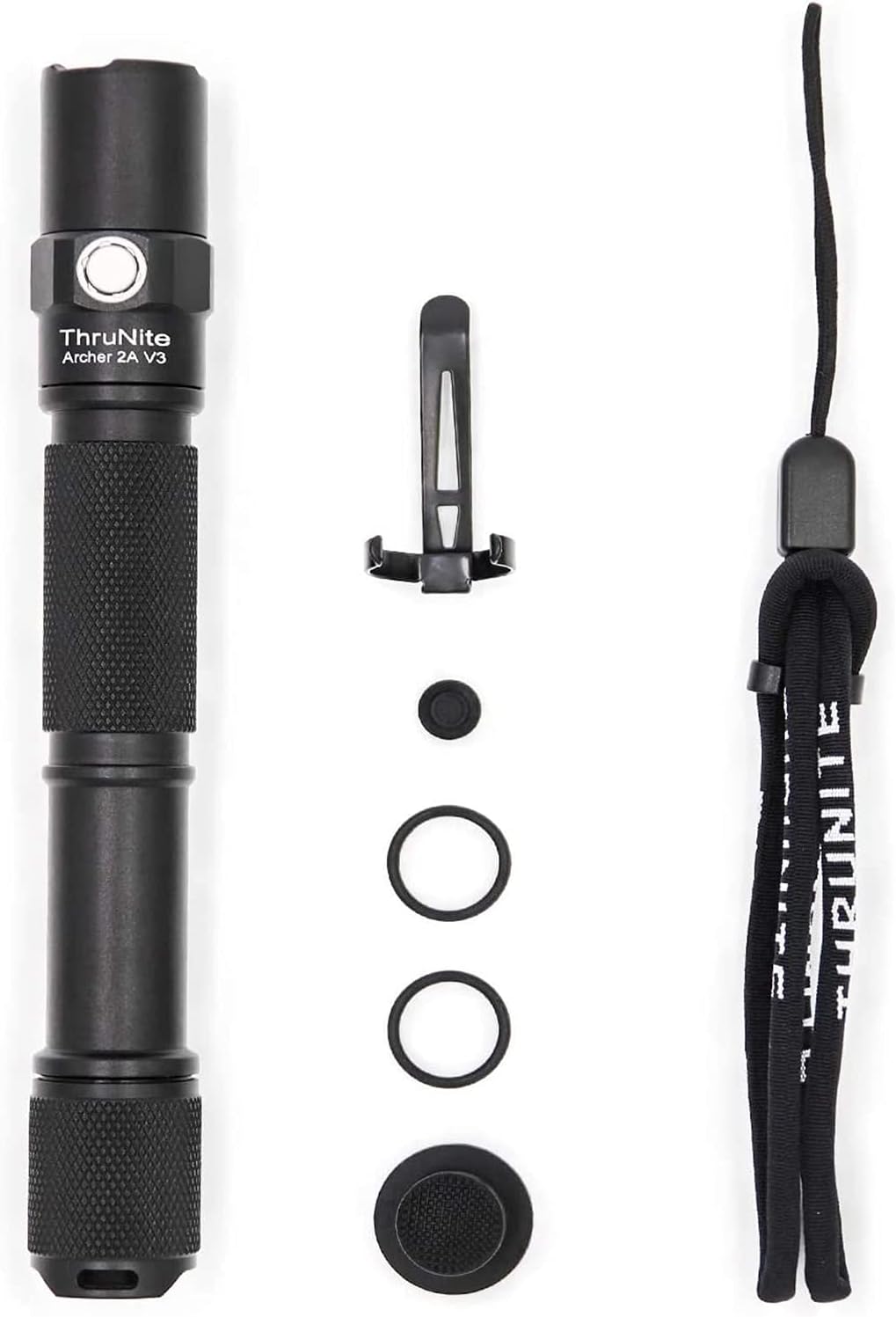
Image: A hand holding the ThruNite Archer 2A V3 flashlight, providing a clear perspective on its ergonomic design and compact size. The image also reiterates its dimensions, 6.1 inches (155mm) in length and 0.87 inches (22mm) in diameter, and highlights its lightweight nature at 48g (without batteries).
8. ການຮັບປະກັນແລະການສະຫນັບສະຫນູນ
ThruNite is committed to providing quality products and excellent customer service.
8.1 ຂໍ້ມູນການຮັບປະກັນ
Specific warranty details may vary. Please refer to the product packaging or the official ThruNite website ສໍາລັບນະໂຍບາຍການຮັບປະກັນໃນປະຈຸບັນຫຼາຍທີ່ສຸດ.
8.2 ສະຫນັບສະຫນູນລູກຄ້າ
If you have any questions, require assistance with setup, operation, or troubleshooting, or need to inquire about warranty service, please contact our customer service team. Contact information can typically be found on the product packaging or the official ThruNite webເວັບໄຊ.