
1. ບົດແນະນຳ
Thank you for choosing the ErGear Electric Standing Desk. This manual provides essential information for the safe assembly, operation, and maintenance of your new desk. Designed for ergonomic comfort and enhanced productivity, this height-adjustable desk features integrated storage and monitor compatibility to optimize your workspace.
2. ຂໍ້ມູນຄວາມປອດໄພ
ກະລຸນາອ່ານຄໍາແນະນໍາທັງຫມົດຢ່າງລະອຽດກ່ອນທີ່ຈະປະກອບແລະນໍາໃຊ້. ຮັກສາຄູ່ມືນີ້ໄວ້ສໍາລັບການອ້າງອີງໃນອະນາຄົດ.
- ສະເຫມີປະຕິບັດຕາມຄໍາແນະນໍາການປະກອບຢ່າງລະມັດລະວັງ.
- Ensure the desk is properly anchored to the floor or wall to prevent tipping.
- Do not exceed the maximum weight recommendation of 176 pounds (80 kg) to maintain stability and prevent damage.
- ຮັກສາເດັກນ້ອຍ ແລະສັດລ້ຽງຢູ່ຫ່າງຈາກໂຕະເຮັດວຽກໃນລະຫວ່າງການເຮັດວຽກເພື່ອປ້ອງກັນການບາດເຈັບ.
- Ensure all cables are properly managed to avoid tripping hazards or damage during height adjustments.
- ຢ່ານັ່ງຫຼືຢືນຢູ່ເທິງໂຕະ.
3. ຄຸນລັກສະນະຂອງຜະລິດຕະພັນ
- ການປັບຄວາມສູງລຽບງ່າຍ: Freely select adjustable standing desk height, from 28.35" to 46.46" (71.12 cm to 118 cm). Save your favorite three settings and smoothly switch the electric standing desk between them.
- Dual Drawers: Two integrated drawers provide convenient storage for your essentials, helping to maintain a clutter-free workspace.
- ຄວາມໝັ້ນຄົງທີ່ໂດດເດັ່ນ: Features a sturdy solid steel frame with aerospace-grade lifting column connectors, tested for over 100,000 cycles to ensure stability and security, even at full height.
- ມໍເຕີທີ່ໄດ້ຮັບການປັບປຸງ: Equipped with a powerful motor for lifting performance (Max 176 lbs load) and reliable long-term operation (tested 50,000 times).
- Built-In Monitor Stand: Position your monitor/laptop and speakers or other devices at an ergonomic height.
- C-Clamp ເຂົ້າກັນໄດ້ Mount: Designed to accommodate C-clamp mounted accessories, such as monitor arms, for flexible setup options.
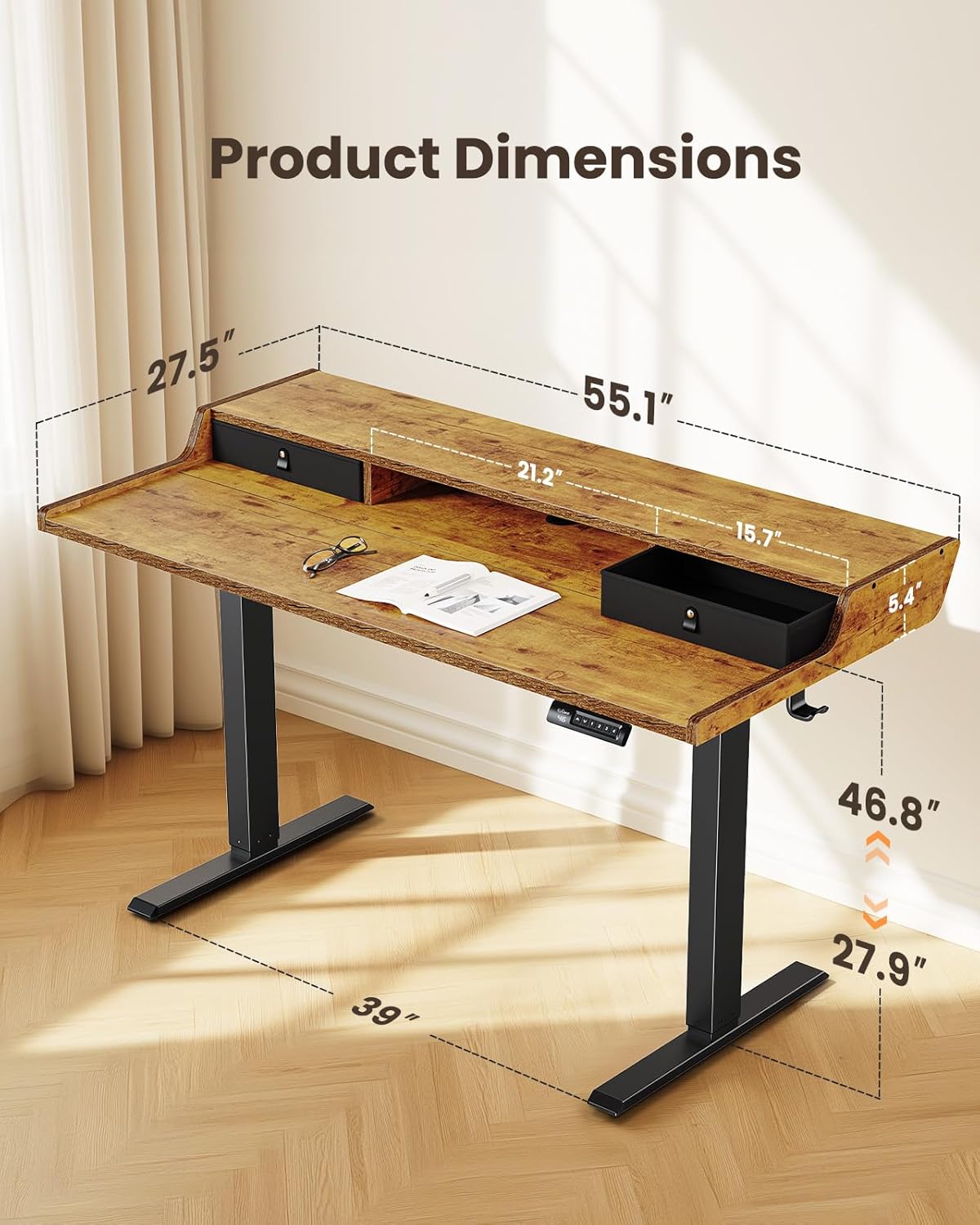
This image illustrates the key dimensions of the ErGear Electric Standing Desk, including its overall width, depth, and adjustable height range.

The desk's electric height adjustment feature is highlighted, showing its ability to transition smoothly between sitting (28 inches) and standing (47 inches) positions.

The desk offers versatile storage solutions, including two integrated drawers, an open cubicle, and a monitor riser to keep your workspace tidy.

The desk is designed with compatibility for C-clamp mounting, allowing users to easily attach monitor arms and other accessories for an optimized setup.
4. ຄໍາແນະນໍາຂອງສະພາແຫ່ງ
For detailed visual guidance, please refer to the official assembly video below. Ensure all parts are present before beginning assembly.
This video provides a step-by-step guide for assembling the ErGear Electric Standing Desk, covering frame assembly, top stand installation, desktop attachment, and cable connections.
ຂັ້ນຕອນກອງປະຊຸມໃຫຍ່:
- ຂັ້ນຕອນທີ 1: ການປະກອບກອບ
Connect the motor rod to the lifting columns and attach the support beams. Ensure all screws are tightened securely. - Step 2: Assembling the Top Stand
Attach the monitor stand components to the main desktop panel using the provided dowels and screws. - ຂັ້ນຕອນທີ 3: ການປະກອບ Desktop
Join the desktop panels together, ensuring a tight fit without gaps. Secure them with the connecting plates and screws. - Step 4: Attaching the Desktop to the Frame
Carefully place the assembled desktop onto the lifting frame. Align the pre-drilled holes and secure the desktop to the frame using the provided screws. Attach any cable management hooks. - ຂັ້ນຕອນທີ 5: ການເຊື່ອມຕໍ່ສາຍ
Connect the motor cables to the control box. Route all cables neatly using the integrated cable management features and secure them. - Step 6: Attaching the Drawers
Insert the fabric drawers into their designated slots on the desktop.
5. ຄໍາແນະນໍາການດໍາເນີນງານ
Your ErGear Electric Standing Desk is equipped with an intuitive control panel for easy height adjustment.
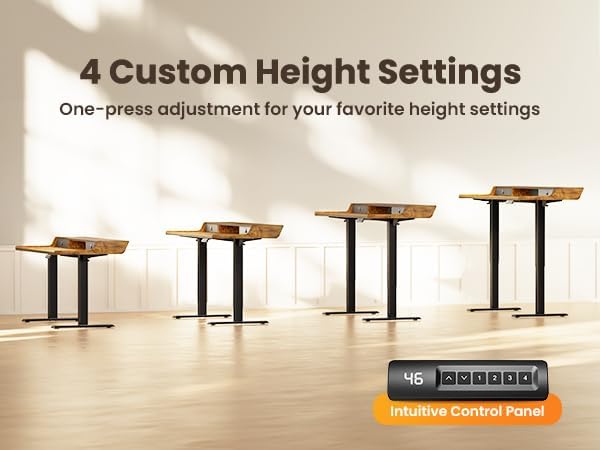
The intuitive control panel allows for easy adjustment of the desk height and features four programmable preset buttons for quick transitions between preferred sitting and standing positions.
ການປັບຄວາມສູງ:
- ການປັບດ້ວຍມື: Use the up (▲) and down (▼) arrow buttons on the control panel to adjust the desk to your desired height.
- ຄວາມສູງທີ່ຕັ້ງໄວ້ລ່ວງໜ້າ: The desk features four programmable memory presets (1, 2, 3, 4). To save a height setting:
- ປັບໂຕະໃຫ້ມີຄວາມສູງທີ່ທ່ານຕ້ອງການ.
- Press the 'M' button. The display will flash.
- Press the desired number button (1, 2, 3, or 4) before the display stops flashing. The height is now saved.
- ເພື່ອເອີ້ນຄວາມສູງທີ່ບັນທຶກໄວ້, ພຽງແຕ່ກົດປຸ່ມຕົວເລກທີ່ສອດຄ້ອງກັນ. ໂຕະຈະຍ້າຍໄປທີ່ຕຳແໜ່ງທີ່ບັນທຶກໄວ້ໂດຍອັດຕະໂນມັດ.
ຫຼາຍກວ່າview ວິດີໂອ showcasing the features of the ErGear Standing Desk, including its integrated drawers, C-clamp mounting compatibility, and ergonomic benefits for a dynamic workspace.
6. ບໍາລຸງຮັກສາ
- Regularly wipe the desk surfaces with a soft, damp ຜ້າ. ຫຼີກເວັ້ນການສານເຄມີທີ່ຮຸນແຮງທີ່ອາດຈະທໍາລາຍການສໍາເລັດຮູບ.
- Check all screws and connections periodically to ensure they remain tight. Re-tighten if necessary.
- Inspect power cords and cables for any signs of wear or damage. Replace immediately if damage is found.
- Keep the lifting columns free from obstructions to ensure smooth operation.
7. ການແກ້ໄຂບັນຫາ
If you encounter any issues with your ErGear Electric Standing Desk, please refer to the following common solutions:
- Desk not responding: Check if the power cord is securely plugged into both the desk and the wall outlet. Ensure all motor cables are correctly connected to the control box.
- Uneven height or tilting: Perform a reset procedure (refer to your specific model's detailed manual for exact steps, usually involving holding down a specific button or combination of buttons). Ensure the desk is on a level surface.
- ລະຫັດຄວາມຜິດພາດສະແດງໃຫ້ເຫັນ: Consult the detailed user manual for a list of error codes and their corresponding solutions. A common solution is to perform a reset.
- ສິ່ງລົບກວນໃນລະຫວ່າງການປະຕິບັດງານ: While the motor is designed for quiet operation, minor sounds can occur. Ensure no cables are rubbing against moving parts. If the noise is excessive or unusual, contact customer support.
8. ຂໍ້ມູນຈໍາເພາະ
| ຂໍ້ມູນຈໍາເພາະ | ລາຍລະອຽດ |
|---|---|
| ຍີ່ຫໍ້ | ErGear |
| ສີ | ວິນtage ສີນ້ໍາຕານ |
| ຂະໜາດສິນຄ້າ (L x W x H) | 139.7 x 71.12 x 71.88 ຊມ (55.1 x 27.5 x 28.3 ນິ້ວ) |
| ລະດັບຄວາມສູງທີ່ສາມາດປັບໄດ້ | 28.35" ຫາ 46.46" (71.12 ຊມ ຫາ 118 ຊມ) |
| ນ້ໍາຫນັກລາຍການ | 29.5 ກິໂລ (65 ປອນ) |
| ຄວາມອາດສາມາດໂຫຼດສູງສຸດ | 176 lbs (80 ກິໂລ) |
| ວັດສະດຸ | Wood (Top), Metal (Base) |
| ຄຸນນະສົມບັດພິເສດ | Electric Height Adjustment, Dual Drawers, Built-in Monitor Stand, C-Clamp Mount ເຂົ້າກັນໄດ້ |
This video demonstrates the rigorous quality and durability testing processes that the ErGear Electric Standing Desk undergoes, including BIFMA X5.5, EN527 series testing, pendulum hammer tests, ISTA series packaging tests, radiated emissions tests, EMC tests, EFT immunity tests, harmonic current tests, and semi-anechoic chamber testing for noise improvement.
9. ການຮັບປະກັນແລະການສະຫນັບສະຫນູນ
ErGear products are designed for durability and performance. For warranty information, technical support, or any questions regarding your product, please contact ErGear customer service through the retailer's platform or the official ErGear webເວັບໄຊ.
ກະລຸນາກຽມໃບຮັບເງິນຊື້ ແລະ ຂໍ້ມູນຮຸ່ນຜະລິດຕະພັນຂອງທ່ານໃຫ້ພ້ອມເມື່ອຕິດຕໍ່ຝ່າຍຊ່ວຍເຫຼືອ.
This video highlights the versatility and ergonomic design of ErGear products, showcasing how they adapt to various work and lifestyle needs to enhance comfort and productivity.


