
1. ຜະລິດຕະພັນເກີນview
The Veise VE07-H Fingerprint Smart Lock with Handle Set offers advanced security and convenient access for your home. This smart lock provides multiple unlocking options, including fingerprint, app control, keypad codes, eKeys, fobs, and a traditional mechanical key. Designed for easy installation and robust performance, it integrates seamlessly into modern smart homes.

Image: Veise VE07-H Fingerprint Smart Lock with Handle Set components.
ວິດີໂອ: ຫຼາຍກວ່າview of Veise VE07-H Fingerprint Smart Deadbolt Lock Handle Set features.
2. ສິ່ງທີ່ຢູ່ໃນກ່ອງ
Your Veise VE07-H Smart Lock package includes all necessary components for installation and operation:
- ລັອກປະຕູອັດສະລິຍະ (ປະກອບພາຍນອກ ແລະ ພາຍໃນ)
- Zinc Alloy Complete Handleset
- Latch and Strike Plates
- ແຜ່ນຍຶດແລະ screws
- 2 ປຸ່ມສຳຮອງ
- 2 Key Cards (Fobs)
- ຄູ່ມືການຕິດຕັ້ງ
- Programming Quick Setup Guide
- ຣີເຊັດເຄື່ອງມື

Image: Visual representation of the smart lock and its various unlocking methods.
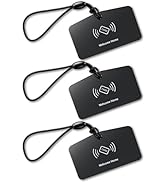
Image: Two Veise VK01 IC Cards (fobs) included with the smart lock.
3. ການຕິດຕັ້ງແລະການຕິດຕັ້ງ
The Veise VE07-H smart lock is designed for easy installation, typically taking about 15 minutes with a screwdriver. Ensure your door meets the following specifications before beginning:
- Door Thickness: 1-3/8" to 2" (35mm-50mm)
- ຂະໜາດຫລັງ: 2-3/8" ຫຼື 2-3/4" (60 ມມ ຫຼື 70 ມມ)
- Hole Diameter (Deadbolt): 2-1/8" (54mm)
- Hole Diameter (Handle): 3/8" (10mm)
- Minimum Distance between holes: 4" (101.6mm)

Image: Detailed door dimension requirements for installation.

Image: Visual guide for left-handed and right-handed door configurations.
For a detailed step-by-step installation guide, please refer to the official installation video:
Video: Veise VE07H Smart Front Door Lock Set Installation Guide.

Image: Quick setup directions for the app, indicating compatibility with right and left-handed doors.
4. ຄໍາແນະນໍາການດໍາເນີນງານ
The Veise VE07-H offers 8 flexible unlocking options for convenient access:
- ນີ້ວມື: Unlock in 0.3 seconds with advanced biometric technology. Supports up to 50 fingerprints.
- Keypad Codes: Use the digital electronic touchscreen to enter a personalized PIN. Supports over 250 access codes, including timed, permanent, recurring, custom, and one-time codes.
- eKeys: Share digital keys via the app for flexible access management.
- Fobs (Key Cards): Tap the included key fobs to unlock the door.
- ກະແຈກົນຈັກ: Use the traditional backup key for manual unlocking.
- Apple Watch: Unlock directly from your Apple Watch.
- Web ປະຕູ: Manage access and settings remotely via a web ປະຕູ.
- ການຄວບຄຸມແອັບ: Lock and unlock your door directly from the mobile app.

Image: Fingerprint unlocking feature with 0.3s identification and 99.9% recognition rate.

Image: Various access code types including one-time, timed, recurring, permanent, custom, and erase codes.
To lock your door, you have several options:
- ລັອກອັດຕະໂນມັດ: Configurable to automatically lock after 5-900 seconds.
- One-touch locking: Press and hold the lock icon in the app for 2 seconds, or press "#" on the keypad for 2 seconds.
- ລະຫັດສຳຮອງ: ໃຊ້ກະແຈກົນຈັກ.
- ລ້ຽວຫົວໂປ້: Manually turn the thumb turn from the inside.
5. ການຈັດການແອັບ
The free mobile app and web portal provide comprehensive management of your smart lock:
- Set and delete passwords.
- Manage access rights for different users.
- View real-time access logs.
- Monitor smart lock status.
- Generate various types of access codes (timed, one-time, permanent, recurring, custom, erase).

ຮູບພາບ: ຫຼາຍກວ່າview of smart app and web management features, including user management, eKey sharing, remote access, and access time logs.

Image: Screenshot of the DD Lock web portal for managing multiple locks and users.

Image: App interface showing access records and user activity.

ຮູບພາບ: Example of a DD Lock notification for unlocking events.
6. ຄຸນນະສົມບັດຄວາມປອດໄພ
The Veise VE07-H smart lock is built with robust security features to protect your home:
- ໄດ້ຮັບການຮັບຮອງ ANSI/BHMA ຊັ້ນ 3: Ensures reliable security for both interior and exterior doors.
- IP54 ກັນນ້ຳ ແລະ ກັນຝຸ່ນ: Designed to withstand various weather conditions, including rain, wind, and sun.
- Anti-Peeping Touchscreen Keypad: Prevents others from guessing your code by allowing you to enter random digits before or after your actual code.
- Anti-Hacking Features: Includes mechanisms to deter unauthorized access attempts.
- ໂໝດຄວາມເປັນສ່ວນຕົວ: Activates a mode for enhanced privacy.
- ໂໝດຜ່ານ: Allows the door to remain unlocked for continuous access during specific periods.

ຮູບພາບ: ຫຼາຍກວ່າview of enhanced security features including IP54 waterproof rating, auto-lock, low battery alert, anti-peeping code, privacy mode, and ANSI/BHMA Grade 3 certification.

Image: Demonstrates anti-cracking (lockout after multiple wrong entries) and anti-peeping features.

Image: Highlights ANSI Grade 3 certification, AES encryption, and IP54 waterproof rating.
7. Smart Home Integration
Enhance your smart home experience by connecting your Veise VE07-H smart lock with a Veise G2 gateway (sold separately). This enables:
- Remote access to your digital door lock from anywhere.
- ການຄວບຄຸມດ້ວຍສຽງດ້ວຍ Amazon Alexa ແລະ Google Home.
- Real-time access logs and status monitoring.

Image: Diagram showing smart lock connectivity with a Veise G2 Gateway and a 2.4G router for remote access.

Image: Demonstrates voice control with Alexa and Google Home via the Veise G2 Gateway.

Image: Table summarizing smart lock features and which require the Veise G2 Wi-Fi Gateway.
8. ບໍາລຸງຮັກສາ
To ensure optimal performance and longevity of your Veise VE07-H smart lock:
- ການປ່ຽນແບັດເຕີຣີ: The lock provides low-battery alerts. Replace the 4 AA alkaline batteries promptly when alerted. Expected battery life is 12 months.
- ທໍາຄວາມສະອາດ: ໃຊ້ຜ້າອ່ອນແລະແຫ້ງເພື່ອເຮັດຄວາມສະອາດໜ້າຈໍສຳຜັດ ແລະ ພື້ນຜິວພາຍນອກ. ຫຼີກລ່ຽງນໍ້າຢາທຳຄວາມສະອາດທີ່ມີສີຂັດ ຫຼື ຕົວລະລາຍ.
- ອົງປະກອບກົນຈັກ: Lifetime maintenance is offered for mechanical components.

Image: App notification showing a low battery alert for the smart lock.
9. ການແກ້ໄຂບັນຫາ
If you encounter issues with your smart lock, consider the following:
- ບັນຫາການເຊື່ອມຕໍ່ແອັບ: If the app doesn't find the lock or cannot connect, try resetting the lock.
- ລະຫັດຜ່ານຕົ້ນສະບັບ: Do not use the keypad to change the Master Password before pairing the lock in the app.
- ການເປີດໃຊ້ງານ: Before pairing, you may need to touch the keypad to activate the lock.
For instructions on how to reset the lock, please refer to the following video:
Video: Veise VE07H Smart Front Door Lock Set Reset Video.
10. ຂໍ້ມູນຈໍາເພາະ
| ຄຸນສົມບັດ | ລາຍລະອຽດ |
|---|---|
| ຍີ່ຫໍ້ | ວີສ |
| ໝາຍເລກຕົວແບບ | VE07-H |
| ປະເພດລັອກ | Biometric, Combination Lock, Deadbolt, Keypad |
| ວັດສະດຸ | ອະລູມິນຽມ, ສັງກະສີ |
| ສີ | ສີດຳ |
| ຂະໜາດລາຍການ (L x W x H) | 6.1 x 2.7 x 1.4 ນິ້ວ |
| ອະນຸສັນຍາການເຊື່ອມຕໍ່ | Bluetooth, WiFi (Veise G2 WiFi Gateway Required) |
| ປະເພດການຄວບຄຸມ | iOS, Android |
| ຄຸນນະສົມບັດພິເສດ | 8-IN-1 Unlock, 0.3s Fingerprint, Auto-Lock (5-900s), App Control & eKeys, Rental Web Management, Watch Unlock, Touchscreen Keypad, Remote Control with G2 Gateway, Alexa and Google Compatible (Veise G2 WiFi Gateway Required), 12-Month Battery Life, Anti-Drill, Anti-Cracking, Anti-Peeping, Passage Mode |
11. ການຮັບປະກັນແລະການສະຫນັບສະຫນູນ
Veise is committed to providing excellent customer service and product reliability:
- ການຮັບປະກັນ: At least a 2-year warranty.
- Lifetime Maintenance: For mechanical components.
- ການຊ່ວຍເຫຼືອທາງໂທລະສັບໃນສະຫະລັດ: Available Monday–Friday 9 AM–5 PM PST, and Saturday 7 AM–3 PM PST.
- 24/7 After-Sales Email Service: For continuous support.

Image: Highlights US-based support, 2-year quality protection, 30-day free return or exchange, lifetime manufacturer service, and lifetime phone support.